 MacRimi
3b2665c4ac
MacRimi
3b2665c4ac
The drafting date (today) was used as a placeholder. The actual
release date is Tuesday 2026-06-02, when PR #218 merges and the
update notifier picks up 1.2.2. Aligns the changelog header in both
EN and ES with the publication date users will see.

Co-Authored-By: Claude Opus 4.7 <noreply@anthropic.com>
80 KiB
2026-06-02
New version ProxMenux v1.2.2 — Stable consolidation of the v1.2.1.x cycle
Stable release that brings the four prereleases of the v1.2.1.x cycle to the main channel in one move. The work over those four betas centred on three themes: making the Health Monitor genuinely configurable instead of just observable (per-category thresholds, per-event dismiss durations, an audit log of active suppressions), expanding the notification stack to cover roughly 80 services through Apprise while persisting events across Quiet Hours, and turning the Monitor process itself into a quieter, more predictable system citizen on idle hosts. On top of those, this release lands automatic upgrade detection for LXC containers, an end-to-end rewrite of the Coral TPU installer with the latest upstream drivers, and a long list of operator-visible fixes — HTTPS terminal handshake, kernel-update detection on PVE 9.x, NVIDIA installer flow on Alpine LXC, mixed-GPU passthrough audio companion handling, and several runtime optimizations on the Monitor scanning loops. Five direct code contributions from the community ship alongside (@jcastro ×5, @pespinel ×1) and the GPU passthrough work was driven by @ghosthvj's detailed field reports — see the Acknowledgments at the end.
🩺 Health Monitor — Configurable, Granular, Auditable
Three coupled pieces that together let the operator tune the Health Monitor to the actual envelope of their host instead of working around its defaults, and to manage dismisses with the same fine-grained control they already have over the rest of the dashboard.
Per-category Warning / Critical thresholds
Every check the Health Monitor runs is parameterised by a pair of numbers — a Warning and a Critical — and both are now exposed under Settings → Health Monitor Thresholds. The defaults that ship with ProxMenux are reasonable for the average Proxmox host, but every environment has its own envelope:
- A small homelab with a single-disk SSD wants to page earlier on capacity (75 / 90 %) to leave room for snapshots.
- A datacentre node with redundant Ceph storage can be far more relaxed on memory warnings (90 % working set is normal under ZFS ARC).
- A passively-cooled mini-PC needs lower temperature thresholds than a server with forced-air cooling — same drive class, different physical envelope.
Edits take effect on the next scan — the Health Monitor re-reads the values from /usr/local/share/proxmenux/health_thresholds.json on every cycle, no service restart. The same numbers also feed the colour ranges of every dashboard widget (storage bars, CPU/memory rings, temperature chips, the dot on the disk modal), so the visual classification anywhere in the Monitor maps to a definite range relative to the configured pair.
Per-event dismiss duration with a Permanent badge
The Dismiss button on each Health Monitor alert now opens a small dropdown with three options:
- 24 hours — previous default, behaves exactly as before
- 7 days — handy for a temporary condition you don't want to hear about during a week-long migration
- Permanently — silences this specific
error_keyindefinitely
Permanent dismisses persist with suppression_hours = -1 in the persistence DB, never re-emit, never re-notify and are marked with a distinct amber Permanent badge in the Health Monitor so the operator always knows which alerts are intentionally silenced. The backend infrastructure for the permanent sentinel already existed — the UI just lacked a way to set it. The API contract is small and backwards-compatible: POST /api/health/acknowledge accepts an optional suppression_hours body field (positive integer for hours, -1 for permanent); omitting it preserves the previous behaviour and uses the category's configured suppression. A second new endpoint POST /api/health/un-acknowledge {error_key} clears a previously-recorded acknowledgment so the alert becomes eligible to fire again — used by the Active Suppressions panel below.
Active Suppressions panel in Settings
A new section inside Settings → Health Monitor, right below the per-category suppression durations, lists every currently-silenced alert — both time-limited dismisses (with a 22h remaining / 6d remaining badge) and permanent ones (with the amber Permanent badge from the dashboard). Each row carries the error_key, category, severity, the timestamp the dismiss was recorded, and a Re-enable button that clears the acknowledgment server-side. Re-enables are queued — clicking the button marks the row green with a strike-through and changes the button to Undo, and the actual POST /api/health/un-acknowledge only fires when the user clicks Save, so a batch of re-enables ships atomically alongside any pending per-category dropdown changes. The action is gated by the Health Monitor Edit toggle at the top of the card. Permanent dismisses can only be reverted from here — the dashboard intentionally does not expose a per-alert un-dismiss affordance to avoid accidental re-enables, so the Settings panel is the deliberate audit + revert surface for them. The list also refreshes automatically when an alert is dismissed from the Health Monitor modal while the Settings page is already open, via a health-suppression-changed browser event plus listeners on window focus and document visibilitychange.
Disk I/O severity tiers
A sliding 24 h window now classifies dmesg ATA / SCSI errors into three buckets: silent (0–10 transient events), WARNING (11–100) and CRITICAL (100+, or any hard error like UNC / Buffer I/O / Sense Key Hardware Error). Quiet days stay quiet, but a single Buffer I/O event still pages immediately.
📨 Apprise Notification Channel — Full Feature Parity
The Apprise integration that landed as a basic adapter in 1.2.1.4-beta has graduated to full parity with the native channels. One Apprise URL now reaches roughly 80 notification services (Pushover, ntfy, Slack, Matrix, mailto, signal, Pushbullet, Mattermost, Microsoft Teams via webhooks, …) without ProxMenux needing a dedicated adapter for each. The Apprise tab in Notifications exposes the same controls as Telegram, Gotify, Discord and Email:
- The full Notification Categories block — the same 10 categories with their per-event sub-toggles, identical to the other channels
- Quiet Hours — start/end window per channel, with the same buffering behaviour (events fired during the window are persisted to SQLite and released as a grouped summary when the window closes, rather than being silently dropped)
- Daily Digest — opt-in once-a-day summary delivery at a chosen time
The backend's per-channel filtering already applied generically to every channel including Apprise via the channel_overrides block — the UI just wasn't surfacing it.
Three reliability fixes ship alongside, all surfaced after the initial beta rollout:
-
Mobile overflow on narrow viewports. The Apprise URL row used to break the design — the placeholder packed four full example URLs into one line and the inline
<code>examples had nobreak-allrule. The placeholder is now a single concise example (tgram://bottoken/ChatID), the URL input wrapper enforcesmin-w-0 / flex-1 / shrink-0on its children, and the examples paragraph usesbreak-all min-w-0so it wraps cleanly at any width. -
Backend whitelist regression that rejected Apprise with HTTP 400. The notifications-test validator's hard-coded channel set (
{telegram, gotify, discord, email, all}) was missingapprise, so every Apprise test or send returned400 Invalid channelbefore the library was even invoked. The whitelist is now derived live fromnotification_channels.CHANNEL_TYPES, so adding a new channel implementation in the future cannot silently regress this validator again. -
Opaque error reporting when the destination returned a non-2xx response. When a destination (
jsons://,ntfy://,slack://, …) rejected the payload, the operator only saw a generic "Apprise rejected the notification (transport failure)" message. The channel now captures Apprise's internal logger duringnotify()and surfaces the real HTTP status code plus the destination's response body (capped at 300 chars) — so a beta tester debugging a custom webhook can immediately see whether the upstream server is rejecting their payload schema.
📦 LXC Update Detection
A new dedicated section in Settings (between Health Monitor Thresholds and Notifications) with a single toggle that gates the per-CT apt list --upgradable / apk list -u scan end-to-end. Default ON. When OFF the scan stops entirely (no pct exec calls), every type=lxc entry is purged from the managed-installs registry immediately, and the matching notification toggle in Notifications → Services disappears from the UI while preserving its stored preference.
The checker also reads the mtime of each CT's package-manager metadata cache and triggers apt-get update / apk update from outside via pct exec if it's older than 24 h, with a 60 s timeout and silent failure. Long-running appliance CTs whose caches were months stale finally surface their real upstream backlog — a Debian 12 CT with a 524-day-old cache went from "0 updates" to "117 (12 security)" on lab hardware.
🐧 Coral TPU on LXC — Latest Upstream Drivers
The Coral installer for LXC (scripts/gpu_tpu/install_coral_lxc.sh) was rewritten end-to-end to install the latest upstream gasket-dkms driver and the latest libedgetpu1 runtime (220 lines added, 150 removed). Coral M.2 / mPCIe modules that previously failed to build on PVE 9 kernels now install and bind cleanly. The registry-driven update notifications that landed in 1.2.1.2 keep both packages fresh going forward: the Hardware tab + Notifications signal when feranick/gasket-driver publishes a newer release, and the apt-tracked libedgetpu1 runtime gets the standard System Updates flow.
The companion Coral installer uninstall path also lands in this cycle — mirroring the NVIDIA flow so a Coral install can be cleanly reversed if the user re-deploys the host without TPU acceleration.
⚡ Monitor Performance Optimizations
A 10-minute strace + sampling run on a live host surfaced three places where the Monitor's background scanner was spawning subprocesses more aggressively than it needed to. All three are fixed in 1.2.2:
fail2ban subprocess storm
On hosts where fail2ban-client was not installed, the cache wrapper around _f2b_get_banned_ips() only updated its timestamp on success. Every HTTP request to the dashboard fell through the cache check and fired a fresh execve("fail2ban-client", ...) that immediately failed with ENOENT — 250+ failed execve calls in a 10-minute window. shutil.which('fail2ban-client') is now resolved once at module load and the cache timestamp is updated unconditionally. Hosts without Fail2Ban now have zero fail2ban-client syscalls per request.
smartctl scheduler collision
Disk SMART temperature polling, CPU temperature read and latency probe used to fire at the same offset within each minute, producing a measurable CPU / IO spike when all their subprocesses spawned together. The polls are now staggered (latency first, then CPU temperature, then disk SMART) while preserving the per-disk 60 s cadence — the spike is gone, total CPU under load is unchanged.
LXC inventory subprocess
The mount monitor used to call lxc-info -n <vmid> -p for every running CT just to get its init PID. It now reads /proc/<lxc-start-pid>/task/<lxc-start-pid>/children directly and falls back to lxc-info only when the /proc read fails. One subprocess per CT per scan cycle eliminated — measurable on hosts with 20+ containers.
🔌 HTTPS Terminal Handshake
Every terminal modal in the Monitor (dashboard terminal, LXC terminal, script terminal) used to fail with WebSocket connection error on hosts where HTTPS was enabled. The root cause was specific to the gevent + SSL path: the gevent-websocket WebSocketHandler was stacked on top of flask-sock's protocol implementation, so the server emitted two consecutive HTTP/1.1 101 Switching Protocols headers and the browser closed the connection as a corrupt frame. Dropping the explicit handler_class=WebSocketHandler argument restores a single 101 response and the handshake completes normally. The fix is invisible to operators running on plain HTTP — they were unaffected — but unblocks every HTTPS-fronted install (reverse proxies, certificate-managed deployments, anything behind nginx/Traefik).
Additionally, the terminal panel used to lose its WebSocket connection when the user enabled the browser's auto-translate feature (Chrome / Edge / Safari "translate this page" prompts). The translator moves DOM nodes that React still holds refs to, and the WebSocket React component breaks because its container ref points to a moved node. Added translate="no" on the terminal container divs so the translator skips the embedded tty entirely — translations on the rest of the page still work.
🐧 Health Monitor — Kernel Update Detection on PVE 9.x (#208)
On Proxmox VE 9.x hosts, the System Updates → Kernel / PVE row used to report "Kernel/PVE up to date" even when an update for the running kernel was waiting upstream. Three combined causes, three combined fixes:
-
Kernel-package prefix list now includes
proxmox-kernel-*andproxmox-firmware-*— PVE 9.x ships kernels underproxmox-kernel-, not thepve-kernel-prefix from 7.x / 8.x. The previous regex never matched the new packages and so never flagged any kernel update on 9.x. -
Dry-run switched from
apt-get upgrade --dry-runtoapt-get dist-upgrade --dry-run. PVE 9 ships kernel updates packaged as new installs (not as straight upgrades of an existing package), and the plainupgrade --dry-rundoes not consider new installs at all.dist-upgrade --dry-rundoes. -
Running-kernel detection now reads
uname -rand flags an update as a running-kernel update when the package matches the running release exactly or its branch meta-package (e.g.proxmox-kernel-6.14for a host on6.14.11-4-pve). The row text distinguishes "Running kernel update available (reboot required)" from "N kernel update(s) available (none for running kernel)" so the operator knows whether they need to reboot or just install.
🟢 NVIDIA Installer
Several improvements driven by @ghosthvj's detailed field reports on mixed GPU configurations (see Acknowledgments):
- Kernel compatibility window — the version menu now respects the running kernel's compatible driver range, only offering branches that won't fail to compile against the host kernel.
- Alpine LXC support — the container-side userspace install was reworked so it succeeds on Alpine hosts; free-space detection works reliably across all storage layouts (LVM-thin, ZFS, directory, etc).
- NVENC patch awareness — when the host has the NVENC patch applied, the version menu narrows to drivers supported by the patch so reinstalling never silently loses it.
- Uninstall feedback — the uninstall path now reports a clear completion message instead of returning to the menu silently.
🌐 Documentation Site — Full i18n Migration
The companion documentation site (proxmenux.com) now ships under locale-prefixed URLs (/en/... and /es/...) with the next-intl plumbing. Every doc page is bilingual — 107 pages translated to Spanish (no copy-of-English placeholders). The root / redirects to /en/ via meta-refresh + JS so the apex URL still resolves to something useful. RSS feeds work per-locale at /en/rss.xml and /es/rss.xml, with the canonical /rss.xml kept for backward compatibility with existing feed subscribers. Client-side search is wired up via Pagefind — the index is built fresh on every CI deploy from the final HTML output and downloaded fragmentally by the client, so search works without a server backend.
New documentation pages cover the Active Suppressions section in the Settings tab and the per-event Dismiss dropdown in the Health Monitor modal, both with screenshots reflecting the new UI.
🔧 Other Improvements
- AI Enhancement section in Notifications — rewritten from a muted uppercase row that testers consistently scrolled past, to a normal-case foreground label with a leading
Sparklesicon and a persistent badge (green Active when AI is enabled, neutral Optional when it isn't) so the feature is discoverable regardless of state. - Disk temperature monitoring — improved readings, smarter caching across SMART probes, and a redesigned history modal that opens at 24 h by default with min / avg / max statistics.
- Post-install function update detection — the Monitor tracks installed ProxMenux optimizations (Log2Ram, Memory Settings, System Limits, Logrotate, …) and notifies when a newer version is available, with one-click apply from Settings.
- Secure Gateway (Tailscale) update flow — one-click Tailscale update from Settings with Last-checked / Installed / Latest indicators and notification when a new version is published.
- Helper-Scripts menu — richer context and useful information for each entry, making it easier to know what every script does before running it.
- Burst aggregation wording — burst summaries now report only the additional events that arrived after the initial individual alert, so the operator no longer sees the first event counted twice.
- Known-error classifier — word-boundary regex on ATA / UNC patterns so kernel messages like
nvidia_uvm:FatalErrorare no longer misclassified as ATA cable issues. - VM / CT control errors — failed start / stop / restart now surfaces the real
pveshstderr (e.g. "no space left on device") in the UI toast and fires avm_fail/ct_failnotification, instead of the bare 500 INTERNAL SERVER ERROR the operator used to see. - log2ram apply path — the auto / update flow now restarts log2ram after writing the new size, so a configured
512Mactually takes effect on the running tmpfs without a manual restart. - PVE webhook URL — the notification webhook now follows the active SSL state automatically, switching between
http://andhttps://when you toggle HTTPS in the panel. - Frontend 401 cascade — the login screen no longer swallows a 401 forever after a brief stale-token state; the dedup flag is cleared on mount and on successful login.
🙏 Acknowledgments
This release includes direct code contributions from the community and a substantial amount of design-shaping feedback. Particular thanks to:
Code contributors
@jcastro landed five direct improvements that ship with v1.2.2:
- Select VM ISOs from all ISO storages — new shared helper
scripts/global/iso_storage_helpers.shplus integration invm_creator.sh,select_linux_iso.shandselect_windows_iso.sh. The ISO picker now reads from every Proxmox storage tagged as ISO content instead of being pinned tolocal. Commit092b548d. - Release channel switcher in Settings — a proper menu under
scripts/menus/config_menu.shto flip between the stable and beta install channels in-place, with the rightversion.txt/beta_version.txthandling on each side. Commitf8a8c43d. - ZFS autotrim in the auto post-install —
auto_post_install.shnow enablesautotrim=onon root ZFS pools by default (with the matching disable in the uninstall path), so SSD-backed installs reclaim freed space without manual intervention. Commit8877f987. - Webhook loopback detection + update handoff —
flask_notification_routes.pycorrectly classifies127.0.0.1/localhostwebhooks as loopback, and themenuscript's update handoff no longer flakes on edge cases. Commit70ab072c. - Figurine bumped to 2.0.0 — banner tool refresh in
customizable_post_install.sh, with the doc page updated to match. Commitaba94028.
@pespinel fixed a beta-installer regression that broke service paths after the move to the new runtime layout — install_proxmenux_beta.sh now resolves the right systemd unit paths on first install and on update. Commit 0daab74a.
Field reports that shaped the GPU + Coral work
@ghosthvj's detailed reports and suggestions on the hardware passthrough flow drove the GPU script improvements in this release. The NVIDIA installer fixes, the GPU + audio companion lifecycle hardening on switch_gpu_mode.sh, and the iGPU audio-companion checklist on add_gpu_vm.sh::detect_optional_gpu_audio all started from his reports of edge cases that the previous code paths handled poorly.
Everyone else
A huge thank you to every user who opened an issue on GitHub, commented in GitHub Discussions, reported a bug on the community channel, or stopped by to share what worked and what didn't on their hardware. Many of the internal improvements in this release — the smartctl scheduler stagger, the fail2ban cache fix, the lxc-info /proc replacement, the HTTPS terminal handshake, the kernel-update detection on PVE 9.x, the entire Apprise wiring — started as a report from somebody running into the issue. Keep them coming.
2026-04-20
New version ProxMenux v1.2.1 — SR-IOV Awareness & GPU Passthrough Hardening
Targeted release on top of v1.2.0 addressing three community-reported areas that needed fixing before the next stable cycle: full SR-IOV awareness across the GPU/PCI subsystem, robust handling of GPU + audio companions during passthrough attach and detach (Intel iGPU with chipset audio, discrete cards with HDMI audio, mixed-GPU VMs), and compatibility fixes for the AI notification providers (OpenAI-compatible custom endpoints such as LiteLLM/MLX/LM Studio, OpenAI reasoning models, and Gemini 2.5+/3.x thinking models). Also bundles quality-of-life fixes in the NVIDIA installer, the disk health monitor, and the LXC lifecycle helpers used by the passthrough wizards.
🎛️ SR-IOV Awareness Across the GPU Subsystem
Intel i915-sriov-dkms and AMD MxGPU split a GPU's Physical Function (PF) into Virtual Functions (VFs) that can be assigned independently to LXCs and VMs. Previously ProxMenux had zero SR-IOV awareness: it treated VFs and PFs identically, which could rewrite vfio.conf with the PF's vendor:device ID, collapse the VF tree on the next boot, and leave users unable to start their guests. Every path that could disrupt an active VF tree has been audited and hardened.
Detection helpers
- New
_pci_is_vf,_pci_has_active_vfs,_pci_sriov_role,_pci_sriov_filter_arrayinscripts/global/pci_passthrough_helpers.sh - HTTP/JSON equivalents in the Flask GPU route — the Monitor UI reads VF/PF state directly from sysfs (
physfn,sriov_totalvfs,sriov_numvfs,virtfn*)
Pre-start hook (gpu_hook_guard_helpers.sh)
The VM pre-start guard now recognises Virtual Functions. Both the slot-only syntax branch (which used to iterate every function of the slot and demand vfio-pci everywhere) and the full-BDF branch skip VFs, so Proxmox can perform its per-VF vfio-pci rebind as usual. The false "GPU passthrough device is not ready" block on SR-IOV VMs is gone.
Mode-switch scripts refuse SR-IOV operations
switch_gpu_mode.sh, switch_gpu_mode_direct.sh, add_gpu_vm.sh, add_gpu_lxc.sh, vm_creator.sh, synology.sh, zimaos.sh and add_controller_nvme_vm.sh all reject VFs and PFs with active VFs before touching host configuration. A clear "SR-IOV Configuration Detected" dialog explains the situation. For wizards invoked mid-flow (VM creators) the message is delivered through whiptail so it interrupts cleanly, followed by a per-device msg_warn line for the log trail.
New "SR-IOV active" state in the Monitor UI
The GPU card in the Hardware page gains a third visual state with a dedicated teal colour, an in-line SR-IOV ×N pill (or SR-IOV VF for a Virtual Function), and dashed/faded LXC and VM branches. The Edit button is hidden because the state is hardware-managed.
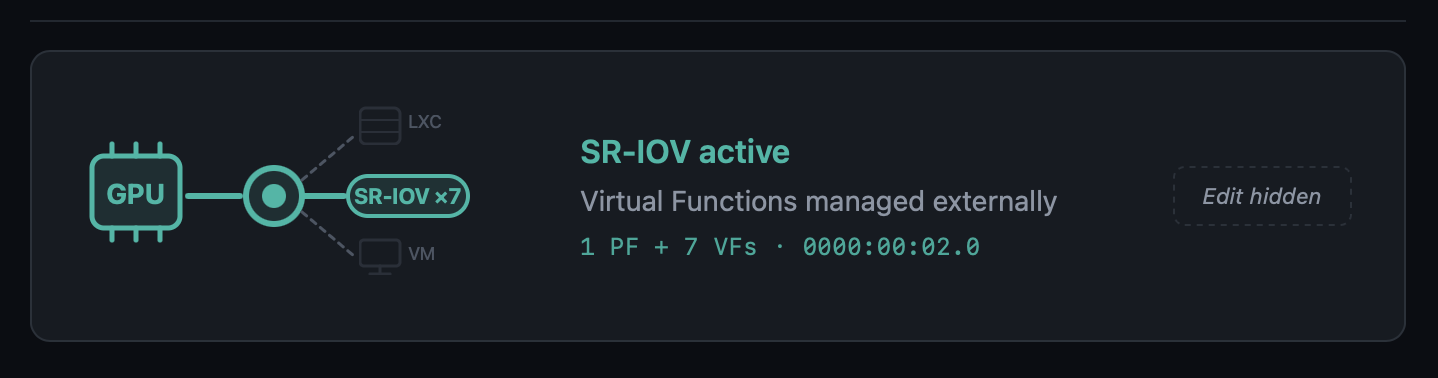
Modal dashboard for SR-IOV GPUs
Opening the modal for a Physical Function with active VFs now shows:
- Aggregate-metrics banner ("Metrics below reflect the Physical Function, aggregate across N VFs")
- Normal GPU real-time telemetry for the PF
- A Virtual Functions table, one row per VF, with the current driver (
i915,vfio-pci, unbound) and the specific VM or LXC that consumes it, including running/stopped state — consumers are discovered by cross-referencinghostpcientries and/dev/dri/renderDNmount lines against the VF's BDF and DRM render node
Opening the modal for a Virtual Function shows its parent PF (clickable to navigate back to the PF's modal), current driver, and consumer.
VM Conflict Policy popup no longer fires for SR-IOV VFs
The regex in detect_affected_vms_for_selected matched the slot (00:02) against VMs that had a VF (00:02.1) assigned, producing a confusing "Keep GPU in VM config" dialog. With the SR-IOV gate upstream, the flow never reaches that code path for SR-IOV slots.
🔊 GPU + Audio Passthrough — Full Lifecycle Hardening
A round of fixes around how GPU passthrough handles its audio companion device. Previously, only the .1 sibling of a discrete GPU was picked up automatically; Intel iGPU passthrough to a VM — where the audio lives separately on the chipset at 00:1f.3 and not at 00:02.1 — was silently skipped. On detach, the old sed that wiped hostpci lines by slot substring could also remove an unrelated GPU whose BDF happened to contain the search slot as a substring (e.g. slot 00:02 matching inside 0000:02:00.0). Both paths are now robust.
iGPU audio-companion checklist on attach
add_gpu_vm.sh::detect_optional_gpu_audio keeps the auto-include fast path for the classic .1 sibling (discrete NVIDIA / AMD with HDMI audio on the card). When no .1 audio exists, the script now:
- Scans sysfs for every PCI audio controller on the host
- Skips anything already covered by the GPU's IOMMU group
- Asks the user via a
_pmx_checklist(dialogin standalone mode,whiptailin wizard mode called fromvm_creator/synology/zimaos) which audio controllers to pass through alongside the GPU - Displays each entry with its current host driver (
snd_hda_intel,snd_hda_codec_*, etc.) so the decision is informed - Defaults to none — the user actively opts in
Orphan audio cascade on detach
When the user picks "Remove GPU from VM config" during a mode switch, the scripts now follow up with a targeted cleanup:
switch_gpu_mode.sh,switch_gpu_mode_direct.shandadd_gpu_vm.sh::cleanup_vm_config(source-VM cleanup on the "move GPU" flow) all call the shared helper_vm_list_orphan_audio_hostpci- The helper uses a two-pass scan of the VM config: pass 1 records slot bases of display/3D hostpci entries; pass 2 classifies audio entries and skips any audio whose slot still has a display sibling in the same VM — protecting the HDMI audio of other dGPUs left in the VM
- Previously the bare substring match would have flagged NVIDIA's
02:00.1as orphan when detaching an Intel iGPU at00:02.0 - The interactive switch flow confirms removals with a
dialogchecklist (default ON). The web variant auto-removes without prompting — the runner has no good way to render a checklist — and logs every BDF it touched
vfio.conf cascade extension
For each audio removed by the cascade, the switch-mode scripts now check whether its BDF is still referenced by any other VM via _pci_bdf_in_any_vm. If nothing else uses it, the vendor:device is appended to SELECTED_IOMMU_IDS before the /etc/modprobe.d/vfio.conf update runs. That closes the loop for the Intel iGPU case: 8086:51c8 (PCH HD Audio) is now pulled from vfio.conf alongside 8086:46a3 (iGPU) when both leave VM mode and no other VM references them. If another VM still uses the audio, the ID is deliberately kept — no breaking side effects on other VMs. add_gpu_vm.sh does NOT extend the cleanup in the move flow, because the GPU is still in use elsewhere and its IDs must remain.
Precise hostpci removal regex
Every inline sed used to detach a GPU from a VM config previously matched the slot as a free substring:
/^hostpci[0-9]+:.*${slot}/d
For slot=00:02 that pattern matches the substring inside 0000:02:00.0 (an unrelated NVIDIA dGPU at slot 02:00) and would wipe both cards. The fix anchors the match to the real BDF shape:
/^hostpci[0-9]+:[[:space:]]*(0000:)?${slot}\.[0-7]([,[:space:]]|$)/d
Applied in switch_gpu_mode.sh, switch_gpu_mode_direct.sh and add_gpu_vm.sh::cleanup_vm_config. The awk-based helper in vm_storage_helpers.sh::_remove_pci_slot_from_vm_config (used by the NVMe wizards) already used the correct pattern and did not need changes.
🤖 AI Provider Compatibility — OpenAI-Compatible, Reasoning & Thinking Models
Three coordinated fixes that unblock model categories previously rejected by the notification enhancement pipeline.
OpenAI-compatible endpoints
LiteLLM, MLX, LM Studio, vLLM, LocalAI, Ollama-proxy — the provider's list_models() used to require "gpt" in every model name, so local setups serving mlx-community/..., Qwen3-..., mistralai/... saw an empty model list. When a Custom Base URL is set, the "gpt" substring check is now skipped and EXCLUDED_PATTERNS (embeddings, whisper, tts, dall-e) is the only filter. The Flask route layer also stops intersecting the result against verified_ai_models.json for custom endpoints — the verified list only describes OpenAI's official model IDs and was erasing every local model the user actually served.
OpenAI reasoning models
o1, o3, o3-mini, o4-mini, gpt-5, gpt-5-mini, gpt-5.1, gpt-5.2-pro, gpt-5.4-nano, etc. (excluding the *-chat-latest variants) use a stricter API contract: max_completion_tokens instead of max_tokens, no temperature. Sending the classic chat parameters produced HTTP 400 Bad Request for every one of them. A detector in openai_provider.py now branches the payload accordingly and sets reasoning_effort: "minimal" — by default these models spend their output budget on internal reasoning and return an empty reply for the short notification-translation request.
Gemini 2.5+ / 3.x thinking models
gemini-2.5-flash, 2.5-pro, gemini-3-pro-preview, gemini-3.1-pro-preview, etc. have internal "thinking" enabled by default. With the small token budget used for notification enrichment (≤250 tokens), the thinking budget consumed the entire allowance and the model returned empty output with finishReason: MAX_TOKENS. gemini_provider.py now sets thinkingConfig.thinkingBudget: 0 for non-lite variants of 2.5+ and 3.x, so the available tokens go to the user-visible response. Lite variants (no thinking enabled) are untouched.
📋 Verified AI Models Refresh
AppImage/config/verified_ai_models.json refreshed for the providers re-tested against live APIs. The new private maintenance tool (kept out of the AppImage) re-runs a standardised translate+explain test against every model each provider advertises, classifies pass / warn / fail, and prints a ready-to-paste JSON snippet. Re-run before each ProxMenux release to keep the list current.
| Provider | New recommended | Notes |
|---|---|---|
| OpenAI | gpt-4.1-nano |
gpt-4.1-nano, gpt-4.1-mini, gpt-4o-mini, gpt-4.1, gpt-4o, gpt-5-chat-latest, plus gpt-5.4-nano / gpt-5.4-mini from 2026-03. Dated snapshots and legacy models excluded. Reasoning models supported by code but not listed by default — slower / costlier without improving notification quality |
| Gemini | gemini-2.5-flash-lite |
gemini-2.5-flash-lite, gemini-2.5-flash (works now), gemini-3-flash-preview. latest aliases intentionally omitted — resolved to different models across runs and produced timeouts in some regions. Pro variants reject thinkingBudget=0 and are overkill for notification translation |
| Groq / Anthropic / OpenRouter | unchanged | Marked with a _note — will be re-verified as soon as keys are available |
🩺 Disk Health Monitor — Observation Persistence in the Journal Watcher
A latent bug in notification_events.py::_check_disk_io meant real-time kernel I/O errors caught by the journal watcher were surfaced as notifications but never written to the permanent per-disk observations table. In practice the parallel periodic dmesg scan usually recorded the observation shortly after, but under timing edge cases (stale dmesg window, service restart right after the error, buffer rotation) the observation could go missing.
The journal watcher now records the observation before the 24h notification cooldown gate, using the same family-based signature classification (io_<disk>_ata_connection_error, io_<disk>_block_io_error, io_<disk>_ata_failed_command) as the periodic scan. Both paths now deduplicate into the same row via the UPSERT in record_disk_observation, so occurrence counts are accurate regardless of which detector fired first.
🔧 NVIDIA Installer Polish
lsmod race condition silenced
During reinstall, the module-unload verification in unload_nvidia_modules produced spurious lsmod: ERROR: could not open '/sys/module/nvidia_uvm/holders' errors because lsmod reads /proc/modules and then opens each module's holders/ directory, which disappears transiently while the module is being removed. The check now reads /proc/modules directly and inserts short sleeps to let the kernel finalise the unload before re-verifying. Applied in the same spirit to the four other lsmod call sites in the script.
Dialog → whiptail in the LXC update flow
The "Insufficient Disk Space" message in update_lxc_nvidia and the "Update NVIDIA in LXC Containers" confirmation now use whiptail-style dialogs consistent with the rest of the in-flow messaging, avoiding the visual break that dialog --msgbox caused when rendered mid-sequence in the container-update phase.
🧵 LXC Lifecycle Helper — Timeout-Safe Stop
A plain pct stop can hang indefinitely when the container has a stale lock from a previous aborted operation, when processes inside (Plex, Jellyfin, databases) ignore TERM and fall into uninterruptible-sleep while the GPU they were using is yanked out, or when pct shutdown --timeout is not enforced by pct itself. Field reports of 5+ min waits during GPU mode switches made this a real UX hazard.
New shared helper _pmx_stop_lxc <ctid> [log_file] in pci_passthrough_helpers.sh:
- Returns 0 immediately if the container is not running
- Best-effort
pct unlock(silent on failure) — most containers aren't actually locked; we only care about the cases where they are pct shutdown --forceStop 1 --timeout 30wrapped in an externaltimeout 45so we never wait longer than that for the graceful phase, even if pct stalls on backend I/O- Verifies actual status via
pct status— pct can return non-zero while the container is in fact stopped - If still running,
pct stopwrapped intimeout 60. Verify again - Returns 1 only if the container is truly stuck after ~107 s total — the wizard moves on instead of hanging
Wired into the three GPU-mode paths that stop LXCs during a switch: switch_gpu_mode.sh, switch_gpu_mode_direct.sh, and add_gpu_vm.sh::cleanup_lxc_configs.
⚙️ add_gpu_vm.sh Reboot Prompt Stability
The final "Reboot Required" prompt of the GPU-to-VM assignment wizard was triggering spurious reboots in certain menu-chain invocations (menu → main_menu → hw_grafics_menu → add_gpu_vm). With the _pmx_yesno helper it sometimes returned exit 0 without the user having actually confirmed, calling reboot immediately. With a bare read in its place the process would get SIGTTIN-suspended when the menu chain detached the script from the terminal's foreground process group, leaving [N]+ Stopped menu on the parent shell with no chance to answer.
The prompt now uses whiptail --yesno invoked directly (the pattern verified to work reliably in that menu chain) and inserts a Press Enter to continue ... read -r pause between the "Yes" answer and the actual reboot call — so an accidental Enter on the confirm button cannot trigger an immediate reboot without a visible confirmation step first.
🙏 Thanks
Thank you to the users who reported the SR-IOV, LiteLLM/MLX and GPU + audio cases — these improvements exist because of detailed, reproducible reports. Feel free to keep reporting issues or suggesting improvements 🙌.
2026-04-17
New version ProxMenux v1.2.0 — AI-Enhanced Monitoring
This release is the culmination of the v1.1.9.1 → v1.1.9.6 beta cycle and introduces the biggest evolution of ProxMenux Monitor to date: AI-enhanced notifications, a redesigned multi-channel notification system, a fully reworked hardware and storage experience, and broad performance improvements across the monitoring stack. It also consolidates all recent work on the Storage, Hardware and GPU/TPU scripts.
🤖 ProxMenux Monitor — AI-Enhanced Notifications
Notifications can now be enhanced using AI to generate clear, contextual messages instead of raw technical output.
Example — instead of backup completed exitcode=0 size=2.3GB, AI produces: "The web server backup completed successfully. Size: 2.3GB".
What AI does
- Transforms technical notifications into readable messages
- Translates to your preferred language
- Lets you choose detail level: minimal, standard, or detailed
- Works with Telegram, Discord, Email, Pushover, and Webhooks
What AI does NOT do
- It is not a chatbot or assistant
- It does not analyze your system or make decisions
- It does not have access to data beyond the notification being processed
- It does not execute commands or modify the server
- It does not store history or learn from your data
Multi-Provider Support
Choose between 6 AI providers, each with its own API key stored independently:
- Groq — fast inference, generous free tier
- Google Gemini — excellent quality/price ratio, free tier available
- OpenAI — industry standard
- Anthropic Claude — excellent for writing and translation
- OpenRouter — 300+ models with a single API key
- Ollama — 100% local execution, no internet required
Verified AI Models
A curated list of models (verified_ai_models.json) tested specifically for notification enhancement.
- Hybrid verification: the system fetches provider-side models and filters to only show those tested to work correctly
- Per-Provider Model Memory: selected model is saved per provider, so switching providers preserves each choice
- Daily verification: background task checks model availability and auto-migrates to a verified alternative if the current model disappears
- Incompatible models excluded: Whisper, TTS, image/video, embeddings, guard models, etc. are filtered out per provider
| Provider | Recommended | Also Verified |
|---|---|---|
| Gemini | gemini-2.5-flash-lite | gemini-flash-lite-latest |
| OpenAI | gpt-4o-mini | gpt-4.1-mini |
| Groq | llama-3.3-70b-versatile | llama-3.1-70b-versatile, llama-3.1-8b-instant, llama3-70b-8192, llama3-8b-8192, mixtral-8x7b-32768, gemma2-9b-it |
| Anthropic | claude-3-5-haiku-latest | claude-3-5-sonnet-latest, claude-3-opus-latest |
| OpenRouter | meta-llama/llama-3.3-70b-instruct | meta-llama/llama-3.1-70b-instruct, anthropic/claude-3.5-haiku, google/gemini-flash-2.5-flash-lite, openai/gpt-4o-mini, mistralai/mixtral-8x7b-instruct |
| Ollama | (all local models) | No filtering — shows all installed models |
Custom AI Prompts
Advanced users can define their own prompt for full control over formatting and translation.
- Prompt Mode selector — Default Prompt or Custom Prompt
- Export / Import — save and share custom prompts across installations
- Example Template — starting point to build your own prompt
- Community Prompts — direct link to GitHub Discussions to share templates
- Language selector is hidden in Custom Prompt mode (you define the output language in the prompt itself)
Enriched Context
- System uptime is included only for error/warning events (not informational ones) — helps distinguish startup vs runtime errors
- Event frequency tracking — indicates recurring vs one-time issues
- SMART disk health data is passed for disk-related errors
- Known Proxmox errors database improves diagnosis accuracy
- Clearer prompt instructions to prevent AI hallucinations
📨 Notification System Redesign
- Multi-Channel Architecture — Telegram, Discord, Pushover, Email, and Webhook channels running simultaneously
- Per-Event Configuration — enable/disable specific event types per channel
- Channel Overrides — customize notification behaviour per channel
- Secure Webhook Endpoint — external systems can send authenticated notifications
- Encrypted Storage — API keys and sensitive data stored encrypted
- Queue-Based Processing — background worker with automatic retry for failed notifications
- SQLite-Based Config Storage — replaces file-based config for reliability
Telegram Topics Support
Send notifications to a specific topic inside groups with Topics enabled.
- New Topic ID field on the Telegram channel
- Automatic detection of topic-enabled groups
- Fully backwards compatible
ProxMenux Update Notifications
The Monitor now detects when a new ProxMenux version is released.
- Dual-channel — monitors both stable (
version.txt) and beta (beta_version.txt) - GitHub integration — compares local vs remote versions
- Dashboard Update Indicator — the ProxMenux logo changes to an update variant when a new version is detected (non-intrusive, no popups)
- Persistent state — status stored in
config.json, reset by update scripts - Single toggle in Settings controls both channels (enabled by default)
🖥️ Hardware Panel — Expanded Detection
The Hardware page has been significantly expanded, with better detection and richer per-device detail.
- SCSI / SAS / RAID Controllers — model, driver and PCI slot shown in the storage controllers section
- PCIe Link Speed Detection — NVMe drives show current link speed (PCIe generation and lane width), making it easy to spot drives underperforming due to limited slot bandwidth
- Enhanced Disk Detail Modal — NVMe, SATA, SAS, and USB drives now expose their specific fields (PCIe link info, SAS version/speed, interface type) instead of a generic view
- Smarter Disk Type Recognition — uniform labelling for NVMe SSDs, SATA SSDs, HDDs and removable disks
- Hardware Info Caching (
lspci,lspci -vmm) — 5 min cache avoids repeated scans for data that doesn't change
💽 Storage Overview — Health, Observations, Exclusions
The Storage Overview has been reworked around real-time state and user-controlled tracking.
Disk Health Status Alignment
- Badges now reflect the current SMART state reported by Proxmox, not a historical worst value
- Observations preserved — historical findings remain accessible via the "X obs." badge
- Automatic recovery — when SMART reports healthy again, the disk immediately shows Healthy
- Removed the old
worst_healthtracking that required manual clearing
Disk Registry Improvements
- Smart serial lookup — when a serial is unknown the system checks for an existing entry with a serial before inserting a new one
- No more duplicates — prevents separate entries for the same disk appearing with/without a serial
- USB disk support — handles USB drives that may appear under different device names between reboots
Storage and Network Interface Exclusions
- Storage Exclusions section — exclude drives from health monitoring and notifications
- Network Interface Exclusions — new section for excluding interfaces (bridges
vmbr, bonds, physical NICs, VLANs) from health and notifications; ideal for intentionally disabled interfaces that would otherwise generate false alerts - Separate toggles per item for Health monitoring and Notifications
Disk Detection Robustness
- Power-On-Hours validation — detects and corrects absurdly large values (billions of hours) on drives with non-standard SMART encoding
- Intelligent bit masking — extracts the correct value from drives that pack extra info into high bytes
- Graceful fallback — shows "N/A" instead of impossible numbers when data cannot be parsed
🧠 Health Monitor & Error Lifecycle
Stale Error Cleanup
Errors for resources that no longer exist are now resolved automatically.
- Deleted VMs / CTs — related errors auto-resolve when the resource is removed
- Removed Disks — errors for disconnected USB or hot-swap drives are cleaned up
- Cluster Changes — cluster errors clear when a node leaves the cluster
- Log Patterns — log-based errors auto-resolve after 48 hours without recurrence
- Security Updates — update notifications auto-resolve after 7 days
Database Migration System
- Automatic column detection — missing columns are added on startup
- Schema compatibility — works with both old and new column naming conventions
- Backwards compatible — databases from older ProxMenux versions are supported
- Graceful migration — no data loss during schema updates
🧩 VM / CT Detail Modal
The VM/CT detail modal has been completely redesigned for usability.
- Tabbed Navigation — Overview (general information, status, resource usage) and Backups (dedicated history)
- Visual Enhancements — icons throughout, improved hierarchy and spacing, better VM vs CT distinction
- Mobile Responsiveness — adapts correctly to mobile screens in both webapp and direct browser access, no more overflow on small devices
- Touch-Friendly Controls — larger buttons and spacing
Secure Gateway Modal
- Scrollable storage list when many destinations are available
- Mobile-adapted layout and improved visual hierarchy
Terminal Connection
- Reconnection loop fix that was affecting mobile devices
- Improved WebSocket handling for mobile browsers
- More graceful connection timeout recovery
Fail2ban & Lynis Management
- Delete buttons added in Settings for both tools
- Clean removal of packages and configuration files
- Confirmation dialog to prevent accidental deletion
⚡ Performance Optimizations
Major reduction in CPU usage and elimination of spikes on the Monitor.
Staggered Polling Intervals
Collectors now run on offset schedules to prevent simultaneous execution:
| Collector | Schedule |
|---|---|
| CPU sampling | Every 30s at offset 0 |
| Temperature sampling | Every 15s at offset 7s |
| Latency pings | Every 60s at offset 25s |
| Temperature record | Every 60s at offset 40s |
| Health collector | Starts at 55s offset |
| Notification polling | Health=10s, Updates=30s, ProxMenux=45s, AI=50s |
Cached System Information
Expensive commands now cached to reduce repeated execution:
| Command | Cache TTL | Impact |
|---|---|---|
pveversion |
6 hours | Eliminates 23%+ CPU spikes from Perl execution |
apt list --upgradable |
6 hours | Reduces package manager queries |
pvesh get /cluster/resources |
30 seconds | 6 API calls per request reduced to 1 |
sensors |
10 seconds | Temperature readings cached between polls |
smartctl (SMART health) |
30 minutes | Disk health checks reduced from every 5 min |
lspci / lspci -vmm |
5 minutes | Hardware info cached (doesn't change) |
journalctl --since 24h |
1 hour | Login attempts count cached (92% reduction) |
Increased journalctl Timeouts
Prevents timeout cascades under system load:
| Query Type | Before | After |
|---|---|---|
| Short-term (3-10 min) | 3s | 10s |
| Medium-term (1 hour) | 5s | 15s |
| Long-term (24 hours) | 5s | 20s |
Reduced Polling Frequency
TaskWatcherinterval raised from 2s → 5s (60% fewer checks)
GitHub Actions
- All workflow actions upgraded to v6 for Node.js 24 compatibility
- Deprecation warnings eliminated in CI/CD
🧰 Scripts — Storage, Hardware and GPU/TPU Work
This release also consolidates significant work on the core ProxMenux scripts.
Storage scripts
- SMART scheduled tests and improved interactive SMART test workflow with clearer progress feedback
- Disk formatting (
format-disk.sh) rework with safer device selection and dialog flow - Disk passthrough for VMs and CTs — updated device enumeration, serial-based identification, and cleaner teardown
- NVMe controller addition for VMs — improved controller type selection and slot detection
- Import disk image — smoother path validation and progress reporting
- Disk & storage manual guide refresh
Hardware / GPU / TPU scripts
- Coral TPU installer updated for current kernels and udev rules (Proxmox VE 8 & VE 9)
- NVIDIA installer — cleaner driver installation, kernel header handling, and VM/LXC attachment flow
- GPU mode switch (direct and interactive variants) — safer switching between iGPU modes
- Add GPU to VM / LXC — unified selection dialogs and permission handling
- Intel / AMD GPU tools kept in sync with the new shared patterns
- Hardware & graphics menu restructured for consistency with the rest of ProxMenux
2026-03-14
New version v1.1.9 — Helper Scripts Catalog Rebuilt
Changed
-
Helper Scripts Menu — Full Catalog Rebuild The Helper Scripts catalog has been completely rebuilt to adapt to the new data architecture of the Community Scripts project.
The previous implementation relied on a
metadata.jsonfile that no longer exists in the upstream repository. The catalog now connects directly to the PocketBase API (db.community-scripts.org), which is the new official data source for the project.A new GitHub Actions workflow generates a local
helpers_cache.jsonindex that replaces the old metadata dependency. This new cache is richer, more structured, and includes:- Script type, slug, description, notes, and default credentials
- OS variants per script (e.g. Debian, Alpine) — each shown as a separate selectable option in the menu
- Direct GitHub URL and Mirror URL (
git.community-scripts.org) for every script - Category names embedded directly in the cache — no external requests needed to build the menu
- Additional metadata: default port, website, logo, update support, ARM availability
Scripts that support multiple OS variants (e.g. Docker with Alpine and Debian) now correctly show one entry per OS, each with its own GitHub and Mirror download option — restoring the behavior that existed before the upstream migration.
🎖 Special Acknowledgment
This update would not have been possible without the openness and collaboration of the Community Scripts maintainers.
When the upstream metadata structure changed and broke the ProxMenux catalog, the maintainers responded quickly, explained the new architecture in detail, and provided all the information needed to rebuild the integration cleanly.
Special thanks to:
- MickLeskCanbiZ (@MickLesk) — for documenting the new script path structure by type and slug, and for the clear and direct technical guidance.
- Michel Roegl-Brunner (@michelroegl-brunner) — for explaining the new PocketBase collections structure (
script_scripts,script_categories).
The Helper Scripts project is an extraordinary resource for the Proxmox community. The scripts belong entirely to their authors and maintainers — ProxMenux simply offers a guided way to discover and launch them. All credit goes to the community behind community-scripts/ProxmoxVE.
2025-09-18
New version v1.1.8 — ProxMenux Offline Mode
Added
-
Offline Execution Mode (no GitHub dependency)
All ProxMenux core scripts now run entirely locally, without requiring live requests to GitHub (raw.githubusercontent.com).
This change provides:- Greater stability during execution
- No interruptions due to network timeouts or regional GitHub blocks
- Support for offline or isolated environments
⚠️ This update resolves recent issues where users in certain regions were unable to run scripts due to CDN or TLS filtering errors while downloading
.shfiles from GitHub raw URLs.🎖 Special Acknowledgment: @cod378
This offline conversion has been made possible thanks to the extraordinary work of @cod378,
who redesigned the entire internal logic of the installer and updater, refactored the file management system,
and implemented the new fully local execution workflow.
Without his collaboration, dedication, and technical contribution, this transformation would not have been possible. -
ProxMenux Monitor v1.0.1
This update brings a major leap in the ProxMenux Monitor interface.
New features and improvements:Proxy Support: Access ProxMenux through reverse proxies with full functionalityAuthentication System: Secure your dashboard with password protectionTwo-Factor Authentication (2FA): Optional TOTP support for enhanced securityPCIe Link Speed Detection: View NVMe connection speeds and detect performance bottlenecksEnhanced Storage Display: Auto-formats disk sizes (GB → TB when appropriate)SATA/SAS Interface Info: Detect and show storage type (SATA, SAS, NVMe, etc.)Health Monitoring System: Built-in system health check with dismissible alerts- Improved rendering across browsers and better performance
-
Helper Scripts Menu (Mirror Support)
TheHelper Scriptsmenu now:- Detects mirror URLs and shows alternative download options when available
- Lists available OS versions when a helper script is version-dependent (e.g. template installers)
Fixed
- Minor fixes and refinements throughout the codebase to ensure full offline compatibility and a smoother user experience.
2025-09-04
New version v1.1.7
Added
-
ProxMenux Monitor
Your new monitoring tool for Proxmox. Discover all the features that will help you manage and supervise your infrastructure efficiently.ProxMenux Monitor is designed to support future updates where actions can be triggered without using the terminal, and managed through a user-friendly interface accessible across multiple formats and devices.
Access it at: http://your-server-ip:8008

-
New Banner Removal Method
A new function to disable the Proxmox subscription message with improved safety:- Creates a full backup before modifying any files
- Shows a clear warning that breaking changes may occur with future GUI updates
- If the GUI fails to load, the user can revert changes via SSH from the post-install menu using the "Uninstall Options → Restore Banner" tool
Special thanks to @eryonki for providing the improved method.
Improved
-
CORAL TPU Installer Updated for PVE 9
The CORAL TPU driver installer now supports both Proxmox VE 8 and VE 9, ensuring compatibility with the latest kernels and udev rules. -
Log2RAM Installation & Integration
- Log2RAM installation is now idempotent and can be safely run multiple times.
- Automatically adjusts
journaldconfiguration to align with the size and behavior of Log2RAM. - Ensures journaling is correctly tuned to avoid overflows or RAM exhaustion on low-memory systems.
-
Network Optimization Function (LXC + NFS)
Improved to prevent “martian source” warnings in setups where LXC containers share storage with VMs over NFS within the same server. -
APT Upgrade Progress
When running full system upgrades via ProxMenux, a real-time progress bar is now displayed, giving the user clear visibility into the update process.
Fixed
- Other small improvements and fixes to optimize runtime performance and eliminate minor bugs.
2025-01-10
New version v1.1.6
Added
-
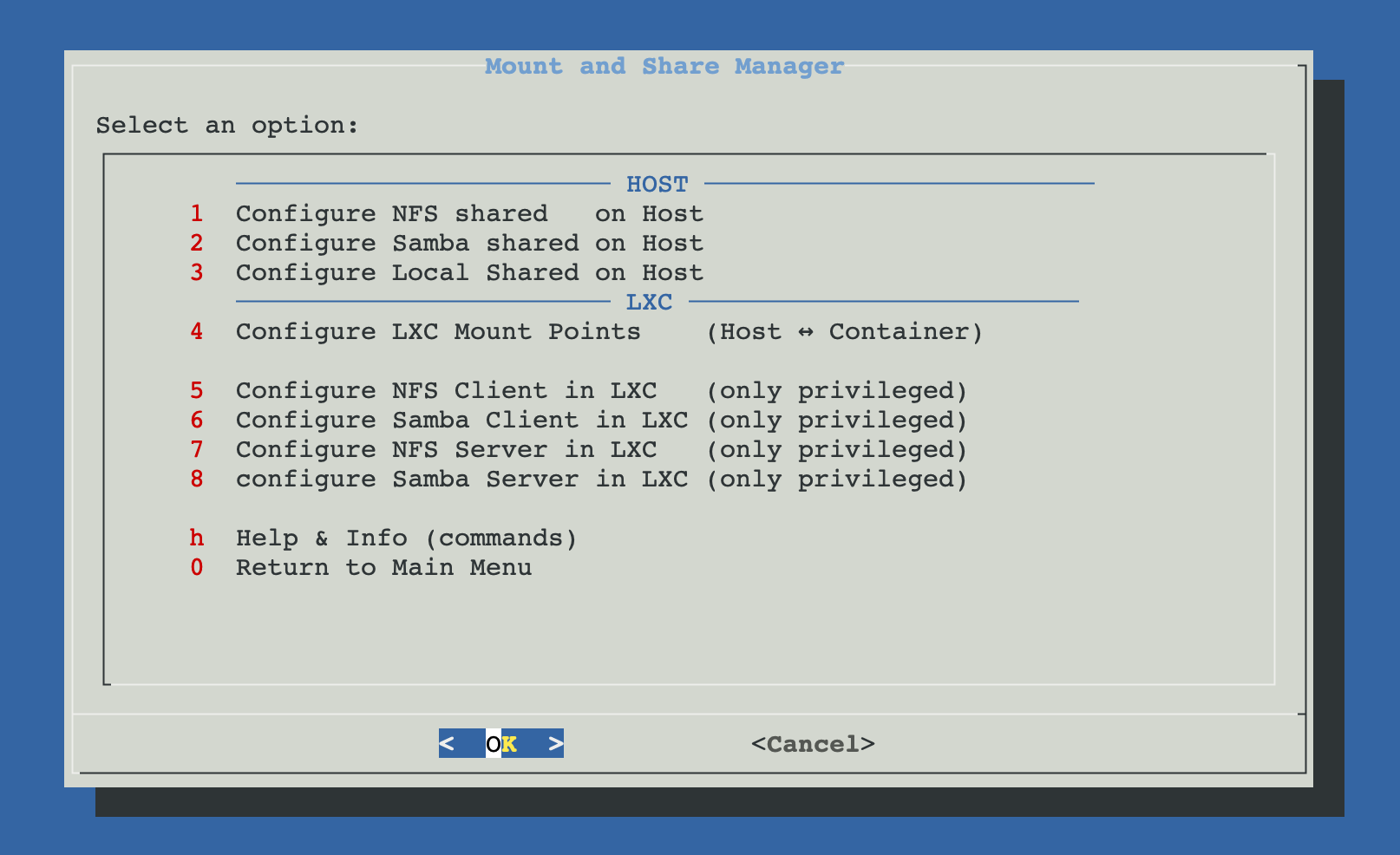
New Menu: Mount and Share Manager
Introduced a comprehensive new menu for managing shared resources between Proxmox host and LXC containers:Host Configuration Options:
- Configure NFS Shared on Host - Add, view, and remove NFS shared resources on the Proxmox server with automatic export management
- Configure Samba Shared on Host - Add, view, and remove Samba/CIFS shared resources on the Proxmox server with share configuration
- Configure Local Shared on Host - Create and manage local shared directories with proper permissions on the Proxmox host
LXC Integration Options:
- Configure LXC Mount Points (Host ↔ Container) - Core feature that enables mounting host directories into LXC containers with automatic permission handling. Includes the ability to view existing mount points for each container in a clear, organized way and remove mount points with proper verification that the process completed successfully. Especially optimized for unprivileged containers where UID/GID mapping is critical.
- Configure NFS Client in LXC - Set up NFS client inside privileged containers
- Configure Samba Client in LXC - Set up Samba client inside privileged containers
- Configure NFS Server in LXC - Install NFS server inside privileged containers
- Configure Samba Server in LXC - Install Samba server inside privileged containers
Documentation & Support:
- Help & Info (commands) - Comprehensive guides with step-by-step manual instructions for all sharing scenarios
The entire system is built around the LXC Mount Points functionality, which automatically detects filesystem types, handles permission mapping between host and container users, and provides seamless integration for both privileged and unprivileged containers.
Improved
- Log2RAM Auto-Detection Enhancement
In the automatic post-install script, the Log2RAM installation function now prompts the user when automatic disk ssd/m2 detection fails. This ensures Log2RAM can still be installed on systems where automatic disk detection doesn't work properly.
Fixed
-
Proxmox Update Repository Verification
Fixed an issue in the Proxmox update function where empty repository source files would cause errors during conflict verification. The function now properly handles empty/etc/apt/sources.list.d/files without throwing false warnings.Thanks to @JF_Car for reporting this issue.
Acknowledgments
Special thanks to @JF_Car, @ghosthvj, and @jonatanc for their testing, valuable feedback, and suggestions that helped refine the shared resources functionality and improve the overall user experience.
2025-08-20
New version v1.1.5
Added
-
New Script: Upgrade PVE 8 to PVE 9
Added a full upgrade tool located underUtilities and Tools. It provides:- Automatic upgrade from PVE 8 to 9
- Interactive upgrade with step-by-step confirmations
- Check-only mode using
check-pve8to9 - Manual instructions shown in order for users who prefer to upgrade manually
-
New Tools in System Utilities
s-tui: Terminal-based CPU monitoring with graphsintel-gpu-tools: Useful for Intel GPU diagnostics
Improved
-
APT Upgrade Handling
The PVE upgrade function now blocks the process if any package prompts for manual confirmation. This avoids partial upgrades and ensures consistency. -
Network Optimization (sysctl)
- Obsolete kernel parameters removed (e.g.,
tcp_tw_recycle,nf_conntrack_helper) to prevent warnings in Proxmox 9 / kernel 6.14 - Now generates only valid, up-to-date sysctl parameters
- Obsolete kernel parameters removed (e.g.,
-
AMD CPU Patch Handling
- Now applies correct
idle=nomwaitand KVM options (ignore_msrs=1,report_ignored_msrs=0) - Expected warning is now documented and safely handled for stability with Ryzen/EPYC
- Now applies correct
-
Timezone & NTP Fixes
- Automatically detects timezone using public IP geolocation
- Falls back to UTC if detection fails
- Restarts Postfix after timezone set → resolves
/var/spool/postfix/etc/localtimemismatch warning
-
Repository & Package Installer Logic
- Now verifies that working repositories exist before installing any package
- If none are available, adds a fallback Debian stable repository
- Replaces deprecated
mlocatewithplocate(compatible with Debian 13 and Proxmox 9)
-
Improved Logs and User Feedback
- Actions that fail now provide precise messages (instead of falsely marking as success)
- Helps users clearly understand what's been applied or skipped
2025-08-06
New version v1.1.4
Added
-
Proxmox 9 Compatibility Preparation
This version prepares ProxMenux for the upcoming Proxmox VE 9:- The function to add the official Proxmox repositories now supports the new
.sourcesformat used in Proxmox 9, while maintaining backward compatibility with Proxmox 8. - Banner removal is now optionally supported for Proxmox 9.
- The function to add the official Proxmox repositories now supports the new
-
xshok-proxmox Detection
Added a check to detect if thexshok-proxmoxpost-install script has already been executed.
If detected, a warning is shown to avoid conflicting adjustments:It appears that you have already executed the xshok-proxmox post-install script on this system. If you continue, some adjustments may be duplicated or conflict with those already made by xshok. Do you want to continue anyway?
Improved
-
Banner Removal (Proxmox 8.4.9+)
Updated the logic for removing the subscription banner in Proxmox 8.4.9, due to changes inproxmoxlib.js. -
LXC Disk Passthrough (Persistent UUID)
The function to add a physical disk to an LXC container now uses UUID-based persistent paths.
This ensures that disks remain correctly mounted, even if the/dev/sdXorder changes due to new hardware.PERSISTENT_DISK=$(get_persistent_path "$DISK") if [[ "$PERSISTENT_DISK" != "$DISK" ]] ... -
System Utilities Installer
Now checks whether APT sources are available before installing selected tools.
If a new Proxmox installation has no active repos, it will automatically add the default sources to avoid installation failure. -
IOMMU Activation on ZFS Systems
The function that enables IOMMU for passthrough now verifies existing kernel parameters to avoid duplication if the user has already configured them manually.
Fixed
- Minor code cleanup and improved runtime performance across several modules.
2025-07-20
Changed
-
Subscription Banner Removal (Proxmox 8.4.5+)
Improved theremove_subscription_bannerfunction to ensure compatibility with Proxmox 8.4.5, where the banner removal method was failing after clean installations. -
Improved Log2RAM Detection
In both the automatic and customizable post-install scripts, the logic for Log2RAM installation has been improved.
Now it correctly detects if Log2RAM is already configured and avoids triggering errors or reconfiguration. -
Optimized Figurine Installation
Theinstall_figurinefunction now avoids duplicating.bashrcentries if the customization for the root prompt already exists.
Added
-
New Function: Persistent Network Interface Naming
Added a new functionsetup_persistent_networkto create stable network interface names using.linkfiles based on MAC addresses.
This avoids unpredictable renaming (e.g.,enp2s0becomingenp3s0) when hardware changes, PCI topology shifts, or passthrough configurations are applied.Why use
.linkfiles?
Because predictable interface names insystemdcan change with hardware reordering or replacement. Using static.linkfiles bound to MAC addresses ensures consistency, especially on systems with multiple NICs or passthrough setups.Special thanks to [@Andres_Eduardo_Rojas_Moya] for contributing the persistent
network naming function and for the original idea.
[Match]
MACAddress=XX:XX:XX:XX:XX:XX

[Link]
Name=eth0
2025-07-01
New version v1.1.3
-
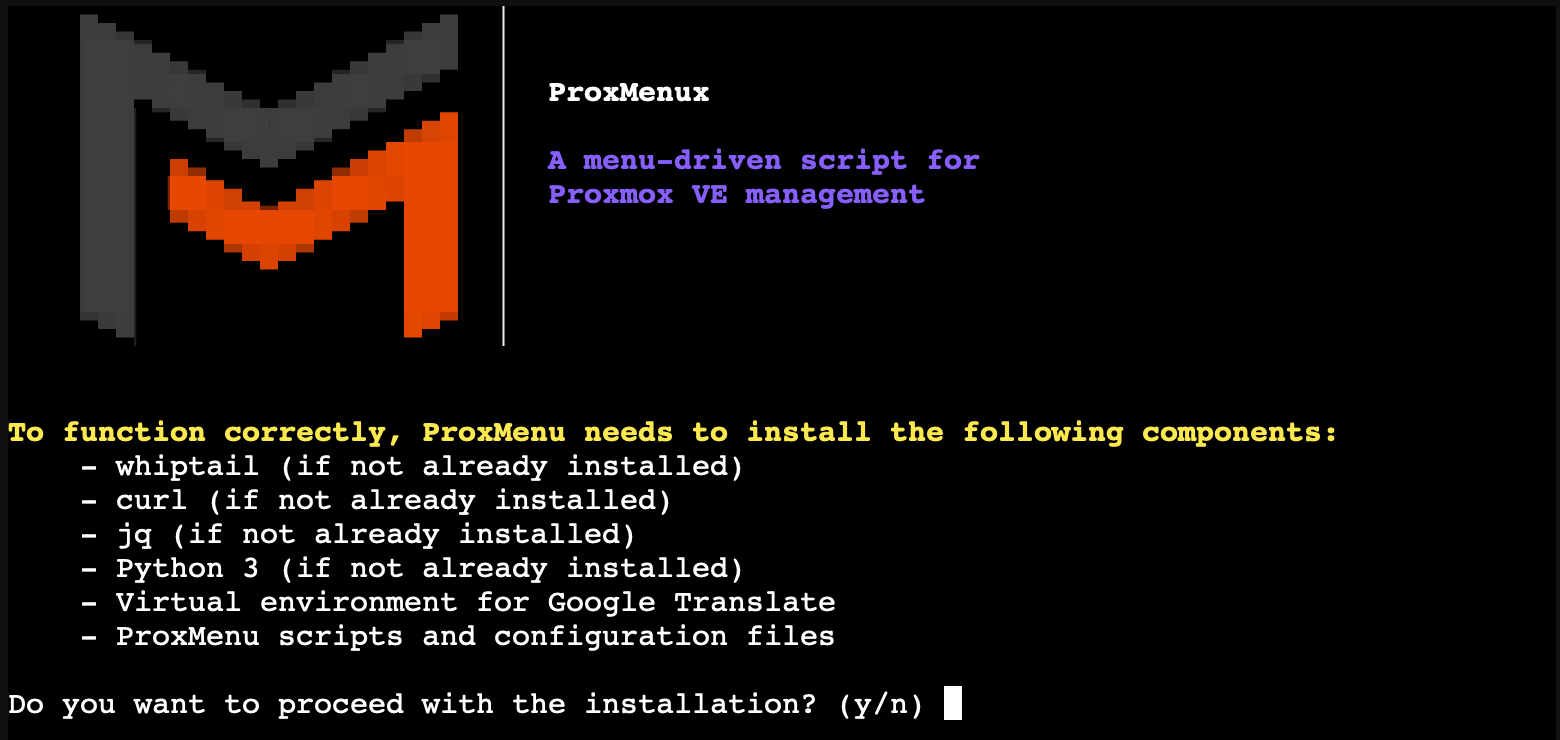
Dual Installation Modes for ProxMenux
The installer now offers two distinct modes:- Lite version (no translations): Only installs two official Debian packages (
dialog,jq) to enable menus and JSON parsing. No files are written beyond the configuration directory. - Full version (with translations): Uses a virtual environment and allows selecting the interface language during installation.
When updating, if the user switches from full to lite, the old version will be automatically removed for a clean transition.
- Lite version (no translations): Only installs two official Debian packages (
Added
-
New Script: Automated Post-Installation Setup
A new minimal post-install script that performs essential setup automatically:- System upgrade and sync
- Remove enterprise banner
- Optimize APT, journald, logrotate, system limits
- Improve kernel panic handling, memory settings, entropy, network
- Add
.bashrctweaks and Log2RAM auto-install (if SSD/M.2 is detected)
-
New Function: Log2RAM Configuration
Now available in both the customizable and automatic post-install scripts.
On systems with SSD/NVMe, Log2RAM is enabled automatically to preserve disk life. -
New Menus:
- 🧰 System Utilities Menu
Lets users select and install useful CLI tools with proper command validation. - 🌐 Network Configuration & Repair
A new interactive menu for analyzing and repairing network interfaces.
- 🧰 System Utilities Menu
Improved
-
Post-Install Menu Logic
Options are now grouped more logically for better usability. -
VM Creation Menu
Enhanced with improved CPU model support and custom options. -
UUP Dump ISO Creator Script
-
Physical Disk to LXC Script
Now handles XFS-formatted disks correctly.
Thanks to @antroxin for reporting and testing! -
System Utilities Installer
Rewritten to verify command availability after installation, ensuring tools work as expected.
🐛 Fix for #18 by @DST73
Fixed
- Enable IOMMU on ZFS
The detection and configuration for enabling IOMMU on ZFS-based systems is now fully functional.
🐛 Fix for #15 by @troponaut
Other
- Performance and code cleanup improvements across several modules.
2025-06-06
Added
-
New Menu: Proxmox PVE Helper Scripts
Officially introduced the new Proxmox PVE Helper Scripts menu, replacing the previous: Esenciales Proxmox.
This new menu includes:- Script search by name in real time
- Category-based browsing
It’s a cleaner, faster, and more functional way to access community scripts in Proxmox.

-
New CPU Models in VM Creation
The CPU selection menu in VM creation has been greatly expanded to support advanced QEMU and x86-64 CPU profiles.
This allows better compatibility with modern guest systems and fine-tuning performance for specific workloads, including nested virtualization and hardware-assisted features.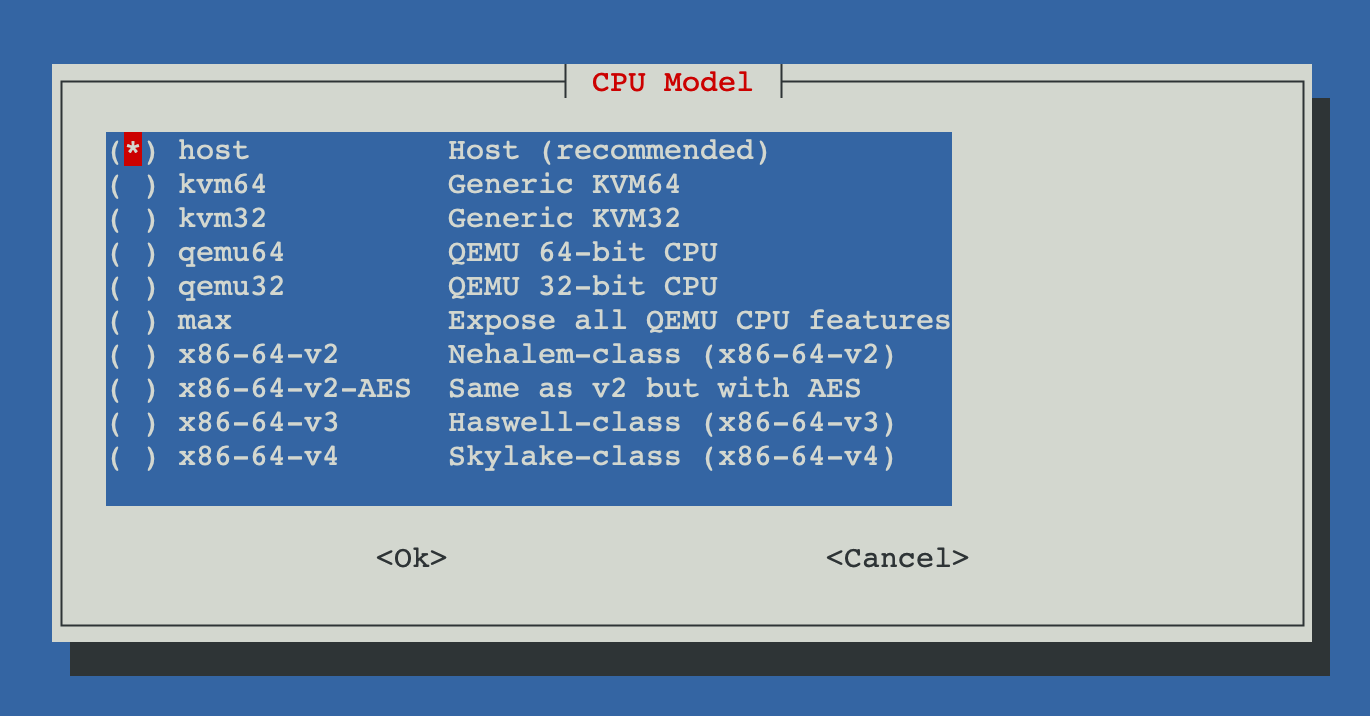
Thanks to @Nida Légé (Nidouille) for suggesting this enhancement.
-
Support for
.rawDisk Images
The disk import tool for VMs now supports.rawfiles, in addition to.img,.qcow2, and.vmdk.
This improves compatibility when working with disk exports from other hypervisors or backup tools.💡 Suggested by @guilloking in GitHub Issue #5
-
Locale Detection in Language Skipping
The function that disables extra APT languages now includes:- Automatic locale detection (
LANG) - Auto-generation of
en_US.UTF-8if none is found - Prevents warnings during script execution due to undefined locale
- Automatic locale detection (
Improved
-
APT Language Skipping Logic
Improved locale handling ensures system compatibility before disabling translations:if ! locale -a | grep -qi "^${default_locale//-/_}$"; then echo "$default_locale UTF-8" >> /etc/locale.gen locale-gen "$default_locale" fi -
System Update Speed
Post-install system upgrades are now faster:- The upgrade process (
dist-upgrade) is separated from container template index updates. - Index refresh is now an optional feature selected in the script.
- The upgrade process (
2025-05-27
Fixed
- Kali Linux ISO URL Updated
Fixed the incorrect download URL for Kali Linux ISO in the Linux installer module. The new correct path is:https://cdimage.kali.org/kali-2025.1c/kali-linux-2025.1c-installer-amd64.iso
Improved
-
Faster Dialog Menu Transitions
Improved UI responsiveness across all interactive menus by replacingwhiptailwithdialog, offering faster transitions and smoother navigation. -
Coral USB Support in LXC
Improved the logic for configuring Coral USB TPU passthrough into LXC containers:- Refactored configuration into modular blocks with better structure and inline comments.
- Clear separation of Coral USB (
/dev/coral) and Coral M.2 (/dev/apex_0) logic. - Maintains backward compatibility with existing LXC configurations.
- Introduced persistent Coral USB passthrough using a udev rule:
# Create udev rule for Coral USB SUBSYSTEM=="usb", ATTRS{idVendor}=="18d1", ATTRS{idProduct}=="9302", MODE="0666", TAG+="uaccess", SYMLINK+="coral" # Map /dev/coral if it exists if [ -e /dev/coral ]; then echo "lxc.mount.entry: /dev/coral dev/coral none bind,optional,create=file" >> "$CONFIG_FILE" fi - Special thanks to @Blaspt for validating the persistent Coral USB passthrough and suggesting the use of
/dev/coralsymbolic link.
Added
-
Persistent Coral USB Passthrough Support
Added udev rule support for Coral USB devices to persistently map them as/dev/coral, enabling consistent passthrough across reboots. This path is automatically detected and mapped in the container configuration. -
RSS Feed Integration
Added support for generating an RSS feed for the changelog, allowing users to stay informed of updates through news clients. -
Release Service Automation
Implemented a new release management service to automate publishing and tagging of versions, starting with version v1.1.2.
2025-05-13
Fixed
- Startup Fix on Newer Proxmox Versions
Fixed an issue where some recent Proxmox installations lacked the/usr/local/bindirectory, causing errors when installing the execution menu. The script now creates the directory if it does not exist before downloading the main menu.
Thanks to @danielmateos for detecting and reporting this issue.
Improved
-
Updated Lynis Installation Logic in Post-Install Settings
Theinstall_lynis()function was improved to always install the latest version of Lynis by cloning the official GitHub repository:https://github.com/CISOfy/lynis.gitThe installation process now ensures the latest version is always fetched and linked properly within the system path.
Thanks to @Kamunhas for reporting this enhancement opportunity.
-
Balanced Memory Optimization for Low-Memory Systems
Improved the default memory settings to better support systems with limited RAM. The previous configuration could prevent low-spec servers from booting. Now, a more balanced set of kernel parameters is used, and memory compaction is enabled if supported by the system.cat <<EOF | sudo tee /etc/sysctl.d/99-memory.conf # Balanced Memory Optimization vm.swappiness = 10 vm.dirty_ratio = 15 vm.dirty_background_ratio = 5 vm.overcommit_memory = 1 vm.max_map_count = 65530 EOF # Enable memory compaction if supported by the system if [ -f /proc/sys/vm/compaction_proactiveness ]; then echo "vm.compaction_proactiveness = 20" | sudo tee -a /etc/sysctl.d/99-memory.conf fi # Apply settings sudo sysctl -p /etc/sysctl.d/99-memory.confThese values help maintain responsiveness and system stability even under constrained memory conditions.
Thanks to @chesspeto for pointing out this issue and helping refine the optimization.
2025-05-04
Added
-
Interactive Help & Info Menu
Added a new script calledHelp and Info, which provides an interactive command reference menu for Proxmox VE through a dialog-based interface.
This tool offers users a quick way to browse and copy useful commands for managing and maintaining their Proxmox server, all in one centralized location.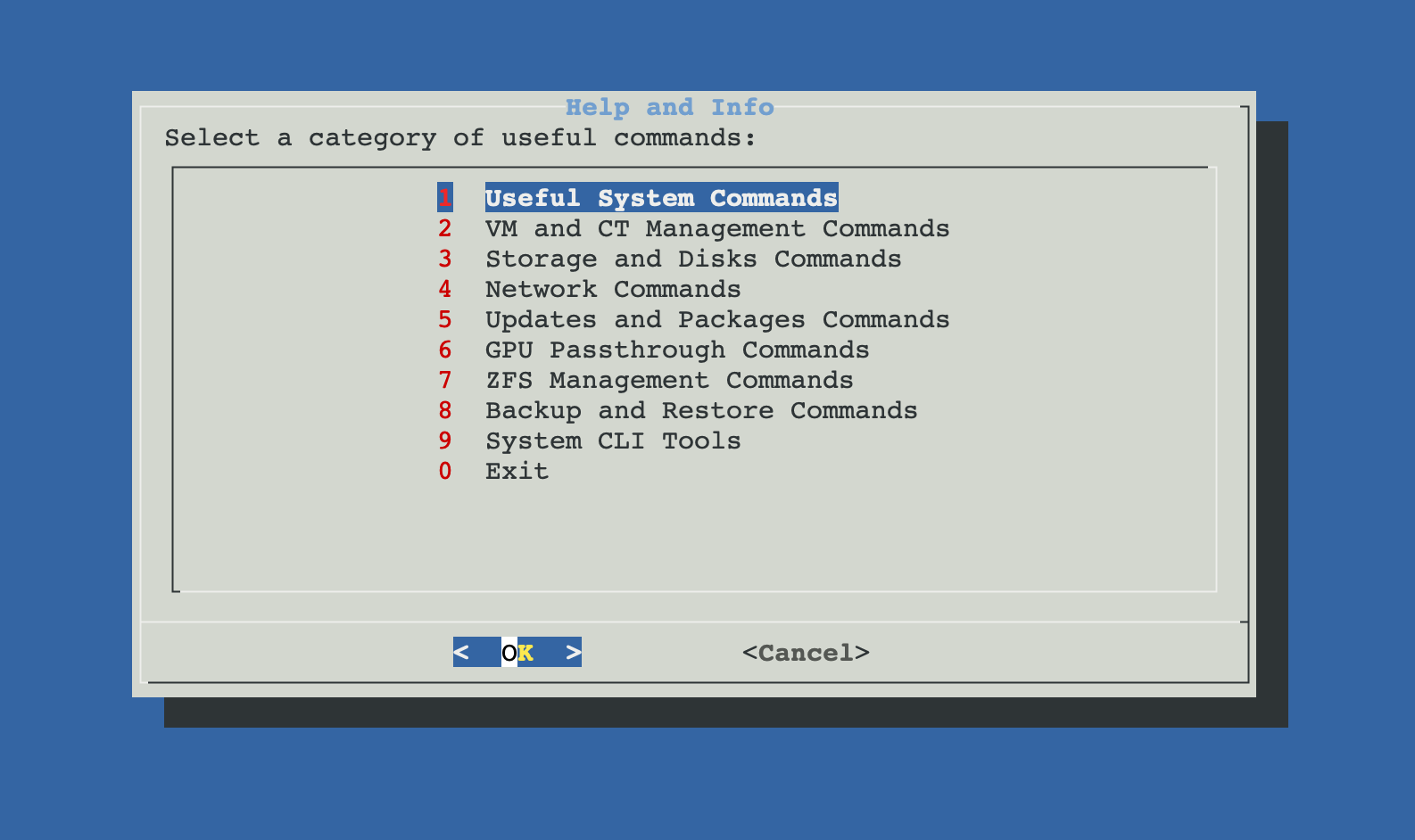
Figure 1: Help and Info interactive command reference menu.
-
Uninstaller for Post-Install Utilities
A new script has been added to the Post-Installation menu, allowing users to uninstall utilities or packages that were previously installed through the post-install script.
Improved
-
Utility Selection Menu in Post-Installation Script
TheInstall Common System Utilitiessection now includes a menu where users can choose which utilities to install, instead of installing all by default. This gives more control over what gets added to the system. -
Old PV Header Detection and Auto-Fix
After updating the system, the post-update script now includes a security check for physical disks with outdated LVM PV (Physical Volume) headers.
This issue can occur when virtual machines have passthrough access to disks and unintentionally modify volume metadata. The script now detects and automatically updates these headers.
If any error occurs during the process, a warning is shown to the user. -
Faster Translations in Menus
Several post-installation menus with auto-translations have been optimized to reduce loading times and improve user experience.
2025-04-14
Added
- New Script: Disk Passthrough to a CT Introduced a new script that enables assigning a dedicated physical disk to a container (CT) in Proxmox VE. This utility lists available physical disks (excluding system and mounted disks), allows the user to select a container and one disk, and then formats or reuses the disk before mounting it inside the CT at a specified path. It supports detection of existing filesystems and ensures permissions are properly configured. Ideal for use cases such as Samba, Nextcloud, or video surveillance containers.
Improved
- Visual Identification of Disks for Passthrough to VMs Enhanced the disk detection logic in the Disk Passthrough to a VM script by including visual indicators and metadata. Disks now display tags like ⚠ In use, ⚠ RAID, ⚠ LVM, or ⚠ ZFS, making it easier to recognize their current status at a glance. This helps prevent selection mistakes and improves clarity for the user.
2025-03-24
Improved
-
Improved the logic for detecting physical disks in the Disk Passthrough to a VM script. Previously, the script would display disks that were already mounted in the system on some setups. This update ensures that only unmounted disks are shown in Proxmox, preventing confusion and potential conflicts.
-
This improvement ensures that disks already mounted or assigned to other VMs are excluded from the list of available disks, providing a more accurate and reliable selection process.
[1.1.1] - 2025-03-21
Improved
- Improved the logic of the post-install script to prevent overwriting or adding duplicate settings if similar settings are already configured by the user.
- Added a warning note to the documentation explaining that using different post-installation scripts is not recommended to avoid conflicts and duplicated settings.
Added
-
Create Synology DSM VM:
A new script that creates a VM to install Synology DSM. The script automates the process of downloading three different loaders with the option to use a custom loader provided by the user from the local storage options.
Additionally, it allows the use of both virtual and physical disks, which are automatically assigned by the script.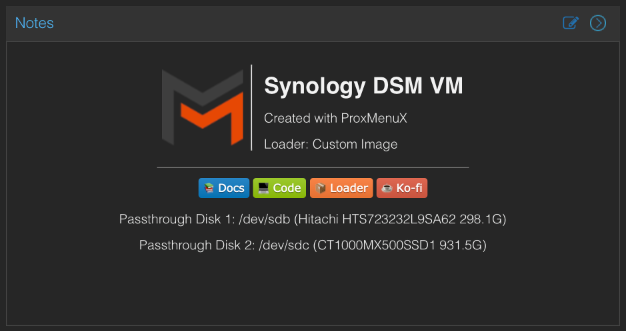
Figure 1: Synology DSM VM setup overview.
-
New VM Creation Menu:
A new menu has been created to enable VM creation from templates or custom scripts. -
Main Menu Update:
Added a new entry to the main menu for accessing the VM creation menu from templates or scripts.
2025-03-06
Added
- Completed the web documentation section to expand information on updated scripts.
[1.1.0] - 2025-03-04
Added
- Created a customizable post-install script for Proxmox with 10 sections and 35 different selectable options.
[1.0.7] - 2025-02-17
Added
- Created a menu with essential scripts from the Proxmox VE Helper-Scripts community.
[1.0.6] - 2025-02-10
Added
- Added real-time translation support using Google Translate.
- Modified existing scripts to support multiple languages.
- Updated installation script to install and configure:
jq(for handling JSON data)- Python 3 and virtual environment (required for translations)
- Google Translate (
googletrans) (for multi-language support)
- Introduced support for the following languages:
- English
- Spanish
- French
- German
- Italian
- Portuguese
- Created a utility script for auxiliary functions that support the execution of menus and scripts.
[1.0.5] - 2025-01-31
Added
- Added the Repair Network script, which includes:
- Verify Network
- Show IP Information
- Created the Network Menu to manage network-related functions.
[1.0.4] - 2025-01-20
Added
- Created a script to add a passthrough disk to a VM.
- Created the Storage Menu to manage storage-related functions.
[1.0.3] - 2025-01-13
Added
- Created a script to import disk images into a VM.
[1.0.2] - 2025-01-09
Modified
- Updated the Coral TPU configuration script to:
- Also include Intel iGPU setup.
- Install GPU drivers for video surveillance applications to support VAAPI and QuickSync.
- Added a function to uninstall ProxMenux.
[1.0.1] - 2025-01-03
Added
- Created a script to add Coral TPU support in an LXC for use in video surveillance programs.
[1.0.0] - 2024-12-18
Added
- Initial release of ProxMenux.
- Created a script to add Coral TPU drivers to Proxmox.