Compare commits
339 Commits
| Author | SHA1 | Date | |
|---|---|---|---|

|
fbaa05de82 | ||
|
|
9844e28f72 | ||
|
|
1508a0ff33 | ||
|
|
b187dedde3 | ||
|
|
037dab1e46 | ||
|
|
be155c0f82 | ||
|
|
e202e0cfc2 | ||
|
|
d4b770cb0c | ||
|
|
69388775a4 | ||
|
|
637d11ab5c | ||
|
|
2ba828ce29 | ||
|
|
caf9408164 | ||
|
|
78017dbf87 | ||
|
|
a94ff0845b | ||
|
|
73759be0a9 | ||
|
|
a5cc115fa6 | ||
|
|
8c5d85bea5 | ||
|
|
0d9a8a1620 | ||
|
|
0d57f06b7c | ||
|
|
3e1ca6a807 | ||
|
|
c17fd09a49 | ||
|
|
c5ace9355f | ||
|
|
ec27043997 | ||
|
|
64889e5b05 | ||
|
|
c5592185e8 | ||
|
|
10c02212e8 | ||
|
|
f1e4fde909 | ||
|
|
5f56f3334c | ||
|
|
135661d488 | ||
|
|
21590258a3 | ||
|
|
d5efe14649 | ||
|
|
03cd684c63 | ||
|
|
4bf726a99d | ||
|
|
12775ae6f9 | ||
|
|
2dadbcbbe1 | ||
|
|
96d47ab19d | ||
|
|
833ff4c68b | ||
|
|
3115c3fa74 | ||
|
|
774c1ddb77 | ||
|
|
87589e6ae3 | ||
|
|
a073746d70 | ||
|
|
dd12f0cfde | ||
|
|
8c1a02b693 | ||
|
|
a9f1bc3674 | ||
|
|
01037f6520 | ||
|
|
86b6696de0 | ||
|
|
770fb8f1af | ||
|
|
c67676219c | ||
|
|
c14d1cd89b | ||
|
|
582b817ce6 | ||
|
|
cc9b9b6861 | ||
|
|
d5da647ea9 | ||
|
|
da56a7b6bc | ||
|
|
1f1e029071 | ||
|
|
dcdc9a5269 | ||
|
|
8f9e3930a7 | ||
|
|
86d1aa3560 | ||
|
|
a130702692 | ||
|
|
3238d582cc | ||
|
|
bf6ac1f02c | ||
|
|
2a97a8e5d9 | ||
|
|
b5535c7ace | ||
|
|
e7031cea90 | ||
|
|
78b758b990 | ||
|
|
5f77c785f9 | ||
|
|
10b658e2e9 | ||
|
|
cb86ce0e39 | ||
|
|
25d6595a8f | ||
|
|
29bede6109 | ||
|
|
6a599ed318 | ||
|
|
f9a32c3e82 | ||
|
|
2346c97118 | ||
|
|
ae0cbec86e | ||
|
|
69c8b91239 | ||
|
|
a8242cecf7 | ||
|
|
da8178d72e | ||
|
|
0c2da78ed2 | ||
|
|
7786499dcc | ||
|
|
56a258a33f | ||
|
|
d6e1ddb265 | ||
|
|
eeb7dca884 | ||
|
|
b2f4582196 | ||
|
|
5a9eaec1ec | ||
|
|
62e198b5d3 | ||
|
|
5a2ec9c670 | ||
|
|
d78c138dad | ||
|
|
021c67bd77 | ||
|
|
e37c31a784 | ||
|
|
4b90f3e2e8 | ||
|
|
fa16341309 | ||
|
|
73e38af896 | ||
|
|
353a2606b6 | ||
|
|
4db8d09ac8 | ||
|
|
80e34bd449 | ||
|
|
f27ecf1541 | ||
|
|
713929d581 | ||
|
|
e99f841067 | ||
|
|
9da6b14783 | ||
|
|
f53832ead1 | ||
|
|
1e5bae6c21 | ||
|
|
00e7394740 | ||
|
|
bdc8a6b111 | ||
|
|
99332037bf | ||
|
|
778d49e84b | ||
|
|
9a2227c30f | ||
|
|
4773a9470d | ||
|
|
175a0e397d | ||
|
|
cf55117a61 | ||
|
|
55d85ea7fb | ||
|
|
3439e7f6d4 | ||
|
|
cb72edef20 | ||
|
|
d9270a5560 | ||
|
|
c068a2e329 | ||
|
|
d388f7e3cd | ||
|
|
d84c7d1f84 | ||
|
|
cb8d6448f5 | ||
|
|
ddeafd1b46 | ||
|
|
f8e7213501 | ||
|
|
201d30c664 | ||
|
|
dc1e1625f9 | ||
|
|
e24a044bf1 | ||
|
|
1c79290ad6 | ||
|
|
750f54301d | ||
|
|
b4e74c2dd1 | ||
|
|
86e0d97afb | ||
|
|
433373bad1 | ||
|
|
9a7e621af6 | ||
|
|
46f33f894b | ||
|
|
84986e4eef | ||
|
|
dd31f375a4 | ||
|
|
71603fb871 | ||
|
|
2a599f6448 | ||
|
|
9be9398dfa | ||
|
|
881170af06 | ||
|
|
28c7fcd7a2 | ||
|
|
1ca7a201ee | ||
|
|
80892fa6f0 | ||
|
|
d1be04f6ec | ||
|
|
b9d2ff7a2a | ||
|
|
5b2bebcdee | ||
|
|
13d5c01935 | ||
|
|
787cd8dab5 | ||
|
|
2131307fc6 | ||
|
|
0c2b9df8ee | ||
|
|
1a8bcd1b19 | ||
|
|
00e919d132 | ||
|
|
9eeb710deb | ||
|
|
3506524041 | ||
|
|
8eb6e5bfab | ||
|
|
bb1468fa42 | ||
|
|
a32b310bf0 | ||
|
|
ed2f1b0c61 | ||
|
|
2578803a78 | ||
|
|
e367ca9f78 | ||
|
|
684fe7142d | ||
|
|
4e00e5b358 | ||
|
|
ca8a5de47e | ||
|
|
ceec9c5f49 | ||
|
|
81d85d0cc6 | ||
|
|
cd669b13d9 | ||
|
|
38a80d2d34 | ||
|
|
d46f57d8ec | ||
|
|
f75e6e85b2 | ||
|
|
7a299a5c98 | ||
|
|
4854c816a4 | ||
|
|
117a4d3eb9 | ||
|
|
8d0e560b1d | ||
|
|
671081b86d | ||
|
|
c677ac7ebe | ||
|
|
4722432209 | ||
|
|
3366fde1fe | ||
|
|
72071c3780 | ||
|
|
b0265efa03 | ||
|
|
97100ac051 | ||
|
|
1cce04664e | ||
|
|
aadda018a1 | ||
|
|
32aa74c1c8 | ||
|
|
414048e8a1 | ||
|
|
9d173d7a2c | ||
|
|
9c2a076f2b | ||
|
|
67f6580d70 | ||
|
|
52e6ae9134 | ||
|
|
e9664bed76 | ||
|
|
5b408bc6a0 | ||
|
|
b9476975dc | ||
|
|
efd0b6f34f | ||
|
|
866a1c4100 | ||
|
|
a4b905ba14 | ||
|
|
55258d0f93 | ||
|
|
784c1e88db | ||
|
|
69d28ef158 | ||
|
|
22cf10da0a | ||
|
|
31f1abe8a0 | ||
|
|
5e91bd84dc | ||
|
|
aec3d358d5 | ||
|
|
dc07b04b45 | ||
|
|
08e3055917 | ||
|
|
88d6efc5da | ||
|
|
bfa4662079 | ||
|
|
b1252bd184 | ||
|
|
bd5a2cd862 | ||
|
|
86b08cd93f | ||
|
|
1fc303dad2 | ||
|
|
a2f2774ca0 | ||
|
|
cffc2a834f | ||
|
|
9f8acd6b6a | ||
|
|
60c699f3b2 | ||
|
|
1669fe7d75 | ||
|
|
3c1ef57740 | ||
|
|
faa2030f0b | ||
|
|
34c5392a66 | ||
|
|
d082a885c4 | ||
|
|
fd89aca219 | ||
|
|
82a46ebb84 | ||
|
|
d7e25dc2d4 | ||
|
|
eeccf78fa6 | ||
|
|
d8043bd4e5 | ||
|
|
e6b10bc9cb | ||
|
|
ab4ac5c217 | ||
|
|
c3c3e2685f | ||
|
|
a120d7c1fc | ||
|
|
ce9748fd0e | ||
|
|
d4ff69d215 | ||
|
|
fdf9457a0d | ||
|
|
b537541788 | ||
|
|
49254bcca9 | ||
|
|
9a7ee95d2f | ||
|
|
e0548102d3 | ||
|
|
d7626822fa | ||
|
|
426b75f336 | ||
|
|
f63aebbcb4 | ||
|
|
5e74f515a7 | ||
|
|
e807c3959a | ||
|
|
d77ccdf233 | ||
|
|
d45c6b5bea | ||
|
|
5625bf6f93 | ||
|
|
efec6eaa1a | ||
|
|
2abbfcea75 | ||
|
|
b7abc1d174 | ||
|
|
71d92bca71 | ||
|
|
b4f9f9b048 | ||
|
|
6b98d84697 | ||
|
|
c305996799 | ||
|
|
684e43a352 | ||
|
|
fc190dd121 | ||
|
|
6c07dc3678 | ||
|
|
dbe3381e7d | ||
|
|
0bae7c84bd | ||
|
|
ddd5c7df8c | ||
|
|
33a6a1b8dc | ||
|
|
4c1de16eb6 | ||
|
|
00b95ed16a | ||
|
|
e7e3221e4c | ||
|
|
c7f4166f0b | ||
|
|
292a674482 | ||
|
|
95231d0507 | ||
|
|
c7263c0aa4 | ||
|
|
09583ae6c8 | ||
|
|
b584b6adc1 | ||
|
|
3355351c98 | ||
|
|
3c7218e2d5 | ||
|
|
8caec76ba0 | ||
|
|
4ad54c6023 | ||
|
|
0e9df8cc17 | ||
|
|
7e63994140 | ||
|
|
f92c7acdce | ||
|
|
a51255b84a | ||
|
|
2985bc0d08 | ||
|
|
e34556bc74 | ||
|
|
16fd866445 | ||
|
|
df734a4fc7 | ||
|
|
e9b1c51530 | ||
|
|
c7357e7ecc | ||
|
|
446035d704 | ||
|
|
6492f84c4e | ||
|
|
3f1477f24a | ||
|
|
a314b2c275 | ||
|
|
3faa173dde | ||
|
|
8b30940056 | ||
|
|
de49af3bca | ||
|
|
8d2584fa69 | ||
|
|
bd7b3c6d28 | ||
|
|
c71bf456e3 | ||
|
|
6679ef7529 | ||
|
|
02911804cb | ||
|
|
d689fe28e5 | ||
|
|
1c946fc78e | ||
|
|
17afa18d84 | ||
|
|
4510ba5164 | ||
|
|
d738258869 | ||
|
|
19f56a8499 | ||
|
|
abc06fcc21 | ||
|
|
c2a746d69c | ||
|
|
72f0aff60e | ||
|
|
161bd2be84 | ||
|
|
c36c8dae59 | ||
|
|
22bf1be2b7 | ||
|
|
6db844565e | ||
|
|
efeff84320 | ||
|
|
e0210b0307 | ||
|
|
f95181c057 | ||
|
|
69f1688dfe | ||
|
|
43824d0de2 | ||
|
|
2efb531765 | ||
|
|
d9686a6706 | ||
|
|
395c3e00a4 | ||
|
|
8869c3c27e | ||
|
|
30a1c72a0c | ||
|
|
3c56427bf7 | ||
|
|
d252900055 | ||
|
|
da5038a51a | ||
|
|
b319fbe156 | ||
|
|
b07b8316ff | ||
|
|
714608ce97 | ||
|
|
471278f7b0 | ||
|
|
445a295404 | ||
|
|
6d7c13775f | ||
|
|
dccc17400c | ||
|
|
6563ec98b3 | ||
|
|
17a12baa2a | ||
|
|
913b60b712 | ||
|
|
9424f704bf | ||
|
|
044d7aa20d | ||
|
|
9b71d93dd3 | ||
|
|
65ec416646 | ||
|
|
99faa6bbfd | ||
|
|
525fd295b7 | ||
|
|
410936dcd8 | ||
|
|
1d333c850c | ||
|
|
ebde466019 | ||
|
|
ba46befde4 | ||
|
|
f50d7438b6 | ||
|
|
2d0ea9a2f1 | ||
|
|
29b91cb17a | ||
|
|
26bf4d6dc3 | ||
|
|
f195c686e7 | ||
|
|
3505f161c6 | ||
|
|
3e2368c0c9 | ||
|
|
d36cd3524c |
13
.github/ISSUE_TEMPLATE/bug-report.md
vendored
@@ -1,8 +1,8 @@
|
||||
---
|
||||
name: Bug Report
|
||||
about: Create a report to help us improve. Please check the FAQ first.
|
||||
title: 'Bug:/Enhancement:/Feature Request: '
|
||||
labels: ''
|
||||
title: '[Bug] '
|
||||
labels: 'bug'
|
||||
assignees: ''
|
||||
|
||||
---
|
||||
@@ -34,12 +34,17 @@ If applicable, add screenshots to help explain your problem.
|
||||
- Browser [e.g. stock browser, safari]
|
||||
- Version [e.g. 22]
|
||||
|
||||
**Self-Hosted**
|
||||
**Bug occurs on official PairDrop instance https://pairdrop.net/**
|
||||
No | Yes
|
||||
Version: v1.10.0
|
||||
|
||||
**Bug occurs on self-hosted PairDrop instance**
|
||||
No | Yes
|
||||
|
||||
**Self-Hosted Setup**
|
||||
Proxy: Nginx | Apache2
|
||||
Deployment: docker run | docker-compose | npm run start:prod
|
||||
Deployment: docker run | docker compose | npm run start:prod
|
||||
Version: v1.10.0
|
||||
|
||||
**Additional context**
|
||||
Add any other context about the problem here.
|
||||
|
||||
20
.github/ISSUE_TEMPLATE/enhancement.md
vendored
Normal file
@@ -0,0 +1,20 @@
|
||||
---
|
||||
name: Enhancement
|
||||
about: Enhancements and feature requests are always welcome. See discussions regarding central topics.
|
||||
title: '[Enhancement] '
|
||||
labels: 'enhancement'
|
||||
assignees: ''
|
||||
|
||||
---
|
||||
|
||||
**What problem is solved by the new feature**
|
||||
What's the motivation for this topic
|
||||
|
||||
**Describe the feature**
|
||||
A clear and concise description of what the new feature/enhancement is.
|
||||
|
||||
**Drafts**
|
||||
Screenshots of Draw.io graph or drawn sketch.
|
||||
|
||||
**Additional context**
|
||||
Add any other context here.
|
||||
13
.github/workflows/docker-image.yml
vendored
@@ -1,3 +1,14 @@
|
||||
# This workflow uses actions that are not certified by GitHub.
|
||||
# They are provided by a third-party and are governed by
|
||||
# separate terms of service, privacy policy, and support
|
||||
# documentation.
|
||||
|
||||
# GitHub recommends pinning actions to a commit SHA.
|
||||
# To get a newer version, you will need to update the SHA.
|
||||
# You can also reference a tag or branch, but the action may change without warning.
|
||||
|
||||
# Build a Docker image whenever it is pushed to master
|
||||
|
||||
name: Docker Image CI
|
||||
|
||||
on:
|
||||
@@ -13,6 +24,6 @@ jobs:
|
||||
runs-on: ubuntu-latest
|
||||
|
||||
steps:
|
||||
- uses: actions/checkout@v3
|
||||
- uses: actions/checkout@b4ffde65f46336ab88eb53be808477a3936bae11 # v4.1.1
|
||||
- name: Build the Docker image
|
||||
run: docker build --pull . -f Dockerfile -t pairdrop
|
||||
|
||||
14
.github/workflows/github-image.yml
vendored
@@ -7,6 +7,8 @@
|
||||
# To get a newer version, you will need to update the SHA.
|
||||
# You can also reference a tag or branch, but the action may change without warning.
|
||||
|
||||
# Create a Docker image and push it to ghcr.io whenever a new version tag is pushed
|
||||
|
||||
name: GHCR Image CI
|
||||
|
||||
on:
|
||||
@@ -27,16 +29,16 @@ jobs:
|
||||
|
||||
steps:
|
||||
- name: Checkout repository
|
||||
uses: actions/checkout@v3
|
||||
uses: actions/checkout@b4ffde65f46336ab88eb53be808477a3936bae11 # v4.1.1
|
||||
|
||||
- name: Setup qemu
|
||||
uses: docker/setup-qemu-action@v2.1.0
|
||||
uses: docker/setup-qemu-action@68827325e0b33c7199eb31dd4e31fbe9023e06e3 # v3.0.0
|
||||
|
||||
- name: Setup Docker Buildx
|
||||
uses: docker/setup-buildx-action@v2.5.0
|
||||
uses: docker/setup-buildx-action@f95db51fddba0c2d1ec667646a06c2ce06100226 # v3.0.0
|
||||
|
||||
- name: Log in to the Container registry
|
||||
uses: docker/login-action@f054a8b539a109f9f41c372932f1ae047eff08c9
|
||||
uses: docker/login-action@343f7c4344506bcbf9b4de18042ae17996df046d # v3.0.0
|
||||
with:
|
||||
registry: ${{ env.REGISTRY }}
|
||||
username: ${{ github.actor }}
|
||||
@@ -44,12 +46,12 @@ jobs:
|
||||
|
||||
- name: Extract metadata (tags, labels) for Docker
|
||||
id: meta
|
||||
uses: docker/metadata-action@98669ae865ea3cffbcbaa878cf57c20bbf1c6c38
|
||||
uses: docker/metadata-action@31cebacef4805868f9ce9a0cb03ee36c32df2ac4 # v5.3.0
|
||||
with:
|
||||
images: ${{ env.REGISTRY }}/${{ env.IMAGE_NAME }}
|
||||
|
||||
- name: Build and push Docker image
|
||||
uses: docker/build-push-action@ad44023a93711e3deb337508980b4b5e9bcdc5dc
|
||||
uses: docker/build-push-action@4a13e500e55cf31b7a5d59a38ab2040ab0f42f56 # v5.1.0
|
||||
with:
|
||||
context: .
|
||||
platforms: linux/amd64,linux/arm64
|
||||
|
||||
35
.github/workflows/zip-release.yml
vendored
Normal file
@@ -0,0 +1,35 @@
|
||||
# This workflow uses actions that are not certified by GitHub.
|
||||
# They are provided by a third-party and are governed by
|
||||
# separate terms of service, privacy policy, and support
|
||||
# documentation.
|
||||
|
||||
# GitHub recommends pinning actions to a commit SHA.
|
||||
# To get a newer version, you will need to update the SHA.
|
||||
# You can also reference a tag or branch, but the action may change without warning.
|
||||
|
||||
# Create a new zip file from pairdrop-cli whenever a new version tag is pushed
|
||||
|
||||
name: Zip Release
|
||||
|
||||
on:
|
||||
push:
|
||||
tags:
|
||||
- "v*.*.*"
|
||||
|
||||
jobs:
|
||||
build:
|
||||
runs-on: ubuntu-latest
|
||||
steps:
|
||||
- uses: actions/checkout@master
|
||||
- name: Archive Release
|
||||
uses: thedoctor0/zip-release@b57d897cb5d60cb78b51a507f63fa184cfe35554 # v0.7.6
|
||||
with:
|
||||
type: 'zip'
|
||||
filename: 'pairdrop-cli.zip'
|
||||
path: 'pairdrop-cli'
|
||||
exclusions: '*.git* /*node_modules/* .editorconfig'
|
||||
- name: Upload Release
|
||||
uses: ncipollo/release-action@6c75be85e571768fa31b40abf38de58ba0397db5 # v1.13.0
|
||||
with:
|
||||
artifacts: "pairdrop-cli.zip"
|
||||
token: ${{ secrets.GITHUB_TOKEN }}
|
||||
3
.gitignore
vendored
@@ -3,3 +3,6 @@ node_modules
|
||||
fqdn.env
|
||||
/docker/certs
|
||||
qrcode-svg/
|
||||
turnserver.conf
|
||||
rtc_config.json
|
||||
ssl/
|
||||
|
||||
@@ -8,7 +8,12 @@ RUN npm ci
|
||||
|
||||
COPY . .
|
||||
|
||||
# environment settings
|
||||
ENV NODE_ENV="production"
|
||||
|
||||
EXPOSE 3000
|
||||
|
||||
HEALTHCHECK --interval=30s --timeout=10s --start-period=5s --retries=3 \
|
||||
CMD wget --quiet --tries=1 --spider http://localhost:3000 || exit 1
|
||||
|
||||
ENTRYPOINT ["npm", "start"]
|
||||
86
README.md
@@ -1,6 +1,6 @@
|
||||
<div align="center">
|
||||
<a href="https://github.com/schlagmichdoch/PairDrop">
|
||||
<img src="https://raw.githubusercontent.com/schlagmichdoch/PairDrop/master/public/images/android-chrome-512x512.png" alt="Logo" width="150" height="150">
|
||||
<img src="public/images/android-chrome-512x512.png" alt="Logo" width="150" height="150">
|
||||
</a>
|
||||
|
||||
<h1>PairDrop</h1>
|
||||
@@ -20,8 +20,12 @@
|
||||
## Features
|
||||
[PairDrop](https://pairdrop.net) is a sublime alternative to AirDrop that works on all platforms.
|
||||
|
||||
Send images, documents or text via peer to peer connection to devices in the same local network/Wi-Fi or to paired devices.
|
||||
As it is web based, it runs on all devices.
|
||||
- File Sharing on your local network
|
||||
- Send images, documents or text via peer to peer connection to devices on the same local network.
|
||||
- Internet Transfers
|
||||
- Join temporary public rooms to transfer files easily over the internet!
|
||||
- Web-Application
|
||||
- As it is web based, it runs on all devices.
|
||||
|
||||
You want to quickly send a file from your phone to your laptop?
|
||||
<br>You want to share photos in original quality with friends that use a mixture of Android and iOS?
|
||||
@@ -32,14 +36,29 @@ You want to quickly send a file from your phone to your laptop?
|
||||
Developed based on [Snapdrop](https://github.com/RobinLinus/snapdrop)
|
||||
|
||||
## Differences to Snapdrop
|
||||
<details><summary>Click to expand</summary>
|
||||
|
||||
### Device Pairing / Internet Transfer
|
||||
* Pair devices via 6-digit code or QR-Code
|
||||
* Pair devices outside your local network or in complex network environment (public Wi-Fi, company network, Apple Private Relay, VPN etc.).
|
||||
### Paired Devices and Public Rooms - Internet Transfer
|
||||
* Transfer files over the internet between paired devices or by entering temporary public rooms.
|
||||
* Connect to devices in complex network environments (public Wi-Fi, company network, Apple Private Relay, VPN etc.).
|
||||
* Connect to devices on your mobile hotspot.
|
||||
* Paired devices will always find each other via shared secrets even after reopening the browser or the Progressive Web App
|
||||
* You will always discover devices on your local network. Paired devices are shown additionally.
|
||||
* Paired devices outside your local network that are behind a NAT are connected automatically via the PairDrop TURN server.
|
||||
* Devices outside your local network that are behind a NAT are connected automatically via the PairDrop TURN server.
|
||||
* Connect to devices on your mobile hotspot.
|
||||
* You will always discover devices on your local network. Paired devices and devices in the same public room are shown additionally.
|
||||
|
||||
#### Persistent Device Pairing
|
||||
* Pair your devices via a 6-digit code or a QR-Code.
|
||||
* Paired devices will always find each other via shared secrets independently of their local network.
|
||||
* Paired devices are persistent. You find your devices even after reopening PairDrop.
|
||||
* You can edit and unpair devices easily
|
||||
* Ideal to always connect easily to your own devices
|
||||
|
||||
#### Temporary Public Rooms
|
||||
* Enter a public room via a 5-letter code or a QR-Code.
|
||||
* Enter a public room to temporarily connect to devices outside your local network.
|
||||
* All devices in the same public room see each other mutually.
|
||||
* Public rooms are temporary. Public rooms are left as soon as PairDrop is closed.
|
||||
* Ideal to connect easily to others in complex network situations or over the internet.
|
||||
|
||||
### [Improved UI for sending/receiving files](https://github.com/RobinLinus/snapdrop/issues/560)
|
||||
* Files are transferred only after a request is accepted first. On transfer completion files are downloaded automatically if possible.
|
||||
@@ -48,10 +67,11 @@ Developed based on [Snapdrop](https://github.com/RobinLinus/snapdrop)
|
||||
* Multiple files are transferred at once with an overall progress indicator
|
||||
|
||||
### Send Files or Text Directly From Share Menu, Context Menu or CLI
|
||||
* [Send files directly from context menu on Windows](/docs/how-to.md#send-files-directly-from-context-menu-on-windows)
|
||||
* [Send directly from share menu on iOS](/docs/how-to.md#send-directly-from-share-menu-on-ios)
|
||||
* [Send directly from share menu on Android](/docs/how-to.md#send-directly-from-share-menu-on-android)
|
||||
* [Send directly via command-line interface](/docs/how-to.md#send-directly-via-command-line-interface)
|
||||
* [Send files directly from context menu on Windows](docs/how-to.md#send-multiple-files-and-directories-directly-from-context-menu-on-windows)
|
||||
* [Send files directly from context menu on Ubuntu (using Nautilus)](/docs/how-to.md#send-multiple-files-and-directories-directly-from-context-menu-on-ubuntu-using-nautilus)
|
||||
* [Send files directly from share menu on iOS](docs/how-to.md#send-directly-from-share-menu-on-ios)
|
||||
* [Send files directly from share menu on Android](docs/how-to.md#send-directly-from-share-menu-on-android)
|
||||
* [Send files directly via command-line interface](docs/how-to.md#send-directly-via-command-line-interface)
|
||||
|
||||
### Other changes
|
||||
* Change your display name permanently to easily differentiate your devices
|
||||
@@ -65,14 +85,14 @@ Developed based on [Snapdrop](https://github.com/RobinLinus/snapdrop)
|
||||
* Automatic restart on error (Thanks [@KaKi87](https://github.com/KaKi87))
|
||||
* Lots of stability fixes (Thanks [@MWY001](https://github.com/MWY001) [@skiby7](https://github.com/skiby7) and [@willstott101](https://github.com/willstott101))
|
||||
* To host PairDrop on your local network (e.g. on Raspberry Pi): [All peers connected with private IPs are discoverable by each other](https://github.com/RobinLinus/snapdrop/pull/558)
|
||||
* When hosting PairDrop yourself you can [set your own STUN/TURN servers](/docs/host-your-own.md#specify-stunturn-servers)
|
||||
* When hosting PairDrop yourself you can [set your own STUN/TURN servers](docs/host-your-own.md#specify-stunturn-servers)
|
||||
* Built-in translations via [Weblate](https://hosted.weblate.org/engage/pairdrop/)
|
||||
* Airy design (Thanks [@Avieshek](https://linktr.ee/avieshek/))
|
||||
|
||||
</details>
|
||||
|
||||
## Screenshots
|
||||
<div align="center">
|
||||
|
||||

|
||||
|
||||
</div>
|
||||
<img src="docs/pairdrop_screenshot_mobile.gif" alt="Gif of Screenshots that show PairDrop in use" style="width: 300px">
|
||||
|
||||
## PairDrop is built with the following awesome technologies:
|
||||
* Vanilla HTML5 / ES6 / CSS3 frontend
|
||||
@@ -80,28 +100,36 @@ Developed based on [Snapdrop](https://github.com/RobinLinus/snapdrop)
|
||||
* [NodeJS](https://nodejs.org/en/) backend
|
||||
* [Progressive Web App](https://wikipedia.org/wiki/Progressive_Web_App)
|
||||
* [IndexedDB API](https://developer.mozilla.org/en-US/docs/Web/API/IndexedDB_API)
|
||||
* [zip.js](https://gildas-lormeau.github.io/zip.js/)
|
||||
* [cyrb53](https://github.com/bryc) super fast hash function
|
||||
* [Weblate](https://weblate.org/) Web based localization tool
|
||||
* [zip.js](https://github.com/gildas-lormeau/zip.js) JavaScript library to zip and unzip files ([BSD 3-Clause License](licenses/BSD_3-Clause-zip-js))
|
||||
* [NoSleep](https://github.com/richtr/NoSleep.js) JavaScript library to prevent display sleep and enable wake lock in any Android or iOS web browser ([MIT License](licenses/MIT-NoSleep))
|
||||
* [heic2any](https://github.com/alexcorvi/heic2any) JavaScript library to convert HEIC/HEIF images to PNG/GIF/JPEG ([MIT License](licenses/MIT-heic2any))
|
||||
* [cyrb53](https://github.com/bryc) Super fast hash function
|
||||
|
||||
Have any questions? Read our [FAQ](/docs/faq.md).
|
||||
Have any questions? Read our [FAQ](docs/faq.md).
|
||||
|
||||
You can [host your own instance with Docker](/docs/host-your-own.md).
|
||||
You can [host your own instance with Docker](docs/host-your-own.md).
|
||||
|
||||
|
||||
## Support the Community
|
||||
PairDrop is free and always will be. Still, we have to pay for the domain and the server.
|
||||
|
||||
To contribute and support:<br>
|
||||
## Support PairDrop
|
||||
<a href="https://www.buymeacoffee.com/pairdrop" target="_blank">
|
||||
<img src="https://cdn.buymeacoffee.com/buttons/v2/default-yellow.png" alt="Buy Me A Coffee" style="height: 60px !important;width: 217px !important;" >
|
||||
</a>
|
||||
|
||||
PairDrop is free and always will be.
|
||||
Still, we have to pay for the domain and the server.
|
||||
|
||||
To contribute and support, please use BuyMeACoffee via the button above.
|
||||
|
||||
Thanks a lot for supporting free and open software!
|
||||
|
||||
To support the original Snapdrop and its creator go to [his GitHub page](https://github.com/RobinLinus/snapdrop).
|
||||
## Translate PairDrop
|
||||
<a href="https://hosted.weblate.org/engage/pairdrop/">
|
||||
<img src="https://hosted.weblate.org/widget/pairdrop/pairdrop-spa/open-graph.png" alt="Translation status" style="width: 300px" />
|
||||
</a>
|
||||
|
||||
## How to contribute
|
||||
|
||||
Feel free to [open an issue](https://github.com/schlagmichdoch/pairdrop/issues/new/choose) or a
|
||||
[pull request](https://github.com/schlagmichdoch/pairdrop/pulls) but follow
|
||||
[Contributing Guidelines](/CONTRIBUTING.md).
|
||||
[Contributing Guidelines](CONTRIBUTING.md).
|
||||
|
||||
@@ -1,19 +1,31 @@
|
||||
version: "3"
|
||||
services:
|
||||
node:
|
||||
image: "node:lts-alpine"
|
||||
user: "node"
|
||||
working_dir: /home/node/app
|
||||
volumes:
|
||||
- ./:/home/node/app
|
||||
command: ash -c "npm i && npm run start:prod"
|
||||
pairdrop:
|
||||
image: "lscr.io/linuxserver/pairdrop:latest"
|
||||
container_name: pairdrop
|
||||
restart: unless-stopped
|
||||
volumes:
|
||||
- ./rtc_config.json:/home/node/app/rtc_config.json
|
||||
environment:
|
||||
- PUID=1000 # UID to run the application as
|
||||
- PGID=1000 # GID to run the application as
|
||||
- WS_FALLBACK=false # Set to true to enable websocket fallback if the peer to peer WebRTC connection is not available to the client.
|
||||
- RATE_LIMIT=false # Set to true to limit clients to 1000 requests per 5 min.
|
||||
- RTC_CONFIG=/home/node/app/rtc_config.json # Set to the path of a file that specifies the STUN/TURN servers.
|
||||
- DEBUG_MODE=false # Set to true to debug container and peer connections.
|
||||
- TZ=Etc/UTC # Time Zone
|
||||
ports:
|
||||
- "3000:3000"
|
||||
- "127.0.0.1:3000:3000" # Web UI. Change the port number before the last colon e.g. `127.0.0.1:9000:3000`
|
||||
coturn_server:
|
||||
image: "coturn/coturn"
|
||||
restart: always
|
||||
network_mode: "host"
|
||||
restart: unless-stopped
|
||||
volumes:
|
||||
- ./turnserver.conf:/etc/coturn/turnserver.conf
|
||||
#you need to copy turnserver_example.conf to turnserver.conf and specify domain, IP address, user and password
|
||||
- ./ssl/:/etc/coturn/ssl/
|
||||
ports:
|
||||
- "3478:3478"
|
||||
- "3478:3478/udp"
|
||||
- "5349:5349"
|
||||
- "5349:5349/udp"
|
||||
- "10000-20000:10000-20000/udp"
|
||||
# see guide at docs/host-your-own.md#coturn-and-pairdrop-via-docker-compose
|
||||
@@ -1,12 +1,16 @@
|
||||
version: "3"
|
||||
services:
|
||||
node:
|
||||
image: "node:lts-alpine"
|
||||
user: "node"
|
||||
working_dir: /home/node/app
|
||||
volumes:
|
||||
- ./:/home/node/app
|
||||
command: ash -c "npm i && npm run start:prod"
|
||||
pairdrop:
|
||||
image: "lscr.io/linuxserver/pairdrop:latest"
|
||||
container_name: pairdrop
|
||||
restart: unless-stopped
|
||||
environment:
|
||||
- PUID=1000 # UID to run the application as
|
||||
- PGID=1000 # GID to run the application as
|
||||
- WS_FALLBACK=false # Set to true to enable websocket fallback if the peer to peer WebRTC connection is not available to the client.
|
||||
- RATE_LIMIT=false # Set to true to limit clients to 1000 requests per 5 min.
|
||||
- RTC_CONFIG=false # Set to the path of a file that specifies the STUN/TURN servers.
|
||||
- DEBUG_MODE=false # Set to true to debug container and peer connections.
|
||||
- TZ=Etc/UTC # Time Zone
|
||||
ports:
|
||||
- "3000:3000"
|
||||
- "127.0.0.1:3000:3000" # Web UI. Change the port number before the last colon e.g. `127.0.0.1:9000:3000`
|
||||
|
||||
@@ -2,42 +2,46 @@
|
||||
|
||||
## Healthcheck
|
||||
|
||||
The [Docker Image](../Dockerfile) includes a Healthcheck with the following options:
|
||||
The [Docker Image](../Dockerfile) includes a health check with the following options:
|
||||
|
||||
```
|
||||
--interval=30s
|
||||
```
|
||||
> Specifies the time interval at which the health check should be performed. In this case, the health check will be performed every 30 seconds.
|
||||
|
||||
> Specifies the time interval to run the health check. \
|
||||
> In this case, the health check is performed every 30 seconds.
|
||||
<br>
|
||||
|
||||
```
|
||||
--timeout=10s
|
||||
```
|
||||
> Specifies the amount of time to wait for a response from the health check command. If the response does not arrive within 10 seconds, the health check will be considered a failure.
|
||||
|
||||
> Specifies the amount of time to wait for a response from the \"HEALTHCHECK\" command. \
|
||||
> If the response does not arrive within 10 seconds, the health check fails.
|
||||
<br>
|
||||
|
||||
```
|
||||
--start-period=5s
|
||||
```
|
||||
> Specifies the amount of time to wait before starting the health check process. In this case, the health check process will begin 5 seconds after the container is started.
|
||||
|
||||
> Specifies the amount of time to wait before starting the health check process. \
|
||||
> In this case, the health check process will begin 5 seconds after the container is started.
|
||||
<br>
|
||||
|
||||
```
|
||||
--retries=3
|
||||
```
|
||||
> Specifies the number of times Docker should retry the health check before considering the container to be unhealthy.
|
||||
|
||||
> Specifies the number of times Docker should retry the health check \
|
||||
> before considering the container to be unhealthy.
|
||||
<br>
|
||||
|
||||
|
||||
The CMD instruction is used to define the command that will be run as part of the health check.
|
||||
In this case, the command is `wget --quiet --tries=1 --spider http://localhost:3000/ || exit 1`. This command will attempt to connect to `http://localhost:3000/`
|
||||
and if it fails it will exit with a status code of `1`. If this command returns a status code other than `0`, the health check will be considered a failure.
|
||||
The CMD instruction is used to define the command that will be run as part of the health check. \
|
||||
In this case, the command is `wget --quiet --tries=1 --spider http://localhost:3000/ || exit 1`. \
|
||||
This command will attempt to connect to `http://localhost:3000/` \
|
||||
and if it fails it will exit with a status code of `1`. \
|
||||
If this command returns a status code other than `0`, the health check fails.
|
||||
|
||||
Overall, this HEALTHCHECK instruction is defining a health check process that will run every 30 seconds, wait up to 10 seconds for a response,
|
||||
begin 5 seconds after the container is started, and retry up to 3 times.
|
||||
The health check will consist of attempting to connect to http://localhost:3000/ and will consider the container to be unhealthy if it is unable to connect.
|
||||
Overall, this \"HEALTHCHECK\" instruction is defining a health check process \
|
||||
that runs every 30 seconds, and waits up to 10 seconds for a response, \
|
||||
begins 5 seconds after the container is started, and retries up to 3 times. \
|
||||
The health check attempts to connect to http://localhost:3000/ \
|
||||
and will considers the container unhealthy if unable to connect.
|
||||
|
||||
|
||||
124
docs/faq.md
@@ -5,20 +5,18 @@
|
||||
Help! I can't install the PWA!
|
||||
</summary>
|
||||
|
||||
if you are using a Chromium-based browser (Chrome, Edge, Brave, etc.), you can easily install PairDrop PWA on your desktop
|
||||
if you are using a Chromium-based browser (Chrome, Edge, Vivaldi, Brave, etc.), you can easily install PairDrop PWA on your desktop
|
||||
by clicking the install-button in the top-right corner while on [pairdrop.net](https://pairdrop.net).
|
||||
|
||||
<img width="400" src="pwa-install.png" alt="Example on how to install a pwa with Edge">
|
||||
|
||||
On Firefox, PWAs are installable via [this browser extensions](https://addons.mozilla.org/de/firefox/addon/pwas-for-firefox/)
|
||||
|
||||
<br>
|
||||
|
||||
<b>Self-Hosted Instance?</b>
|
||||
|
||||
To be able to install the PWA from a self-hosted instance, the connection needs to be [established through HTTPS](https://developer.mozilla.org/en-US/docs/Web/Progressive_web_apps/Installable_PWAs).
|
||||
See [this host your own section](https://github.com/schlagmichdoch/PairDrop/blob/master/docs/host-your-own.md#testing-pwa-related-features) for more information.
|
||||
|
||||
See [this host your own section](https://github.com/schlagmichdoch/PairDrop/blob/master/docs/host-your-own.md#testing-pwa-related-features) for more info.
|
||||
<br>
|
||||
|
||||
</details>
|
||||
@@ -28,12 +26,11 @@ See [this host your own section](https://github.com/schlagmichdoch/PairDrop/blob
|
||||
Shortcuts?
|
||||
</summary>
|
||||
|
||||
Shortcuts!
|
||||
Shortcuts
|
||||
- Send a message with `CTRL + ENTER`
|
||||
- Close all send and pair dialogs by pressing `Escape`.
|
||||
- Copy a received message to clipboard with `CTRL/⌘ + C`.
|
||||
- Accept file transfer request with `Enter` and decline with `Escape`.
|
||||
|
||||
- Close all "Send" and "Pair" dialogs by pressing `Esc`.
|
||||
- Copy a received message to the clipboard with `CTRL/⌘ + C`.
|
||||
- Accept file-transfer requests with `Enter` and decline with `Esc`.
|
||||
<br>
|
||||
|
||||
</details>
|
||||
@@ -44,28 +41,24 @@ Shortcuts!
|
||||
</summary>
|
||||
|
||||
Apparently, iOS does not allow images shared from a website to be saved to the gallery directly.
|
||||
It simply does not offer the option for images shared from a website.
|
||||
It simply does not offer that option for images shared from a website.
|
||||
|
||||
iOS Shortcuts to the win:
|
||||
iOS Shortcuts saves the day:
|
||||
I created a simple iOS shortcut that takes your photos and saves them to your gallery:
|
||||
https://routinehub.co/shortcut/13988/
|
||||
|
||||
|
||||
<br>
|
||||
|
||||
</details>
|
||||
|
||||
<details>
|
||||
<summary style="font-size:1.25em;margin-top: 24px; margin-bottom: 16px; font-weight: var(--base-text-weight-semibold, 600); line-height: 1.25;">
|
||||
Is it possible to send files or text directly from the context or share menu?
|
||||
Is it possible to send files or text directly from the "Context" or "Share" menu?
|
||||
</summary>
|
||||
|
||||
Yes, it finally is!
|
||||
* [Send files directly from context menu on Windows](/docs/how-to.md#send-files-directly-from-context-menu-on-windows)
|
||||
* [Send directly from share menu on iOS](/docs/how-to.md#send-directly-from-share-menu-on-ios)
|
||||
* [Send directly from share menu on Android](/docs/how-to.md#send-directly-from-share-menu-on-android)
|
||||
|
||||
|
||||
Yes, it finally is.
|
||||
* [Send files directly from the "Context" menu on Windows](/docs/how-to.md#send-files-directly-from-context-menu-on-windows)
|
||||
* [Send directly from the "Share" menu on iOS](/docs/how-to.md#send-directly-from-share-menu-on-ios)
|
||||
* [Send directly from the "Share" menu on Android](/docs/how-to.md#send-directly-from-share-menu-on-android)
|
||||
<br>
|
||||
|
||||
</details>
|
||||
@@ -75,71 +68,81 @@ Yes, it finally is!
|
||||
Is it possible to send files or text directly via CLI?
|
||||
</summary>
|
||||
|
||||
Yes, it is!
|
||||
|
||||
* [Send directly from command-line interface](/docs/how-to.md#send-directly-via-command-line-interface)
|
||||
|
||||
Yes.
|
||||
|
||||
* [Send directly from a command-line interface](/docs/how-to.md#send-directly-via-command-line-interface)
|
||||
<br>
|
||||
|
||||
</details>
|
||||
|
||||
<details>
|
||||
<summary style="font-size:1.25em;margin-top: 24px; margin-bottom: 16px; font-weight: var(--base-text-weight-semibold, 600); line-height: 1.25;">
|
||||
Are there any Third-Party Apps?
|
||||
Are there any third-party Apps?
|
||||
</summary>
|
||||
|
||||
Here's a list of some third-party apps compatible with PairDrop:
|
||||
These third-party apps are compatible with PairDrop:
|
||||
|
||||
1. [Snapdrop Android App](https://github.com/fm-sys/snapdrop-android)
|
||||
2. [Snapdrop for Firefox (Addon)](https://github.com/ueen/SnapdropFirefoxAddon)
|
||||
3. Feel free to make one :)
|
||||
|
||||
<br>
|
||||
|
||||
</details>
|
||||
|
||||
<details>
|
||||
<summary style="font-size:1.25em;margin-top: 24px; margin-bottom: 16px; font-weight: var(--base-text-weight-semibold, 600); line-height: 1.25;">
|
||||
What about the connection? Is it a P2P-connection directly from device to device or is there any third-party-server?
|
||||
What about the connection? Is it a P2P connection directly from device to device or is there any third-party-server?
|
||||
</summary>
|
||||
|
||||
It uses a WebRTC peer to peer connection. WebRTC needs a Signaling Server that is only used to establish a connection. The server is not involved in the file transfer.
|
||||
It uses a WebRTC peer-to-peer connection.
|
||||
WebRTC needs a signaling server that is only used to establish a connection.
|
||||
The server is not involved in the file transfer.
|
||||
|
||||
If devices are on the same network, none of your files are ever sent to any server.
|
||||
If the devices are on the same network,
|
||||
none of your files are ever sent to any server.
|
||||
|
||||
If your devices are paired and behind a NAT, the PairDrop TURN Server is used to route your files and messages. See the [Technical Documentation](technical-documentation.md#encryption-webrtc-stun-and-turn) to learn more about STUN, TURN and WebRTC.
|
||||
|
||||
If you host your own instance and want to support devices that do not support WebRTC, you can [start the PairDrop instance with an activated Websocket fallback](https://github.com/schlagmichdoch/PairDrop/blob/master/docs/host-your-own.md#websocket-fallback-for-vpn).
|
||||
If your devices are paired and behind a NAT,
|
||||
the PairDrop TURN Server is used to route your files and messages.
|
||||
See the [Technical Documentation](technical-documentation.md#encryption-webrtc-stun-and-turn)
|
||||
to learn more about STUN, TURN and WebRTC.
|
||||
|
||||
If you host your own instance
|
||||
and want to support devices that do not support WebRTC,
|
||||
you can [start the PairDrop instance with an activated WebSocket fallback](https://github.com/schlagmichdoch/PairDrop/blob/master/docs/host-your-own.md#websocket-fallback-for-vpn).
|
||||
<br>
|
||||
|
||||
</details>
|
||||
|
||||
<details>
|
||||
<summary style="font-size:1.25em;margin-top: 24px; margin-bottom: 16px; font-weight: var(--base-text-weight-semibold, 600); line-height: 1.25;">
|
||||
What about privacy? Will files be saved on third-party-servers?
|
||||
What about privacy? Will files be saved on third-party servers?
|
||||
</summary>
|
||||
|
||||
Files are sent directly between peers. PairDrop doesn't even use a database. If you are curious, have a look [at the Server](https://github.com/schlagmichdoch/pairdrop/blob/master/index.js).
|
||||
WebRTC encrypts the files on transit.
|
||||
Files are sent directly between peers.
|
||||
PairDrop doesn't even use a database.
|
||||
If curious, study [the server](https://github.com/schlagmichdoch/pairdrop/blob/master/index.js).
|
||||
WebRTC encrypts the files in transit.
|
||||
|
||||
If devices are on the same network, none of your files are ever sent to any server.
|
||||
|
||||
If your devices are paired and behind a NAT, the PairDrop TURN Server is used to route your files and messages. See the [Technical Documentation](technical-documentation.md#encryption-webrtc-stun-and-turn) to learn more about STUN, TURN and WebRTC.
|
||||
If the devices are on the same network,
|
||||
none of your files are ever sent to any server.
|
||||
|
||||
If your devices are paired and behind a NAT,
|
||||
the PairDrop TURN Server is used to route your files and messages.
|
||||
See the [Technical Documentation](technical-documentation.md#encryption-webrtc-stun-and-turn)
|
||||
to learn more about STUN, TURN and WebRTC.
|
||||
<br>
|
||||
|
||||
</details>
|
||||
|
||||
<details>
|
||||
<summary style="font-size:1.25em;margin-top: 24px; margin-bottom: 16px; font-weight: var(--base-text-weight-semibold, 600); line-height: 1.25;">
|
||||
What about security? Are my files encrypted while being sent between the computers?
|
||||
What about security? Are my files encrypted while sent between the computers?
|
||||
</summary>
|
||||
|
||||
Yes. Your files are sent using WebRTC, which encrypts them on transit. To ensure the connection is secure and there is no MITM, compare the security number shown under the device name on both devices. The security number is different for every connection.
|
||||
|
||||
|
||||
Yes. Your files are sent using WebRTC, encrypting them in transit.
|
||||
To ensure the connection is secure and there is no [MITM](https://wikiless.org/wiki/Man-in-the-middle_attack),
|
||||
compare the security number shown under the device name on both devices.
|
||||
The security number is different for every connection.
|
||||
<br>
|
||||
|
||||
</details>
|
||||
@@ -149,18 +152,18 @@ Yes. Your files are sent using WebRTC, which encrypts them on transit. To ensure
|
||||
Transferring many files with paired devices takes too long
|
||||
</summary>
|
||||
|
||||
Naturally, if traffic needs to be routed through the turn server because your devices are behind different NATs, transfer speed decreases.
|
||||
Naturally, if traffic needs to be routed through the TURN server
|
||||
because your devices are behind different NATs, transfer speed decreases.
|
||||
|
||||
You can open a hotspot on one of your devices to bridge the connection which omits the need of the TURN server.
|
||||
You can open a hotspot on one of your devices to bridge the connection,
|
||||
which omits the need of the TURN server.
|
||||
|
||||
- [How to open a hotspot on Windows](https://support.microsoft.com/en-us/windows/use-your-windows-pc-as-a-mobile-hotspot-c89b0fad-72d5-41e8-f7ea-406ad9036b85#WindowsVersion=Windows_11)
|
||||
- [How to open a hotspot on Mac](https://support.apple.com/guide/mac-help/share-internet-connection-mac-network-users-mchlp1540/mac)
|
||||
- [How to open a hotspot on macOS](https://support.apple.com/guide/mac-help/share-internet-connection-mac-network-users-mchlp1540/mac)
|
||||
- [Library to open a hotspot on Linux](https://github.com/lakinduakash/linux-wifi-hotspot)
|
||||
|
||||
You can also use mobile hotspots on phones to do that.
|
||||
Then, all data should be sent directly between devices and your data plan should not be charged.
|
||||
|
||||
|
||||
Then, all data should be sent directly between devices and not use your data plan.
|
||||
<br>
|
||||
|
||||
</details>
|
||||
@@ -170,10 +173,16 @@ Then, all data should be sent directly between devices and your data plan should
|
||||
Why don't you implement feature xyz?
|
||||
</summary>
|
||||
|
||||
Snapdrop and PairDrop are a study in radical simplicity. The user interface is insanely simple. Features are chosen very carefully because complexity grows quadratically since every feature potentially interferes with each other feature. We focus very narrowly on a single use case: instant file transfer.
|
||||
We are not trying to optimize for some edge-cases. We are optimizing the user flow of the average users. Don't be sad if we decline your feature request for the sake of simplicity.
|
||||
Snapdrop and PairDrop are a study in radical simplicity.
|
||||
The user interface is insanely simple.
|
||||
Features are chosen very carefully because complexity grows quadratically
|
||||
since every feature potentially interferes with each other feature.
|
||||
We focus very narrowly on a single use case: instant file transfer.
|
||||
Not facilitating optimal edge-cases means better flow for average users.
|
||||
Don't be sad. We may decline your feature request for the sake of simplicity.
|
||||
|
||||
If you want to learn more about simplicity you can read *Insanely Simple: The Obsession that Drives Apple's Success* or *Thinking, Fast and Slow*.
|
||||
Read *Insanely Simple: The Obsession that Drives Apple's Success*,
|
||||
and/or *Thinking, Fast and Slow* to learn more.
|
||||
|
||||
|
||||
<br>
|
||||
@@ -182,17 +191,15 @@ If you want to learn more about simplicity you can read *Insanely Simple: The Ob
|
||||
|
||||
<details>
|
||||
<summary style="font-size:1.25em;margin-top: 24px; margin-bottom: 16px; font-weight: var(--base-text-weight-semibold, 600); line-height: 1.25;">
|
||||
Snapdrop and PairDrop are awesome! How can I support them?
|
||||
Snapdrop and PairDrop are awesome. How can I support them?
|
||||
</summary>
|
||||
|
||||
* [Buy me a coffee](https://www.buymeacoffee.com/pairdrop) to pay for the domain and the server, and support open source software
|
||||
* [Buy me a coffee](https://www.buymeacoffee.com/pairdrop) to pay for the domain and the server, and support libre software.
|
||||
* [File bugs, give feedback, submit suggestions](https://github.com/schlagmichdoch/pairdrop/issues)
|
||||
* Share PairDrop on social media.
|
||||
* Fix bugs and make a pull request.
|
||||
* Do security analysis and suggestions
|
||||
* Do some security analysis and make suggestions.
|
||||
* To support the original Snapdrop and its creator go to [his GitHub page](https://github.com/RobinLinus/snapdrop)
|
||||
|
||||
|
||||
<br>
|
||||
|
||||
</details>
|
||||
@@ -202,8 +209,7 @@ If you want to learn more about simplicity you can read *Insanely Simple: The Ob
|
||||
How does it work?
|
||||
</summary>
|
||||
|
||||
[See here for Information about the Technical Implementation](/docs/technical-documentation.md)
|
||||
|
||||
[See here for info about the technical implementation](/docs/technical-documentation.md)
|
||||
<br>
|
||||
|
||||
</details>
|
||||
|
||||
@@ -1,153 +1,132 @@
|
||||
# Deployment Notes
|
||||
The easiest way to get PairDrop up and running is by using Docker.
|
||||
|
||||
> <b>TURN server for Internet Transfer</b>
|
||||
>
|
||||
> Beware that you have to host your own TURN server in order to enable transfers between different networks.
|
||||
>
|
||||
> You can follow [this guide](https://gabrieltanner.org/blog/turn-server/) to either install coturn directly on your system (Step 1) or deploy it via docker-compose (Step 5).
|
||||
## TURN server for Internet Transfer
|
||||
|
||||
Beware that you have to host your own TURN server to enable transfers between different networks.
|
||||
|
||||
Follow [this guide](https://gabrieltanner.org/blog/turn-server/) to either install coturn directly on your system (Step 1)
|
||||
or deploy it via Docker (Step 5).
|
||||
|
||||
You can use the `docker-compose-coturn.yml` in this repository. See [Coturn and PairDrop via Docker Compose](#coturn-and-pairdrop-via-docker-compose).
|
||||
|
||||
Alternatively, use a free, pre-configured TURN server like [OpenRelay](https://www.metered.ca/tools/openrelay/)
|
||||
|
||||
<br>
|
||||
|
||||
## PairDrop via HTTPS
|
||||
|
||||
On some browsers PairDrop must be served over TLS in order for some features to work properly.
|
||||
These may include:
|
||||
- Copying an incoming message via the 'copy' button
|
||||
- Installing PairDrop as PWA
|
||||
- Persistent pairing of devices
|
||||
- Changing of the display name
|
||||
- Notifications
|
||||
|
||||
Naturally, this is also recommended to increase security.
|
||||
|
||||
<br>
|
||||
|
||||
## Deployment with Docker
|
||||
|
||||
The easiest way to get PairDrop up and running is by using Docker.
|
||||
|
||||
### Docker Image from Docker Hub
|
||||
|
||||
```bash
|
||||
docker run -d --restart=unless-stopped --name=pairdrop -p 127.0.0.1:3000:3000 lscr.io/linuxserver/pairdrop
|
||||
```
|
||||
|
||||
> You must use a server proxy to set the X-Forwarded-For to prevent all clients from discovering each other (See [#HTTP-Server](#http-server)).
|
||||
>
|
||||
> To prevent bypassing the proxy by reaching the docker container directly, `127.0.0.1` is specified in the run command.
|
||||
|
||||
#### Options / Flags
|
||||
Set options by using the following flags in the `docker run` command:
|
||||
|
||||
##### Port
|
||||
```bash
|
||||
-p 127.0.0.1:8080:3000
|
||||
```
|
||||
> Specify the port used by the docker image
|
||||
> - 3000 -> `-p 127.0.0.1:3000:3000`
|
||||
> - 8080 -> `-p 127.0.0.1:8080:3000`
|
||||
##### Rate limiting requests
|
||||
```bash
|
||||
-e RATE_LIMIT=true
|
||||
```
|
||||
> Limits clients to 1000 requests per 5 min
|
||||
|
||||
##### IPv6 Localization
|
||||
```bash
|
||||
-e IPV6_LOCALIZE=4
|
||||
```
|
||||
> To enable Peer Discovery among IPv6 peers, you can specify a reduced number of segments of the client IPv6 address to be evaluated as the peer's IP. This can be especially useful when using Cloudflare as a proxy.
|
||||
>
|
||||
> The flag must be set to an **integer** between `1` and `7`. The number represents the number of IPv6 [hextets](https://en.wikipedia.org/wiki/IPv6#Address_representation) to match the client IP against. The most common value would be `4`, which will group peers within the same `/64` subnet.
|
||||
|
||||
##### Websocket Fallback (for VPN)
|
||||
```bash
|
||||
-e WS_FALLBACK=true
|
||||
```
|
||||
> Provides PairDrop to clients with an included websocket fallback if the peer to peer WebRTC connection is not available to the client.
|
||||
>
|
||||
> This is not used on the official https://pairdrop.net, but you can activate it on your self-hosted instance.
|
||||
> This is especially useful if you connect to your instance via a VPN as most VPN services block WebRTC completely in order to hide your real IP address ([read more](https://privacysavvy.com/security/safe-browsing/disable-webrtc-chrome-firefox-safari-opera-edge/)).
|
||||
>
|
||||
> **Warning:** All traffic sent between devices using this fallback is routed through the server and therefor not peer to peer!
|
||||
> Beware that the traffic routed via this fallback is readable by the server. Only ever use this on instances you can trust.
|
||||
> Additionally, beware that all traffic using this fallback debits the servers data plan.
|
||||
|
||||
##### Specify STUN/TURN Servers
|
||||
```bash
|
||||
-e RTC_CONFIG="rtc_config.json"
|
||||
```
|
||||
|
||||
> Specify the STUN/TURN servers PairDrop clients use by setting `RTC_CONFIG` to a JSON file including the configuration.
|
||||
> You can use `pairdrop/rtc_config_example.json` as a starting point.
|
||||
>
|
||||
> To host your own TURN server you can follow this guide: https://gabrieltanner.org/blog/turn-server/
|
||||
>
|
||||
> Default configuration:
|
||||
> ```json
|
||||
> {
|
||||
> "sdpSemantics": "unified-plan",
|
||||
> "iceServers": [
|
||||
> {
|
||||
> "urls": "stun:stun.l.google.com:19302"
|
||||
> }
|
||||
> ]
|
||||
> }
|
||||
> ```
|
||||
|
||||
##### Debug Mode
|
||||
```bash
|
||||
-e DEBUG_MODE="true"
|
||||
```
|
||||
|
||||
> Use this flag to enable debugging information about the connecting peers IP addresses. This is quite useful to check whether the [#HTTP-Server](#http-server)
|
||||
> is configured correctly, so the auto discovery feature works correctly. Otherwise, all clients discover each other mutually, independently of their network status.
|
||||
>
|
||||
> If this flag is set to `"true"` each peer that connects to the PairDrop server will produce a log to STDOUT like this:
|
||||
> ```
|
||||
> ----DEBUGGING-PEER-IP-START----
|
||||
> remoteAddress: ::ffff:172.17.0.1
|
||||
> x-forwarded-for: 19.117.63.126
|
||||
> cf-connecting-ip: undefined
|
||||
> PairDrop uses: 19.117.63.126
|
||||
> IP is private: false
|
||||
> if IP is private, '127.0.0.1' is used instead
|
||||
> ----DEBUGGING-PEER-IP-END----
|
||||
> ```
|
||||
> If the IP PairDrop uses is the public IP of your device everything is correctly setup.
|
||||
>To find out your devices public IP visit https://www.whatismyip.com/.
|
||||
>
|
||||
> To preserve your clients' privacy, **never use this flag in production!**
|
||||
> This image is hosted by [linuxserver.io](https://linuxserver.io). For more information visit https://hub.docker.com/r/linuxserver/pairdrop
|
||||
|
||||
|
||||
<br>
|
||||
|
||||
### Docker Image from GHCR
|
||||
```bash
|
||||
docker run -d --restart=unless-stopped --name=pairdrop -p 127.0.0.1:3000:3000 ghcr.io/schlagmichdoch/pairdrop npm run start:prod
|
||||
```
|
||||
> You must use a server proxy to set the X-Forwarded-For to prevent all clients from discovering each other (See [#HTTP-Server](#http-server)).
|
||||
>
|
||||
> To prevent bypassing the proxy by reaching the docker container directly, `127.0.0.1` is specified in the run command.
|
||||
>
|
||||
> To specify options replace `npm run start:prod` according to [the documentation below.](#options--flags-1)
|
||||
### Docker Image from GitHub Container Registry (ghcr.io)
|
||||
|
||||
> The Docker Image includes a Healthcheck. To learn more see [Docker Swarm Usage](docker-swarm-usage.md#docker-swarm-usage)
|
||||
```bash
|
||||
docker run -d --restart=unless-stopped --name=pairdrop -p 127.0.0.1:3000:3000 ghcr.io/schlagmichdoch/pairdrop
|
||||
```
|
||||
|
||||
|
||||
<br>
|
||||
|
||||
### Docker Image self-built
|
||||
|
||||
#### Build the image
|
||||
|
||||
```bash
|
||||
docker build --pull . -f Dockerfile -t pairdrop
|
||||
```
|
||||
> A GitHub action is set up to do this step automatically.
|
||||
|
||||
> A GitHub action is set up to do this step automatically at the release of new versions.
|
||||
>
|
||||
> `--pull` ensures always the latest node image is used.
|
||||
|
||||
#### Run the image
|
||||
```bash
|
||||
docker run -d --restart=unless-stopped --name=pairdrop -p 127.0.0.1:3000:3000 -it pairdrop npm run start:prod
|
||||
```
|
||||
> You must use a server proxy to set the X-Forwarded-For to prevent all clients from discovering each other (See [#HTTP-Server](#http-server)).
|
||||
>
|
||||
> To prevent bypassing the proxy by reaching the docker container directly, `127.0.0.1` is specified in the run command.
|
||||
>
|
||||
> To specify options replace `npm run start:prod` according to [the documentation below.](#options--flags-1)
|
||||
|
||||
> The Docker Image includes a Healthcheck. To learn more see [Docker Swarm Usage](docker-swarm-usage.md#docker-swarm-usage)
|
||||
```bash
|
||||
docker run -d --restart=unless-stopped --name=pairdrop -p 127.0.0.1:3000:3000 -it pairdrop
|
||||
```
|
||||
|
||||
> You must use a server proxy to set the `X-Forwarded-For` header
|
||||
> to prevent all clients from discovering each other (See [#HTTP-Server](#http-server)).
|
||||
>
|
||||
> To prevent bypassing the proxy by reaching the docker container directly,
|
||||
> `127.0.0.1` is specified in the run command.
|
||||
|
||||
|
||||
<br>
|
||||
|
||||
### Flags
|
||||
|
||||
Set options by using the following flags in the `docker run` command:
|
||||
|
||||
#### Port
|
||||
|
||||
```bash
|
||||
-p 127.0.0.1:8080:3000
|
||||
```
|
||||
|
||||
> Specify the port used by the docker image
|
||||
>
|
||||
> - 3000 -> `-p 127.0.0.1:3000:3000`
|
||||
> - 8080 -> `-p 127.0.0.1:8080:3000`
|
||||
|
||||
#### Set Environment Variables via Docker
|
||||
|
||||
Environment Variables are set directly in the `docker run` command: \
|
||||
e.g. `docker run -p 127.0.0.1:3000:3000 -it pairdrop -e DEBUG_MODE="true"`
|
||||
|
||||
Overview of available Environment Variables are found [here](#environment-variables).
|
||||
|
||||
Example:
|
||||
```bash
|
||||
docker run -d \
|
||||
--name=pairdrop \
|
||||
--restart=unless-stopped \
|
||||
-p 127.0.0.1:3000:3000 \
|
||||
-e PUID=1000 \
|
||||
-e PGID=1000 \
|
||||
-e WS_SERVER=false \
|
||||
-e WS_FALLBACK=false \
|
||||
-e RTC_CONFIG=false \
|
||||
-e RATE_LIMIT=false \
|
||||
-e DEBUG_MODE=false \
|
||||
-e TZ=Etc/UTC \
|
||||
lscr.io/linuxserver/pairdrop
|
||||
```
|
||||
|
||||
<br>
|
||||
|
||||
## Deployment with Docker Compose
|
||||
Here's an example docker-compose file:
|
||||
|
||||
Here's an example docker compose file:
|
||||
|
||||
```yaml
|
||||
version: "2"
|
||||
version: "3"
|
||||
services:
|
||||
pairdrop:
|
||||
image: lscr.io/linuxserver/pairdrop:latest
|
||||
image: "lscr.io/linuxserver/pairdrop:latest"
|
||||
container_name: pairdrop
|
||||
restart: unless-stopped
|
||||
environment:
|
||||
@@ -155,20 +134,26 @@ services:
|
||||
- PGID=1000 # GID to run the application as
|
||||
- WS_FALLBACK=false # Set to true to enable websocket fallback if the peer to peer WebRTC connection is not available to the client.
|
||||
- RATE_LIMIT=false # Set to true to limit clients to 1000 requests per 5 min.
|
||||
- RTC_CONFIG=false # Set to the path of a file that specifies the STUN/TURN servers.
|
||||
- DEBUG_MODE=false # Set to true to debug container and peer connections.
|
||||
- TZ=Etc/UTC # Time Zone
|
||||
ports:
|
||||
- 127.0.0.1:3000:3000 # Web UI
|
||||
- "127.0.0.1:3000:3000" # Web UI
|
||||
```
|
||||
|
||||
Run the compose file with `docker compose up -d`.
|
||||
|
||||
> You must use a server proxy to set the X-Forwarded-For to prevent all clients from discovering each other (See [#HTTP-Server](#http-server)).
|
||||
> You must use a server proxy to set the `X-Forwarded-For` header
|
||||
> to prevent all clients from discovering each other (See [#HTTP-Server](#http-server)).
|
||||
>
|
||||
> To prevent bypassing the proxy by reaching the docker container directly, `127.0.0.1` is specified in the run command.
|
||||
> To prevent bypassing the proxy by reaching the Docker container
|
||||
> directly, `127.0.0.1` is specified in the `ports` argument.
|
||||
|
||||
<br>
|
||||
|
||||
## Deployment with node
|
||||
## Deployment with Node.js
|
||||
|
||||
Clone this repository and enter the folder
|
||||
|
||||
```bash
|
||||
git clone https://github.com/schlagmichdoch/PairDrop.git && cd PairDrop
|
||||
@@ -182,53 +167,223 @@ npm install
|
||||
|
||||
Start the server with:
|
||||
|
||||
```bash
|
||||
node index.js
|
||||
```
|
||||
or
|
||||
```bash
|
||||
npm start
|
||||
```
|
||||
|
||||
> Remember to check your IP Address using your OS command to see where you can access the server.
|
||||
|
||||
> By default, the node server listens on port 3000.
|
||||
|
||||
|
||||
<br>
|
||||
|
||||
### Environment variables
|
||||
#### Port
|
||||
On Unix based systems
|
||||
```bash
|
||||
PORT=3010 npm start
|
||||
```
|
||||
On Windows
|
||||
```bash
|
||||
$env:PORT=3010; npm start
|
||||
```
|
||||
> Specify the port PairDrop is running on. (Default: 3000)
|
||||
### Options / Flags
|
||||
|
||||
These are some flags only reasonable when deploying via Node.js
|
||||
|
||||
#### Port
|
||||
|
||||
```bash
|
||||
PORT=3000
|
||||
```
|
||||
|
||||
> Default: `3000`
|
||||
>
|
||||
> Environment variable to specify the port used by the Node.js server \
|
||||
> e.g. `PORT=3010 npm start`
|
||||
|
||||
#### Local Run
|
||||
|
||||
```bash
|
||||
npm start -- --localhost-only
|
||||
```
|
||||
|
||||
> Only allow connections from localhost.
|
||||
>
|
||||
> You must use a server proxy to set the `X-Forwarded-For` header
|
||||
> to prevent all clients from discovering each other (See [#HTTP-Server](#http-server)).
|
||||
>
|
||||
> Use this when deploying PairDrop with node to prevent
|
||||
> bypassing the reverse proxy by reaching the Node.js server directly.
|
||||
|
||||
#### Automatic restart on error
|
||||
|
||||
```bash
|
||||
npm start -- --auto-restart
|
||||
```
|
||||
|
||||
> Restarts server automatically on error
|
||||
|
||||
#### Production (autostart and rate-limit)
|
||||
|
||||
```bash
|
||||
npm run start:prod
|
||||
```
|
||||
|
||||
> shortcut for `RATE_LIMIT=5 npm start -- --auto-restart`
|
||||
|
||||
#### Production (autostart, rate-limit, localhost-only)
|
||||
|
||||
```bash
|
||||
npm run start:prod -- --localhost-only
|
||||
```
|
||||
|
||||
> To prevent connections to the node server from bypassing \
|
||||
> the proxy server you should always use "--localhost-only" on production.
|
||||
|
||||
#### Set Environment Variables via Node.js
|
||||
|
||||
To specify environment variables set them in the run command in front of `npm start`.
|
||||
The syntax is different on Unix and Windows.
|
||||
|
||||
On Unix based systems
|
||||
|
||||
```bash
|
||||
PORT=3000 RTC_CONFIG="rtc_config.json" npm start
|
||||
```
|
||||
|
||||
On Windows
|
||||
|
||||
```bash
|
||||
$env:PORT=3000 RTC_CONFIG="rtc_config.json"; npm start
|
||||
```
|
||||
|
||||
Overview of available Environment Variables are found [here](#environment-variables).
|
||||
|
||||
<br>
|
||||
|
||||
## Environment Variables
|
||||
|
||||
### Debug Mode
|
||||
|
||||
```bash
|
||||
DEBUG_MODE="true"
|
||||
```
|
||||
|
||||
> Default: `false`
|
||||
>
|
||||
> Logs the used environment variables for debugging.
|
||||
>
|
||||
> Prints debugging information about the connecting peers IP addresses.
|
||||
>
|
||||
> This is quite useful to check whether the [#HTTP-Server](#http-server)
|
||||
> is configured correctly, so the auto-discovery feature works correctly.
|
||||
> Otherwise, all clients discover each other mutually, independently of their network status.
|
||||
>
|
||||
> If this flag is set to `"true"` each peer that connects to the PairDrop server will produce a log to STDOUT like this:
|
||||
>
|
||||
> ```
|
||||
> ----DEBUGGING-PEER-IP-START----
|
||||
> remoteAddress: ::ffff:172.17.0.1
|
||||
> x-forwarded-for: 19.117.63.126
|
||||
> cf-connecting-ip: undefined
|
||||
> PairDrop uses: 19.117.63.126
|
||||
> IP is private: false
|
||||
> if IP is private, '127.0.0.1' is used instead
|
||||
> ----DEBUGGING-PEER-IP-END----
|
||||
> ```
|
||||
>
|
||||
> If the IP address "PairDrop uses" matches the public IP address of the client device, everything is set up correctly. \
|
||||
> To find out the public IP address of the client device visit https://whatsmyip.com/.
|
||||
>
|
||||
> To preserve your clients' privacy: \
|
||||
> **Never use this environment variable in production!**
|
||||
|
||||
|
||||
<br>
|
||||
|
||||
### Rate limiting requests
|
||||
|
||||
```bash
|
||||
RATE_LIMIT=1
|
||||
```
|
||||
|
||||
> Default: `false`
|
||||
>
|
||||
> Limits clients to 1000 requests per 5 min
|
||||
>
|
||||
> "If you are behind a proxy/load balancer (usually the case with most hosting services, e.g. Heroku, Bluemix, AWS ELB,
|
||||
> Render, Nginx, Cloudflare, Akamai, Fastly, Firebase Hosting, Rackspace LB, Riverbed Stingray, etc.), the IP address of
|
||||
> the request might be the IP of the load balancer/reverse proxy (making the rate limiter effectively a global one and
|
||||
> blocking all requests once the limit is reached) or undefined."
|
||||
> (See: https://express-rate-limit.mintlify.app/guides/troubleshooting-proxy-issues)
|
||||
>
|
||||
> To find the correct number to use for this setting:
|
||||
>
|
||||
> 1. Start PairDrop with `DEBUG_MODE=True` and `RATE_LIMIT=1`
|
||||
> 2. Make a `get` request to `/ip` of the PairDrop instance (e.g. `https://pairdrop-example.net/ip`)
|
||||
> 3. Check if the IP address returned in the response matches your public IP address (find out by visiting e.g. https://whatsmyip.com/)
|
||||
> 4. You have found the correct number if the IP addresses match. If not, then increase `RATE_LIMIT` by one and redo 1. - 4.
|
||||
>
|
||||
> e.g. on Render you must use RATE_LIMIT=5
|
||||
|
||||
|
||||
<br>
|
||||
|
||||
### IPv6 Localization
|
||||
|
||||
#### IPv6 Localization
|
||||
```bash
|
||||
IPV6_LOCALIZE=4
|
||||
```
|
||||
> Truncate a portion of the client IPv6 address to make peers more discoverable. See [Options/Flags](#options--flags) above.
|
||||
|
||||
#### Specify STUN/TURN Server
|
||||
On Unix based systems
|
||||
> Default: `false`
|
||||
>
|
||||
> To enable Peer Auto-Discovery among IPv6 peers, you can specify a reduced number of segments \
|
||||
> of the client IPv6 address to be evaluated as the peer's IP. \
|
||||
> This can be especially useful when using Cloudflare as a proxy.
|
||||
>
|
||||
> The flag must be set to an **integer** between `1` and `7`. \
|
||||
> The number represents the number of IPv6 [hextets](https://en.wikipedia.org/wiki/IPv6#Address_representation) \
|
||||
> to match the client IP against. The most common value would be `4`, \
|
||||
> which will group peers within the same `/64` subnet.
|
||||
|
||||
|
||||
<br>
|
||||
|
||||
### Websocket Fallback (for VPN)
|
||||
|
||||
```bash
|
||||
RTC_CONFIG="rtc_config.json" npm start
|
||||
WS_FALLBACK=true
|
||||
```
|
||||
On Windows
|
||||
```bash
|
||||
$env:RTC_CONFIG="rtc_config.json"; npm start
|
||||
```
|
||||
> Specify the STUN/TURN servers PairDrop clients use by setting `RTC_CONFIG` to a JSON file including the configuration.
|
||||
> You can use `pairdrop/rtc_config_example.json` as a starting point.
|
||||
|
||||
> Default: `false`
|
||||
>
|
||||
> Provides PairDrop to clients with an included websocket fallback \
|
||||
> if the peer to peer WebRTC connection is not available to the client.
|
||||
>
|
||||
> This is not used on the official https://pairdrop.net website,
|
||||
> but you can activate it on your self-hosted instance.\
|
||||
> This is especially useful if you connect to your instance via a VPN (as most VPN services block WebRTC completely in
|
||||
> order to hide your real IP address). ([Read more here](https://privacysavvy.com/security/safe-browsing/disable-webrtc-chrome-firefox-safari-opera-edge/)).
|
||||
>
|
||||
> **Warning:** \
|
||||
> All traffic sent between devices using this fallback
|
||||
> is routed through the server and therefor not peer to peer!
|
||||
>
|
||||
> To host your own TURN server you can follow this guide: https://gabrieltanner.org/blog/turn-server/
|
||||
> Beware that the traffic routed via this fallback is readable by the server. \
|
||||
> Only ever use this on instances you can trust.
|
||||
>
|
||||
> Additionally, beware that all traffic using this fallback debits the servers data plan.
|
||||
|
||||
|
||||
<br>
|
||||
|
||||
### Specify STUN/TURN Servers
|
||||
|
||||
```bash
|
||||
RTC_CONFIG="rtc_config.json"
|
||||
```
|
||||
|
||||
> Default: `false`
|
||||
>
|
||||
> Specify the STUN/TURN servers PairDrop clients use by setting \
|
||||
> `RTC_CONFIG` to a JSON file including the configuration. \
|
||||
> You can use `rtc_config_example.json` as a starting point.
|
||||
>
|
||||
> To host your own TURN server you can follow this guide: https://gabrieltanner.org/blog/turn-server/
|
||||
> Alternatively, use a free, pre-configured TURN server like [OpenRelay](<[url](https://www.metered.ca/tools/openrelay/)>)
|
||||
>
|
||||
> Default configuration:
|
||||
>
|
||||
> ```json
|
||||
> {
|
||||
> "sdpSemantics": "unified-plan",
|
||||
@@ -240,96 +395,51 @@ $env:RTC_CONFIG="rtc_config.json"; npm start
|
||||
> }
|
||||
> ```
|
||||
|
||||
#### Debug Mode
|
||||
On Unix based systems
|
||||
<br>
|
||||
|
||||
You can host an instance that uses another signaling server
|
||||
This can be useful if you don't want to trust the client files that are hosted on another instance but still want to connect to devices that use https://pairdrop.net.
|
||||
### Host Websocket Server (for VPN)
|
||||
|
||||
```bash
|
||||
DEBUG_MODE="true" npm start
|
||||
```
|
||||
On Windows
|
||||
```bash
|
||||
$env:DEBUG_MODE="true"; npm start
|
||||
SIGNALING_SERVER="pairdrop.net"
|
||||
```
|
||||
|
||||
> Use this flag to enable debugging information about the connecting peers IP addresses. This is quite useful to check whether the [#HTTP-Server](#http-server)
|
||||
> is configured correctly, so the auto discovery feature works correctly. Otherwise, all clients discover each other mutually, independently of their network status.
|
||||
> Default: `false`
|
||||
>
|
||||
> If this flag is set to `"true"` each peer that connects to the PairDrop server will produce a log to STDOUT like this:
|
||||
> ```
|
||||
> ----DEBUGGING-PEER-IP-START----
|
||||
> remoteAddress: ::ffff:172.17.0.1
|
||||
> x-forwarded-for: 19.117.63.126
|
||||
> cf-connecting-ip: undefined
|
||||
> PairDrop uses: 19.117.63.126
|
||||
> IP is private: false
|
||||
> if IP is private, '127.0.0.1' is used instead
|
||||
> ----DEBUGGING-PEER-IP-END----
|
||||
> ```
|
||||
> If the IP PairDrop uses is the public IP of your device everything is correctly setup.
|
||||
>To find out your devices public IP visit https://www.whatismyip.com/.
|
||||
>
|
||||
> To preserve your clients' privacy, **never use this flag in production!**
|
||||
|
||||
|
||||
### Options / Flags
|
||||
#### Local Run
|
||||
```bash
|
||||
npm start -- --localhost-only
|
||||
```
|
||||
> Only allow connections from localhost.
|
||||
> By default, clients connecting to your instance use the signaling server of your instance to connect to other devices.
|
||||
>
|
||||
> You must use a server proxy to set the X-Forwarded-For to prevent all clients from discovering each other (See [#HTTP-Server](#http-server)).
|
||||
>
|
||||
> Use this when deploying PairDrop with node to prevent bypassing the proxy by reaching the docker container directly.
|
||||
|
||||
#### Automatic restart on error
|
||||
```bash
|
||||
npm start -- --auto-restart
|
||||
```
|
||||
> Restarts server automatically on error
|
||||
|
||||
<br>
|
||||
|
||||
#### Rate limiting requests
|
||||
```bash
|
||||
npm start -- --rate-limit
|
||||
```
|
||||
> Limits clients to 1000 requests per 5 min
|
||||
|
||||
<br>
|
||||
|
||||
#### Websocket Fallback (for VPN)
|
||||
```bash
|
||||
npm start -- --include-ws-fallback
|
||||
```
|
||||
> Provides PairDrop to clients with an included websocket fallback if the peer to peer WebRTC connection is not available to the client.
|
||||
>
|
||||
> This is not used on the official https://pairdrop.net, but you can activate it on your self-hosted instance.
|
||||
> This is especially useful if you connect to your instance via a VPN as most VPN services block WebRTC completely in order to hide your real IP address ([read more](https://privacysavvy.com/security/safe-browsing/disable-webrtc-chrome-firefox-safari-opera-edge/)).
|
||||
> By using `SIGNALING_SERVER`, you can host an instance that uses another signaling server.
|
||||
>
|
||||
> **Warning:** All traffic sent between devices using this fallback is routed through the server and therefor not peer to peer!
|
||||
> Beware that the traffic routed via this fallback is readable by the server. Only ever use this on instances you can trust.
|
||||
> Additionally, beware that all traffic using this fallback debits the servers data plan.
|
||||
|
||||
> This can be useful if you want to ensure the integrity of the client files and don't want to trust the client files that are hosted on another PairDrop instance but still want to connect to devices that use the other instance.
|
||||
> E.g. host your own client files under *pairdrop.your-domain.com* but use the official signaling server under *pairdrop.net*
|
||||
> This way devices connecting to *pairdrop.your-domain.com* and *pairdrop.net* can discover each other.
|
||||
>
|
||||
> Beware that the version of your PairDrop server is compatible with the version of the signaling server.
|
||||
>
|
||||
> `WS_SERVER` must be a valid url without the protocol prefix.
|
||||
> Examples of valid values: `pairdrop.net`, `pairdrop.your-domain.com:3000`, `your-domain.com/pairdrop`
|
||||
<br>
|
||||
|
||||
#### Production (autostart and rate-limit)
|
||||
```bash
|
||||
npm run start:prod
|
||||
```
|
||||
## Healthcheck
|
||||
|
||||
#### Production (autostart, rate-limit, localhost-only and websocket fallback for VPN)
|
||||
```bash
|
||||
npm run start:prod -- --localhost-only --include-ws-fallback
|
||||
```
|
||||
> To prevent connections to the node server from bypassing the proxy server you should always use "--localhost-only" on production.
|
||||
> The Docker Image hosted on `ghcr.io` and the self-built Docker Image include a healthcheck.
|
||||
>
|
||||
> Read more about [Docker Swarm Usage](docker-swarm-usage.md#docker-swarm-usage).
|
||||
|
||||
<br>
|
||||
|
||||
## HTTP-Server
|
||||
When running PairDrop, the `X-Forwarded-For` header has to be set by a proxy. Otherwise, all clients will be mutually visible.
|
||||
|
||||
When running PairDrop, the `X-Forwarded-For` header has to be set by a proxy. \
|
||||
Otherwise, all clients will be mutually visible.
|
||||
|
||||
To check if your setup is configured correctly [use the environment variable `DEBUG_MODE="true"`](#debug-mode).
|
||||
|
||||
### Using nginx
|
||||
|
||||
#### Allow http and https requests
|
||||
|
||||
```
|
||||
server {
|
||||
listen 80;
|
||||
@@ -363,6 +473,7 @@ server {
|
||||
```
|
||||
|
||||
#### Automatic http to https redirect:
|
||||
|
||||
```
|
||||
server {
|
||||
listen 80;
|
||||
@@ -391,33 +502,42 @@ server {
|
||||
}
|
||||
```
|
||||
|
||||
|
||||
<br>
|
||||
|
||||
### Using Apache
|
||||
|
||||
install modules `proxy`, `proxy_http`, `mod_proxy_wstunnel`
|
||||
|
||||
```bash
|
||||
a2enmod proxy
|
||||
```
|
||||
|
||||
```bash
|
||||
a2enmod proxy_http
|
||||
```
|
||||
|
||||
```bash
|
||||
a2enmod proxy_wstunnel
|
||||
```
|
||||
|
||||
<br>
|
||||
|
||||
Create a new configuration file under `/etc/apache2/sites-available` (on debian)
|
||||
Create a new configuration file under `/etc/apache2/sites-available` (on Debian)
|
||||
|
||||
**pairdrop.conf**
|
||||
#### Allow http and https requests
|
||||
|
||||
#### Allow HTTP and HTTPS requests
|
||||
|
||||
```apacheconf
|
||||
<VirtualHost *:80>
|
||||
<VirtualHost *:80>
|
||||
ProxyPass / http://127.0.0.1:3000/
|
||||
RewriteEngine on
|
||||
RewriteCond %{HTTP:Upgrade} websocket [NC]
|
||||
RewriteCond %{HTTP:Connection} upgrade [NC]
|
||||
RewriteRule ^/?(.*) "ws://127.0.0.1:3000/$1" [P,L]
|
||||
</VirtualHost>
|
||||
<VirtualHost *:443>
|
||||
<VirtualHost *:443>
|
||||
ProxyPass / https://127.0.0.1:3000/
|
||||
RewriteEngine on
|
||||
RewriteCond %{HTTP:Upgrade} websocket [NC]
|
||||
@@ -425,12 +545,14 @@ Create a new configuration file under `/etc/apache2/sites-available` (on debian)
|
||||
RewriteRule ^/?(.*) "wws://127.0.0.1:3000/$1" [P,L]
|
||||
</VirtualHost>
|
||||
```
|
||||
#### Automatic http to https redirect:
|
||||
|
||||
#### Automatic HTTP to HTTPS redirect:
|
||||
|
||||
```apacheconf
|
||||
<VirtualHost *:80>
|
||||
<VirtualHost *:80>
|
||||
Redirect permanent / https://127.0.0.1:3000/
|
||||
</VirtualHost>
|
||||
<VirtualHost *:443>
|
||||
<VirtualHost *:443>
|
||||
ProxyPass / https://127.0.0.1:3000/
|
||||
RewriteEngine on
|
||||
RewriteCond %{HTTP:Upgrade} websocket [NC]
|
||||
@@ -438,52 +560,120 @@ Create a new configuration file under `/etc/apache2/sites-available` (on debian)
|
||||
RewriteRule ^/?(.*) "wws://127.0.0.1:3000/$1" [P,L]
|
||||
</VirtualHost>
|
||||
```
|
||||
Activate the new virtual host and reload apache:
|
||||
|
||||
Activate the new virtual host and reload Apache:
|
||||
|
||||
```bash
|
||||
a2ensite pairdrop
|
||||
```
|
||||
|
||||
```bash
|
||||
service apache2 reload
|
||||
```
|
||||
|
||||
# Local Development
|
||||
## Install
|
||||
<br>
|
||||
|
||||
## Coturn and PairDrop via Docker Compose
|
||||
|
||||
### Setup container
|
||||
To run coturn and PairDrop at once by using the `docker-compose-coturn.yml` with TURN over TLS enabled
|
||||
you need to follow these steps:
|
||||
|
||||
1. Generate or retrieve certificates for your `<DOMAIN>` (e.g. letsencrypt / certbot)
|
||||
2. Create `./ssl` folder: `mkdir ssl`
|
||||
3. Copy your ssl-certificates and the privkey to `./ssl`
|
||||
4. Restrict access to `./ssl`: `chown -R nobody:nogroup ./ssl`
|
||||
5. Create a dh-params file: `openssl dhparam -out ./ssl/dhparams.pem 4096`
|
||||
6. Copy `rtc_config_example.json` to `rtc_config.json`
|
||||
7. Copy `turnserver_example.conf` to `turnserver.conf`
|
||||
8. Change `<DOMAIN>` in both files to the domain where your PairDrop instance is running
|
||||
9. Change `username` and `password` in `turnserver.conf` and `rtc-config.json`
|
||||
10. To start the container including coturn run: \
|
||||
`docker compose -f docker-compose-coturn.yml up -d`
|
||||
|
||||
<br>
|
||||
|
||||
#### Setup container
|
||||
To restart the container including coturn run: \
|
||||
`docker compose -f docker-compose-coturn.yml restart`
|
||||
|
||||
<br>
|
||||
|
||||
#### Setup container
|
||||
To stop the container including coturn run: \
|
||||
`docker compose -f docker-compose-coturn.yml stop`
|
||||
|
||||
<br>
|
||||
|
||||
### Firewall
|
||||
To run PairDrop including its own coturn-server you need to punch holes in the firewall. These ports must be opened additionally:
|
||||
- 3478 tcp/udp
|
||||
- 5349 tcp/udp
|
||||
- 10000:20000 tcp/udp
|
||||
|
||||
<br>
|
||||
|
||||
### Firewall
|
||||
To run PairDrop including its own coturn-server you need to punch holes in the firewall. These ports must be opened additionally:
|
||||
- 3478 tcp/udp
|
||||
- 5349 tcp/udp
|
||||
- 10000:20000 tcp/udp
|
||||
|
||||
<br>
|
||||
|
||||
## Local Development
|
||||
|
||||
### Install
|
||||
|
||||
All files needed for developing are available on the branch `dev`.
|
||||
|
||||
First, [Install docker with docker-compose.](https://docs.docker.com/compose/install/)
|
||||
|
||||
Then, clone the repository and run docker-compose:
|
||||
|
||||
```bash
|
||||
git clone https://github.com/schlagmichdoch/PairDrop.git
|
||||
|
||||
cd PairDrop
|
||||
|
||||
git checkout dev
|
||||
|
||||
docker-compose up -d
|
||||
git clone https://github.com/schlagmichdoch/PairDrop.git && cd PairDrop
|
||||
```
|
||||
```bash
|
||||
git checkout dev
|
||||
```
|
||||
```bash
|
||||
docker compose -f docker-compose-dev.yml up -d
|
||||
```
|
||||
Now point your browser to `http://localhost:8080`.
|
||||
|
||||
- To restart the containers run `docker-compose restart`.
|
||||
- To stop the containers run `docker-compose stop`.
|
||||
- To debug the NodeJS server run `docker logs pairdrop_node_1`.
|
||||
Now point your web browser to `http://localhost:8080`.
|
||||
|
||||
- To restart the containers, run `docker compose restart`.
|
||||
- To stop the containers, run `docker compose stop`.
|
||||
- To debug the Node.js server, run `docker logs pairdrop`.
|
||||
|
||||
|
||||
<br>
|
||||
|
||||
## Testing PWA related features
|
||||
PWAs require that the app is served under a correctly set up and trusted TLS endpoint.
|
||||
### Testing PWA related features
|
||||
|
||||
The nginx container creates a CA certificate and a website certificate for you. To correctly set the common name of the certificate, you need to change the FQDN environment variable in `docker/fqdn.env` to the fully qualified domain name of your workstation.
|
||||
PWAs requires the app to be served under a correctly set up and trusted TLS endpoint.
|
||||
|
||||
The NGINX container creates a CA certificate and a website certificate for you.
|
||||
To correctly set the common name of the certificate,
|
||||
you need to change the FQDN environment variable in `docker/fqdn.env`
|
||||
to the fully qualified domain name of your workstation.
|
||||
|
||||
If you want to test PWA features, you need to trust the CA of the certificate for your local deployment. \
|
||||
For your convenience, you can download the crt file from `http://<Your FQDN>:8080/ca.crt`. \
|
||||
Install that certificate to the trust store of your operating system. \
|
||||
|
||||
If you want to test PWA features, you need to trust the CA of the certificate for your local deployment. For your convenience, you can download the crt file from `http://<Your FQDN>:8080/ca.crt`. Install that certificate to the trust store of your operating system.
|
||||
- On Windows, make sure to install it to the `Trusted Root Certification Authorities` store.
|
||||
- On macOS, double-click the installed CA certificate in `Keychain Access`, expand `Trust`, and select `Always Trust` for SSL.
|
||||
- Firefox uses its own trust store. To install the CA, point Firefox at `http://<Your FQDN>:8080/ca.crt`. When prompted, select `Trust this CA to identify websites` and click OK.
|
||||
- When using Chrome, you need to restart Chrome so it reloads the trust store (`chrome://restart`). Additionally, after installing a new cert, you need to clear the Storage (DevTools -> Application -> Clear storage -> Clear site data).
|
||||
- On macOS, double-click the installed CA certificate in `Keychain Access`,
|
||||
- expand `Trust`, and select `Always Trust` for SSL.
|
||||
- Firefox uses its own trust store. To install the CA,
|
||||
- point Firefox at `http://<Your FQDN>:8080/ca.crt`.
|
||||
- When prompted, select `Trust this CA to identify websites` and click _OK_.
|
||||
- When using Chrome, you need to restart Chrome so it reloads the trust store (`chrome://restart`).
|
||||
- Additionally, after installing a new cert, you need to clear the Storage (DevTools → Application → Clear storage → Clear site data).
|
||||
|
||||
Please note that the certificates (CA and webserver cert) expire after a day.
|
||||
Also, whenever you restart the nginx docker, container new certificates are created.
|
||||
Also, whenever you restart the NGINX Docker container new certificates are created.
|
||||
|
||||
The site is served on `https://<Your FQDN>:8443`.
|
||||
|
||||
|
||||
134
docs/how-to.md
@@ -1,82 +1,120 @@
|
||||
# How-To
|
||||
## Send files directly from context menu on Windows
|
||||
### Registering to open files with PairDrop
|
||||
The [File Handling API](https://learn.microsoft.com/en-us/microsoft-edge/progressive-web-apps-chromium/how-to/handle-files) is implemented
|
||||
|
||||
This is still experimental and must be enabled via a flag **before** the PWA is installed to Windows.
|
||||
1. [Enabled feature in Edge](https://learn.microsoft.com/en-us/microsoft-edge/progressive-web-apps-chromium/how-to/handle-files#enable-the-file-handling-api)
|
||||
2. Install PairDrop by visiting https://pairdrop.net/ with the Edge browser and install it as described [here](faq.md#help--i-cant-install-the-pwa-).
|
||||
3. You are done! You can now send most files one at a time via PairDrop:
|
||||
|
||||
_context menu > Open with > PairDrop_
|
||||
|
||||
[//]: # (Todo: add screenshots)
|
||||
|
||||
### Sending multiple files to PairDrop
|
||||
Outstandingly, it is also possible to send multiple files to PairDrop via the context menu by adding PairDrop to the `Send to` menu:
|
||||
1. [Register PairDrop as file handler](#registering-to-open-files-with-pairdrop)
|
||||
2. Hit Windows Key+R, type: `shell:programs` and hit Enter.
|
||||
3. Copy the PairDrop shortcut from the directory
|
||||
4. Hit Windows Key+R, type: `shell:sendto` and hit Enter.
|
||||
5. Paste the copied shortcut into the directory
|
||||
6. You are done! You can now send multiple files (but no directories) directly via PairDrop:
|
||||
|
||||
_context menu > Send to > PairDrop_
|
||||
|
||||
[//]: # (Todo: add screenshots)
|
||||
|
||||
## Send directly from share menu on iOS
|
||||
I created an iOS shortcut to send images, files, folder, URLs or text directly from the share-menu
|
||||
I created an iOS shortcut to send images, files, folder, URLs \
|
||||
or text directly from the share-menu
|
||||
https://routinehub.co/shortcut/13990/
|
||||
|
||||
[//]: # (Todo: add doku with screenshots)
|
||||
[//]: # (Todo: Add screenshots)
|
||||
|
||||
<br>
|
||||
|
||||
## Send directly from share menu on Android
|
||||
The [Web Share Target API](https://developer.mozilla.org/en-US/docs/Web/Manifest/share_target) is implemented.
|
||||
|
||||
When the PWA is installed, it will register itself to the share-menu of the device automatically.
|
||||
|
||||
<br>
|
||||
|
||||
## Send directly via command-line interface
|
||||
Send files or text with PairDrop via command-line interface.
|
||||
|
||||
Send files or text with PairDrop via command-line interface. \
|
||||
This opens PairDrop in the default browser where you can choose the receiver.
|
||||
|
||||
### Usage
|
||||
```bash
|
||||
$ pairdrop -h
|
||||
Current domain: https://pairdrop.net/
|
||||
pairdrop -h
|
||||
```
|
||||
```bash
|
||||
Send files or text with PairDrop via command-line interface.
|
||||
Current domain: https://pairdrop-dev.onrender.com/
|
||||
|
||||
Usage:
|
||||
Open PairDrop: pairdrop
|
||||
Send files: pairdrop file/directory
|
||||
Send text: pairdrop -t "text"
|
||||
Specify domain: pairdrop -d "https://pairdrop.net/"
|
||||
Show this help text: pairdrop (-h|--help)
|
||||
Open PairDrop: pairdrop
|
||||
Send files: pairdrop file1/directory1 (file2/directory2 file3/directory3 ...)
|
||||
Send text: pairdrop -t "text"
|
||||
Specify domain: pairdrop -d "https://pairdrop.net/"
|
||||
Show this help text: pairdrop (-h|--help)
|
||||
|
||||
This pairdrop-cli version was released alongside v1.10.0
|
||||
```
|
||||
|
||||
On Windows Command Prompt you need to use bash: `bash pairdrop -h`
|
||||
|
||||
<br>
|
||||
|
||||
### Setup
|
||||
Download the bash file: [pairdrop-cli/pairdrop](/pairdrop-cli/pairdrop).
|
||||
|
||||
#### Linux
|
||||
1. Put file in a preferred folder e.g. `/usr/local/bin`
|
||||
2. Make sure the bash file is executable. Otherwise, use `chmod +x pairdrop`
|
||||
3. Add absolute path of the folder to PATH variable to make `pairdrop` available globally by executing
|
||||
`export PATH=$PATH:/opt/pairdrop-cli`
|
||||
1. Download the latest _pairdrop-cli.zip_ from the [releases page](https://github.com/schlagmichdoch/PairDrop/releases)
|
||||
2. Unzip the archive to a folder of your choice e.g. `/usr/local/bin/pairdrop-cli/`
|
||||
3. Make sure the bash file `/usr/local/bin/pairdrop-cli/pairdrop` is executable. Otherwise, use `chmod +x pairdrop`
|
||||
4. Add absolute path of the folder to PATH variable to make `pairdrop` available globally by executing
|
||||
`export PATH=$PATH:/usr/local/bin/pairdrop-cli/`
|
||||
|
||||
<br>
|
||||
|
||||
#### Mac
|
||||
1. add bash file to `/usr/local/bin`
|
||||
|
||||
<br>
|
||||
|
||||
#### Windows
|
||||
1. Put file in a preferred folder e.g. `C:\Users\Public\pairdrop-cli`
|
||||
2. Search for and open `Edit environment variables for your account`
|
||||
3. Click `Environment Variables...`
|
||||
4. Under *System Variables* select `Path` and click *Edit...*
|
||||
5. Click *New*, insert the preferred folder (`C:\Users\Public\pairdrop-cli`), click *OK* until all windows are closed
|
||||
6. Reopen Command prompt window
|
||||
1. Download the latest _pairdrop-cli.zip_ from the [releases page](https://github.com/schlagmichdoch/PairDrop/releases)
|
||||
2. Put file in a preferred folder e.g. `C:\Program Files\pairdrop-cli`
|
||||
3. Search for and open `Edit environment variables for your account`
|
||||
4. Click `Environment Variables…`
|
||||
5. Under *System Variables* select `Path` and click *Edit...*
|
||||
6. Click *New*, insert the preferred folder (`C:\Program Files\pairdrop-cli`), click *OK* until all windows are closed
|
||||
7. Reopen Command prompt window
|
||||
|
||||
<br>
|
||||
|
||||
### Requirements
|
||||
As Windows cannot execute bash scripts natively, you need to install [Git Bash](https://gitforwindows.org/).
|
||||
Then, you can also use pairdrop-cli from the default Windows Command Prompt \
|
||||
by using the shell file instead of the bash file: `pairdrop.sh -h` which then itself executes \
|
||||
pairdrop-cli (the bash file) via the Git Bash.
|
||||
|
||||
<br>
|
||||
|
||||
## Send multiple files and directories directly from context menu on Windows
|
||||
|
||||
### Registering to open files with PairDrop
|
||||
It is possible to send multiple files with PairDrop via the context menu by adding pairdrop-cli to Windows `Send to` menu:
|
||||
1. Download the latest _pairdrop-cli.zip_ from the [releases page](https://github.com/schlagmichdoch/PairDrop/releases)
|
||||
2. Unzip the archive to a folder of your choice e.g. `C:\Program Files\pairdrop-cli\`
|
||||
3. Copy the shortcut _send with PairDrop.lnk_
|
||||
4. Hit Windows Key+R, type: `shell:sendto` and hit Enter.
|
||||
5. Paste the copied shortcut into the directory
|
||||
6. Open the properties window of the shortcut and edit the link field to point to _send-with-pairdrop.ps1_ located in the folder you used in step 2: \
|
||||
`"C:\Program Files\PowerShell\7\pwsh.exe" -File "C:\Program Files\pairdrop-cli\send-with-pairdrop.ps1"`
|
||||
7. You are done! You can now send multiple files and directories directly via PairDrop:
|
||||
|
||||
> _context menu > Send to > PairDrop_
|
||||
|
||||
##### Requirements
|
||||
As Windows cannot execute bash scripts natively, you need to install [Git Bash](https://gitforwindows.org/).
|
||||
|
||||
<br>
|
||||
|
||||
## Send multiple files and directories directly from context menu on Ubuntu using Nautilus
|
||||
|
||||
### Registering to open files with PairDrop
|
||||
It is possible to send multiple files with PairDrop via the context menu by adding pairdrop-cli to Nautilus `Scripts` menu:
|
||||
1. Download the latest _pairdrop-cli.zip_ from the [releases page](https://github.com/schlagmichdoch/PairDrop/releases)
|
||||
2. Unzip the archive to a folder of your choice e.g. `/usr/local/bin/pairdrop-cli/`
|
||||
3. Copy the shell file _send-with-pairdrop.sh_ to `/home/<user>/.local/share/nautilus/scripts/`
|
||||
4. Edit the shell file and edit the variable `pathToPairDropCli` to point to the pairdrop-cli executable from step 2 (e.g. `/usr/local/bin/pairdrop-cli/pairdrop`)
|
||||
5. Make sure the shell file `/home/<user>/.local/share/nautilus/scripts/send-with-pairdrop.sh` is executable. Otherwise, use `chmod +x send-with-pairdrop.sh`
|
||||
6. You are done! You can now send multiple files and directories directly via PairDrop:
|
||||
|
||||
> _context menu > Scripts > send-with-pairdrop.sh_
|
||||
|
||||
<br>
|
||||
|
||||
## File Handling API
|
||||
The [File Handling API](https://learn.microsoft.com/en-us/microsoft-edge/progressive-web-apps-chromium/how-to/handle-files)
|
||||
was implemented, but it was removed as default file associations were overwritten ([#17](https://github.com/schlagmichdoch/PairDrop/issues/17),
|
||||
[#116](https://github.com/schlagmichdoch/PairDrop/issues/116) [#190](https://github.com/schlagmichdoch/PairDrop/issues/190))
|
||||
and it only worked with explicitly specified file types and not with directories at all.
|
||||
|
||||
[< Back](/README.md)
|
||||
|
||||

|
Before Width: | Height: | Size: 326 KiB After Width: | Height: | Size: 1.5 MiB |
@@ -3,48 +3,80 @@
|
||||
|
||||
Encryption is mandatory for WebRTC connections and completely done by the browser itself.
|
||||
|
||||
When the peers are first connecting, a channel is created by exchanging their signaling information.
|
||||
This signaling information includes some sort of public key and is specific to the clients ip address.
|
||||
That is what the STUN Server is used for: it simply returns your public IP address as you only know your local ip address
|
||||
When the peers are first connecting, \
|
||||
a channel is created by exchanging their signaling info. \
|
||||
This signaling information includes some sort of public key \
|
||||
and is specific to the clients IP address. \
|
||||
That is what the STUN Server is used for: \
|
||||
it simply returns your public IP address \
|
||||
as you only know your local ip address \
|
||||
if behind a NAT (router).
|
||||
|
||||
The transfer of the signaling information is done by the PairDrop / Snapdrop server using secure websockets.
|
||||
After that the channel itself is completely peer-2-peer and all information can only be decrypted by the receiver.
|
||||
When the two peers are on the same network or when they are not behind any NAT system (which they are always for classic
|
||||
Snapdrop and for not paired users on PairDrop) the files are send directly peer to peer.
|
||||
The transfer of the signaling info is done by the \
|
||||
PairDrop / Snapdrop server using secure websockets. \
|
||||
After that the channel itself is completely peer-to-peer \
|
||||
and all info can only be decrypted by the receiver. \
|
||||
When the two peers are on the same network \
|
||||
or when they are not behind any NAT system \
|
||||
(which they are always for classic \
|
||||
Snapdrop and for not paired users on PairDrop) \
|
||||
the files are send directly peer-to-peer.
|
||||
|
||||
When a user is behind a NAT (behind a router) the contents are channeled through a TURN server.
|
||||
But again, the contents send via the channel can only be decrypted by the receiver. So a rogue TURN server could only
|
||||
see that there is a connection, but not what is sent. Obviously, connections which are channeled through a TURN server
|
||||
are not as fast as peer to peer.
|
||||
When a user is behind a NAT (behind a router) \
|
||||
the contents are channeled through a TURN server. \
|
||||
But again, the contents send via the channel \
|
||||
can only be decrypted by the receiver. \
|
||||
So a rogue TURN server could only \
|
||||
see that there is a connection, but not what is sent. \
|
||||
Obviously, connections which are channeled through a TURN server \
|
||||
are not as fast as peer-to-peer.
|
||||
|
||||
The selection whether a TURN server is needed or not is also done automatically by the browser.
|
||||
It simply iterated through the configured RTC iceServers and checks what works. Only if the STUN server is not sufficient,
|
||||
The selection whether a TURN server is needed \
|
||||
or not is also done automatically by the web browser. \
|
||||
It simply iterated through the configured \
|
||||
RTC iceServers and checks what works. \
|
||||
Only if the STUN server is not sufficient, \
|
||||
the TURN server is used.
|
||||
|
||||
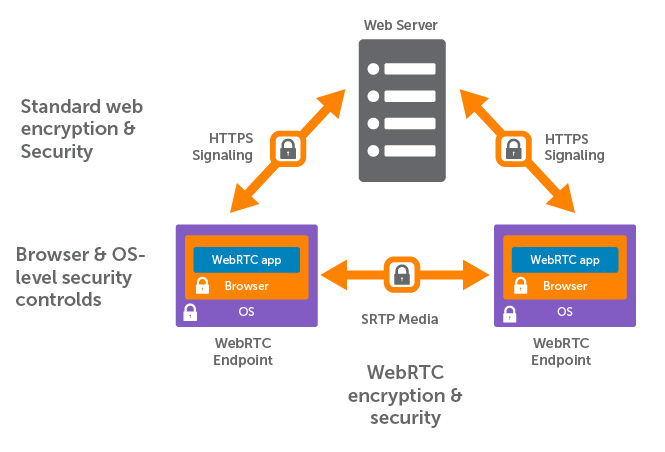
|
||||
_Diagram created by wowza.com_
|
||||
|
||||
Good thing: if your device has an IPv6 address it is uniquely reachable by that address. As I understand it, when both devices are using IPv6 addresses there is no need for a TURN server in any scenario.
|
||||
Good thing: if your device has an IPv6 address \
|
||||
it is uniquely reachable by that address. \
|
||||
As I understand it, when both devices are using \
|
||||
IPv6 addresses there is no need for a TURN server in any scenario.
|
||||
|
||||
To learn more take a look at https://www.wowza.com/blog/webrtc-encryption-and-security which gives a good insight into stun, turn and webrtc
|
||||
Learn more by reading https://www.wowza.com/blog/webrtc-encryption-and-security \
|
||||
which gives a good insight into STUN, TURN and WebRTC.
|
||||
|
||||
|
||||
## Device Pairing
|
||||
|
||||
The pairing functionality uses the [IndexedDB API](https://developer.mozilla.org/en-US/docs/Web/API/IndexedDB_API).
|
||||
|
||||
It works by creating long secrets that are served by the server to the initiating and requesting pair peer,
|
||||
when the inserted key is correct. These long secrets are then saved to an indexedDB database in the browser.
|
||||
IndexedDB is somewhat the successor of localStorage as saved data is shared between all tabs.
|
||||
It goes one step further by making the data persistent and available offline if implemented to a PWA.
|
||||
It works by creating long secrets that are served \
|
||||
by the server to the initiating and requesting pair peer, \
|
||||
when the inserted key is correct. \
|
||||
These long secrets are then saved to an \
|
||||
indexedDB database in the web browser. \
|
||||
IndexedDB is somewhat the successor of localStorage \
|
||||
as saved data is shared between all tabs. \
|
||||
It goes one step further by making the data persistent \
|
||||
and available offline if implemented to a PWA.
|
||||
|
||||
All secrets a client has saved to its database are send to the PairDrop server. Peers with a common secret are discoverable
|
||||
to each other analog to peers with the same ip-address are discoverable to each other.
|
||||
All secrets a client has saved to its database \
|
||||
are sent to the PairDrop server. \
|
||||
Peers with a common secret are discoverable \
|
||||
to each other analog to peers with the same \
|
||||
IP address are discoverable by each other.
|
||||
|
||||
What I really like about this approach, and the reason why I implemented it, is that devices on the same network are always
|
||||
visible regardless whether any devices are paired or not. The main user flow is never obstructed. Paired devices are simply
|
||||
shown additionally. This makes it in my idea better than the idea of using a room system as [discussed here](https://github.com/RobinLinus/snapdrop/pull/214).
|
||||
What I really like about this approach (and the reason I implemented it) \
|
||||
is that devices on the same network are always \
|
||||
visible regardless whether any devices are paired or not. \
|
||||
The main user flow is never obstructed. \
|
||||
Paired devices are simply shown additionally. \
|
||||
This makes it in my idea better than the idea of \
|
||||
using a room system as [discussed here](https://github.com/RobinLinus/snapdrop/pull/214).
|
||||
|
||||
|
||||
[< Back](/README.md)
|
||||
|
||||
729
index.js
@@ -1,729 +0,0 @@
|
||||
const process = require('process')
|
||||
const crypto = require('crypto')
|
||||
const {spawn} = require('child_process')
|
||||
const WebSocket = require('ws');
|
||||
const fs = require('fs');
|
||||
const parser = require('ua-parser-js');
|
||||
const { uniqueNamesGenerator, animals, colors } = require('unique-names-generator');
|
||||
const express = require('express');
|
||||
const RateLimit = require('express-rate-limit');
|
||||
const http = require('http');
|
||||
|
||||
// Handle SIGINT
|
||||
process.on('SIGINT', () => {
|
||||
console.info("SIGINT Received, exiting...")
|
||||
process.exit(0)
|
||||
})
|
||||
|
||||
// Handle SIGTERM
|
||||
process.on('SIGTERM', () => {
|
||||
console.info("SIGTERM Received, exiting...")
|
||||
process.exit(0)
|
||||
})
|
||||
|
||||
// Handle APP ERRORS
|
||||
process.on('uncaughtException', (error, origin) => {
|
||||
console.log('----- Uncaught exception -----')
|
||||
console.log(error)
|
||||
console.log('----- Exception origin -----')
|
||||
console.log(origin)
|
||||
})
|
||||
process.on('unhandledRejection', (reason, promise) => {
|
||||
console.log('----- Unhandled Rejection at -----')
|
||||
console.log(promise)
|
||||
console.log('----- Reason -----')
|
||||
console.log(reason)
|
||||
})
|
||||
|
||||
if (process.argv.includes('--auto-restart')) {
|
||||
process.on(
|
||||
'uncaughtException',
|
||||
() => {
|
||||
process.once(
|
||||
'exit',
|
||||
() => spawn(
|
||||
process.argv.shift(),
|
||||
process.argv,
|
||||
{
|
||||
cwd: process.cwd(),
|
||||
detached: true,
|
||||
stdio: 'inherit'
|
||||
}
|
||||
)
|
||||
);
|
||||
process.exit();
|
||||
}
|
||||
);
|
||||
}
|
||||
|
||||
const rtcConfig = process.env.RTC_CONFIG
|
||||
? JSON.parse(fs.readFileSync(process.env.RTC_CONFIG, 'utf8'))
|
||||
: {
|
||||
"sdpSemantics": "unified-plan",
|
||||
"iceServers": [
|
||||
{
|
||||
"urls": "stun:stun.l.google.com:19302"
|
||||
}
|
||||
]
|
||||
};
|
||||
|
||||
const app = express();
|
||||
|
||||
if (process.argv.includes('--rate-limit')) {
|
||||
const limiter = RateLimit({
|
||||
windowMs: 5 * 60 * 1000, // 5 minutes
|
||||
max: 1000, // Limit each IP to 1000 requests per `window` (here, per 5 minutes)
|
||||
message: 'Too many requests from this IP Address, please try again after 5 minutes.',
|
||||
standardHeaders: true, // Return rate limit info in the `RateLimit-*` headers
|
||||
legacyHeaders: false, // Disable the `X-RateLimit-*` headers
|
||||
})
|
||||
|
||||
app.use(limiter);
|
||||
// ensure correct client ip and not the ip of the reverse proxy is used for rate limiting on render.com
|
||||
// see https://github.com/express-rate-limit/express-rate-limit#troubleshooting-proxy-issues
|
||||
app.set('trust proxy', 5);
|
||||
}
|
||||
|
||||
if (process.argv.includes('--include-ws-fallback')) {
|
||||
app.use(express.static('public_included_ws_fallback'));
|
||||
} else {
|
||||
app.use(express.static('public'));
|
||||
}
|
||||
|
||||
const debugMode = process.env.DEBUG_MODE === "true";
|
||||
|
||||
if (debugMode) {
|
||||
console.log("DEBUG_MODE is active. To protect privacy, do not use in production.")
|
||||
}
|
||||
|
||||
let ipv6_lcl;
|
||||
if (process.env.IPV6_LOCALIZE) {
|
||||
ipv6_lcl = parseInt(process.env.IPV6_LOCALIZE);
|
||||
if (!ipv6_lcl || !(0 < ipv6_lcl && ipv6_lcl < 8)) {
|
||||
console.error("IPV6_LOCALIZE must be an integer between 1 and 7");
|
||||
return;
|
||||
}
|
||||
|
||||
console.log("IPv6 client IPs will be localized to", ipv6_lcl, ipv6_lcl === 1 ? "segment" : "segments");
|
||||
}
|
||||
|
||||
app.use(function(req, res) {
|
||||
res.redirect('/');
|
||||
});
|
||||
|
||||
app.get('/', (req, res) => {
|
||||
res.sendFile('index.html');
|
||||
});
|
||||
|
||||
const server = http.createServer(app);
|
||||
const port = process.env.PORT || 3000;
|
||||
|
||||
if (process.argv.includes('--localhost-only')) {
|
||||
server.listen(port, '127.0.0.1');
|
||||
} else {
|
||||
server.listen(port);
|
||||
}
|
||||
|
||||
class PairDropServer {
|
||||
|
||||
constructor() {
|
||||
this._wss = new WebSocket.Server({ server });
|
||||
this._wss.on('connection', (socket, request) => this._onConnection(new Peer(socket, request)));
|
||||
|
||||
this._rooms = {};
|
||||
this._roomSecrets = {};
|
||||
|
||||
console.log('PairDrop is running on port', port);
|
||||
}
|
||||
|
||||
_onConnection(peer) {
|
||||
peer.socket.on('message', message => this._onMessage(peer, message));
|
||||
peer.socket.onerror = e => console.error(e);
|
||||
this._keepAlive(peer);
|
||||
this._send(peer, {
|
||||
type: 'rtc-config',
|
||||
config: rtcConfig
|
||||
});
|
||||
|
||||
// send displayName
|
||||
this._send(peer, {
|
||||
type: 'display-name',
|
||||
message: {
|
||||
displayName: peer.name.displayName,
|
||||
deviceName: peer.name.deviceName,
|
||||
peerId: peer.id,
|
||||
peerIdHash: hasher.hashCodeSalted(peer.id)
|
||||
}
|
||||
});
|
||||
}
|
||||
|
||||
_onMessage(sender, message) {
|
||||
// Try to parse message
|
||||
try {
|
||||
message = JSON.parse(message);
|
||||
} catch (e) {
|
||||
return; // TODO: handle malformed JSON
|
||||
}
|
||||
|
||||
switch (message.type) {
|
||||
case 'disconnect':
|
||||
this._onDisconnect(sender);
|
||||
break;
|
||||
case 'pong':
|
||||
sender.lastBeat = Date.now();
|
||||
break;
|
||||
case 'join-ip-room':
|
||||
this._joinRoom(sender);
|
||||
break;
|
||||
case 'room-secrets':
|
||||
this._onRoomSecrets(sender, message);
|
||||
break;
|
||||
case 'room-secrets-deleted':
|
||||
this._onRoomSecretsDeleted(sender, message);
|
||||
break;
|
||||
case 'pair-device-initiate':
|
||||
this._onPairDeviceInitiate(sender);
|
||||
break;
|
||||
case 'pair-device-join':
|
||||
this._onPairDeviceJoin(sender, message);
|
||||
break;
|
||||
case 'pair-device-cancel':
|
||||
this._onPairDeviceCancel(sender);
|
||||
break;
|
||||
case 'regenerate-room-secret':
|
||||
this._onRegenerateRoomSecret(sender, message);
|
||||
break
|
||||
case 'resend-peers':
|
||||
this._notifyPeers(sender);
|
||||
break;
|
||||
case 'signal':
|
||||
default:
|
||||
this._signalAndRelay(sender, message);
|
||||
}
|
||||
}
|
||||
|
||||
_signalAndRelay(sender, message) {
|
||||
const room = message.roomType === 'ip' ? sender.ip : message.roomSecret;
|
||||
|
||||
// relay message to recipient
|
||||
if (message.to && Peer.isValidUuid(message.to) && this._rooms[room]) {
|
||||
const recipient = this._rooms[room][message.to];
|
||||
delete message.to;
|
||||
// add sender
|
||||
message.sender = {
|
||||
id: sender.id,
|
||||
rtcSupported: sender.rtcSupported
|
||||
};
|
||||
this._send(recipient, message);
|
||||
}
|
||||
}
|
||||
|
||||
_onDisconnect(sender) {
|
||||
this._leaveRoom(sender, 'ip', '', true);
|
||||
this._leaveAllSecretRooms(sender, true);
|
||||
this._removeRoomKey(sender.roomKey);
|
||||
sender.roomKey = null;
|
||||
}
|
||||
|
||||
_onRoomSecrets(sender, message) {
|
||||
if (!message.roomSecrets) return;
|
||||
|
||||
const roomSecrets = message.roomSecrets.filter(roomSecret => {
|
||||
return /^[\x00-\x7F]{64,256}$/.test(roomSecret);
|
||||
})
|
||||
|
||||
if (!roomSecrets) return;
|
||||
|
||||
this._joinSecretRooms(sender, roomSecrets);
|
||||
}
|
||||
|
||||
_onRoomSecretsDeleted(sender, message) {
|
||||
for (let i = 0; i<message.roomSecrets.length; i++) {
|
||||
this._deleteSecretRoom(message.roomSecrets[i]);
|
||||
}
|
||||
}
|
||||
|
||||
_deleteSecretRoom(roomSecret) {
|
||||
const room = this._rooms[roomSecret];
|
||||
if (!room) return;
|
||||
|
||||
for (const peerId in room) {
|
||||
const peer = room[peerId];
|
||||
|
||||
this._leaveRoom(peer, 'secret', roomSecret);
|
||||
|
||||
this._send(peer, {
|
||||
type: 'secret-room-deleted',
|
||||
roomSecret: roomSecret,
|
||||
});
|
||||
}
|
||||
}
|
||||
|
||||
_onPairDeviceInitiate(sender) {
|
||||
let roomSecret = randomizer.getRandomString(256);
|
||||
let roomKey = this._createRoomKey(sender, roomSecret);
|
||||
if (sender.roomKey) this._removeRoomKey(sender.roomKey);
|
||||
sender.roomKey = roomKey;
|
||||
this._send(sender, {
|
||||
type: 'pair-device-initiated',
|
||||
roomSecret: roomSecret,
|
||||
roomKey: roomKey
|
||||
});
|
||||
this._joinRoom(sender, 'secret', roomSecret);
|
||||
}
|
||||
|
||||
_onPairDeviceJoin(sender, message) {
|
||||
// rate limit implementation: max 10 attempts every 10s
|
||||
if (sender.roomKeyRate >= 10) {
|
||||
this._send(sender, { type: 'pair-device-join-key-rate-limit' });
|
||||
return;
|
||||
}
|
||||
sender.roomKeyRate += 1;
|
||||
setTimeout(_ => sender.roomKeyRate -= 1, 10000);
|
||||
|
||||
if (!this._roomSecrets[message.roomKey] || sender.id === this._roomSecrets[message.roomKey].creator.id) {
|
||||
this._send(sender, { type: 'pair-device-join-key-invalid' });
|
||||
return;
|
||||
}
|
||||
|
||||
const roomSecret = this._roomSecrets[message.roomKey].roomSecret;
|
||||
const creator = this._roomSecrets[message.roomKey].creator;
|
||||
this._removeRoomKey(message.roomKey);
|
||||
this._send(sender, {
|
||||
type: 'pair-device-joined',
|
||||
roomSecret: roomSecret,
|
||||
peerId: creator.id
|
||||
});
|
||||
this._send(creator, {
|
||||
type: 'pair-device-joined',
|
||||
roomSecret: roomSecret,
|
||||
peerId: sender.id
|
||||
});
|
||||
this._joinRoom(sender, 'secret', roomSecret);
|
||||
this._removeRoomKey(sender.roomKey);
|
||||
}
|
||||
|
||||
_onPairDeviceCancel(sender) {
|
||||
const roomKey = sender.roomKey
|
||||
|
||||
if (!roomKey) return;
|
||||
|
||||
this._removeRoomKey(roomKey);
|
||||
this._send(sender, {
|
||||
type: 'pair-device-canceled',
|
||||
roomKey: roomKey,
|
||||
});
|
||||
}
|
||||
|
||||
_onRegenerateRoomSecret(sender, message) {
|
||||
const oldRoomSecret = message.roomSecret;
|
||||
const newRoomSecret = randomizer.getRandomString(256);
|
||||
|
||||
// notify all other peers
|
||||
for (const peerId in this._rooms[oldRoomSecret]) {
|
||||
const peer = this._rooms[oldRoomSecret][peerId];
|
||||
this._send(peer, {
|
||||
type: 'room-secret-regenerated',
|
||||
oldRoomSecret: oldRoomSecret,
|
||||
newRoomSecret: newRoomSecret,
|
||||
});
|
||||
peer.removeRoomSecret(oldRoomSecret);
|
||||
}
|
||||
delete this._rooms[oldRoomSecret];
|
||||
}
|
||||
|
||||
_createRoomKey(creator, roomSecret) {
|
||||
let roomKey;
|
||||
do {
|
||||
// get randomInt until keyRoom not occupied
|
||||
roomKey = crypto.randomInt(1000000, 1999999).toString().substring(1); // include numbers with leading 0s
|
||||
} while (roomKey in this._roomSecrets)
|
||||
|
||||
this._roomSecrets[roomKey] = {
|
||||
roomSecret: roomSecret,
|
||||
creator: creator
|
||||
}
|
||||
|
||||
return roomKey;
|
||||
}
|
||||
|
||||
_removeRoomKey(roomKey) {
|
||||
if (roomKey in this._roomSecrets) {
|
||||
this._roomSecrets[roomKey].creator.roomKey = null
|
||||
delete this._roomSecrets[roomKey];
|
||||
}
|
||||
}
|
||||
|
||||
_joinRoom(peer, roomType = 'ip', roomSecret = '') {
|
||||
const room = roomType === 'ip' ? peer.ip : roomSecret;
|
||||
|
||||
if (this._rooms[room] && this._rooms[room][peer.id]) {
|
||||
this._leaveRoom(peer, roomType, roomSecret);
|
||||
}
|
||||
|
||||
// if room doesn't exist, create it
|
||||
if (!this._rooms[room]) {
|
||||
this._rooms[room] = {};
|
||||
}
|
||||
|
||||
this._notifyPeers(peer, roomType, roomSecret);
|
||||
|
||||
// add peer to room
|
||||
this._rooms[room][peer.id] = peer;
|
||||
// add secret to peer
|
||||
if (roomType === 'secret') {
|
||||
peer.addRoomSecret(roomSecret);
|
||||
}
|
||||
}
|
||||
|
||||
_leaveRoom(peer, roomType = 'ip', roomSecret = '', disconnect = false) {
|
||||
const room = roomType === 'ip' ? peer.ip : roomSecret;
|
||||
|
||||
if (!this._rooms[room] || !this._rooms[room][peer.id]) return;
|
||||
this._cancelKeepAlive(this._rooms[room][peer.id]);
|
||||
|
||||
// delete the peer
|
||||
delete this._rooms[room][peer.id];
|
||||
|
||||
if (roomType === 'ip') {
|
||||
peer.socket.terminate();
|
||||
}
|
||||
|
||||
//if room is empty, delete the room
|
||||
if (!Object.keys(this._rooms[room]).length) {
|
||||
delete this._rooms[room];
|
||||
} else {
|
||||
// notify all other peers
|
||||
for (const otherPeerId in this._rooms[room]) {
|
||||
const otherPeer = this._rooms[room][otherPeerId];
|
||||
this._send(otherPeer, {
|
||||
type: 'peer-left',
|
||||
peerId: peer.id,
|
||||
roomType: roomType,
|
||||
roomSecret: roomSecret,
|
||||
disconnect: disconnect
|
||||
});
|
||||
}
|
||||
}
|
||||
//remove secret from peer
|
||||
if (roomType === 'secret') {
|
||||
peer.removeRoomSecret(roomSecret);
|
||||
}
|
||||
}
|
||||
|
||||
_notifyPeers(peer, roomType = 'ip', roomSecret = '') {
|
||||
const room = roomType === 'ip' ? peer.ip : roomSecret;
|
||||
if (!this._rooms[room]) return;
|
||||
|
||||
// notify all other peers
|
||||
for (const otherPeerId in this._rooms[room]) {
|
||||
if (otherPeerId === peer.id) continue;
|
||||
const otherPeer = this._rooms[room][otherPeerId];
|
||||
this._send(otherPeer, {
|
||||
type: 'peer-joined',
|
||||
peer: peer.getInfo(),
|
||||
roomType: roomType,
|
||||
roomSecret: roomSecret
|
||||
});
|
||||
}
|
||||
|
||||
// notify peer about the other peers
|
||||
const otherPeers = [];
|
||||
for (const otherPeerId in this._rooms[room]) {
|
||||
if (otherPeerId === peer.id) continue;
|
||||
otherPeers.push(this._rooms[room][otherPeerId].getInfo());
|
||||
}
|
||||
|
||||
this._send(peer, {
|
||||
type: 'peers',
|
||||
peers: otherPeers,
|
||||
roomType: roomType,
|
||||
roomSecret: roomSecret
|
||||
});
|
||||
}
|
||||
|
||||
_joinSecretRooms(peer, roomSecrets) {
|
||||
for (let i=0; i<roomSecrets.length; i++) {
|
||||
this._joinRoom(peer, 'secret', roomSecrets[i])
|
||||
}
|
||||
}
|
||||
|
||||
_leaveAllSecretRooms(peer, disconnect = false) {
|
||||
for (let i=0; i<peer.roomSecrets.length; i++) {
|
||||
this._leaveRoom(peer, 'secret', peer.roomSecrets[i], disconnect);
|
||||
}
|
||||
}
|
||||
|
||||
_send(peer, message) {
|
||||
if (!peer) return;
|
||||
if (this._wss.readyState !== this._wss.OPEN) return;
|
||||
message = JSON.stringify(message);
|
||||
peer.socket.send(message);
|
||||
}
|
||||
|
||||
_keepAlive(peer) {
|
||||
this._cancelKeepAlive(peer);
|
||||
let timeout = 500;
|
||||
if (!peer.lastBeat) {
|
||||
peer.lastBeat = Date.now();
|
||||
}
|
||||
if (Date.now() - peer.lastBeat > 2 * timeout) {
|
||||
this._leaveRoom(peer);
|
||||
this._leaveAllSecretRooms(peer);
|
||||
return;
|
||||
}
|
||||
|
||||
this._send(peer, { type: 'ping' });
|
||||
|
||||
peer.timerId = setTimeout(() => this._keepAlive(peer), timeout);
|
||||
}
|
||||
|
||||
_cancelKeepAlive(peer) {
|
||||
if (peer && peer.timerId) {
|
||||
clearTimeout(peer.timerId);
|
||||
}
|
||||
}
|
||||
}
|
||||
|
||||
|
||||
|
||||
class Peer {
|
||||
|
||||
constructor(socket, request) {
|
||||
// set socket
|
||||
this.socket = socket;
|
||||
|
||||
// set remote ip
|
||||
this._setIP(request);
|
||||
|
||||
// set peer id
|
||||
this._setPeerId(request);
|
||||
|
||||
// is WebRTC supported ?
|
||||
this.rtcSupported = request.url.indexOf('webrtc') > -1;
|
||||
|
||||
// set name
|
||||
this._setName(request);
|
||||
|
||||
// for keepalive
|
||||
this.timerId = 0;
|
||||
this.lastBeat = Date.now();
|
||||
|
||||
this.roomSecrets = [];
|
||||
this.roomKey = null;
|
||||
this.roomKeyRate = 0;
|
||||
}
|
||||
|
||||
_setIP(request) {
|
||||
if (request.headers['cf-connecting-ip']) {
|
||||
this.ip = request.headers['cf-connecting-ip'].split(/\s*,\s*/)[0];
|
||||
} else if (request.headers['x-forwarded-for']) {
|
||||
this.ip = request.headers['x-forwarded-for'].split(/\s*,\s*/)[0];
|
||||
} else {
|
||||
this.ip = request.connection.remoteAddress;
|
||||
}
|
||||
|
||||
// remove the prefix used for IPv4-translated addresses
|
||||
if (this.ip.substring(0,7) === "::ffff:")
|
||||
this.ip = this.ip.substring(7);
|
||||
|
||||
let ipv6_was_localized = false;
|
||||
if (ipv6_lcl && this.ip.includes(':')) {
|
||||
this.ip = this.ip.split(':',ipv6_lcl).join(':');
|
||||
ipv6_was_localized = true;
|
||||
}
|
||||
|
||||
if (debugMode) {
|
||||
console.debug("----DEBUGGING-PEER-IP-START----");
|
||||
console.debug("remoteAddress:", request.connection.remoteAddress);
|
||||
console.debug("x-forwarded-for:", request.headers['x-forwarded-for']);
|
||||
console.debug("cf-connecting-ip:", request.headers['cf-connecting-ip']);
|
||||
if (ipv6_was_localized)
|
||||
console.debug("IPv6 client IP was localized to", ipv6_lcl, ipv6_lcl > 1 ? "segments" : "segment");
|
||||
console.debug("PairDrop uses:", this.ip);
|
||||
console.debug("IP is private:", this.ipIsPrivate(this.ip));
|
||||
console.debug("if IP is private, '127.0.0.1' is used instead");
|
||||
console.debug("----DEBUGGING-PEER-IP-END----");
|
||||
}
|
||||
|
||||
// IPv4 and IPv6 use different values to refer to localhost
|
||||
// put all peers on the same network as the server into the same room as well
|
||||
if (this.ip === '::1' || this.ipIsPrivate(this.ip)) {
|
||||
this.ip = '127.0.0.1';
|
||||
}
|
||||
}
|
||||
|
||||
ipIsPrivate(ip) {
|
||||
// if ip is IPv4
|
||||
if (!ip.includes(":")) {
|
||||
// 10.0.0.0 - 10.255.255.255 || 172.16.0.0 - 172.31.255.255 || 192.168.0.0 - 192.168.255.255
|
||||
return /^(10)\.(.*)\.(.*)\.(.*)$/.test(ip) || /^(172)\.(1[6-9]|2[0-9]|3[0-1])\.(.*)\.(.*)$/.test(ip) || /^(192)\.(168)\.(.*)\.(.*)$/.test(ip)
|
||||
}
|
||||
|
||||
// else: ip is IPv6
|
||||
const firstWord = ip.split(":").find(el => !!el); //get first not empty word
|
||||
|
||||
// The original IPv6 Site Local addresses (fec0::/10) are deprecated. Range: fec0 - feff
|
||||
if (/^fe[c-f][0-f]$/.test(firstWord))
|
||||
return true;
|
||||
|
||||
// These days Unique Local Addresses (ULA) are used in place of Site Local.
|
||||
// Range: fc00 - fcff
|
||||
else if (/^fc[0-f]{2}$/.test(firstWord))
|
||||
return true;
|
||||
|
||||
// Range: fd00 - fcff
|
||||
else if (/^fd[0-f]{2}$/.test(firstWord))
|
||||
return true;
|
||||
|
||||
// Link local addresses (prefixed with fe80) are not routable
|
||||
else if (firstWord === "fe80")
|
||||
return true;
|
||||
|
||||
// Discard Prefix
|
||||
else if (firstWord === "100")
|
||||
return true;
|
||||
|
||||
// Any other IP address is not Unique Local Address (ULA)
|
||||
return false;
|
||||
}
|
||||
|
||||
_setPeerId(request) {
|
||||
const searchParams = new URL(request.url, "http://server").searchParams;
|
||||
let peerId = searchParams.get("peer_id");
|
||||
let peerIdHash = searchParams.get("peer_id_hash");
|
||||
if (peerId && Peer.isValidUuid(peerId) && this.isPeerIdHashValid(peerId, peerIdHash)) {
|
||||
this.id = peerId;
|
||||
} else {
|
||||
this.id = crypto.randomUUID();
|
||||
}
|
||||
}
|
||||
|
||||
toString() {
|
||||
return `<Peer id=${this.id} ip=${this.ip} rtcSupported=${this.rtcSupported}>`
|
||||
}
|
||||
|
||||
_setName(req) {
|
||||
let ua = parser(req.headers['user-agent']);
|
||||
|
||||
|
||||
let deviceName = '';
|
||||
|
||||
if (ua.os && ua.os.name) {
|
||||
deviceName = ua.os.name.replace('Mac OS', 'Mac') + ' ';
|
||||
}
|
||||
|
||||
if (ua.device.model) {
|
||||
deviceName += ua.device.model;
|
||||
} else {
|
||||
deviceName += ua.browser.name;
|
||||
}
|
||||
|
||||
if(!deviceName)
|
||||
deviceName = 'Unknown Device';
|
||||
|
||||
const displayName = uniqueNamesGenerator({
|
||||
length: 2,
|
||||
separator: ' ',
|
||||
dictionaries: [colors, animals],
|
||||
style: 'capital',
|
||||
seed: cyrb53(this.id)
|
||||
})
|
||||
|
||||
this.name = {
|
||||
model: ua.device.model,
|
||||
os: ua.os.name,
|
||||
browser: ua.browser.name,
|
||||
type: ua.device.type,
|
||||
deviceName,
|
||||
displayName
|
||||
};
|
||||
}
|
||||
|
||||
getInfo() {
|
||||
return {
|
||||
id: this.id,
|
||||
name: this.name,
|
||||
rtcSupported: this.rtcSupported
|
||||
}
|
||||
}
|
||||
|
||||
static isValidUuid(uuid) {
|
||||
return /^([0-9]|[a-f]){8}-(([0-9]|[a-f]){4}-){3}([0-9]|[a-f]){12}$/.test(uuid);
|
||||
}
|
||||
|
||||
isPeerIdHashValid(peerId, peerIdHash) {
|
||||
return peerIdHash === hasher.hashCodeSalted(peerId);
|
||||
}
|
||||
|
||||
addRoomSecret(roomSecret) {
|
||||
if (!(roomSecret in this.roomSecrets)) {
|
||||
this.roomSecrets.push(roomSecret);
|
||||
}
|
||||
}
|
||||
|
||||
removeRoomSecret(roomSecret) {
|
||||
if (roomSecret in this.roomSecrets) {
|
||||
delete this.roomSecrets[roomSecret];
|
||||
}
|
||||
}
|
||||
}
|
||||
|
||||
const hasher = (() => {
|
||||
let password;
|
||||
return {
|
||||
hashCodeSalted(salt) {
|
||||
if (!password) {
|
||||
// password is created on first call.
|
||||
password = randomizer.getRandomString(128);
|
||||
}
|
||||
|
||||
return crypto.createHash("sha3-512")
|
||||
.update(password)
|
||||
.update(crypto.createHash("sha3-512").update(salt, "utf8").digest("hex"))
|
||||
.digest("hex");
|
||||
}
|
||||
}
|
||||
})()
|
||||
|
||||
const randomizer = (() => {
|
||||
return {
|
||||
getRandomString(length) {
|
||||
let string = "";
|
||||
while (string.length < length) {
|
||||
let arr = new Uint16Array(length);
|
||||
crypto.webcrypto.getRandomValues(arr);
|
||||
arr = Array.apply([], arr); /* turn into non-typed array */
|
||||
arr = arr.map(function (r) {
|
||||
return r % 128
|
||||
})
|
||||
arr = arr.filter(function (r) {
|
||||
/* strip non-printables: if we transform into desirable range we have a probability bias, so I suppose we better skip this character */
|
||||
return r === 45 || r >= 47 && r <= 57 || r >= 64 && r <= 90 || r >= 97 && r <= 122;
|
||||
});
|
||||
string += String.fromCharCode.apply(String, arr);
|
||||
}
|
||||
return string.substring(0, length)
|
||||
}
|
||||
}
|
||||
})()
|
||||
|
||||
/*
|
||||
cyrb53 (c) 2018 bryc (github.com/bryc)
|
||||
A fast and simple hash function with decent collision resistance.
|
||||
Largely inspired by MurmurHash2/3, but with a focus on speed/simplicity.
|
||||
Public domain. Attribution appreciated.
|
||||
*/
|
||||
const cyrb53 = function(str, seed = 0) {
|
||||
let h1 = 0xdeadbeef ^ seed, h2 = 0x41c6ce57 ^ seed;
|
||||
for (let i = 0, ch; i < str.length; i++) {
|
||||
ch = str.charCodeAt(i);
|
||||
h1 = Math.imul(h1 ^ ch, 2654435761);
|
||||
h2 = Math.imul(h2 ^ ch, 1597334677);
|
||||
}
|
||||
h1 = Math.imul(h1 ^ (h1>>>16), 2246822507) ^ Math.imul(h2 ^ (h2>>>13), 3266489909);
|
||||
h2 = Math.imul(h2 ^ (h2>>>16), 2246822507) ^ Math.imul(h1 ^ (h1>>>13), 3266489909);
|
||||
return 4294967296 * (2097151 & h2) + (h1>>>0);
|
||||
};
|
||||
|
||||
new PairDropServer();
|
||||
28
licenses/BSD_3-Clause-zip-js
Normal file
@@ -0,0 +1,28 @@
|
||||
BSD 3-Clause License
|
||||
|
||||
Copyright (c) 2023, Gildas Lormeau
|
||||
|
||||
Redistribution and use in source and binary forms, with or without
|
||||
modification, are permitted provided that the following conditions are met:
|
||||
|
||||
1. Redistributions of source code must retain the above copyright notice, this
|
||||
list of conditions and the following disclaimer.
|
||||
|
||||
2. Redistributions in binary form must reproduce the above copyright notice,
|
||||
this list of conditions and the following disclaimer in the documentation
|
||||
and/or other materials provided with the distribution.
|
||||
|
||||
3. Neither the name of the copyright holder nor the names of its
|
||||
contributors may be used to endorse or promote products derived from
|
||||
this software without specific prior written permission.
|
||||
|
||||
THIS SOFTWARE IS PROVIDED BY THE COPYRIGHT HOLDERS AND CONTRIBUTORS "AS IS"
|
||||
AND ANY EXPRESS OR IMPLIED WARRANTIES, INCLUDING, BUT NOT LIMITED TO, THE
|
||||
IMPLIED WARRANTIES OF MERCHANTABILITY AND FITNESS FOR A PARTICULAR PURPOSE ARE
|
||||
DISCLAIMED. IN NO EVENT SHALL THE COPYRIGHT HOLDER OR CONTRIBUTORS BE LIABLE
|
||||
FOR ANY DIRECT, INDIRECT, INCIDENTAL, SPECIAL, EXEMPLARY, OR CONSEQUENTIAL
|
||||
DAMAGES (INCLUDING, BUT NOT LIMITED TO, PROCUREMENT OF SUBSTITUTE GOODS OR
|
||||
SERVICES; LOSS OF USE, DATA, OR PROFITS; OR BUSINESS INTERRUPTION) HOWEVER
|
||||
CAUSED AND ON ANY THEORY OF LIABILITY, WHETHER IN CONTRACT, STRICT LIABILITY,
|
||||
OR TORT (INCLUDING NEGLIGENCE OR OTHERWISE) ARISING IN ANY WAY OUT OF THE USE
|
||||
OF THIS SOFTWARE, EVEN IF ADVISED OF THE POSSIBILITY OF SUCH DAMAGE.
|
||||
22
licenses/MIT-NoSleep
Normal file
@@ -0,0 +1,22 @@
|
||||
The MIT License (MIT)
|
||||
|
||||
Copyright (c) Rich Tibbett
|
||||
|
||||
Permission is hereby granted, free of charge, to any person obtaining
|
||||
a copy of this software and associated documentation files (the
|
||||
"Software"), to deal in the Software without restriction, including
|
||||
without limitation the rights to use, copy, modify, merge, publish,
|
||||
distribute, sublicense, and/or sell copies of the Software, and to
|
||||
permit persons to whom the Software is furnished to do so, subject to
|
||||
the following conditions:
|
||||
|
||||
The above copyright notice and this permission notice shall be
|
||||
included in all copies or substantial portions of the Software.
|
||||
|
||||
THE SOFTWARE IS PROVIDED "AS IS", WITHOUT WARRANTY OF ANY KIND,
|
||||
EXPRESS OR IMPLIED, INCLUDING BUT NOT LIMITED TO THE WARRANTIES OF
|
||||
MERCHANTABILITY, FITNESS FOR A PARTICULAR PURPOSE AND
|
||||
NONINFRINGEMENT. IN NO EVENT SHALL THE AUTHORS OR COPYRIGHT HOLDERS BE
|
||||
LIABLE FOR ANY CLAIM, DAMAGES OR OTHER LIABILITY, WHETHER IN AN ACTION
|
||||
OF CONTRACT, TORT OR OTHERWISE, ARISING FROM, OUT OF OR IN CONNECTION
|
||||
WITH THE SOFTWARE OR THE USE OR OTHER DEALINGS IN THE SOFTWARE.
|
||||
22
licenses/MIT-heic2any
Normal file
@@ -0,0 +1,22 @@
|
||||
MIT License
|
||||
|
||||
Copyright (c) 2020 Alex Corvi
|
||||
|
||||
Permission is hereby granted, free of charge, to any person obtaining
|
||||
a copy of this software and associated documentation files (the
|
||||
"Software"), to deal in the Software without restriction, including
|
||||
without limitation the rights to use, copy, modify, merge, publish,
|
||||
distribute, sublicense, and/or sell copies of the Software, and to
|
||||
permit persons to whom the Software is furnished to do so, subject to
|
||||
the following conditions:
|
||||
|
||||
The above copyright notice and this permission notice shall be
|
||||
included in all copies or substantial portions of the Software.
|
||||
|
||||
THE SOFTWARE IS PROVIDED "AS IS", WITHOUT WARRANTY OF ANY KIND,
|
||||
EXPRESS OR IMPLIED, INCLUDING BUT NOT LIMITED TO THE WARRANTIES OF
|
||||
MERCHANTABILITY, FITNESS FOR A PARTICULAR PURPOSE AND
|
||||
NONINFRINGEMENT. IN NO EVENT SHALL THE AUTHORS OR COPYRIGHT HOLDERS BE
|
||||
LIABLE FOR ANY CLAIM, DAMAGES OR OTHER LIABILITY, WHETHER IN AN ACTION
|
||||
OF CONTRACT, TORT OR OTHERWISE, ARISING FROM, OUT OF OR IN CONNECTION
|
||||
WITH THE SOFTWARE OR THE USE OR OTHER DEALINGS IN THE SOFTWARE.
|
||||
57
package-lock.json
generated
@@ -1,19 +1,19 @@
|
||||
{
|
||||
"name": "pairdrop",
|
||||
"version": "1.7.4",
|
||||
"version": "1.10.0",
|
||||
"lockfileVersion": 2,
|
||||
"requires": true,
|
||||
"packages": {
|
||||
"": {
|
||||
"name": "pairdrop",
|
||||
"version": "1.7.4",
|
||||
"version": "1.10.0",
|
||||
"license": "ISC",
|
||||
"dependencies": {
|
||||
"express": "^4.18.2",
|
||||
"express-rate-limit": "^6.7.0",
|
||||
"ua-parser-js": "^1.0.35",
|
||||
"express-rate-limit": "^7.1.5",
|
||||
"ua-parser-js": "^1.0.37",
|
||||
"unique-names-generator": "^4.3.0",
|
||||
"ws": "^8.13.0"
|
||||
"ws": "^8.15.0"
|
||||
},
|
||||
"engines": {
|
||||
"node": ">=15"
|
||||
@@ -204,14 +204,17 @@
|
||||
}
|
||||
},
|
||||
"node_modules/express-rate-limit": {
|
||||
"version": "6.7.0",
|
||||
"resolved": "https://registry.npmjs.org/express-rate-limit/-/express-rate-limit-6.7.0.tgz",
|
||||
"integrity": "sha512-vhwIdRoqcYB/72TK3tRZI+0ttS8Ytrk24GfmsxDXK9o9IhHNO5bXRiXQSExPQ4GbaE5tvIS7j1SGrxsuWs+sGA==",
|
||||
"version": "7.1.5",
|
||||
"resolved": "https://registry.npmjs.org/express-rate-limit/-/express-rate-limit-7.1.5.tgz",
|
||||
"integrity": "sha512-/iVogxu7ueadrepw1bS0X0kaRC/U0afwiYRSLg68Ts+p4Dc85Q5QKsOnPS/QUjPMHvOJQtBDrZgvkOzf8ejUYw==",
|
||||
"engines": {
|
||||
"node": ">= 12.9.0"
|
||||
"node": ">= 16"
|
||||
},
|
||||
"funding": {
|
||||
"url": "https://github.com/sponsors/express-rate-limit"
|
||||
},
|
||||
"peerDependencies": {
|
||||
"express": "^4 || ^5"
|
||||
"express": "4 || 5 || ^5.0.0-beta.1"
|
||||
}
|
||||
},
|
||||
"node_modules/finalhandler": {
|
||||
@@ -583,9 +586,9 @@
|
||||
}
|
||||
},
|
||||
"node_modules/ua-parser-js": {
|
||||
"version": "1.0.35",
|
||||
"resolved": "https://registry.npmjs.org/ua-parser-js/-/ua-parser-js-1.0.35.tgz",
|
||||
"integrity": "sha512-fKnGuqmTBnIE+/KXSzCn4db8RTigUzw1AN0DmdU6hJovUTbYJKyqj+8Mt1c4VfRDnOVJnENmfYkIPZ946UrSAA==",
|
||||
"version": "1.0.37",
|
||||
"resolved": "https://registry.npmjs.org/ua-parser-js/-/ua-parser-js-1.0.37.tgz",
|
||||
"integrity": "sha512-bhTyI94tZofjo+Dn8SN6Zv8nBDvyXTymAdM3LDI/0IboIUwTu1rEhW7v2TfiVsoYWgkQ4kOVqnI8APUFbIQIFQ==",
|
||||
"funding": [
|
||||
{
|
||||
"type": "opencollective",
|
||||
@@ -594,6 +597,10 @@
|
||||
{
|
||||
"type": "paypal",
|
||||
"url": "https://paypal.me/faisalman"
|
||||
},
|
||||
{
|
||||
"type": "github",
|
||||
"url": "https://github.com/sponsors/faisalman"
|
||||
}
|
||||
],
|
||||
"engines": {
|
||||
@@ -633,9 +640,9 @@
|
||||
}
|
||||
},
|
||||
"node_modules/ws": {
|
||||
"version": "8.13.0",
|
||||
"resolved": "https://registry.npmjs.org/ws/-/ws-8.13.0.tgz",
|
||||
"integrity": "sha512-x9vcZYTrFPC7aSIbj7sRCYo7L/Xb8Iy+pW0ng0wt2vCJv7M9HOMy0UoN3rr+IFC7hb7vXoqS+P9ktyLLLhO+LA==",
|
||||
"version": "8.15.0",
|
||||
"resolved": "https://registry.npmjs.org/ws/-/ws-8.15.0.tgz",
|
||||
"integrity": "sha512-H/Z3H55mrcrgjFwI+5jKavgXvwQLtfPCUEp6pi35VhoB0pfcHnSoyuTzkBEZpzq49g1193CUEwIvmsjcotenYw==",
|
||||
"engines": {
|
||||
"node": ">=10.0.0"
|
||||
},
|
||||
@@ -801,9 +808,9 @@
|
||||
}
|
||||
},
|
||||
"express-rate-limit": {
|
||||
"version": "6.7.0",
|
||||
"resolved": "https://registry.npmjs.org/express-rate-limit/-/express-rate-limit-6.7.0.tgz",
|
||||
"integrity": "sha512-vhwIdRoqcYB/72TK3tRZI+0ttS8Ytrk24GfmsxDXK9o9IhHNO5bXRiXQSExPQ4GbaE5tvIS7j1SGrxsuWs+sGA==",
|
||||
"version": "7.1.5",
|
||||
"resolved": "https://registry.npmjs.org/express-rate-limit/-/express-rate-limit-7.1.5.tgz",
|
||||
"integrity": "sha512-/iVogxu7ueadrepw1bS0X0kaRC/U0afwiYRSLg68Ts+p4Dc85Q5QKsOnPS/QUjPMHvOJQtBDrZgvkOzf8ejUYw==",
|
||||
"requires": {}
|
||||
},
|
||||
"finalhandler": {
|
||||
@@ -1070,9 +1077,9 @@
|
||||
}
|
||||
},
|
||||
"ua-parser-js": {
|
||||
"version": "1.0.35",
|
||||
"resolved": "https://registry.npmjs.org/ua-parser-js/-/ua-parser-js-1.0.35.tgz",
|
||||
"integrity": "sha512-fKnGuqmTBnIE+/KXSzCn4db8RTigUzw1AN0DmdU6hJovUTbYJKyqj+8Mt1c4VfRDnOVJnENmfYkIPZ946UrSAA=="
|
||||
"version": "1.0.37",
|
||||
"resolved": "https://registry.npmjs.org/ua-parser-js/-/ua-parser-js-1.0.37.tgz",
|
||||
"integrity": "sha512-bhTyI94tZofjo+Dn8SN6Zv8nBDvyXTymAdM3LDI/0IboIUwTu1rEhW7v2TfiVsoYWgkQ4kOVqnI8APUFbIQIFQ=="
|
||||
},
|
||||
"unique-names-generator": {
|
||||
"version": "4.7.1",
|
||||
@@ -1095,9 +1102,9 @@
|
||||
"integrity": "sha512-BNGbWLfd0eUPabhkXUVm0j8uuvREyTh5ovRa/dyow/BqAbZJyC+5fU+IzQOzmAKzYqYRAISoRhdQr3eIZ/PXqg=="
|
||||
},
|
||||
"ws": {
|
||||
"version": "8.13.0",
|
||||
"resolved": "https://registry.npmjs.org/ws/-/ws-8.13.0.tgz",
|
||||
"integrity": "sha512-x9vcZYTrFPC7aSIbj7sRCYo7L/Xb8Iy+pW0ng0wt2vCJv7M9HOMy0UoN3rr+IFC7hb7vXoqS+P9ktyLLLhO+LA==",
|
||||
"version": "8.15.0",
|
||||
"resolved": "https://registry.npmjs.org/ws/-/ws-8.15.0.tgz",
|
||||
"integrity": "sha512-H/Z3H55mrcrgjFwI+5jKavgXvwQLtfPCUEp6pi35VhoB0pfcHnSoyuTzkBEZpzq49g1193CUEwIvmsjcotenYw==",
|
||||
"requires": {}
|
||||
}
|
||||
}
|
||||
|
||||
15
package.json
@@ -1,20 +1,21 @@
|
||||
{
|
||||
"name": "pairdrop",
|
||||
"version": "1.7.4",
|
||||
"version": "1.10.0",
|
||||
"type": "module",
|
||||
"description": "",
|
||||
"main": "index.js",
|
||||
"main": "server/index.js",
|
||||
"scripts": {
|
||||
"start": "node index.js",
|
||||
"start:prod": "node index.js --rate-limit --auto-restart"
|
||||
"start": "node server/index.js",
|
||||
"start:prod": "node server/index.js --rate-limit --auto-restart"
|
||||
},
|
||||
"author": "",
|
||||
"license": "ISC",
|
||||
"dependencies": {
|
||||
"express": "^4.18.2",
|
||||
"express-rate-limit": "^6.7.0",
|
||||
"ua-parser-js": "^1.0.35",
|
||||
"express-rate-limit": "^7.1.5",
|
||||
"ua-parser-js": "^1.0.37",
|
||||
"unique-names-generator": "^4.3.0",
|
||||
"ws": "^8.13.0"
|
||||
"ws": "^8.15.0"
|
||||
},
|
||||
"engines": {
|
||||
"node": ">=15"
|
||||
|
||||
1
pairdrop-cli/.gitignore
vendored
Normal file
@@ -0,0 +1 @@
|
||||
.pairdrop-cli-config
|
||||
@@ -12,10 +12,12 @@ help()
|
||||
echo
|
||||
echo "Usage:"
|
||||
echo -e "Open PairDrop:\t\t$(basename "$0")"
|
||||
echo -e "Send files:\t\t$(basename "$0") file/directory"
|
||||
echo -e "Send files:\t\t$(basename "$0") file1/directory1 (file2/directory2 file3/directory3 ...)"
|
||||
echo -e "Send text:\t\t$(basename "$0") -t \"text\""
|
||||
echo -e "Specify domain:\t\t$(basename "$0") -d \"https://pairdrop.net/\""
|
||||
echo -e "Show this help text:\t$(basename "$0") (-h|--help)"
|
||||
echo
|
||||
echo "This pairdrop-cli version was released alongside v1.10.0"
|
||||
}
|
||||
|
||||
openPairDrop()
|
||||
@@ -36,9 +38,12 @@ openPairDrop()
|
||||
elif [[ $OS == "WSL" || $OS == "WSL2" ]];then
|
||||
powershell.exe /c "Start-Process ${url}"
|
||||
else
|
||||
xdg-open "$url"
|
||||
xdg-open "$url" > /dev/null 2>&1
|
||||
fi
|
||||
|
||||
|
||||
exit
|
||||
|
||||
}
|
||||
|
||||
setOs()
|
||||
@@ -59,7 +64,7 @@ setOs()
|
||||
specifyDomain()
|
||||
{
|
||||
[[ ! $1 = http* ]] || [[ ! $1 = */ ]] && echo "Incorrect format. Specify domain like https://pairdrop.net/" && exit
|
||||
echo "DOMAIN=${1}" > "$CONFIGPATH"
|
||||
echo "DOMAIN=${1}" > "$config_path"
|
||||
echo -e "Domain is now set to:\n$1\n"
|
||||
}
|
||||
|
||||
@@ -84,60 +89,224 @@ sendText()
|
||||
exit
|
||||
}
|
||||
|
||||
escapePSPath()
|
||||
{
|
||||
local path=$1
|
||||
|
||||
# escape '[' and ']' with grave accent (`) character
|
||||
pathPS=${path//[/\`[}
|
||||
pathPS=${pathPS//]/\`]}
|
||||
# escape single quote (') with another single quote (')
|
||||
pathPS=${pathPS//\'/\'\'}
|
||||
|
||||
# Convert GitHub bash path "/i/path" to Windows path "I:/path"
|
||||
if [[ $pathPS == /* ]]; then
|
||||
# Remove preceding slash
|
||||
pathPS="${pathPS#/}"
|
||||
# Convert drive letter to uppercase
|
||||
driveLetter=$(echo "${pathPS::1}" | tr '[:lower:]' '[:upper:]')
|
||||
# Put together absolute path as used in Windows
|
||||
pathPS="${driveLetter}:${pathPS:1}"
|
||||
fi
|
||||
|
||||
echo "$pathPS"
|
||||
}
|
||||
|
||||
sendFiles()
|
||||
{
|
||||
params="base64zip=hash"
|
||||
if [[ $1 == */ ]]; then
|
||||
path="${1::-1}"
|
||||
else
|
||||
path=$1
|
||||
fi
|
||||
zipPath="${path}_pairdrop.zip"
|
||||
zipPath=${zipPath// /_}
|
||||
workingDir="$(pwd)"
|
||||
tmpDir="/tmp/pairdrop-cli-temp/"
|
||||
tmpDirPS="\$env:TEMP/pairdrop-cli-temp/"
|
||||
|
||||
index=0
|
||||
directoryBaseNamesUnix=()
|
||||
directoryPathsUnix=()
|
||||
filePathsUnix=()
|
||||
directoryCount=0
|
||||
fileCount=0
|
||||
pathsPS=""
|
||||
|
||||
[[ -a "$zipPath" ]] && echo "Cannot overwrite $zipPath. Please remove first." && exit
|
||||
|
||||
if [[ -d $path ]]; then
|
||||
zipPathTemp="temp_${zipPath}"
|
||||
[[ -a "$zipPathTemp" ]] && echo "Cannot overwrite $zipPathTemp. Please remove first." && exit
|
||||
echo "Processing directory..."
|
||||
|
||||
# Create zip files temporarily to send directory
|
||||
zip -q -b /tmp/ -r "$zipPath" "$path"
|
||||
zip -q -b /tmp/ "$zipPathTemp" "$zipPath"
|
||||
|
||||
if [[ $OS == "Mac" ]];then
|
||||
hash=$(base64 -i "$zipPathTemp")
|
||||
else
|
||||
hash=$(base64 -w 0 "$zipPathTemp")
|
||||
fi
|
||||
|
||||
# remove temporary temp file
|
||||
rm "$zipPathTemp"
|
||||
else
|
||||
echo "Processing file..."
|
||||
|
||||
# Create zip file temporarily to send file
|
||||
zip -q -b /tmp/ "$zipPath" "$path"
|
||||
|
||||
if [[ $OS == "Mac" ]];then
|
||||
hash=$(base64 -i "$zipPath")
|
||||
else
|
||||
hash=$(base64 -w 0 "$zipPath")
|
||||
fi
|
||||
#create tmp folder if it does not exist already
|
||||
if [[ ! -d "$tmpDir" ]]; then
|
||||
mkdir "$tmpDir"
|
||||
fi
|
||||
|
||||
# remove temporary temp file
|
||||
rm "$zipPath"
|
||||
for arg in "$@"; do
|
||||
echo "$arg"
|
||||
[[ ! -e "$arg" ]] && echo "The given path $arg does not exist." && exit
|
||||
|
||||
if [[ $(echo -n "$hash" | wc -m) -gt 32600 ]];then
|
||||
# Remove trailing slash from directory
|
||||
arg="${arg%/}"
|
||||
|
||||
# get absolute path and basename of file/directory
|
||||
absolutePath=$(realpath "$arg")
|
||||
baseName=$(basename "$absolutePath")
|
||||
directoryPath=$(dirname "$absolutePath")
|
||||
|
||||
if [[ -d $absolutePath ]]; then
|
||||
# is directory
|
||||
((directoryCount+=1))
|
||||
# add basename and directory path to arrays
|
||||
directoryBaseNamesUnix+=("$baseName")
|
||||
directoryPathsUnix+=("$directoryPath")
|
||||
else
|
||||
# is file
|
||||
((fileCount+=1))
|
||||
absolutePathUnix=$absolutePath
|
||||
# append new path and separate paths with space
|
||||
filePathsUnix+=("$absolutePathUnix")
|
||||
fi
|
||||
|
||||
# Prepare paths for PowerShell on Windows
|
||||
if [[ $OS == "Windows" ]];then
|
||||
absolutePathPS=$(escapePSPath "$absolutePath")
|
||||
|
||||
# append new path and separate paths with commas
|
||||
pathsPS+="'${absolutePathPS}', "
|
||||
fi
|
||||
|
||||
# set fileNames on first loop
|
||||
if [[ $index == 0 ]]; then
|
||||
baseNameU=${baseName// /_}
|
||||
|
||||
# Prevent baseNameU being empty for hidden files by removing the preceding dot
|
||||
if [[ $baseNameU == .* ]]; then
|
||||
baseNameU=${baseNameU#.*}
|
||||
fi
|
||||
|
||||
# only use trunk of basename "document.txt" -> "document"
|
||||
baseNameTrunk=${baseNameU%.*}
|
||||
|
||||
# remove all special characters
|
||||
zipName=${baseNameTrunk//[^a-zA-Z0-9_]/}
|
||||
|
||||
zipToSendAbs="${tmpDir}${zipName}_pairdrop.zip"
|
||||
wrapperZipAbs="${tmpDir}${zipName}_pairdrop_wrapper.zip"
|
||||
|
||||
if [[ $OS == "Windows" ]];then
|
||||
zipToSendAbsPS="${tmpDirPS}${zipName}_pairdrop.zip"
|
||||
wrapperZipAbsPS="${tmpDirPS}${zipName}_pairdrop_wrapper.zip"
|
||||
fi
|
||||
fi
|
||||
|
||||
((index+=1)) # somehow ((index++)) stops the script
|
||||
done
|
||||
|
||||
# Prepare paths for PowerShell on Windows
|
||||
if [[ $OS == "Windows" ]];then
|
||||
# remove trailing comma
|
||||
pathsPS=${pathsPS%??}
|
||||
fi
|
||||
|
||||
echo "Preparing ${fileCount} files and ${directoryCount} directories..."
|
||||
|
||||
# if arguments include files only -> zip files once so files it is unzipped by sending browser
|
||||
# if arguments include directories -> wrap first zip in a second wrapper zip so that after unzip by sending browser a zip file is sent to receiver
|
||||
#
|
||||
# Preferred zip structure:
|
||||
# pairdrop "d1/d2/d3/f1" "../../d4/d5/d6/f2" "d7/" "../d8/" "f5"
|
||||
# zip structure: pairdrop.zip
|
||||
# |-f1
|
||||
# |-f2
|
||||
# |-d7/
|
||||
# |-d8/
|
||||
# |-f5
|
||||
# -> truncate (relative) paths but keep directories
|
||||
|
||||
[[ -e "$zipToSendAbs" ]] && echo "Cannot overwrite $zipToSendAbs. Please remove first." && exit
|
||||
|
||||
if [[ $OS == "Windows" ]];then
|
||||
# Powershell does preferred zip structure natively
|
||||
powershell.exe -Command "Compress-Archive -Path ${pathsPS} -DestinationPath ${zipToSendAbsPS}"
|
||||
else
|
||||
# Workaround needed to create preferred zip structure on unix systems
|
||||
# Create zip file with all single files by junking the path
|
||||
if [[ $fileCount != 0 ]]; then
|
||||
zip -q -b /tmp/ -j -0 -r "$zipToSendAbs" "${filePathsUnix[@]}"
|
||||
fi
|
||||
|
||||
# Add directories recursively to zip file
|
||||
index=0
|
||||
while [[ $index < $directoryCount ]]; do
|
||||
# workaround to keep directory name but junk the rest of the paths
|
||||
|
||||
# cd to path above directory
|
||||
cd "${directoryPathsUnix[index]}"
|
||||
|
||||
# add directory to zip without junking the path
|
||||
zip -q -b /tmp/ -0 -u -r "$zipToSendAbs" "${directoryBaseNamesUnix[index]}"
|
||||
|
||||
# cd back to working directory
|
||||
cd "$workingDir"
|
||||
|
||||
((index+=1)) # somehow ((index++)) stops the script
|
||||
done
|
||||
fi
|
||||
|
||||
# If directories are included send as zip
|
||||
# -> Create additional zip wrapper which will be unzipped by the sending browser
|
||||
if [[ "$directoryCount" != 0 ]]; then
|
||||
echo "Bundle as ZIP file..."
|
||||
|
||||
# Prevent filename from being absolute zip path by "cd"ing to directory before zipping
|
||||
zipToSendDirectory=$(dirname "$zipToSendAbs")
|
||||
zipToSendBaseName=$(basename "$zipToSendAbs")
|
||||
|
||||
cd "$zipToSendDirectory"
|
||||
|
||||
[[ -e "$wrapperZipAbs" ]] && echo "Cannot overwrite $wrapperZipAbs. Please remove first." && exit
|
||||
|
||||
if [[ $OS == "Windows" ]];then
|
||||
powershell.exe -Command "Compress-Archive -Path ${zipToSendBaseName} -DestinationPath ${wrapperZipAbsPS} -CompressionLevel Optimal"
|
||||
else
|
||||
zip -q -b /tmp/ -0 "$wrapperZipAbs" "$zipToSendBaseName"
|
||||
fi
|
||||
cd "$workingDir"
|
||||
|
||||
# remove inner zip file and set wrapper as zipToSend (do not differentiate between OS as this is done via Git Bash on Windows)
|
||||
rm "$zipToSendAbs"
|
||||
|
||||
zipToSendAbs=$wrapperZipAbs
|
||||
fi
|
||||
|
||||
# base64 encode zip file
|
||||
if [[ $OS == "Mac" ]];then
|
||||
hash=$(base64 -i "$zipToSendAbs")
|
||||
else
|
||||
hash=$(base64 -w 0 "$zipToSendAbs")
|
||||
fi
|
||||
|
||||
# remove zip file (do not differentiate between OS as this is done via Git Bash on Windows)
|
||||
rm "$zipToSendAbs"
|
||||
|
||||
if [[ $(echo -n "$hash" | wc -m) -gt 1000 ]];then
|
||||
params="base64zip=paste"
|
||||
|
||||
# Copy $hash to clipboard
|
||||
if [[ $OS == "Windows" || $OS == "WSL" || $OS == "WSL2" ]];then
|
||||
echo -n "$hash" | clip.exe
|
||||
elif [[ $OS == "Mac" ]];then
|
||||
echo -n "$hash" | pbcopy
|
||||
elif [ -n "$WAYLAND_DISPLAY" ]; then
|
||||
# Wayland
|
||||
if ! command -v wl-copy &> /dev/null; then
|
||||
echo -e "You need to install 'wl-copy' to send bigger filePathsUnix from cli"
|
||||
echo "Try: sudo apt install wl-clipboard"
|
||||
exit 1
|
||||
fi
|
||||
# Workaround to prevent use of Pipe which has a max letter limit
|
||||
echo -n "$hash" > /tmp/pairdrop-cli-temp/pairdrop_hash_temp
|
||||
wl-copy < /tmp/pairdrop-cli-temp/pairdrop_hash_temp
|
||||
rm /tmp/pairdrop-cli-temp/pairdrop_hash_temp
|
||||
else
|
||||
(echo -n "$hash" | xclip) || echo "You need to install xclip for sending bigger files from cli"
|
||||
# X11
|
||||
if ! command -v xclip &> /dev/null; then
|
||||
echo -e "You need to install 'xclip' to send bigger filePathsUnix from cli"
|
||||
echo "Try: sudo apt install xclip"
|
||||
exit 1
|
||||
fi
|
||||
echo -n "$hash" | xclip -sel c
|
||||
fi
|
||||
hash=
|
||||
fi
|
||||
@@ -151,31 +320,32 @@ sendFiles()
|
||||
# Main program #
|
||||
############################################################
|
||||
############################################################
|
||||
SCRIPTPATH="$( cd -- "$(dirname "$0")" >/dev/null 2>&1 ; pwd -P )"
|
||||
script_path="$( cd -- "$(dirname "$0")" >/dev/null 2>&1 ; pwd -P )"
|
||||
|
||||
pushd . > '/dev/null';
|
||||
SCRIPTPATH="${BASH_SOURCE[0]:-$0}";
|
||||
script_path="${BASH_SOURCE[0]:-$0}";
|
||||
|
||||
while [ -h "$SCRIPTPATH" ];
|
||||
while [ -h "$script_path" ];
|
||||
do
|
||||
cd "$( dirname -- "$SCRIPTPATH"; )";
|
||||
SCRIPTPATH="$( readlink -f -- "$SCRIPTPATH"; )";
|
||||
cd "$( dirname -- "$script_path"; )";
|
||||
script_path="$( readlink -f -- "$script_path"; )";
|
||||
done
|
||||
|
||||
cd "$( dirname -- "$SCRIPTPATH"; )" > '/dev/null';
|
||||
SCRIPTPATH="$( pwd; )";
|
||||
cd "$( dirname -- "$script_path"; )" > '/dev/null';
|
||||
script_path="$( pwd; )";
|
||||
popd > '/dev/null';
|
||||
|
||||
CONFIGPATH="${SCRIPTPATH}/.pairdrop-cli-config"
|
||||
config_path="${script_path}/.pairdrop-cli-config"
|
||||
|
||||
[ ! -f "$CONFIGPATH" ] &&
|
||||
specifyDomain "https://pairdrop.net/" &&
|
||||
[ ! -f "$CONFIGPATH" ] &&
|
||||
echo "Could not create config file. Add 'DOMAIN=https://pairdrop.net/' to a file called .pairdrop-cli-config in the same file as this 'pairdrop' bash file"
|
||||
[ ! -f "$config_path" ] &&
|
||||
specifyDomain "https://pairdrop.net/" &&
|
||||
[ ! -f "$config_path" ] &&
|
||||
echo "Could not create config file. Add 'DOMAIN=https://pairdrop.net/' to a file called .pairdrop-cli-config in the same file as this 'pairdrop' bash file"
|
||||
|
||||
[ ! -f "$CONFIGPATH" ] || export "$(grep -v '^#' "$CONFIGPATH" | xargs)"
|
||||
[ ! -f "$config_path" ] || export "$(grep -v '^#' "$config_path" | xargs)"
|
||||
|
||||
setOs
|
||||
|
||||
############################################################
|
||||
# Process the input options. Add options as needed. #
|
||||
############################################################
|
||||
@@ -184,24 +354,23 @@ setOs
|
||||
[[ $# -eq 0 ]] && openPairDrop && exit
|
||||
|
||||
# display help and exit if first argument is "--help" or more than 2 arguments are given
|
||||
[ "$1" == "--help" ] || [[ $# -gt 2 ]] && help && exit
|
||||
[ "$1" == "--help" ] && help && exit
|
||||
|
||||
while getopts "d:ht:*" option; do
|
||||
case $option in
|
||||
d) # specify domain
|
||||
specifyDomain "$2"
|
||||
exit;;
|
||||
t) # Send text
|
||||
sendText
|
||||
exit;;
|
||||
h | ?) # display help and exit
|
||||
help
|
||||
exit;;
|
||||
esac
|
||||
case $option in
|
||||
d) # specify domain - show help and exit if too many arguments
|
||||
[[ $# -gt 2 ]] && help && exit
|
||||
specifyDomain "$2"
|
||||
exit;;
|
||||
t) # Send text - show help and exit if too many arguments
|
||||
[[ $# -gt 2 ]] && help && exit
|
||||
sendText
|
||||
exit;;
|
||||
h | ?) # display help and exit
|
||||
help
|
||||
exit;;
|
||||
esac
|
||||
done
|
||||
|
||||
# Send file(s)
|
||||
# display help and exit if 2 arguments are given or if file does not exist
|
||||
[[ $# -eq 2 ]] || [[ ! -a $1 ]] && help && exit
|
||||
|
||||
sendFiles "$1"
|
||||
sendFiles "$@"
|
||||
|
||||
6
pairdrop-cli/pairdrop.sh
Normal file
@@ -0,0 +1,6 @@
|
||||
#!/bin/bash
|
||||
parent_path=$( cd "$(dirname "${BASH_SOURCE[0]}")" || exit ; pwd -P )
|
||||
|
||||
cd "$parent_path" || exit
|
||||
|
||||
./pairdrop "$@"
|
||||
BIN
pairdrop-cli/send with PairDrop.lnk
Normal file
3
pairdrop-cli/send-with-pairdrop.ps1
Normal file
@@ -0,0 +1,3 @@
|
||||
$scriptDir = Split-Path -Parent $MyInvocation.MyCommand.Path
|
||||
|
||||
& "$scriptDir\pairdrop.sh" $args
|
||||
20
pairdrop-cli/send-with-pairdrop.sh
Normal file
@@ -0,0 +1,20 @@
|
||||
#!/bin/bash
|
||||
|
||||
# edit this to point to the pairdrop-cli executable
|
||||
pathToPairDropCli="/usr/local/bin/pairdrop-cli/pairdrop"
|
||||
|
||||
# Initialize an array
|
||||
lines=()
|
||||
|
||||
# Read each line into the array
|
||||
while IFS= read -r line; do
|
||||
lines+=("$line")
|
||||
done <<< "$NAUTILUS_SCRIPT_SELECTED_FILE_PATHS"
|
||||
|
||||
# Get the length of the array
|
||||
length=${#lines[@]}
|
||||
|
||||
# Remove the last entry
|
||||
unset 'lines[length-1]'
|
||||
|
||||
$pathToPairDropCli "${lines[@]}"
|
||||
93
public/fonts/OpenSans/OFL.txt
Normal file
@@ -0,0 +1,93 @@
|
||||
Copyright 2020 The Open Sans Project Authors (https://github.com/googlefonts/opensans)
|
||||
|
||||
This Font Software is licensed under the SIL Open Font License, Version 1.1.
|
||||
This license is copied below, and is also available with a FAQ at:
|
||||
http://scripts.sil.org/OFL
|
||||
|
||||
|
||||
-----------------------------------------------------------
|
||||
SIL OPEN FONT LICENSE Version 1.1 - 26 February 2007
|
||||
-----------------------------------------------------------
|
||||
|
||||
PREAMBLE
|
||||
The goals of the Open Font License (OFL) are to stimulate worldwide
|
||||
development of collaborative font projects, to support the font creation
|
||||
efforts of academic and linguistic communities, and to provide a free and
|
||||
open framework in which fonts may be shared and improved in partnership
|
||||
with others.
|
||||
|
||||
The OFL allows the licensed fonts to be used, studied, modified and
|
||||
redistributed freely as long as they are not sold by themselves. The
|
||||
fonts, including any derivative works, can be bundled, embedded,
|
||||
redistributed and/or sold with any software provided that any reserved
|
||||
names are not used by derivative works. The fonts and derivatives,
|
||||
however, cannot be released under any other type of license. The
|
||||
requirement for fonts to remain under this license does not apply
|
||||
to any document created using the fonts or their derivatives.
|
||||
|
||||
DEFINITIONS
|
||||
"Font Software" refers to the set of files released by the Copyright
|
||||
Holder(s) under this license and clearly marked as such. This may
|
||||
include source files, build scripts and documentation.
|
||||
|
||||
"Reserved Font Name" refers to any names specified as such after the
|
||||
copyright statement(s).
|
||||
|
||||
"Original Version" refers to the collection of Font Software components as
|
||||
distributed by the Copyright Holder(s).
|
||||
|
||||
"Modified Version" refers to any derivative made by adding to, deleting,
|
||||
or substituting -- in part or in whole -- any of the components of the
|
||||
Original Version, by changing formats or by porting the Font Software to a
|
||||
new environment.
|
||||
|
||||
"Author" refers to any designer, engineer, programmer, technical
|
||||
writer or other person who contributed to the Font Software.
|
||||
|
||||
PERMISSION & CONDITIONS
|
||||
Permission is hereby granted, free of charge, to any person obtaining
|
||||
a copy of the Font Software, to use, study, copy, merge, embed, modify,
|
||||
redistribute, and sell modified and unmodified copies of the Font
|
||||
Software, subject to the following conditions:
|
||||
|
||||
1) Neither the Font Software nor any of its individual components,
|
||||
in Original or Modified Versions, may be sold by itself.
|
||||
|
||||
2) Original or Modified Versions of the Font Software may be bundled,
|
||||
redistributed and/or sold with any software, provided that each copy
|
||||
contains the above copyright notice and this license. These can be
|
||||
included either as stand-alone text files, human-readable headers or
|
||||
in the appropriate machine-readable metadata fields within text or
|
||||
binary files as long as those fields can be easily viewed by the user.
|
||||
|
||||
3) No Modified Version of the Font Software may use the Reserved Font
|
||||
Name(s) unless explicit written permission is granted by the corresponding
|
||||
Copyright Holder. This restriction only applies to the primary font name as
|
||||
presented to the users.
|
||||
|
||||
4) The name(s) of the Copyright Holder(s) or the Author(s) of the Font
|
||||
Software shall not be used to promote, endorse or advertise any
|
||||
Modified Version, except to acknowledge the contribution(s) of the
|
||||
Copyright Holder(s) and the Author(s) or with their explicit written
|
||||
permission.
|
||||
|
||||
5) The Font Software, modified or unmodified, in part or in whole,
|
||||
must be distributed entirely under this license, and must not be
|
||||
distributed under any other license. The requirement for fonts to
|
||||
remain under this license does not apply to any document created
|
||||
using the Font Software.
|
||||
|
||||
TERMINATION
|
||||
This license becomes null and void if any of the above conditions are
|
||||
not met.
|
||||
|
||||
DISCLAIMER
|
||||
THE FONT SOFTWARE IS PROVIDED "AS IS", WITHOUT WARRANTY OF ANY KIND,
|
||||
EXPRESS OR IMPLIED, INCLUDING BUT NOT LIMITED TO ANY WARRANTIES OF
|
||||
MERCHANTABILITY, FITNESS FOR A PARTICULAR PURPOSE AND NONINFRINGEMENT
|
||||
OF COPYRIGHT, PATENT, TRADEMARK, OR OTHER RIGHT. IN NO EVENT SHALL THE
|
||||
COPYRIGHT HOLDER BE LIABLE FOR ANY CLAIM, DAMAGES OR OTHER LIABILITY,
|
||||
INCLUDING ANY GENERAL, SPECIAL, INDIRECT, INCIDENTAL, OR CONSEQUENTIAL
|
||||
DAMAGES, WHETHER IN AN ACTION OF CONTRACT, TORT OR OTHERWISE, ARISING
|
||||
FROM, OUT OF THE USE OR INABILITY TO USE THE FONT SOFTWARE OR FROM
|
||||
OTHER DEALINGS IN THE FONT SOFTWARE.
|
||||
BIN
public/fonts/OpenSans/OpenSans-Italic-VariableFont_wdth,wght.ttf
Normal file
BIN
public/fonts/OpenSans/OpenSans-VariableFont_wdth,wght.ttf
Normal file
100
public/fonts/OpenSans/README.txt
Normal file
@@ -0,0 +1,100 @@
|
||||
Open Sans Variable Font
|
||||
=======================
|
||||
|
||||
This download contains Open Sans as both variable fonts and static fonts.
|
||||
|
||||
Open Sans is a variable font with these axes:
|
||||
wdth
|
||||
wght
|
||||
|
||||
This means all the styles are contained in these files:
|
||||
OpenSans-VariableFont_wdth,wght.ttf
|
||||
OpenSans-Italic-VariableFont_wdth,wght.ttf
|
||||
|
||||
If your app fully supports variable fonts, you can now pick intermediate styles
|
||||
that aren’t available as static fonts. Not all apps support variable fonts, and
|
||||
in those cases you can use the static font files for Open Sans:
|
||||
static/OpenSans_Condensed-Light.ttf
|
||||
static/OpenSans_Condensed-Regular.ttf
|
||||
static/OpenSans_Condensed-Medium.ttf
|
||||
static/OpenSans_Condensed-SemiBold.ttf
|
||||
static/OpenSans_Condensed-Bold.ttf
|
||||
static/OpenSans_Condensed-ExtraBold.ttf
|
||||
static/OpenSans_SemiCondensed-Light.ttf
|
||||
static/OpenSans_SemiCondensed-Regular.ttf
|
||||
static/OpenSans_SemiCondensed-Medium.ttf
|
||||
static/OpenSans_SemiCondensed-SemiBold.ttf
|
||||
static/OpenSans_SemiCondensed-Bold.ttf
|
||||
static/OpenSans_SemiCondensed-ExtraBold.ttf
|
||||
static/OpenSans-Light.ttf
|
||||
static/OpenSans-Regular.ttf
|
||||
static/OpenSans-Medium.ttf
|
||||
static/OpenSans-SemiBold.ttf
|
||||
static/OpenSans-Bold.ttf
|
||||
static/OpenSans-ExtraBold.ttf
|
||||
static/OpenSans_Condensed-LightItalic.ttf
|
||||
static/OpenSans_Condensed-Italic.ttf
|
||||
static/OpenSans_Condensed-MediumItalic.ttf
|
||||
static/OpenSans_Condensed-SemiBoldItalic.ttf
|
||||
static/OpenSans_Condensed-BoldItalic.ttf
|
||||
static/OpenSans_Condensed-ExtraBoldItalic.ttf
|
||||
static/OpenSans_SemiCondensed-LightItalic.ttf
|
||||
static/OpenSans_SemiCondensed-Italic.ttf
|
||||
static/OpenSans_SemiCondensed-MediumItalic.ttf
|
||||
static/OpenSans_SemiCondensed-SemiBoldItalic.ttf
|
||||
static/OpenSans_SemiCondensed-BoldItalic.ttf
|
||||
static/OpenSans_SemiCondensed-ExtraBoldItalic.ttf
|
||||
static/OpenSans-LightItalic.ttf
|
||||
static/OpenSans-Italic.ttf
|
||||
static/OpenSans-MediumItalic.ttf
|
||||
static/OpenSans-SemiBoldItalic.ttf
|
||||
static/OpenSans-BoldItalic.ttf
|
||||
static/OpenSans-ExtraBoldItalic.ttf
|
||||
|
||||
Get started
|
||||
-----------
|
||||
|
||||
1. Install the font files you want to use
|
||||
|
||||
2. Use your app's font picker to view the font family and all the
|
||||
available styles
|
||||
|
||||
Learn more about variable fonts
|
||||
-------------------------------
|
||||
|
||||
https://developers.google.com/web/fundamentals/design-and-ux/typography/variable-fonts
|
||||
https://variablefonts.typenetwork.com
|
||||
https://medium.com/variable-fonts
|
||||
|
||||
In desktop apps
|
||||
|
||||
https://theblog.adobe.com/can-variable-fonts-illustrator-cc
|
||||
https://helpx.adobe.com/nz/photoshop/using/fonts.html#variable_fonts
|
||||
|
||||
Online
|
||||
|
||||
https://developers.google.com/fonts/docs/getting_started
|
||||
https://developer.mozilla.org/en-US/docs/Web/CSS/CSS_Fonts/Variable_Fonts_Guide
|
||||
https://developer.microsoft.com/en-us/microsoft-edge/testdrive/demos/variable-fonts
|
||||
|
||||
Installing fonts
|
||||
|
||||
MacOS: https://support.apple.com/en-us/HT201749
|
||||
Linux: https://www.google.com/search?q=how+to+install+a+font+on+gnu%2Blinux
|
||||
Windows: https://support.microsoft.com/en-us/help/314960/how-to-install-or-remove-a-font-in-windows
|
||||
|
||||
Android Apps
|
||||
|
||||
https://developers.google.com/fonts/docs/android
|
||||
https://developer.android.com/guide/topics/ui/look-and-feel/downloadable-fonts
|
||||
|
||||
License
|
||||
-------
|
||||
Please read the full license text (OFL.txt) to understand the permissions,
|
||||
restrictions and requirements for usage, redistribution, and modification.
|
||||
|
||||
You can use them in your products & projects – print or digital,
|
||||
commercial or otherwise.
|
||||
|
||||
This isn't legal advice, please consider consulting a lawyer and see the full
|
||||
license for all details.
|
||||
BIN
public/fonts/OpenSans/static/OpenSans-Bold.ttf
Normal file
BIN
public/fonts/OpenSans/static/OpenSans-BoldItalic.ttf
Normal file
BIN
public/fonts/OpenSans/static/OpenSans-ExtraBold.ttf
Normal file
BIN
public/fonts/OpenSans/static/OpenSans-ExtraBoldItalic.ttf
Normal file
BIN
public/fonts/OpenSans/static/OpenSans-Italic.ttf
Normal file
BIN
public/fonts/OpenSans/static/OpenSans-Light.ttf
Normal file
BIN
public/fonts/OpenSans/static/OpenSans-LightItalic.ttf
Normal file
BIN
public/fonts/OpenSans/static/OpenSans-Medium.ttf
Normal file
BIN
public/fonts/OpenSans/static/OpenSans-MediumItalic.ttf
Normal file
BIN
public/fonts/OpenSans/static/OpenSans-Regular.ttf
Normal file
BIN
public/fonts/OpenSans/static/OpenSans-SemiBold.ttf
Normal file
BIN
public/fonts/OpenSans/static/OpenSans-SemiBoldItalic.ttf
Normal file
BIN
public/fonts/OpenSans/static/OpenSans_Condensed-Bold.ttf
Normal file
BIN
public/fonts/OpenSans/static/OpenSans_Condensed-BoldItalic.ttf
Normal file
BIN
public/fonts/OpenSans/static/OpenSans_Condensed-ExtraBold.ttf
Normal file
BIN
public/fonts/OpenSans/static/OpenSans_Condensed-Italic.ttf
Normal file
BIN
public/fonts/OpenSans/static/OpenSans_Condensed-Light.ttf
Normal file
BIN
public/fonts/OpenSans/static/OpenSans_Condensed-LightItalic.ttf
Normal file
BIN
public/fonts/OpenSans/static/OpenSans_Condensed-Medium.ttf
Normal file
BIN
public/fonts/OpenSans/static/OpenSans_Condensed-MediumItalic.ttf
Normal file
BIN
public/fonts/OpenSans/static/OpenSans_Condensed-Regular.ttf
Normal file
BIN
public/fonts/OpenSans/static/OpenSans_Condensed-SemiBold.ttf
Normal file
BIN
public/fonts/OpenSans/static/OpenSans_SemiCondensed-Bold.ttf
Normal file
BIN
public/fonts/OpenSans/static/OpenSans_SemiCondensed-Italic.ttf
Normal file
BIN
public/fonts/OpenSans/static/OpenSans_SemiCondensed-Light.ttf
Normal file
BIN
public/fonts/OpenSans/static/OpenSans_SemiCondensed-Medium.ttf
Normal file
BIN
public/fonts/OpenSans/static/OpenSans_SemiCondensed-Regular.ttf
Normal file
BIN
public/fonts/OpenSans/static/OpenSans_SemiCondensed-SemiBold.ttf
Normal file

|
Before Width: | Height: | Size: 8.3 KiB After Width: | Height: | Size: 22 KiB |

|
Before Width: | Height: | Size: 16 KiB After Width: | Height: | Size: 23 KiB |

|
Before Width: | Height: | Size: 30 KiB After Width: | Height: | Size: 60 KiB |

|
Before Width: | Height: | Size: 52 KiB After Width: | Height: | Size: 62 KiB |

|
Before Width: | Height: | Size: 13 KiB After Width: | Height: | Size: 20 KiB |

|
Before Width: | Height: | Size: 7.0 KiB After Width: | Height: | Size: 7.5 KiB |

|
Before Width: | Height: | Size: 7.0 KiB After Width: | Height: | Size: 7.1 KiB |

|
Before Width: | Height: | Size: 33 KiB After Width: | Height: | Size: 60 KiB |

|
Before Width: | Height: | Size: 10 KiB |

|
Before Width: | Height: | Size: 52 KiB |

|
Before Width: | Height: | Size: 25 KiB After Width: | Height: | Size: 27 KiB |

|
Before Width: | Height: | Size: 31 KiB |

|
Before Width: | Height: | Size: 3.5 KiB After Width: | Height: | Size: 8.9 KiB |

|
Before Width: | Height: | Size: 232 KiB After Width: | Height: | Size: 269 KiB |

|
Before Width: | Height: | Size: 232 KiB After Width: | Height: | Size: 271 KiB |

|
Before Width: | Height: | Size: 1.0 MiB After Width: | Height: | Size: 1.4 MiB |

|
Before Width: | Height: | Size: 232 KiB After Width: | Height: | Size: 271 KiB |

|
Before Width: | Height: | Size: 1.7 MiB After Width: | Height: | Size: 2.5 MiB |

|
Before Width: | Height: | Size: 180 KiB After Width: | Height: | Size: 190 KiB |

|
Before Width: | Height: | Size: 201 KiB After Width: | Height: | Size: 231 KiB |
BIN
public/images/pairdrop_screenshot_mobile_8.png
Normal file

|
After Width: | Height: | Size: 221 KiB |
@@ -5,17 +5,17 @@
|
||||
<meta charset="utf-8">
|
||||
<meta http-equiv="Content-Type" content="text/html; charset=utf-8">
|
||||
<!-- Web App Config -->
|
||||
<title>PairDrop</title>
|
||||
<title>PairDrop | Transfer Files Cross-Platform. No Setup, No Signup.</title>
|
||||
<meta name="viewport" content="width=device-width, initial-scale=1.0">
|
||||
<meta name="theme-color" content="#3367d6">
|
||||
<meta name="color-scheme" content="dark light">
|
||||
<meta name="apple-mobile-web-app-capable" content="no">
|
||||
<meta name="apple-mobile-web-app-capable" content="yes">
|
||||
<meta name="apple-mobile-web-app-title" content="PairDrop">
|
||||
<meta name="application-name" content="PairDrop">
|
||||
<!-- Descriptions -->
|
||||
<meta name="description" content="Instantly share images, videos, PDFs, and links with people nearby. Peer2Peer and Open Source. No Setup, No Signup.">
|
||||
<meta name="keywords" content="File, Transfer, Share, Peer2Peer">
|
||||
<meta name="author" content="RobinLinus">
|
||||
<meta name="author" content="schlagmichdoch">
|
||||
<meta property="og:title" content="PairDrop">
|
||||
<meta property="og:type" content="article">
|
||||
<meta property="og:url" content="https://pairdrop.net/">
|
||||
@@ -28,115 +28,284 @@
|
||||
<link rel="icon" sizes="96x96" href="images/favicon-96x96.png">
|
||||
<link rel="shortcut icon" href="images/favicon-96x96.png">
|
||||
<link rel="apple-touch-icon" href="images/apple-touch-icon.png">
|
||||
<link rel="apple-touch-icon-precomposed" href="images/apple-touch-icon.png">
|
||||
<meta name="msapplication-TileImage" content="images/mstile-150x150.png">
|
||||
<link rel="fluid-icon" type="image/png" href="images/android-chrome-192x192.png">
|
||||
<meta name="twitter:image" content="images/logo_transparent_512x512.png">
|
||||
<meta property="og:image" content="images/logo_transparent_512x512.png">
|
||||
<!-- Resources -->
|
||||
<link rel="stylesheet" type="text/css" href="styles.css">
|
||||
<link rel="preload" href="lang/en.json" as="fetch">
|
||||
<link rel="stylesheet" type="text/css" href="styles/styles-main.css">
|
||||
<link rel="manifest" href="manifest.json">
|
||||
</head>
|
||||
|
||||
<body translate="no">
|
||||
<header class="row-reverse">
|
||||
<a href="#about" class="icon-button" title="About PairDrop" aria-label="Open About PairDrop">
|
||||
<header class="row-reverse wrap opacity-0">
|
||||
<a href="#about" class="icon-button" data-i18n-key="header.about" data-i18n-attrs="title aria-label">
|
||||
<svg class="icon">
|
||||
<use xlink:href="#info-outline" />
|
||||
<use xlink:href="#info-outline"></use>
|
||||
</svg>
|
||||
</a>
|
||||
<div id="language-selector" class="icon-button" data-i18n-key="header.language-selector" data-i18n-attrs="title">
|
||||
<svg class="icon">
|
||||
<use xlink:href="#icon-language-selector"></use>
|
||||
</svg>
|
||||
</div>
|
||||
<div id="theme-wrapper">
|
||||
<div id="theme-auto" class="icon-button selected" title="Adapt Theme to System" >
|
||||
<div id="theme-auto" class="icon-button selected" data-i18n-key="header.theme-auto" data-i18n-attrs="title">
|
||||
<svg class="icon">
|
||||
<use xlink:href="#icon-theme-auto" />
|
||||
<use xlink:href="#icon-theme-auto"></use>
|
||||
</svg>
|
||||
</div>
|
||||
<div>
|
||||
<div id="theme-light" class="icon-button" title="Always Use Light-Theme" >
|
||||
<div id="theme-light" class="icon-button" data-i18n-key="header.theme-light" data-i18n-attrs="title">
|
||||
<svg class="icon">
|
||||
<use xlink:href="#icon-theme-light" />
|
||||
<use xlink:href="#icon-theme-light"></use>
|
||||
</svg>
|
||||
</div>
|
||||
<div id="theme-dark" class="icon-button" title="Always Use Dark-Theme" >
|
||||
<div id="theme-dark" class="icon-button" data-i18n-key="header.theme-dark" data-i18n-attrs="title">
|
||||
<svg class="icon">
|
||||
<use xlink:href="#icon-theme-dark" />
|
||||
<use xlink:href="#icon-theme-dark"></use>
|
||||
</svg>
|
||||
</div>
|
||||
</div>
|
||||
</div>
|
||||
<div id="notification" class="icon-button" title="Enable Notifications" hidden>
|
||||
<div id="notification" class="icon-button" data-i18n-key="header.notification" data-i18n-attrs="title" hidden>
|
||||
<svg class="icon">
|
||||
<use xlink:href="#notifications" />
|
||||
<use xlink:href="#notifications"></use>
|
||||
</svg>
|
||||
</div>
|
||||
<div id="install" class="icon-button" title="Install PairDrop" hidden>
|
||||
<div id="install" class="icon-button" data-i18n-key="header.install" data-i18n-attrs="title" hidden>
|
||||
<svg class="icon">
|
||||
<use xlink:href="#homescreen" />
|
||||
<use xlink:href="#homescreen"></use>
|
||||
</svg>
|
||||
</div>
|
||||
<div id="pair-device" class="icon-button" title="Pair Device" hidden>
|
||||
<div id="pair-device" class="icon-button" data-i18n-key="header.pair-device" data-i18n-attrs="title">
|
||||
<svg class="icon">
|
||||
<use xlink:href="#pair-device-icon" />
|
||||
<use xlink:href="#pair-device-icon"></use>
|
||||
</svg>
|
||||
</div>
|
||||
<div id="edit-paired-devices" class="icon-button" title="Edit Paired Devices" hidden>
|
||||
<div id="edit-paired-devices" class="icon-button" data-i18n-key="header.edit-paired-devices" data-i18n-attrs="title" hidden>
|
||||
<svg class="icon">
|
||||
<use xlink:href="#edit-pair-devices-icon" />
|
||||
<use xlink:href="#edit-pair-devices-icon"></use>
|
||||
</svg>
|
||||
</div>
|
||||
<div id="join-public-room" class="icon-button" data-i18n-key="header.join-public-room" data-i18n-attrs="title">
|
||||
<svg class="icon">
|
||||
<use xlink:href="#public-room-icon"></use>
|
||||
</svg>
|
||||
</div>
|
||||
<div id="expand" class="icon-button" data-i18n-key="header.expand" data-i18n-attrs="title" hidden>
|
||||
<svg class="icon">
|
||||
<use xlink:href="#caret"></use>
|
||||
</svg>
|
||||
</div>
|
||||
<div id="cancel-paste-mode" class="button" hidden>Done</div>
|
||||
</header>
|
||||
<!-- Center -->
|
||||
<div id="center">
|
||||
<div id="center" class="opacity-0">
|
||||
<!-- Peers -->
|
||||
<div class="x-peers-filler"></div>
|
||||
<x-peers class="center"></x-peers>
|
||||
<x-no-peers>
|
||||
<h2>Open PairDrop on other devices to send files</h2>
|
||||
<div>Pair devices to be discoverable on other networks</div>
|
||||
<x-peers class="center grow-5"></x-peers>
|
||||
<x-no-peers class="center grow fade-in no-animation-on-load" data-i18n-key="instructions.no-peers" data-i18n-attrs="data-drop-bg">
|
||||
<h2 data-i18n-key="instructions.no-peers-title" data-i18n-attrs="text"></h2>
|
||||
<div data-i18n-key="instructions.no-peers-subtitle" data-i18n-attrs="text"></div>
|
||||
</x-no-peers>
|
||||
<x-instructions desktop="Click to send files or right click to send a message" mobile="Tap to send files or long tap to send a message">
|
||||
<p id="paste-filename"></p>
|
||||
</x-instructions>
|
||||
<x-instructions class="grow fade-in" data-i18n-key="instructions.x-instructions" data-i18n-attrs="desktop mobile data-drop-peer data-drop-bg"></x-instructions>
|
||||
<div class="shr-panel panel column" hidden>
|
||||
<div class="row">
|
||||
<div class="thumb center">
|
||||
<div class="text-thumb row" hidden>
|
||||
<svg>
|
||||
<use xlink:href="#font"></use>
|
||||
</svg>
|
||||
<svg>
|
||||
<use xlink:href="#i-cursor"></use>
|
||||
</svg>
|
||||
</div>
|
||||
<div class="file-thumb" hidden>
|
||||
<svg>
|
||||
<use xlink:href="#file"></use>
|
||||
</svg>
|
||||
</div>
|
||||
<div class="image-thumb" hidden></div>
|
||||
</div>
|
||||
<div class="share-descriptor column p-1">
|
||||
<span class="descriptor-item"></span>
|
||||
<span class="descriptor-other" hidden></span>
|
||||
</div>
|
||||
</div>
|
||||
<div class="center btn-row wrap">
|
||||
<div class="cancel-btn btn btn-small btn-rounded btn-dark text-white" data-i18n-key="header.cancel-share-mode" data-i18n-attrs="text"></div>
|
||||
<div class="edit-btn btn btn-small btn-rounded btn-dark text-white" data-i18n-key="header.edit-share-mode" data-i18n-attrs="text" hidden></div>
|
||||
</div>
|
||||
</div>
|
||||
<div id="websocket-fallback" hidden>
|
||||
<span data-i18n-key="footer.traffic" data-i18n-attrs="text"></span>
|
||||
<span data-i18n-key="footer.routed" data-i18n-attrs="text"></span>
|
||||
<span data-i18n-key="footer.webrtc" data-i18n-attrs="text"></span>
|
||||
</div>
|
||||
</div>
|
||||
<!-- Footer -->
|
||||
<footer class="column">
|
||||
<footer class="column opacity-0">
|
||||
<svg class="icon logo">
|
||||
<use xlink:href="#wifi-tethering" />
|
||||
<defs>
|
||||
<linearGradient id="primaryGradient" gradientTransform="rotate(90)">
|
||||
<stop offset="0%" class="start-color" />
|
||||
<stop offset="100%" class="stop-color" />
|
||||
</linearGradient>
|
||||
</defs>
|
||||
<use xlink:href="#wifi-tethering" style="fill: url(#primaryGradient);"></use>
|
||||
</svg>
|
||||
<div>
|
||||
<span>You are known as:</span>
|
||||
<div id="display-name" placeholder="Loading..." title="Edit your device name permanently" autocorrect="off" autocomplete="off" autocapitalize="none" spellcheck="false" contenteditable></div>
|
||||
<svg id="edit-pen" class="icon">
|
||||
<use xlink:href="#edit-pen-icon" />
|
||||
</svg>
|
||||
</div>
|
||||
<div class="font-body2">
|
||||
You can be discovered by everyone <span id="on-this-network">on this network</span>
|
||||
<span id="and-by-paired-devices" hidden> and by <span id="paired-devices">paired devices</span></span>
|
||||
<div class="column">
|
||||
<div class="known-as-wrapper">
|
||||
<span data-i18n-key="footer.known-as" data-i18n-attrs="text"></span>
|
||||
<div id="display-name" class="badge" data-i18n-key="footer.display-name" data-i18n-attrs="data-placeholder title" placeholder="Loading..." autocorrect="off" autocomplete="off" autocapitalize="none" spellcheck="false" contenteditable></div>
|
||||
<svg class="icon edit-pen">
|
||||
<use xlink:href="#edit-pen-icon"></use>
|
||||
</svg>
|
||||
</div>
|
||||
<div class="discovery-wrapper panel border row">
|
||||
<div class="row center">
|
||||
<span data-i18n-key="footer.discovery" data-i18n-attrs="text"></span>
|
||||
</div>
|
||||
<div class="row center wrap">
|
||||
<span class="badge badge-room-ip" data-i18n-key="footer.on-this-network" data-i18n-attrs="text title"></span>
|
||||
<span class="badge badge-room-secret pointer" data-i18n-key="footer.paired-devices" data-i18n-attrs="text title" hidden></span>
|
||||
<span class="badge badge-room-public-id pointer" data-i18n-key="footer.public-room-devices" data-i18n-attrs="title" hidden>in room IAIAI</span>
|
||||
</div>
|
||||
</div>
|
||||
</div>
|
||||
</footer>
|
||||
<!-- Language Select Dialog -->
|
||||
<x-dialog id="language-select-dialog">
|
||||
<x-background class="full center">
|
||||
<x-paper shadow="2">
|
||||
<div class="row center p-2">
|
||||
<h2 class="dialog-title" data-i18n-key="dialogs.language-selector-title" data-i18n-attrs="text"></h2>
|
||||
</div>
|
||||
<div class="language-buttons p2">
|
||||
<button class="btn fw wrap">
|
||||
<span data-i18n-key="dialogs.system-language" data-i18n-attrs="text"></span>
|
||||
</button>
|
||||
<button class="btn fw wrap" value="ar">
|
||||
<span>العربية</span>
|
||||
<span> - </span>
|
||||
<span>(Arabic)</span>
|
||||
</button>
|
||||
<button class="btn fw wrap" value="de">
|
||||
<span>Deutsch</span>
|
||||
<span> - </span>
|
||||
<span>(German)</span>
|
||||
</button>
|
||||
<button class="btn fw wrap" value="en">
|
||||
<span>English</span>
|
||||
</button>
|
||||
<button class="btn fw wrap" value="es">
|
||||
<span>Español</span>
|
||||
<span> - </span>
|
||||
<span>(Spanish)</span>
|
||||
</button>
|
||||
<button class="btn fw wrap" value="fr">
|
||||
<span>Français</span>
|
||||
<span> - </span>
|
||||
<span>(French)</span>
|
||||
</button>
|
||||
<button class="btn fw wrap" value="id">
|
||||
<span>Bahasa Indonesia</span>
|
||||
<span> - </span>
|
||||
<span>(Indonesian)</span>
|
||||
</button>
|
||||
<button class="btn fw wrap" value="it">
|
||||
<span>Italiano</span>
|
||||
<span> - </span>
|
||||
<span>(Italian)</span>
|
||||
</button>
|
||||
<button class="btn fw wrap" value="nl">
|
||||
<span>Nederlands</span>
|
||||
<span> - </span>
|
||||
<span>(Dutch)</span>
|
||||
</button>
|
||||
<button class="btn fw wrap" value="nb">
|
||||
<span>Norsk</span>
|
||||
<span> - </span>
|
||||
<span>(Norwegian)</span>
|
||||
</button>
|
||||
<button class="btn fw wrap" value="pt-BR">
|
||||
<span>Português do Brasil</span>
|
||||
<span> - </span>
|
||||
<span>(Brazilian Portuguese)</span>
|
||||
</button>
|
||||
<button class="btn fw wrap" value="ro">
|
||||
<span>Română</span>
|
||||
<span> - </span>
|
||||
<span>(Romanian)</span>
|
||||
</button>
|
||||
<button class="btn fw wrap" value="ru">
|
||||
<span>Русский язык</span>
|
||||
<span> - </span>
|
||||
<span>(Russian)</span>
|
||||
</button>
|
||||
<button class="btn fw wrap" value="tr">
|
||||
<span>Türkçe</span>
|
||||
<span> - </span>
|
||||
<span>(Turkish)</span>
|
||||
</button>
|
||||
<button class="btn fw wrap" value="zh-CN">
|
||||
<span>中文</span>
|
||||
<span> - </span>
|
||||
<span>(Chinese)</span>
|
||||
</button>
|
||||
<button class="btn fw wrap" value="ja">
|
||||
<span>日本語</span>
|
||||
<span> - </span>
|
||||
<span>(Japanese)</span>
|
||||
</button>
|
||||
</div>
|
||||
<div class="center row-reverse btn-row wrap">
|
||||
<button class="btn btn-rounded btn-grey" type="button" data-i18n-key="dialogs.close" data-i18n-attrs="text" close></button>
|
||||
</div>
|
||||
</x-paper>
|
||||
</x-background>
|
||||
</x-dialog>
|
||||
<!-- Pair Device Dialog -->
|
||||
<x-dialog id="pair-device-dialog">
|
||||
<form action="#">
|
||||
<x-background class="full center text-center">
|
||||
<x-paper shadow="2">
|
||||
<h2 class="center">Pair Devices</h2>
|
||||
<div id="room-key-qr-code" class="center"></div>
|
||||
<h1 id="room-key" class="center">000 000</h1>
|
||||
<div id="pair-instructions" class="font-subheading center text-center">Input this key on another device<br>or scan the QR-Code.</div>
|
||||
<hr>
|
||||
<div id="key-input-container">
|
||||
<input type="tel" class="textarea center" aria-label="pair-key-1" maxlength="1" autocorrect="off" autocomplete="off" autocapitalize="none" spellcheck="false" autofocus contenteditable placeholder="" disabled>
|
||||
<input type="tel" class="textarea center" aria-label="pair-key-2" maxlength="1" autocorrect="off" autocomplete="off" autocapitalize="none" spellcheck="false" contenteditable placeholder="" disabled>
|
||||
<input type="tel" class="textarea center" aria-label="pair-key-3" maxlength="1" autocorrect="off" autocomplete="off" autocapitalize="none" spellcheck="false" contenteditable placeholder="" disabled>
|
||||
<input type="tel" class="textarea center" aria-label="pair-key-4" maxlength="1" autocorrect="off" autocomplete="off" autocapitalize="none" spellcheck="false" contenteditable placeholder="" disabled>
|
||||
<input type="tel" class="textarea center" aria-label="pair-key-5" maxlength="1" autocorrect="off" autocomplete="off" autocapitalize="none" spellcheck="false" contenteditable placeholder="" disabled>
|
||||
<input type="tel" class="textarea center" aria-label="pair-key-6" maxlength="1" autocorrect="off" autocomplete="off" autocapitalize="none" spellcheck="false" contenteditable placeholder="" disabled>
|
||||
<div class="row center p-2">
|
||||
<h2 class="dialog-title" data-i18n-key="dialogs.pair-devices-title" data-i18n-attrs="text"></h2>
|
||||
</div>
|
||||
<div class="font-subheading center text-center">Enter key from another device to continue.</div>
|
||||
<div class="center row-reverse">
|
||||
<button class="button" type="submit" disabled>Pair</button>
|
||||
<button class="button" type="button" close>Cancel</button>
|
||||
<div class="row center p-2">
|
||||
<div class="column">
|
||||
<div class="center key-qr-code pointer" data-i18n-key="dialogs.pair-devices-qr-code" data-i18n-attrs="title"></div>
|
||||
<h1 class="center key" dir="ltr">000 000</h1>
|
||||
<p class="center text-center key-instructions">
|
||||
<span class="font-subheading" data-i18n-key="dialogs.input-key-on-this-device" data-i18n-attrs="text"></span>
|
||||
<span class="font-subheading" data-i18n-key="dialogs.scan-qr-code" data-i18n-attrs="text"></span>
|
||||
</p>
|
||||
</div>
|
||||
</div>
|
||||
<div class="hr-note">
|
||||
<hr>
|
||||
<div>
|
||||
<span data-i18n-key="dialogs.hr-or" data-i18n-attrs="text"></span>
|
||||
</div>
|
||||
</div>
|
||||
<div class="row center p-2">
|
||||
<div class="column fw">
|
||||
<div class="input-key-container six-chars" dir="ltr">
|
||||
<input type="tel" class="textarea center" aria-label="pair-key-char-1" maxlength="1" autocorrect="off" autocomplete="off" autocapitalize="none" spellcheck="false" autofocus contenteditable placeholder disabled>
|
||||
<input type="tel" class="textarea center" aria-label="pair-key-char-2" maxlength="1" autocorrect="off" autocomplete="off" autocapitalize="none" spellcheck="false" contenteditable placeholder disabled>
|
||||
<input type="tel" class="textarea center" aria-label="pair-key-char-3" maxlength="1" autocorrect="off" autocomplete="off" autocapitalize="none" spellcheck="false" contenteditable placeholder disabled>
|
||||
<input type="tel" class="textarea center" aria-label="pair-key-char-4" maxlength="1" autocorrect="off" autocomplete="off" autocapitalize="none" spellcheck="false" contenteditable placeholder disabled>
|
||||
<input type="tel" class="textarea center" aria-label="pair-key-char-5" maxlength="1" autocorrect="off" autocomplete="off" autocapitalize="none" spellcheck="false" contenteditable placeholder disabled>
|
||||
<input type="tel" class="textarea center" aria-label="pair-key-char-6" maxlength="1" autocorrect="off" autocomplete="off" autocapitalize="none" spellcheck="false" contenteditable placeholder disabled>
|
||||
</div>
|
||||
<p class="font-subheading center text-center" data-i18n-key="dialogs.enter-key-from-another-device" data-i18n-attrs="text"></p>
|
||||
</div>
|
||||
</div>
|
||||
<div class="btn-row row-reverse wrap">
|
||||
<button class="btn btn-rounded btn-grey" type="submit" data-i18n-key="dialogs.pair" data-i18n-attrs="text" disabled></button>
|
||||
<button class="btn btn-rounded btn-grey" type="button" data-i18n-key="dialogs.cancel" data-i18n-attrs="text" close></button>
|
||||
</div>
|
||||
</x-paper>
|
||||
</x-background>
|
||||
@@ -147,13 +316,66 @@
|
||||
<form action="#">
|
||||
<x-background class="full center text-center">
|
||||
<x-paper shadow="2">
|
||||
<h2 class="center">Edit Paired Devices</h2>
|
||||
<div class="paired-devices-wrapper"></div>
|
||||
<div class="font-subheading center">
|
||||
<p>Activate <u>auto-accept</u> to automatically accept all files sent from that device.</p>
|
||||
<div class="row center p-2">
|
||||
<h2 class="dialog-title" data-i18n-key="dialogs.edit-paired-devices-title" data-i18n-attrs="text"></h2>
|
||||
</div>
|
||||
<div class="center row-reverse">
|
||||
<button class="button" type="button" close>Close</button>
|
||||
<div class="paired-devices-wrapper" data-i18n-key="dialogs.paired-devices-wrapper" data-i18n-attrs="data-empty"></div>
|
||||
<div class="font-subheading center">
|
||||
<p>
|
||||
<span data-i18n-key="dialogs.auto-accept-instructions-1" data-i18n-attrs="text"></span>
|
||||
<u data-i18n-key="dialogs.auto-accept" data-i18n-attrs="text"></u>
|
||||
<span data-i18n-key="dialogs.auto-accept-instructions-2" data-i18n-attrs="text"></span>
|
||||
</p>
|
||||
</div>
|
||||
<div class="center row-reverse btn-row wrap">
|
||||
<button class="btn btn-rounded btn-grey" type="button" data-i18n-key="dialogs.close" data-i18n-attrs="text" close></button>
|
||||
</div>
|
||||
</x-paper>
|
||||
</x-background>
|
||||
</form>
|
||||
</x-dialog>
|
||||
<!-- Public Room Dialog -->
|
||||
<x-dialog id="public-room-dialog">
|
||||
<form action="#">
|
||||
<x-background class="full center text-center">
|
||||
<x-paper shadow="2">
|
||||
<div class="row center p-2">
|
||||
<h2 class="dialog-title" data-i18n-key="dialogs.temporary-public-room-title" data-i18n-attrs="text"></h2>
|
||||
</div>
|
||||
<div class="row center p-2">
|
||||
<div class="column">
|
||||
<div class="center key-qr-code pointer" data-i18n-key="dialogs.public-room-qr-code" data-i18n-attrs="title"></div>
|
||||
<h1 class="center key" dir="ltr"></h1>
|
||||
<p class="center text-center key-instructions">
|
||||
<span class="font-subheading" data-i18n-key="dialogs.input-room-id-on-another-device" data-i18n-attrs="text"></span>
|
||||
<span class="font-subheading" data-i18n-key="dialogs.scan-qr-code" data-i18n-attrs="text"></span>
|
||||
</p>
|
||||
</div>
|
||||
</div>
|
||||
<div class="hr-note">
|
||||
<hr>
|
||||
<div>
|
||||
<span data-i18n-key="dialogs.hr-or" data-i18n-attrs="text"></span>
|
||||
</div>
|
||||
</div>
|
||||
<div class="row center p-2">
|
||||
<div class="column fw">
|
||||
<div class="input-key-container" dir="ltr">
|
||||
<input type="text" class="textarea center" aria-label="room-id-char-1" maxlength="1" autocorrect="off" autocomplete="off" autocapitalize="none" spellcheck="false" autofocus contenteditable placeholder disabled>
|
||||
<input type="text" class="textarea center" aria-label="room-id-char-2" maxlength="1" autocorrect="off" autocomplete="off" autocapitalize="none" spellcheck="false" contenteditable placeholder disabled>
|
||||
<input type="text" class="textarea center" aria-label="room-id-char-3" maxlength="1" autocorrect="off" autocomplete="off" autocapitalize="none" spellcheck="false" contenteditable placeholder disabled>
|
||||
<input type="text" class="textarea center" aria-label="room-id-char-4" maxlength="1" autocorrect="off" autocomplete="off" autocapitalize="none" spellcheck="false" contenteditable placeholder disabled>
|
||||
<input type="text" class="textarea center" aria-label="room-id-char-5" maxlength="1" autocorrect="off" autocomplete="off" autocapitalize="none" spellcheck="false" contenteditable placeholder disabled>
|
||||
</div>
|
||||
<p class="font-subheading center text-center" data-i18n-key="dialogs.enter-room-id-from-another-device" data-i18n-attrs="text"></p>
|
||||
</div>
|
||||
</div>
|
||||
<div class="center row-reverse btn-row wrap">
|
||||
<div class="row-reverse wrap grow-2">
|
||||
<button class="btn btn-rounded btn-grey" type="submit" data-i18n-key="dialogs.join" data-i18n-attrs="text" disabled></button>
|
||||
<button class="btn btn-rounded btn-grey leave-room" type="button" data-i18n-key="dialogs.leave" data-i18n-attrs="text"></button>
|
||||
</div>
|
||||
<button class="btn btn-rounded btn-grey" type="button" data-i18n-key="dialogs.close" data-i18n-attrs="text" close></button>
|
||||
</div>
|
||||
</x-paper>
|
||||
</x-background>
|
||||
@@ -163,24 +385,28 @@
|
||||
<x-dialog id="receive-request-dialog">
|
||||
<x-background class="full center">
|
||||
<x-paper shadow="2">
|
||||
<h2 class="center"></h2>
|
||||
<div class="center column file-description">
|
||||
<div>
|
||||
<span class="display-name"></span>
|
||||
<span>would like to share</span>
|
||||
<div class="row center p-2">
|
||||
<h2 class="dialog-title"></h2>
|
||||
</div>
|
||||
<div class="row center p-2">
|
||||
<div class="column center file-description">
|
||||
<div>
|
||||
<span class="display-name badge"></span>
|
||||
<span data-i18n-key="dialogs.would-like-to-share" data-i18n-attrs="text"></span>
|
||||
</div>
|
||||
<div class="row file-name">
|
||||
<span class="file-stem"></span>
|
||||
<span class="file-extension"></span>
|
||||
</div>
|
||||
<div class="row file-other">
|
||||
</div>
|
||||
<div class="row font-body2 file-size"></div>
|
||||
</div>
|
||||
<div class="row file-name" >
|
||||
<span class="file-stem"></span>
|
||||
<span class="file-extension"></span>
|
||||
</div>
|
||||
<div class="row file-other">
|
||||
</div>
|
||||
<div class="row font-body2 file-size"></div>
|
||||
</div>
|
||||
<div class="center file-preview"></div>
|
||||
<div class="center row-reverse">
|
||||
<button id="accept-request" class="button" title="ENTER" autofocus>Accept</button>
|
||||
<button id="decline-request" class="button" title="ESCAPE">Decline</button>
|
||||
<div class="row-reverse center btn-row wrap">
|
||||
<button id="accept-request" class="btn btn-rounded btn-grey" title="ENTER" data-i18n-key="dialogs.accept" data-i18n-attrs="text" autofocus disabled></button>
|
||||
<button id="decline-request" class="btn btn-rounded btn-grey" title="ESCAPE" data-i18n-key="dialogs.decline" data-i18n-attrs="text"></button>
|
||||
</div>
|
||||
</x-paper>
|
||||
</x-background>
|
||||
@@ -189,24 +415,29 @@
|
||||
<x-dialog id="receive-file-dialog">
|
||||
<x-background class="full center">
|
||||
<x-paper shadow="2">
|
||||
<h2 class="center"></h2>
|
||||
<div class="center column file-description">
|
||||
<div>
|
||||
<span class="display-name"></span>
|
||||
<span>has sent</span>
|
||||
<div class="row center p-2">
|
||||
<h2 class="dialog-title"></h2>
|
||||
</div>
|
||||
<div class="row center p-2">
|
||||
<div class="column center file-description">
|
||||
<div>
|
||||
<span class="display-name badge"></span>
|
||||
<span data-i18n-key="dialogs.has-sent" data-i18n-attrs="text"></span>
|
||||
</div>
|
||||
<div class="row file-name">
|
||||
<span class="file-stem"></span>
|
||||
<span class="file-extension"></span>
|
||||
</div>
|
||||
<div class="row file-other">
|
||||
</div>
|
||||
<div class="row font-body2 file-size"></div>
|
||||
</div>
|
||||
<div class="row file-name" >
|
||||
<span class="file-stem"></span>
|
||||
<span class="file-extension"></span>
|
||||
</div>
|
||||
<div class="row file-other"></div>
|
||||
<div class="row font-body2 file-size"></div>
|
||||
</div>
|
||||
<div class="center file-preview"></div>
|
||||
<div class="center row-reverse">
|
||||
<button id="share-btn" class="button" autofocus hidden>Share</button>
|
||||
<button id="download-btn" class="button" autofocus>Download</button>
|
||||
<button class="button" close>Close</button>
|
||||
<div class="row-reverse center btn-row wrap">
|
||||
<button id="share-btn" class="btn btn-rounded btn-grey" data-i18n-key="dialogs.share" data-i18n-attrs="text" hidden></button>
|
||||
<button id="download-btn" class="btn btn-rounded btn-grey" data-i18n-key="dialogs.download" data-i18n-attrs="text" autofocus disabled></button>
|
||||
<button class="btn btn-rounded btn-grey" data-i18n-key="dialogs.close" data-i18n-attrs="text" close></button>
|
||||
</div>
|
||||
</x-paper>
|
||||
</x-background>
|
||||
@@ -216,16 +447,25 @@
|
||||
<form action="#">
|
||||
<x-background class="full center">
|
||||
<x-paper shadow="2">
|
||||
<h2 class="text-center">Send Message</h2>
|
||||
<div class="dialog-subheader text-center">
|
||||
<span>Send a Message to</span>
|
||||
<span class="display-name"></span>
|
||||
<div class="row center p-2">
|
||||
<h2 class="dialog-title" data-i18n-key="dialogs.send-message-title" data-i18n-attrs="text"></h2>
|
||||
</div>
|
||||
<div class="row-separator"></div>
|
||||
<div id="text-input" title="Message" class="textarea" role="textbox" autocapitalize="none" spellcheck="false" autofocus contenteditable></div>
|
||||
<div class="center row-reverse">
|
||||
<button class="button" type="submit" title="CTRL/⌘ + ENTER" disabled>Send</button>
|
||||
<button class="button" type="button" title="ESCAPE" close>Cancel</button>
|
||||
<div class="row center p-2 display-name-wrapper">
|
||||
<div class="column">
|
||||
<div class="text-center">
|
||||
<span data-i18n-key="dialogs.send-message-to" data-i18n-attrs="text"></span>
|
||||
<span class="display-name badge"></span>
|
||||
</div>
|
||||
</div>
|
||||
</div>
|
||||
<div class="row p-2">
|
||||
<div class="column fw">
|
||||
<div class="fw textarea" role="textbox" data-i18n-key="dialogs.message" data-i18n-attrs="title placeholder" autofocus contenteditable></div>
|
||||
</div>
|
||||
</div>
|
||||
<div class="btn-row row-reverse wrap">
|
||||
<button class="btn btn-rounded btn-grey" type="submit" title="CTRL/⌘ + ENTER" data-i18n-key="dialogs.send" data-i18n-attrs="text" disabled></button>
|
||||
<button class="btn btn-rounded btn-grey" type="button" title="ESCAPE" data-i18n-key="dialogs.cancel" data-i18n-attrs="text" close></button>
|
||||
</div>
|
||||
</x-paper>
|
||||
</x-background>
|
||||
@@ -235,16 +475,55 @@
|
||||
<x-dialog id="receive-text-dialog">
|
||||
<x-background class="full center">
|
||||
<x-paper shadow="2">
|
||||
<h2 class="text-center">Message Received</h2>
|
||||
<div class="text-center dialog-subheader">
|
||||
<span class="display-name"></span>
|
||||
<span>has sent:</span>
|
||||
<div class="row center p-2">
|
||||
<h2 class="dialog-title" class="text-center" data-i18n-key="dialogs.receive-text-title" data-i18n-attrs="text"></h2>
|
||||
</div>
|
||||
<div class="row-separator"></div>
|
||||
<div id="text"></div>
|
||||
<div class="center row-reverse">
|
||||
<button id="copy" class="button" title="CTRL/⌘ + C">Copy</button>
|
||||
<button id="close" class="button" title="ESCAPE">Close</button>
|
||||
<div class="row center p-2 display-name-wrapper">
|
||||
<div class="text-center">
|
||||
<span class="display-name badge"></span>
|
||||
<span data-i18n-key="dialogs.has-sent" data-i18n-attrs="text"></span>
|
||||
</div>
|
||||
</div>
|
||||
<div class="row center p-2">
|
||||
<div class="column fw">
|
||||
<div id="text" class="textarea"></div>
|
||||
</div>
|
||||
</div>
|
||||
<div class="row-reverse center btn-row wrap">
|
||||
<button id="copy" class="btn btn-rounded btn-grey" title="CTRL/⌘ + C" data-i18n-key="dialogs.copy" data-i18n-attrs="text"></button>
|
||||
<button id="close" class="btn btn-rounded btn-grey" title="ESCAPE" data-i18n-key="dialogs.close" data-i18n-attrs="text"></button>
|
||||
</div>
|
||||
</x-paper>
|
||||
</x-background>
|
||||
</x-dialog>
|
||||
<!-- Share Text Dialog -->
|
||||
<x-dialog id="share-text-dialog">
|
||||
<x-background class="full center">
|
||||
<x-paper shadow="2">
|
||||
<div class="row center p-2">
|
||||
<h2 class="dialog-title" data-i18n-key="dialogs.share-text-title" data-i18n-attrs="text"></h2>
|
||||
</div>
|
||||
<div class="row center p-2 pb-0">
|
||||
<div class="column">
|
||||
<div class="text-center">
|
||||
<span data-i18n-key="dialogs.share-text-subtitle" data-i18n-attrs="text"></span>
|
||||
</div>
|
||||
</div>
|
||||
</div>
|
||||
<div class="row p-2">
|
||||
<div class="column fw">
|
||||
<div class="fw textarea" role="textbox" data-i18n-key="dialogs.message" data-i18n-attrs="title placeholder" contenteditable></div>
|
||||
</div>
|
||||
</div>
|
||||
<div class="row p-2 center">
|
||||
<span class="mx-1" data-i18n-key="dialogs.share-text-checkbox" data-i18n-attrs="text"></span>
|
||||
<label class="pointer switch mx-1">
|
||||
<input type="checkbox">
|
||||
<div class="slider round"></div>
|
||||
</label>
|
||||
</div>
|
||||
<div class="btn-row row-reverse wrap">
|
||||
<button class="btn btn-rounded btn-grey" type="submit" title="CTRL/⌘ + ENTER" data-i18n-key="dialogs.approve" data-i18n-attrs="text" autofocus disabled></button>
|
||||
</div>
|
||||
</x-paper>
|
||||
</x-background>
|
||||
@@ -253,133 +532,170 @@
|
||||
<x-dialog id="base64-paste-dialog">
|
||||
<x-background class="full center">
|
||||
<x-paper shadow="2">
|
||||
<button class="button center" id="base64-paste-btn" title="Paste">Tap here to paste files</button>
|
||||
<div class="textarea" placeholder="Paste here to send files" title="CMD/⌘ + V" contenteditable hidden></div>
|
||||
<button class="button center" close>Close</button>
|
||||
<div class="row center p-2">
|
||||
<h2 class="dialog-title"></h2>
|
||||
</div>
|
||||
<div class="row p-2">
|
||||
<button class="btn btn-rounded btn-grey center" id="base64-paste-btn" title="Paste"></button>
|
||||
<div class="textarea" title="CMD/⌘ + V" contenteditable hidden></div>
|
||||
</div>
|
||||
<div class="row-reverse center btn-row wrap">
|
||||
<button class="btn btn-rounded btn-grey" data-i18n-key="dialogs.close" data-i18n-attrs="text" close></button>
|
||||
</div>
|
||||
</x-paper>
|
||||
</x-background>
|
||||
</x-dialog>
|
||||
<!-- Toast -->
|
||||
<div class="toast-container full center">
|
||||
<x-toast id="toast" class="row" shadow="1"></x-toast>
|
||||
<x-toast id="toast" shadow="1">
|
||||
<span class="center text-center"></span>
|
||||
<div class="icon-button" data-i18n-key="dialogs.close-toast" data-i18n-attrs="title">
|
||||
<svg class="icon">
|
||||
<use xlink:href="#close-icon"></use>
|
||||
</svg>
|
||||
</div>
|
||||
</x-toast>
|
||||
</div>
|
||||
<!-- About Page -->
|
||||
<x-about id="about" class="full center column">
|
||||
<header class="row-reverse fade-in">
|
||||
<a href="#" class="close icon-button" aria-label="Close About PairDrop">
|
||||
<header class="row-reverse">
|
||||
<a href="#" class="close icon-button" data-i18n-key="about.close-about" data-i18n-attrs="aria-label">
|
||||
<svg class="icon">
|
||||
<use xlink:href="#close-icon" />
|
||||
<use xlink:href="#close-icon"></use>
|
||||
</svg>
|
||||
</a>
|
||||
</header>
|
||||
<section class="center column fade-in">
|
||||
<section class="center column">
|
||||
<svg class="icon logo">
|
||||
<use xlink:href="#wifi-tethering" />
|
||||
<use xlink:href="#wifi-tethering"></use>
|
||||
</svg>
|
||||
<div class="title-wrapper">
|
||||
<div class="title-wrapper" dir="ltr">
|
||||
<h1>PairDrop</h1>
|
||||
<div class="font-subheading">v1.7.4</div>
|
||||
<div class="font-subheading">v1.10.0</div>
|
||||
</div>
|
||||
<div class="font-subheading">The easiest way to transfer files across devices</div>
|
||||
<div class="font-subheading" data-i18n-key="about.claim" data-i18n-attrs="text"></div>
|
||||
<div class="row">
|
||||
<a class="icon-button" target="_blank" href="https://github.com/schlagmichdoch/pairdrop" title="PairDrop on Github" rel="noreferrer">
|
||||
<a class="icon-button" target="_blank" href="https://github.com/schlagmichdoch/pairdrop" rel="noreferrer" data-i18n-key="about.github" data-i18n-attrs="title">
|
||||
<svg class="icon">
|
||||
<use xlink:href="#github" />
|
||||
<use xlink:href="#github"></use>
|
||||
</svg>
|
||||
</a>
|
||||
<a class="icon-button" target="_blank" href="https://www.buymeacoffee.com/pairdrop" title="Buy me a coffee!" rel="noreferrer">
|
||||
<a class="icon-button" target="_blank" href="https://www.buymeacoffee.com/pairdrop" rel="noreferrer" data-i18n-key="about.buy-me-a-coffee" data-i18n-attrs="title">
|
||||
<svg class="icon">
|
||||
<use xlink:href="#monetarization" />
|
||||
<use xlink:href="#monetarization"></use>
|
||||
</svg>
|
||||
</a>
|
||||
<a class="icon-button" target="_blank" href="https://twitter.com/intent/tweet?text=https%3A%2F%2Fpairdrop.net%20by%20https%3A%2F%2Fgithub.com%2Fschlagmichdoch%2F&" title="Tweet about PairDrop" rel="noreferrer">
|
||||
<a class="icon-button" target="_blank" href="https://twitter.com/intent/tweet?text=https%3A%2F%2Fpairdrop.net%20by%20https%3A%2F%2Fgithub.com%2Fschlagmichdoch%2F&" rel="noreferrer" data-i18n-key="about.tweet" data-i18n-attrs="title">
|
||||
<svg class="icon">
|
||||
<use xlink:href="#twitter" />
|
||||
<use xlink:href="#twitter"></use>
|
||||
</svg>
|
||||
</a>
|
||||
<a class="icon-button" target="_blank" href="https://github.com/schlagmichdoch/pairdrop/blob/master/docs/faq.md" title="Frequently asked questions" rel="noreferrer">
|
||||
<a class="icon-button" target="_blank" href="https://github.com/schlagmichdoch/pairdrop/blob/master/docs/faq.md" rel="noreferrer" data-i18n-key="about.faq" data-i18n-attrs="title">
|
||||
<svg class="icon">
|
||||
<use xlink:href="#help-outline" />
|
||||
<use xlink:href="#help-outline"></use>
|
||||
</svg>
|
||||
</a>
|
||||
</div>
|
||||
</section>
|
||||
<x-background></x-background>
|
||||
</x-about>
|
||||
<canvas class="circles"></canvas>
|
||||
<canvas class="circles opacity-0"></canvas>
|
||||
<!-- SVG Icon Library -->
|
||||
<svg style="display: none;">
|
||||
<symbol id=wifi-tethering viewBox="0 0 24 24">
|
||||
<symbol id="wifi-tethering" viewBox="0 0 24 24">
|
||||
<path d="M12 11c-1.1 0-2 .9-2 2s.9 2 2 2 2-.9 2-2-.9-2-2-2zm6 2c0-3.31-2.69-6-6-6s-6 2.69-6 6c0 2.22 1.21 4.15 3 5.19l1-1.74c-1.19-.7-2-1.97-2-3.45 0-2.21 1.79-4 4-4s4 1.79 4 4c0 1.48-.81 2.75-2 3.45l1 1.74c1.79-1.04 3-2.97 3-5.19zM12 3C6.48 3 2 7.48 2 13c0 3.7 2.01 6.92 4.99 8.65l1-1.73C5.61 18.53 4 15.96 4 13c0-4.42 3.58-8 8-8s8 3.58 8 8c0 2.96-1.61 5.53-4 6.92l1 1.73c2.99-1.73 5-4.95 5-8.65 0-5.52-4.48-10-10-10z"></path>
|
||||
</symbol>
|
||||
<symbol id=desktop-mac viewBox="0 0 24 24">
|
||||
<symbol id="desktop-mac" viewBox="0 0 24 24">
|
||||
<path d="M21 2H3c-1.1 0-2 .9-2 2v12c0 1.1.9 2 2 2h7l-2 3v1h8v-1l-2-3h7c1.1 0 2-.9 2-2V4c0-1.1-.9-2-2-2zm0 12H3V4h18v10z"></path>
|
||||
</symbol>
|
||||
<symbol id=phone-iphone viewBox="0 0 24 24">
|
||||
<symbol id="phone-iphone" viewBox="0 0 24 24">
|
||||
<path d="M15.5 1h-8C6.12 1 5 2.12 5 3.5v17C5 21.88 6.12 23 7.5 23h8c1.38 0 2.5-1.12 2.5-2.5v-17C18 2.12 16.88 1 15.5 1zm-4 21c-.83 0-1.5-.67-1.5-1.5s.67-1.5 1.5-1.5 1.5.67 1.5 1.5-.67 1.5-1.5 1.5zm4.5-4H7V4h9v14z"></path>
|
||||
</symbol>
|
||||
<symbol id=tablet-mac viewBox="0 0 24 24">
|
||||
<symbol id="tablet-mac" viewBox="0 0 24 24">
|
||||
<path d="M18.5 0h-14C3.12 0 2 1.12 2 2.5v19C2 22.88 3.12 24 4.5 24h14c1.38 0 2.5-1.12 2.5-2.5v-19C21 1.12 19.88 0 18.5 0zm-7 23c-.83 0-1.5-.67-1.5-1.5s.67-1.5 1.5-1.5 1.5.67 1.5 1.5-.67 1.5-1.5 1.5zm7.5-4H4V3h15v16z"></path>
|
||||
</symbol>
|
||||
<symbol id=info-outline viewBox="0 0 24 24">
|
||||
<symbol id="info-outline" viewBox="0 0 24 24">
|
||||
<path d="M11 17h2v-6h-2v6zm1-15C6.48 2 2 6.48 2 12s4.48 10 10 10 10-4.48 10-10S17.52 2 12 2zm0 18c-4.41 0-8-3.59-8-8s3.59-8 8-8 8 3.59 8 8-3.59 8-8 8zM11 9h2V7h-2v2z"></path>
|
||||
</symbol>
|
||||
<symbol id=close-icon viewBox="0 0 24 24">
|
||||
<symbol id="close-icon" viewBox="0 0 24 24">
|
||||
<path d="M19 6.41L17.59 5 12 10.59 6.41 5 5 6.41 10.59 12 5 17.59 6.41 19 12 13.41 17.59 19 19 17.59 13.41 12z"></path>
|
||||
</symbol>
|
||||
<symbol id=help-outline viewBox="0 0 24 24">
|
||||
<symbol id="help-outline" viewBox="0 0 24 24">
|
||||
<path d="M11 18h2v-2h-2v2zm1-16C6.48 2 2 6.48 2 12s4.48 10 10 10 10-4.48 10-10S17.52 2 12 2zm0 18c-4.41 0-8-3.59-8-8s3.59-8 8-8 8 3.59 8 8-3.59 8-8 8zm0-14c-2.21 0-4 1.79-4 4h2c0-1.1.9-2 2-2s2 .9 2 2c0 2-3 1.75-3 5h2c0-2.25 3-2.5 3-5 0-2.21-1.79-4-4-4z"></path>
|
||||
</symbol>
|
||||
<symbol id="twitter">
|
||||
<path d="M23.954 4.569c-.885.389-1.83.654-2.825.775 1.014-.611 1.794-1.574 2.163-2.723-.951.555-2.005.959-3.127 1.184-.896-.959-2.173-1.559-3.591-1.559-2.717 0-4.92 2.203-4.92 4.917 0 .39.045.765.127 1.124C7.691 8.094 4.066 6.13 1.64 3.161c-.427.722-.666 1.561-.666 2.475 0 1.71.87 3.213 2.188 4.096-.807-.026-1.566-.248-2.228-.616v.061c0 2.385 1.693 4.374 3.946 4.827-.413.111-.849.171-1.296.171-.314 0-.615-.03-.916-.086.631 1.953 2.445 3.377 4.604 3.417-1.68 1.319-3.809 2.105-6.102 2.105-.39 0-.779-.023-1.17-.067 2.189 1.394 4.768 2.209 7.557 2.209 9.054 0 13.999-7.496 13.999-13.986 0-.209 0-.42-.015-.63.961-.689 1.8-1.56 2.46-2.548l-.047-.02z" />
|
||||
<path d="M23.954 4.569c-.885.389-1.83.654-2.825.775 1.014-.611 1.794-1.574 2.163-2.723-.951.555-2.005.959-3.127 1.184-.896-.959-2.173-1.559-3.591-1.559-2.717 0-4.92 2.203-4.92 4.917 0 .39.045.765.127 1.124C7.691 8.094 4.066 6.13 1.64 3.161c-.427.722-.666 1.561-.666 2.475 0 1.71.87 3.213 2.188 4.096-.807-.026-1.566-.248-2.228-.616v.061c0 2.385 1.693 4.374 3.946 4.827-.413.111-.849.171-1.296.171-.314 0-.615-.03-.916-.086.631 1.953 2.445 3.377 4.604 3.417-1.68 1.319-3.809 2.105-6.102 2.105-.39 0-.779-.023-1.17-.067 2.189 1.394 4.768 2.209 7.557 2.209 9.054 0 13.999-7.496 13.999-13.986 0-.209 0-.42-.015-.63.961-.689 1.8-1.56 2.46-2.548l-.047-.02z"></path>
|
||||
</symbol>
|
||||
<symbol id="github">
|
||||
<path d="M12 .297c-6.63 0-12 5.373-12 12 0 5.303 3.438 9.8 8.205 11.385.6.113.82-.258.82-.577 0-.285-.01-1.04-.015-2.04-3.338.724-4.042-1.61-4.042-1.61C4.422 18.07 3.633 17.7 3.633 17.7c-1.087-.744.084-.729.084-.729 1.205.084 1.838 1.236 1.838 1.236 1.07 1.835 2.809 1.305 3.495.998.108-.776.417-1.305.76-1.605-2.665-.3-5.466-1.332-5.466-5.93 0-1.31.465-2.38 1.235-3.22-.135-.303-.54-1.523.105-3.176 0 0 1.005-.322 3.3 1.23.96-.267 1.98-.399 3-.405 1.02.006 2.04.138 3 .405 2.28-1.552 3.285-1.23 3.285-1.23.645 1.653.24 2.873.12 3.176.765.84 1.23 1.91 1.23 3.22 0 4.61-2.805 5.625-5.475 5.92.42.36.81 1.096.81 2.22 0 1.606-.015 2.896-.015 3.286 0 .315.21.69.825.57C20.565 22.092 24 17.592 24 12.297c0-6.627-5.373-12-12-12" />
|
||||
<path d="M12 .297c-6.63 0-12 5.373-12 12 0 5.303 3.438 9.8 8.205 11.385.6.113.82-.258.82-.577 0-.285-.01-1.04-.015-2.04-3.338.724-4.042-1.61-4.042-1.61C4.422 18.07 3.633 17.7 3.633 17.7c-1.087-.744.084-.729.084-.729 1.205.084 1.838 1.236 1.838 1.236 1.07 1.835 2.809 1.305 3.495.998.108-.776.417-1.305.76-1.605-2.665-.3-5.466-1.332-5.466-5.93 0-1.31.465-2.38 1.235-3.22-.135-.303-.54-1.523.105-3.176 0 0 1.005-.322 3.3 1.23.96-.267 1.98-.399 3-.405 1.02.006 2.04.138 3 .405 2.28-1.552 3.285-1.23 3.285-1.23.645 1.653.24 2.873.12 3.176.765.84 1.23 1.91 1.23 3.22 0 4.61-2.805 5.625-5.475 5.92.42.36.81 1.096.81 2.22 0 1.606-.015 2.896-.015 3.286 0 .315.21.69.825.57C20.565 22.092 24 17.592 24 12.297c0-6.627-5.373-12-12-12"></path>
|
||||
</symbol>
|
||||
<symbol id="notifications">
|
||||
<path d="M12 22c1.1 0 2-.9 2-2h-4c0 1.1.89 2 2 2zm6-6v-5c0-3.07-1.64-5.64-4.5-6.32V4c0-.83-.67-1.5-1.5-1.5s-1.5.67-1.5 1.5v.68C7.63 5.36 6 7.92 6 11v5l-2 2v1h16v-1l-2-2z"></path>
|
||||
</symbol>
|
||||
<g id="notifications">
|
||||
<path d="M12 22c1.1 0 2-.9 2-2h-4c0 1.1.89 2 2 2zm6-6v-5c0-3.07-1.64-5.64-4.5-6.32V4c0-.83-.67-1.5-1.5-1.5s-1.5.67-1.5 1.5v.68C7.63 5.36 6 7.92 6 11v5l-2 2v1h16v-1l-2-2z" />
|
||||
</g>
|
||||
<symbol id="homescreen">
|
||||
<path fill="none" d="M0 0h24v24H0V0z" />
|
||||
<path d="M18 1.01L8 1c-1.1 0-2 .9-2 2v3h2V5h10v14H8v-1H6v3c0 1.1.9 2 2 2h10c1.1 0 2-.9 2-2V3c0-1.1-.9-1.99-2-1.99zM10 15h2V8H5v2h3.59L3 15.59 4.41 17 10 11.41z" />
|
||||
<path fill="none" d="M0 0h24v24H0V0z" />
|
||||
<path fill="none" d="M0 0h24v24H0V0z"></path>
|
||||
<path d="M18 1.01L8 1c-1.1 0-2 .9-2 2v3h2V5h10v14H8v-1H6v3c0 1.1.9 2 2 2h10c1.1 0 2-.9 2-2V3c0-1.1-.9-1.99-2-1.99zM10 15h2V8H5v2h3.59L3 15.59 4.41 17 10 11.41z"></path>
|
||||
<path fill="none" d="M0 0h24v24H0V0z"></path>
|
||||
</symbol>
|
||||
<symbol id="monetarization">
|
||||
<path d="M0 0h24v24H0z" fill="none" />
|
||||
<path d="M12 2C6.48 2 2 6.48 2 12s4.48 10 10 10 10-4.48 10-10S17.52 2 12 2zm1.41 16.09V20h-2.67v-1.93c-1.71-.36-3.16-1.46-3.27-3.4h1.96c.1 1.05.82 1.87 2.65 1.87 1.96 0 2.4-.98 2.4-1.59 0-.83-.44-1.61-2.67-2.14-2.48-.6-4.18-1.62-4.18-3.67 0-1.72 1.39-2.84 3.11-3.21V4h2.67v1.95c1.86.45 2.79 1.86 2.85 3.39H14.3c-.05-1.11-.64-1.87-2.22-1.87-1.5 0-2.4.68-2.4 1.64 0 .84.65 1.39 2.67 1.91s4.18 1.39 4.18 3.91c-.01 1.83-1.38 2.83-3.12 3.16z" />
|
||||
<path d="M0 0h24v24H0z" fill="none"></path>
|
||||
<path d="M12 2C6.48 2 2 6.48 2 12s4.48 10 10 10 10-4.48 10-10S17.52 2 12 2zm1.41 16.09V20h-2.67v-1.93c-1.71-.36-3.16-1.46-3.27-3.4h1.96c.1 1.05.82 1.87 2.65 1.87 1.96 0 2.4-.98 2.4-1.59 0-.83-.44-1.61-2.67-2.14-2.48-.6-4.18-1.62-4.18-3.67 0-1.72 1.39-2.84 3.11-3.21V4h2.67v1.95c1.86.45 2.79 1.86 2.85 3.39H14.3c-.05-1.11-.64-1.87-2.22-1.87-1.5 0-2.4.68-2.4 1.64 0 .84.65 1.39 2.67 1.91s4.18 1.39 4.18 3.91c-.01 1.83-1.38 2.83-3.12 3.16z"></path>
|
||||
</symbol>
|
||||
<symbol id="icon-theme-auto" viewBox="0 0 24 24">
|
||||
<svg xmlns="http://www.w3.org/2000/svg" viewBox="-54 -54 620 620"><!--! Font Awesome Pro 6.4.0 by @fontawesome - https://fontawesome.com License - https://fontawesome.com/license (Commercial License) Copyright 2023 Fonticons, Inc. --><path d="M448 256c0-106-86-192-192-192V448c106 0 192-86 192-192zM0 256a256 256 0 1 1 512 0A256 256 0 1 1 0 256z"/></svg>
|
||||
<symbol id="icon-theme-auto" viewBox="-54 -54 620 620">
|
||||
<!--! Font Awesome Pro 6.4.0 by @fontawesome - https://fontawesome.com License - https://fontawesome.com/license (Commercial License) Copyright 2023 Fonticons, Inc. -->
|
||||
<path d="M448 256c0-106-86-192-192-192V448c106 0 192-86 192-192zM0 256a256 256 0 1 1 512 0A256 256 0 1 1 0 256z"></path>
|
||||
</symbol>
|
||||
<symbol id="icon-theme-light" viewBox="0 0 24 24">
|
||||
<svg xmlns="http://www.w3.org/2000/svg" viewBox="-54 -54 620 620"><!--! Font Awesome Pro 6.4.0 by @fontawesome - https://fontawesome.com License - https://fontawesome.com/license (Commercial License) Copyright 2023 Fonticons, Inc. --><path d="M361.5 1.2c5 2.1 8.6 6.6 9.6 11.9L391 121l107.9 19.8c5.3 1 9.8 4.6 11.9 9.6s1.5 10.7-1.6 15.2L446.9 256l62.3 90.3c3.1 4.5 3.7 10.2 1.6 15.2s-6.6 8.6-11.9 9.6L391 391 371.1 498.9c-1 5.3-4.6 9.8-9.6 11.9s-10.7 1.5-15.2-1.6L256 446.9l-90.3 62.3c-4.5 3.1-10.2 3.7-15.2 1.6s-8.6-6.6-9.6-11.9L121 391 13.1 371.1c-5.3-1-9.8-4.6-11.9-9.6s-1.5-10.7 1.6-15.2L65.1 256 2.8 165.7c-3.1-4.5-3.7-10.2-1.6-15.2s6.6-8.6 11.9-9.6L121 121 140.9 13.1c1-5.3 4.6-9.8 9.6-11.9s10.7-1.5 15.2 1.6L256 65.1 346.3 2.8c4.5-3.1 10.2-3.7 15.2-1.6zM160 256a96 96 0 1 1 192 0 96 96 0 1 1 -192 0zm224 0a128 128 0 1 0 -256 0 128 128 0 1 0 256 0z"/></svg>
|
||||
<symbol id="icon-theme-light" viewBox="-54 -54 620 620">
|
||||
<!--! Font Awesome Pro 6.4.0 by @fontawesome - https://fontawesome.com License - https://fontawesome.com/license (Commercial License) Copyright 2023 Fonticons, Inc. -->
|
||||
<path d="M361.5 1.2c5 2.1 8.6 6.6 9.6 11.9L391 121l107.9 19.8c5.3 1 9.8 4.6 11.9 9.6s1.5 10.7-1.6 15.2L446.9 256l62.3 90.3c3.1 4.5 3.7 10.2 1.6 15.2s-6.6 8.6-11.9 9.6L391 391 371.1 498.9c-1 5.3-4.6 9.8-9.6 11.9s-10.7 1.5-15.2-1.6L256 446.9l-90.3 62.3c-4.5 3.1-10.2 3.7-15.2 1.6s-8.6-6.6-9.6-11.9L121 391 13.1 371.1c-5.3-1-9.8-4.6-11.9-9.6s-1.5-10.7 1.6-15.2L65.1 256 2.8 165.7c-3.1-4.5-3.7-10.2-1.6-15.2s6.6-8.6 11.9-9.6L121 121 140.9 13.1c1-5.3 4.6-9.8 9.6-11.9s10.7-1.5 15.2 1.6L256 65.1 346.3 2.8c4.5-3.1 10.2-3.7 15.2-1.6zM160 256a96 96 0 1 1 192 0 96 96 0 1 1 -192 0zm224 0a128 128 0 1 0 -256 0 128 128 0 1 0 256 0z"></path>
|
||||
</symbol>
|
||||
<symbol id="icon-theme-dark" viewBox="0 0 24 24">
|
||||
<rect fill="none" height="24" width="24"/><path d="M12,3c-4.97,0-9,4.03-9,9s4.03,9,9,9s9-4.03,9-9c0-0.46-0.04-0.92-0.1-1.36c-0.98,1.37-2.58,2.26-4.4,2.26 c-2.98,0-5.4-2.42-5.4-5.4c0-1.81,0.89-3.42,2.26-4.4C12.92,3.04,12.46,3,12,3L12,3z"/>
|
||||
<rect fill="none" height="24" width="24"></rect><path d="M12,3c-4.97,0-9,4.03-9,9s4.03,9,9,9s9-4.03,9-9c0-0.46-0.04-0.92-0.1-1.36c-0.98,1.37-2.58,2.26-4.4,2.26 c-2.98,0-5.4-2.42-5.4-5.4c0-1.81,0.89-3.42,2.26-4.4C12.92,3.04,12.46,3,12,3L12,3z"></path>
|
||||
</symbol>
|
||||
<symbol id="pair-device-icon" viewBox="0 0 640 512">
|
||||
<!--! Font Awesome Pro 6.2.1 by @fontawesome - https://fontawesome.com License - https://fontawesome.com/license (Commercial License) Copyright 2022 Fonticons, Inc. -->
|
||||
<path d="M579.8 267.7c56.5-56.5 56.5-148 0-204.5c-50-50-128.8-56.5-186.3-15.4l-1.6 1.1c-14.4 10.3-17.7 30.3-7.4 44.6s30.3 17.7 44.6 7.4l1.6-1.1c32.1-22.9 76-19.3 103.8 8.6c31.5 31.5 31.5 82.5 0 114L422.3 334.8c-31.5 31.5-82.5 31.5-114 0c-27.9-27.9-31.5-71.8-8.6-103.8l1.1-1.6c10.3-14.4 6.9-34.4-7.4-44.6s-34.4-6.9-44.6 7.4l-1.1 1.6C206.5 251.2 213 330 263 380c56.5 56.5 148 56.5 204.5 0L579.8 267.7zM60.2 244.3c-56.5 56.5-56.5 148 0 204.5c50 50 128.8 56.5 186.3 15.4l1.6-1.1c14.4-10.3 17.7-30.3 7.4-44.6s-30.3-17.7-44.6-7.4l-1.6 1.1c-32.1 22.9-76 19.3-103.8-8.6C74 372 74 321 105.5 289.5L217.7 177.2c31.5-31.5 82.5-31.5 114 0c27.9 27.9 31.5 71.8 8.6 103.9l-1.1 1.6c-10.3 14.4-6.9 34.4 7.4 44.6s34.4 6.9 44.6-7.4l1.1-1.6C433.5 260.8 427 182 377 132c-56.5-56.5-148-56.5-204.5 0L60.2 244.3z"/>
|
||||
<path d="M579.8 267.7c56.5-56.5 56.5-148 0-204.5c-50-50-128.8-56.5-186.3-15.4l-1.6 1.1c-14.4 10.3-17.7 30.3-7.4 44.6s30.3 17.7 44.6 7.4l1.6-1.1c32.1-22.9 76-19.3 103.8 8.6c31.5 31.5 31.5 82.5 0 114L422.3 334.8c-31.5 31.5-82.5 31.5-114 0c-27.9-27.9-31.5-71.8-8.6-103.8l1.1-1.6c10.3-14.4 6.9-34.4-7.4-44.6s-34.4-6.9-44.6 7.4l-1.1 1.6C206.5 251.2 213 330 263 380c56.5 56.5 148 56.5 204.5 0L579.8 267.7zM60.2 244.3c-56.5 56.5-56.5 148 0 204.5c50 50 128.8 56.5 186.3 15.4l1.6-1.1c14.4-10.3 17.7-30.3 7.4-44.6s-30.3-17.7-44.6-7.4l-1.6 1.1c-32.1 22.9-76 19.3-103.8-8.6C74 372 74 321 105.5 289.5L217.7 177.2c31.5-31.5 82.5-31.5 114 0c27.9 27.9 31.5 71.8 8.6 103.9l-1.1 1.6c-10.3 14.4-6.9 34.4 7.4 44.6s34.4 6.9 44.6-7.4l1.1-1.6C433.5 260.8 427 182 377 132c-56.5-56.5-148-56.5-204.5 0L60.2 244.3z"></path>
|
||||
</symbol>
|
||||
<symbol id="edit-pair-devices-icon" viewBox="-159 25 640 512">
|
||||
<!--! Font Awesome Pro 6.4.0 by @fontawesome - https://fontawesome.com License - https://fontawesome.com/license (Commercial License) Copyright 2023 Fonticons, Inc. -->
|
||||
<!--! edited by @schlagmichdoch -->
|
||||
<path d="M218,155.4c-56.5-56.5-148-56.5-204.5,0L-98.8,267.7c-56.5,56.5-56.5,148,0,204.5c50,50,128.8,56.5,186.3,15.4l1.6-1.1 c14.4-10.3,17.7-30.3,7.4-44.6s-30.3-17.7-44.6-7.4l-1.6,1.1c-32.1,22.9-76,19.3-103.8-8.6c-31.5-31.6-31.5-82.6,0-114.1L58.7,200.6 c31.5-31.5,82.5-31.5,114,0c15.8,15.8,23.8,36.7,23.6,57.6c7.9-8.3,18.9-13,30.6-13c4.5,0,8.9,0.7,13.2,2l17.4,5.5 c0.9-0.5,1.8-1,2.7-1.5C258.7,216.2,244.4,181.8,218,155.4z M420.8,86.6c-50-50-128.8-56.5-186.3-15.4l-1.6,1.1 c-14.4,10.3-17.7,30.3-7.4,44.6s30.3,17.7,44.6,7.4l1.6-1.1c32.1-22.9,76-19.3,103.8,8.6c25.8,25.8,30.5,64.7,14,95.2 c0.7,2,1.3,4,1.8,6.1l3.9,17.9c1.1,0.6,2.1,1.2,3.2,1.8l17.4-5.5c4.3-1.4,8.7-2,13.1-2c7.3,0,14.3,1.8,20.5,5.2 C474.7,196.8,465.1,130.9,420.8,86.6z M140.7,254.4l1.1-1.6c10.3-14.4,6.9-34.4-7.4-44.6s-34.4-6.9-44.6,7.4l-1.1,1.6 C47.5,274.6,54,353.4,104,403.4c18.7,18.7,41.2,31.2,65,37.5c-1.4-3.1-2.6-6.2-3.8-9.3c-6-16.4-1.5-34.6,11.6-46.4l7.2-6.6 c-12.7-3.6-24.7-10.5-34.8-20.5C121.4,330.3,117.8,286.4,140.7,254.4z"/>
|
||||
<path d="M458.9,407.4l-24.3-22.1c0.6-4.7,1-9.4,1-14.2s-0.3-9.6-1-14.2l24.3-22.1c3.9-3.5,5.4-8.9,3.6-13.8v-0.1 c-2.5-6.7-5.4-13.1-8.9-19.2l-2.6-4.5c-3.7-6.2-7.8-12-12.4-17.5c-3.3-4-8.8-5.4-13.7-3.8l-31.2,9.9c-7.5-5.8-15.8-10.6-24.7-14.2 l-7-32c-1.1-5.1-5-9.1-10.2-10c-7.7-1.3-15.7-2-23.8-2s-16.1,0.7-23.8,2c-5.2,0.9-9.1,4.9-10.2,10l-7,32 c-8.9,3.7-17.2,8.5-24.7,14.2l-31.2-9.9c-4.9-1.6-10.4-0.2-13.7,3.8c-4.5,5.5-8.7,11.3-12.4,17.5l-2.6,4.5 c-3.4,6.2-6.4,12.6-8.9,19.2c-1.8,4.9-0.3,10.3,3.6,13.8l24.3,22.1c-0.6,4.7-1,9.4-1,14.2s0.3,9.6,1,14.3L197,407.5 c-3.9,3.5-5.4,8.9-3.6,13.8c2.5,6.7,5.4,13.1,8.9,19.2l2.6,4.5c3.7,6.2,7.8,12,12.4,17.5c3.3,4,8.8,5.4,13.7,3.8l31.2-10 c7.5,5.8,15.8,10.6,24.7,14.2l7,32c1.1,5.1,5,9.1,10.2,10c7.7,1.3,15.7,2,23.8,2c8.1,0,16.1-0.7,23.8-2c5.2-0.8,9.1-4.9,10.2-10 l7-32c8.9-3.6,17.2-8.5,24.7-14.2l31.2,9.9c4.9,1.6,10.4,0.2,13.7-3.8c4.5-5.5,8.7-11.3,12.4-17.5l2.6-4.5 c3.4-6.2,6.4-12.6,8.9-19.2C464.2,416.3,462.7,410.9,458.9,407.4z M328,415.9c-24.8,0-44.9-20.1-44.9-44.8 c0-24.8,20.1-44.8,44.9-44.8s44.8,20.1,44.8,44.8C372.8,395.9,352.7,415.9,328,415.9z"/>
|
||||
<path d="M218,155.4c-56.5-56.5-148-56.5-204.5,0L-98.8,267.7c-56.5,56.5-56.5,148,0,204.5c50,50,128.8,56.5,186.3,15.4l1.6-1.1 c14.4-10.3,17.7-30.3,7.4-44.6s-30.3-17.7-44.6-7.4l-1.6,1.1c-32.1,22.9-76,19.3-103.8-8.6c-31.5-31.6-31.5-82.6,0-114.1L58.7,200.6 c31.5-31.5,82.5-31.5,114,0c15.8,15.8,23.8,36.7,23.6,57.6c7.9-8.3,18.9-13,30.6-13c4.5,0,8.9,0.7,13.2,2l17.4,5.5 c0.9-0.5,1.8-1,2.7-1.5C258.7,216.2,244.4,181.8,218,155.4z M420.8,86.6c-50-50-128.8-56.5-186.3-15.4l-1.6,1.1 c-14.4,10.3-17.7,30.3-7.4,44.6s30.3,17.7,44.6,7.4l1.6-1.1c32.1-22.9,76-19.3,103.8,8.6c25.8,25.8,30.5,64.7,14,95.2 c0.7,2,1.3,4,1.8,6.1l3.9,17.9c1.1,0.6,2.1,1.2,3.2,1.8l17.4-5.5c4.3-1.4,8.7-2,13.1-2c7.3,0,14.3,1.8,20.5,5.2 C474.7,196.8,465.1,130.9,420.8,86.6z M140.7,254.4l1.1-1.6c10.3-14.4,6.9-34.4-7.4-44.6s-34.4-6.9-44.6,7.4l-1.1,1.6 C47.5,274.6,54,353.4,104,403.4c18.7,18.7,41.2,31.2,65,37.5c-1.4-3.1-2.6-6.2-3.8-9.3c-6-16.4-1.5-34.6,11.6-46.4l7.2-6.6 c-12.7-3.6-24.7-10.5-34.8-20.5C121.4,330.3,117.8,286.4,140.7,254.4z"></path>
|
||||
<path d="M458.9,407.4l-24.3-22.1c0.6-4.7,1-9.4,1-14.2s-0.3-9.6-1-14.2l24.3-22.1c3.9-3.5,5.4-8.9,3.6-13.8v-0.1 c-2.5-6.7-5.4-13.1-8.9-19.2l-2.6-4.5c-3.7-6.2-7.8-12-12.4-17.5c-3.3-4-8.8-5.4-13.7-3.8l-31.2,9.9c-7.5-5.8-15.8-10.6-24.7-14.2 l-7-32c-1.1-5.1-5-9.1-10.2-10c-7.7-1.3-15.7-2-23.8-2s-16.1,0.7-23.8,2c-5.2,0.9-9.1,4.9-10.2,10l-7,32 c-8.9,3.7-17.2,8.5-24.7,14.2l-31.2-9.9c-4.9-1.6-10.4-0.2-13.7,3.8c-4.5,5.5-8.7,11.3-12.4,17.5l-2.6,4.5 c-3.4,6.2-6.4,12.6-8.9,19.2c-1.8,4.9-0.3,10.3,3.6,13.8l24.3,22.1c-0.6,4.7-1,9.4-1,14.2s0.3,9.6,1,14.3L197,407.5 c-3.9,3.5-5.4,8.9-3.6,13.8c2.5,6.7,5.4,13.1,8.9,19.2l2.6,4.5c3.7,6.2,7.8,12,12.4,17.5c3.3,4,8.8,5.4,13.7,3.8l31.2-10 c7.5,5.8,15.8,10.6,24.7,14.2l7,32c1.1,5.1,5,9.1,10.2,10c7.7,1.3,15.7,2,23.8,2c8.1,0,16.1-0.7,23.8-2c5.2-0.8,9.1-4.9,10.2-10 l7-32c8.9-3.6,17.2-8.5,24.7-14.2l31.2,9.9c4.9,1.6,10.4,0.2,13.7-3.8c4.5-5.5,8.7-11.3,12.4-17.5l2.6-4.5 c3.4-6.2,6.4-12.6,8.9-19.2C464.2,416.3,462.7,410.9,458.9,407.4z M328,415.9c-24.8,0-44.9-20.1-44.9-44.8 c0-24.8,20.1-44.8,44.9-44.8s44.8,20.1,44.8,44.8C372.8,395.9,352.7,415.9,328,415.9z"></path>
|
||||
</symbol>
|
||||
<symbol id="edit-pen-icon" viewBox="0 0 512 512">
|
||||
<!--! Font Awesome Pro 6.3.0 by @fontawesome - https://fontawesome.com License - https://fontawesome.com/license (Commercial License) Copyright 2023 Fonticons, Inc. -->
|
||||
<path d="M362.7 19.3L314.3 67.7 444.3 197.7l48.4-48.4c25-25 25-65.5 0-90.5L453.3 19.3c-25-25-65.5-25-90.5 0zm-71 71L58.6 323.5c-10.4 10.4-18 23.3-22.2 37.4L1 481.2C-1.5 489.7 .8 498.8 7 505s15.3 8.5 23.7 6.1l120.3-35.4c14.1-4.2 27-11.8 37.4-22.2L421.7 220.3 291.7 90.3z"/>
|
||||
<path d="M362.7 19.3L314.3 67.7 444.3 197.7l48.4-48.4c25-25 25-65.5 0-90.5L453.3 19.3c-25-25-65.5-25-90.5 0zm-71 71L58.6 323.5c-10.4 10.4-18 23.3-22.2 37.4L1 481.2C-1.5 489.7 .8 498.8 7 505s15.3 8.5 23.7 6.1l120.3-35.4c14.1-4.2 27-11.8 37.4-22.2L421.7 220.3 291.7 90.3z"></path>
|
||||
</symbol>
|
||||
<symbol id="public-room-icon" viewBox="0 0 640 512">
|
||||
<!--! Font Awesome Pro 6.4.0 by @fontawesome - https://fontawesome.com License - https://fontawesome.com/license (Commercial License) Copyright 2023 Fonticons, Inc. -->
|
||||
<path d="M0 24C0 10.7 10.7 0 24 0H616c13.3 0 24 10.7 24 24s-10.7 24-24 24H24C10.7 48 0 37.3 0 24zM0 488c0-13.3 10.7-24 24-24H616c13.3 0 24 10.7 24 24s-10.7 24-24 24H24c-13.3 0-24-10.7-24-24zM83.2 160a64 64 0 1 1 128 0 64 64 0 1 1 -128 0zM32 320c0-35.3 28.7-64 64-64h96c12.2 0 23.7 3.4 33.4 9.4c-37.2 15.1-65.6 47.2-75.8 86.6H64c-17.7 0-32-14.3-32-32zm461.6 32c-10.3-40.1-39.6-72.6-77.7-87.4c9.4-5.5 20.4-8.6 32.1-8.6h96c35.3 0 64 28.7 64 64c0 17.7-14.3 32-32 32H493.6zM391.2 290.4c32.1 7.4 58.1 30.9 68.9 61.6c3.5 10 5.5 20.8 5.5 32c0 17.7-14.3 32-32 32h-224c-17.7 0-32-14.3-32-32c0-11.2 1.9-22 5.5-32c10.5-29.7 35.3-52.8 66.1-60.9c7.8-2.1 16-3.1 24.5-3.1h96c7.4 0 14.7 .8 21.6 2.4zm44-130.4a64 64 0 1 1 128 0 64 64 0 1 1 -128 0zM321.6 96a80 80 0 1 1 0 160 80 80 0 1 1 0-160z"></path>
|
||||
</symbol>
|
||||
<symbol id="icon-language-selector" viewBox="0 0 640 512">
|
||||
<!--! Font Awesome Free 6.4.2 by @fontawesome - https://fontawesome.com License - https://fontawesome.com/license (Commercial License) Copyright 2023 Fonticons, Inc. -->
|
||||
<path d="M0 128C0 92.7 28.7 64 64 64H256h48 16H576c35.3 0 64 28.7 64 64V384c0 35.3-28.7 64-64 64H320 304 256 64c-35.3 0-64-28.7-64-64V128zm320 0V384H576V128H320zM178.3 175.9c-3.2-7.2-10.4-11.9-18.3-11.9s-15.1 4.7-18.3 11.9l-64 144c-4.5 10.1 .1 21.9 10.2 26.4s21.9-.1 26.4-10.2l8.9-20.1h73.6l8.9 20.1c4.5 10.1 16.3 14.6 26.4 10.2s14.6-16.3 10.2-26.4l-64-144zM160 233.2L179 276H141l19-42.8zM448 164c11 0 20 9 20 20v4h44 16c11 0 20 9 20 20s-9 20-20 20h-2l-1.6 4.5c-8.9 24.4-22.4 46.6-39.6 65.4c.9 .6 1.8 1.1 2.7 1.6l18.9 11.3c9.5 5.7 12.5 18 6.9 27.4s-18 12.5-27.4 6.9l-18.9-11.3c-4.5-2.7-8.8-5.5-13.1-8.5c-10.6 7.5-21.9 14-34 19.4l-3.6 1.6c-10.1 4.5-21.9-.1-26.4-10.2s.1-21.9 10.2-26.4l3.6-1.6c6.4-2.9 12.6-6.1 18.5-9.8l-12.2-12.2c-7.8-7.8-7.8-20.5 0-28.3s20.5-7.8 28.3 0l14.6 14.6 .5 .5c12.4-13.1 22.5-28.3 29.8-45H448 376c-11 0-20-9-20-20s9-20 20-20h52v-4c0-11 9-20 20-20z"></path>
|
||||
</symbol>
|
||||
<symbol id="i-cursor" viewBox="-180 0 640 512">
|
||||
<!--!Font Awesome Free 6.5.1 by @fontawesome - https://fontawesome.com License - https://fontawesome.com/license/free Copyright 2023 Fonticons, Inc.-->
|
||||
<path d="M.1 29.3C-1.4 47 11.7 62.4 29.3 63.9l8 .7C70.5 67.3 96 95 96 128.3V224H64c-17.7 0-32 14.3-32 32s14.3 32 32 32H96v95.7c0 33.3-25.5 61-58.7 63.8l-8 .7C11.7 449.6-1.4 465 .1 482.7s16.9 30.7 34.5 29.2l8-.7c34.1-2.8 64.2-18.9 85.4-42.9c21.2 24 51.2 40.1 85.4 42.9l8 .7c17.6 1.5 33.1-11.6 34.5-29.2s-11.6-33.1-29.2-34.5l-8-.7C185.5 444.7 160 417 160 383.7V288h32c17.7 0 32-14.3 32-32s-14.3-32-32-32H160V128.3c0-33.3 25.5-61 58.7-63.8l8-.7c17.6-1.5 30.7-16.9 29.2-34.5S239-1.4 221.3 .1l-8 .7C179.2 3.6 149.2 19.7 128 43.7c-21.2-24-51.2-40-85.4-42.9l-8-.7C17-1.4 1.6 11.7 .1 29.3z"></path>
|
||||
</symbol>
|
||||
<symbol id="font" viewBox="-100 0 640 512">
|
||||
<!--!Font Awesome Free 6.5.1 by @fontawesome - https://fontawesome.com License - https://fontawesome.com/license/free Copyright 2023 Fonticons, Inc.-->
|
||||
<path d="M254 52.8C249.3 40.3 237.3 32 224 32s-25.3 8.3-30 20.8L57.8 416H32c-17.7 0-32 14.3-32 32s14.3 32 32 32h96c17.7 0 32-14.3 32-32s-14.3-32-32-32h-1.8l18-48H303.8l18 48H320c-17.7 0-32 14.3-32 32s14.3 32 32 32h96c17.7 0 32-14.3 32-32s-14.3-32-32-32H390.2L254 52.8zM279.8 304H168.2L224 155.1 279.8 304z"></path>
|
||||
</symbol>
|
||||
<symbol id="file" viewBox="-130 0 650 530">
|
||||
<!--!Font Awesome Free 6.5.1 by @fontawesome - https://fontawesome.com License - https://fontawesome.com/license/free Copyright 2023 Fonticons, Inc.-->
|
||||
<path d="M320 464c8.8 0 16-7.2 16-16V160H256c-17.7 0-32-14.3-32-32V48H64c-8.8 0-16 7.2-16 16V448c0 8.8 7.2 16 16 16H320zM0 64C0 28.7 28.7 0 64 0H229.5c17 0 33.3 6.7 45.3 18.7l90.5 90.5c12 12 18.7 28.3 18.7 45.3V448c0 35.3-28.7 64-64 64H64c-35.3 0-64-28.7-64-64V64z"></path>
|
||||
</symbol>
|
||||
<symbol id="caret" viewBox="0 0 320 512">
|
||||
<!--!Font Awesome Free 6.5.1 by @fontawesome - https://fontawesome.com License - https://fontawesome.com/license/free Copyright 2023 Fonticons, Inc.--><path d="M137.4 374.6c12.5 12.5 32.8 12.5 45.3 0l128-128c9.2-9.2 11.9-22.9 6.9-34.9s-16.6-19.8-29.6-19.8L32 192c-12.9 0-24.6 7.8-29.6 19.8s-2.2 25.7 6.9 34.9l128 128z"></path>
|
||||
</symbol>
|
||||
|
||||
</svg>
|
||||
<!-- Scripts -->
|
||||
<script src="scripts/theme.js"></script>
|
||||
<script src="scripts/network.js"></script>
|
||||
<script src="scripts/ui.js"></script>
|
||||
<script src="scripts/util.js" async></script>
|
||||
<script src="scripts/QRCode.min.js" async></script>
|
||||
<script src="scripts/zip.min.js" async></script>
|
||||
<script src="scripts/NoSleep.min.js" async></script>
|
||||
<script src="scripts/localization.js"></script>
|
||||
<script src="scripts/persistent-storage.js"></script>
|
||||
<script src="scripts/ui-main.js"></script>
|
||||
<script src="scripts/main.js"></script>
|
||||
<!-- Sounds -->
|
||||
<audio id="blop" autobuffer="true">
|
||||
<source src="sounds/blop.mp3" type="audio/mpeg">
|
||||
@@ -393,3 +709,4 @@
|
||||
</x-noscript>
|
||||
</noscript>
|
||||
</body>
|
||||
</html>
|
||||
159
public/lang/ar.json
Normal file
@@ -0,0 +1,159 @@
|
||||
{
|
||||
"footer": {
|
||||
"webrtc": "إذا لم يكن WebRTC متاحًا.",
|
||||
"public-room-devices_title": "يمكن اكتشافك بواسطة الأجهزة الموجودة في هذه الغرفة العامة المستقلة عن الشبكة.",
|
||||
"display-name_data-placeholder": "تحميل …",
|
||||
"display-name_title": "قم بتحرير اسم جهازك بشكل دائم",
|
||||
"traffic": "حركة المرور هي",
|
||||
"paired-devices_title": "يمكن اكتشافك بواسطة الأجهزة المقترنة في جميع الأوقات بشكل مستقل عن الشبكة.",
|
||||
"public-room-devices": "في الغرفة {{roomId}}",
|
||||
"paired-devices": "بواسطة الأجهزة المقترنة",
|
||||
"on-this-network": "على هذه الشبكة",
|
||||
"routed": "توجيهّا من خلال الخادم",
|
||||
"discovery": "يمكنك اكتشافك:",
|
||||
"on-this-network_title": "يمكن للجميع اكتشافك على هذه الشبكة.",
|
||||
"known-as": "أنت معروف بأنك:"
|
||||
},
|
||||
"notifications": {
|
||||
"request-title": "يرغب {{name}} في نقل {{count}} {{descriptor}}",
|
||||
"unfinished-transfers-warning": "هناك تحويلات غير مكتملة. هل أنت متأكد أنك تريد إغلاق PairDrop؟",
|
||||
"message-received": "تم استلام الرابط بواسطة {{name}} - انقر للفتح",
|
||||
"rate-limit-join-key": "تم الوصول إلى الحد الأقصى. انتظر 10 ثوان وحاول مرة أخرى.",
|
||||
"connecting": "يتصل …",
|
||||
"pairing-key-invalidated": "المفتاح {{key}} خاطئ",
|
||||
"pairing-key-invalid": "مُفتاح خاطئ",
|
||||
"connected": "متصل",
|
||||
"pairing-not-persistent": "الأجهزة المقترنة ليست ثابتة",
|
||||
"text-content-incorrect": "محتوى النص غير صحيح",
|
||||
"message-transfer-completed": "اكتمل نقل الرسالة",
|
||||
"file-transfer-completed": "اكتمل نقل الملف",
|
||||
"file-content-incorrect": "محتوى الملف غير صحيح",
|
||||
"files-incorrect": "الملفات غير صحيحة",
|
||||
"selected-peer-left": "مُحَدد الاجهزة المقترنة",
|
||||
"link-received": "تم استلام الرابط بواسطة {{name}} - انقر للفتح",
|
||||
"online": "لقد عدت متصلاً بالإنترنت",
|
||||
"public-room-left": "الخروج من الغرفة العامة {{publicRoomId}}",
|
||||
"copied-text": "نُسِخَ النص إلى الحافظة",
|
||||
"display-name-random-again": "يتم إنشاء اسم العرض بشكل عشوائي مرة أخرى",
|
||||
"display-name-changed-permanently": "يتم تغيير اسم العرض بشكل دائم",
|
||||
"copied-to-clipboard-error": "النسخ غير ممكن. انسخ يدويًا.",
|
||||
"pairing-success": "الأجهزة المقترنة",
|
||||
"clipboard-content-incorrect": "محتوى الحافظة غير صحيح",
|
||||
"display-name-changed-temporarily": "تم تغيير اسم العرض لهذه الجلسة فقط",
|
||||
"copied-to-clipboard": "تم النسخ إلى الحافظة",
|
||||
"offline": "انت غير متصل",
|
||||
"pairing-tabs-error": "من المستحيل إقران علامتي تبويب متصفح الويب",
|
||||
"public-room-id-invalid": "معرف الغرفة غير صالح",
|
||||
"click-to-download": "إضغط للتحميل",
|
||||
"pairing-cleared": "جميع الأجهزة غير مقترنة",
|
||||
"notifications-enabled": "تم تمكين الإشعارات",
|
||||
"online-requirement-pairing": "يجب أن تكون متصلاً بالإنترنت لإقران الأجهزة",
|
||||
"ios-memory-limit": "لا يمكن إرسال ملفات إلى iOS إلا بحجم يصل إلى 200 ميجابايت مرة واحدة",
|
||||
"online-requirement-public-room": "يجب أن تكون متصلاً بالإنترنت لإنشاء غرفة عامة",
|
||||
"copied-text-error": "فشلت الكتابة من الحافظة. انسخ يدويًا!",
|
||||
"download-successful": "تم تحميل {{descriptor}}",
|
||||
"click-to-show": "اضغط للعرض"
|
||||
},
|
||||
"header": {
|
||||
"cancel-share-mode": "تمّ",
|
||||
"theme-auto_title": "تغيير المظهر تلقائيا من النظام",
|
||||
"install_title": "تثبيت PairDrop",
|
||||
"theme-dark_title": "إستخدم دائما المظهر المظلم",
|
||||
"pair-device_title": "قم بإقران أجهزتك بشكل دائم",
|
||||
"join-public-room_title": "انضم إلى الغرفة العامة مؤقتًا",
|
||||
"notification_title": "تفعيل الإشعارات",
|
||||
"edit-paired-devices_title": "تعديل الأجهزة المقترنة",
|
||||
"language-selector_title": "إختر اللغة",
|
||||
"about_title": "حول PairDrop",
|
||||
"about_aria-label": "افتح حول PairDrop",
|
||||
"theme-light_title": "إستخدم دائماً المظهر الفاتح"
|
||||
},
|
||||
"instructions": {
|
||||
"x-instructions_mobile": "انقر لإرسال الملفات أو انقر لفترة طويلة لإرسال رسالة",
|
||||
"x-instructions-share-mode_desktop": "انقر للإرسال",
|
||||
"activate-share-mode-and-other-files-plural": "و{{count}} ملفات أخرى",
|
||||
"x-instructions-share-mode_mobile": "انقر للإرسال",
|
||||
"activate-share-mode-base": "افتح PairDrop على الأجهزة الأخرى للإرسال",
|
||||
"no-peers-subtitle": "قم بإقران الأجهزة أو ادخل إلى غرفة عامة لتتمكن من أن تكتشف على الشبكات الأخرى",
|
||||
"activate-share-mode-shared-text": "النص المشترك",
|
||||
"x-instructions_desktop": "انقر لإرسال الملفات أو انقر بزر الفأرة الأيمن لإرسال رسالة",
|
||||
"no-peers-title": "افتح PairDrop على الأجهزة الأخرى لإرسال الملفات",
|
||||
"x-instructions_data-drop-bg": "حرر لتحديد المستلم",
|
||||
"no-peers_data-drop-bg": "حرر لتحديد المستلم",
|
||||
"x-instructions_data-drop-peer": "قم بالتحرير لإرسالها إلى القرين"
|
||||
},
|
||||
"peer-ui": {
|
||||
"processing": "مُعالجة …",
|
||||
"click-to-send-share-mode": "انقر للإرسال {{descriptor}}",
|
||||
"click-to-send": "انقر لإرسال الملفات أو انقر بزر الماوس الأيمن لإرسال رسالة",
|
||||
"waiting": "يُرجى الإنتظار…",
|
||||
"connection-hash": "للتحقق من أمان التشفير الشامل، قم بمقارنة رقم الأمان هذا على كلا الجهازين",
|
||||
"preparing": "يقترن…",
|
||||
"transferring": "جارٍ النقل…"
|
||||
},
|
||||
"dialogs": {
|
||||
"base64-paste-to-send": "الصق هنا لإرسال {{type}}",
|
||||
"auto-accept-instructions-2": "لقبول جميع الملفات المرسلة من هذا الجهاز تلقائيًا.",
|
||||
"receive-text-title": "تلقيت رسالة",
|
||||
"edit-paired-devices-title": "تحرير الأجهزة المقترنة",
|
||||
"cancel": "إلغاء",
|
||||
"auto-accept-instructions-1": "تفعيل",
|
||||
"pair-devices-title": "إقران الأجهزة بشكل دائم",
|
||||
"download": "تحميل",
|
||||
"title-file": "ملف",
|
||||
"base64-processing": "مُعالجة…",
|
||||
"decline": "رفض",
|
||||
"receive-title": "تم الاستلام {{descriptor}}",
|
||||
"leave": "مُغادرة",
|
||||
"join": "انضمام",
|
||||
"title-image-plural": "صور",
|
||||
"send": "ارسال",
|
||||
"base64-tap-to-paste": "انقر هنا للصق {{type}}",
|
||||
"base64-text": "نص",
|
||||
"copy": "نسخ",
|
||||
"file-other-description-image": "وصورة واحدة أخرى",
|
||||
"temporary-public-room-title": "غرفة عامة مؤقتة",
|
||||
"base64-files": "ملفات",
|
||||
"has-sent": "ارسلت:",
|
||||
"file-other-description-file": "وملف واحد آخر",
|
||||
"close": "إغلاق",
|
||||
"system-language": "لغة النظام",
|
||||
"unpair": "إلغاء الإقتران",
|
||||
"title-image": "صورة",
|
||||
"file-other-description-file-plural": "و{{count}} ملفات أخرى",
|
||||
"would-like-to-share": "ترغب في المشاركة",
|
||||
"send-message-to": "أرسال رسالة إلى",
|
||||
"language-selector-title": "إختر اللُغة",
|
||||
"pair": "إقتران",
|
||||
"hr-or": "او",
|
||||
"scan-qr-code": "أو مسح رمز الاستجابة السريعة.",
|
||||
"input-key-on-this-device": "أدخل هذا المفتاح على جهاز آخر",
|
||||
"download-again": "تحميل مرة أخرى",
|
||||
"accept": "قبول",
|
||||
"paired-devices-wrapper_data-empty": "لا توجد أجهزة مقترنة.",
|
||||
"enter-key-from-another-device": "أدخل المفتاح من جهاز آخر هنا.",
|
||||
"share": "مُشاركة",
|
||||
"auto-accept": "قبول تلقائي",
|
||||
"title-file-plural": "ملفات",
|
||||
"send-message-title": "إرسال رسالة",
|
||||
"input-room-id-on-another-device": "أدخل معرف الغرفة هذا على جهاز آخر",
|
||||
"file-other-description-image-plural": "و{{count}} صور أخرى",
|
||||
"enter-room-id-from-another-device": "أدخل معرف الغرفة من جهاز آخر للانضمام إلى الغرفة."
|
||||
},
|
||||
"about": {
|
||||
"claim": "أسهل طريقة لنقل الملفات عبر الأجهزة",
|
||||
"tweet_title": "غرّد حول PairDrop",
|
||||
"close-about_aria-label": "إغلاق حول PairDrop",
|
||||
"buy-me-a-coffee_title": "اشتري لي القهوة!",
|
||||
"github_title": "PairDrop على جيت هاب",
|
||||
"faq_title": "أسئلة متكررة"
|
||||
},
|
||||
"document-titles": {
|
||||
"file-transfer-requested": "طلب نقل الملف",
|
||||
"message-received-plural": "{{count}} الرسائل المستلمة",
|
||||
"message-received": "تم إرسال الرسالة",
|
||||
"file-received": "تم استلام الملف",
|
||||
"file-received-plural": "{{count}} الملفات المستلمة",
|
||||
"image-transfer-requested": "طُلب نقل الصور المطلوبة"
|
||||
}
|
||||
}
|
||||
26
public/lang/ca.json
Normal file
@@ -0,0 +1,26 @@
|
||||
{
|
||||
"instructions": {
|
||||
"x-instructions_mobile": "Toca per enviar fitxers o mantén premut per enviar un missatge",
|
||||
"no-peers-subtitle": "Vincula dispositius o entra a una sala pública per ser detectable en altres xarxes",
|
||||
"x-instructions_desktop": "Fes click per enviar fitxers o click dret per enviar un missatge de text",
|
||||
"no-peers-title": "Obre PairDrop a altres dispositius per enviar arxius",
|
||||
"x-instructions_data-drop-peer": "Allibera per enviar a un company",
|
||||
"x-instructions_data-drop-bg": "Allibera per seleccionar recipient",
|
||||
"no-peers_data-drop-bg": "Allibera per seleccionar destinatari"
|
||||
},
|
||||
"header": {
|
||||
"theme-auto_title": "Adapta el tema al del sistema automàticament",
|
||||
"install_title": "Instal·la PairDrop",
|
||||
"theme-dark_title": "Utilitza sempre el mode fosc",
|
||||
"pair-device_title": "Vincula els teus dispositius permanentment",
|
||||
"join-public-room_title": "Uneix-te temporalment a una sala pública",
|
||||
"notification_title": "Permet les notificacions",
|
||||
"edit-paired-devices_title": "Edita els dispositius vinculats",
|
||||
"edit-share-mode": "Editar",
|
||||
"language-selector_title": "Configurar idioma",
|
||||
"cancel-share-mode": "Cancel·lar",
|
||||
"about_title": "Sobre PairDrop",
|
||||
"about_aria-label": "Obre Sobre PairDrop",
|
||||
"theme-light_title": "Utilitza sempre el mode clar"
|
||||
}
|
||||
}
|
||||
181
public/lang/de.json
Normal file
@@ -0,0 +1,181 @@
|
||||
{
|
||||
"header": {
|
||||
"about_title": "Über PairDrop",
|
||||
"notification_title": "Benachrichtigungen aktivieren",
|
||||
"about_aria-label": "Über PairDrop öffnen",
|
||||
"install_title": "PairDrop installieren",
|
||||
"pair-device_title": "Kopple deine Geräte dauerhaft",
|
||||
"edit-paired-devices_title": "Gekoppelte Geräte bearbeiten",
|
||||
"theme-auto_title": "Systemstil verwenden",
|
||||
"theme-dark_title": "Immer dunklen Stil verwenden",
|
||||
"theme-light_title": "Immer hellen Stil verwenden",
|
||||
"cancel-share-mode": "Fertig",
|
||||
"language-selector_title": "Sprache Wählen",
|
||||
"join-public-room_title": "Öffentlichen Raum temporär betreten",
|
||||
"edit-share-mode": "Bearbeiten"
|
||||
},
|
||||
"dialogs": {
|
||||
"share": "Teilen",
|
||||
"download": "Download",
|
||||
"pair-devices-title": "Geräte Dauerhaft Koppeln",
|
||||
"input-key-on-this-device": "Gib diesen Schlüssel auf einem anderen Gerät ein",
|
||||
"enter-key-from-another-device": "Gib den Schlüssel von einem anderen Gerät hier ein.",
|
||||
"pair": "Koppeln",
|
||||
"cancel": "Abbrechen",
|
||||
"edit-paired-devices-title": "Gekoppelte Geräte Bearbeiten",
|
||||
"paired-devices-wrapper_data-empty": "Keine gekoppelten Geräte.",
|
||||
"close": "Schließen",
|
||||
"accept": "Akzeptieren",
|
||||
"decline": "Ablehnen",
|
||||
"title-image": "Bild",
|
||||
"title-file": "Datei",
|
||||
"title-image-plural": "Bilder",
|
||||
"title-file-plural": "Dateien",
|
||||
"scan-qr-code": "oder scanne den QR-Code.",
|
||||
"would-like-to-share": "möchte Folgendes teilen",
|
||||
"send": "Senden",
|
||||
"copy": "Kopieren",
|
||||
"receive-text-title": "Nachricht Erhalten",
|
||||
"file-other-description-image-plural": "und {{count}} andere Bilder",
|
||||
"file-other-description-file-plural": "und {{count}} andere Dateien",
|
||||
"auto-accept-instructions-1": "Aktiviere",
|
||||
"auto-accept": "automatisch-akzeptieren",
|
||||
"auto-accept-instructions-2": "um automatisch alle Dateien von diesem Gerät zu akzeptieren.",
|
||||
"has-sent": "hat Folgendes gesendet:",
|
||||
"send-message-title": "Nachricht Senden",
|
||||
"send-message-to": "An:",
|
||||
"base64-tap-to-paste": "Hier tippen, um {{type}} zu teilen",
|
||||
"base64-paste-to-send": "Hier einfügen, um {{type}} zu teilen",
|
||||
"base64-text": "Text",
|
||||
"base64-files": "Dateien",
|
||||
"base64-processing": "Bearbeitung läuft…",
|
||||
"file-other-description-image": "und ein anderes Bild",
|
||||
"file-other-description-file": "und eine andere Datei",
|
||||
"receive-title": "{{descriptor}} Erhalten",
|
||||
"download-again": "Erneuter Download",
|
||||
"system-language": "Systemsprache",
|
||||
"language-selector-title": "Sprache Einstellen",
|
||||
"hr-or": "ODER",
|
||||
"input-room-id-on-another-device": "Gib diese Raum-ID auf einem anderen Gerät ein",
|
||||
"unpair": "Entkoppeln",
|
||||
"leave": "Verlassen",
|
||||
"join": "Betreten",
|
||||
"enter-room-id-from-another-device": "Gib die Raum-ID von einem anderen Gerät hier ein.",
|
||||
"temporary-public-room-title": "Temporärer Öffentlicher Raum",
|
||||
"message_title": "Nachricht zum Senden hier einfügen",
|
||||
"pair-devices-qr-code_title": "Klicke, um Link zum Koppeln mit diesem Gerät zu kopieren",
|
||||
"public-room-qr-code_title": "Klicke, um Link zu diesem öffentlichen Raum zu kopieren",
|
||||
"message_placeholder": "Text",
|
||||
"close-toast_title": "Benachrichtigung schließen",
|
||||
"share-text-checkbox": "Diesen Dialog immer anzeigen, wenn Text geteilt wird",
|
||||
"base64-title-files": "Teile Dateien",
|
||||
"approve": "bestätigen",
|
||||
"paired-device-removed": "Gekoppeltes Gerät wurde entfernt.",
|
||||
"share-text-title": "Teile Nachricht",
|
||||
"share-text-subtitle": "Bearbeite Nachricht vor dem Senden:",
|
||||
"base64-title-text": "Teile Text"
|
||||
},
|
||||
"about": {
|
||||
"tweet_title": "Über PairDrop twittern",
|
||||
"faq_title": "Häufig gestellte Fragen",
|
||||
"close-about_aria-label": "Schließe Über PairDrop",
|
||||
"github_title": "PairDrop auf GitHub",
|
||||
"buy-me-a-coffee_title": "Kauf mir einen Kaffee!",
|
||||
"claim": "Der einfachste Weg, Dateien zwischen Geräten zu übertragen"
|
||||
},
|
||||
"footer": {
|
||||
"known-as": "Du wirst angezeigt als:",
|
||||
"display-name_title": "Ändere deinen Gerätenamen dauerhaft",
|
||||
"on-this-network": "in diesem Netzwerk",
|
||||
"paired-devices": "für gekoppelte Geräte",
|
||||
"traffic": "Datenverkehr wird",
|
||||
"display-name_placeholder": "Lade…",
|
||||
"routed": "durch den Server geleitet",
|
||||
"webrtc": "wenn WebRTC nicht verfügbar ist.",
|
||||
"display-name_data-placeholder": "Lade…",
|
||||
"public-room-devices_title": "Du kannst von Geräten in diesem öffentlichen Raum gefunden werden, egal in welchem Netzwerk.",
|
||||
"paired-devices_title": "Du kannst immer von gekoppelten Geräten gefunden werden, egal in welchem Netzwerk.",
|
||||
"public-room-devices": "in Raum {{roomId}}",
|
||||
"discovery": "Du bist sichtbar:",
|
||||
"on-this-network_title": "Du kannst von jedem in diesem Netzwerk gefunden werden."
|
||||
},
|
||||
"notifications": {
|
||||
"link-received": "Link von {{name}} empfangen - Klicke um ihn zu öffnen",
|
||||
"message-received": "Nachricht von {{name}} empfangen - Klicke um sie zu kopieren",
|
||||
"click-to-download": "Klicken zum Download",
|
||||
"copied-text": "Text in die Zwischenablage kopiert",
|
||||
"connected": "Verbunden",
|
||||
"pairing-success": "Geräte gekoppelt",
|
||||
"display-name-random-again": "Anzeigename wird ab jetzt wieder zufällig generiert",
|
||||
"pairing-tabs-error": "Es können keine zwei Webbrowser Tabs gekoppelt werden",
|
||||
"pairing-not-persistent": "Gekoppelte Geräte sind nicht persistent",
|
||||
"pairing-key-invalid": "Ungültiger Schlüssel",
|
||||
"pairing-key-invalidated": "Schlüssel {{key}} wurde ungültig gemacht",
|
||||
"copied-to-clipboard": "In die Zwischenablage kopiert",
|
||||
"text-content-incorrect": "Textinhalt ist fehlerhaft",
|
||||
"clipboard-content-incorrect": "Inhalt der Zwischenablage ist fehlerhaft",
|
||||
"copied-text-error": "Konnte nicht in die Zwischenablage schreiben. Kopiere manuell!",
|
||||
"file-content-incorrect": "Dateiinhalt ist fehlerhaft",
|
||||
"notifications-enabled": "Benachrichtigungen aktiviert",
|
||||
"offline": "Du bist offline",
|
||||
"online": "Du bist wieder Online",
|
||||
"unfinished-transfers-warning": "Es wurden noch nicht alle Übertragungen fertiggestellt. Möchtest du PairDrop wirklich schließen?",
|
||||
"display-name-changed-permanently": "Anzeigename wurde dauerhaft geändert",
|
||||
"download-successful": "{{descriptor}} heruntergeladen",
|
||||
"pairing-cleared": "Alle Geräte entkoppelt",
|
||||
"click-to-show": "Klicken zum Anzeigen",
|
||||
"online-requirement": "Du musst online sein um Geräte zu koppeln.",
|
||||
"display-name-changed-temporarily": "Anzeigename wurde nur für diese Session geändert",
|
||||
"request-title": "{{name}} möchte {{count}}{{descriptor}} übertragen",
|
||||
"connecting": "Verbindung wird hergestellt…",
|
||||
"files-incorrect": "Dateien sind fehlerhaft",
|
||||
"file-transfer-completed": "Dateitransfer abgeschlossen",
|
||||
"message-transfer-completed": "Nachricht übertragen",
|
||||
"rate-limit-join-key": "Rate Limit erreicht. Warte 10 Sekunden und versuche es erneut.",
|
||||
"selected-peer-left": "Ausgewählter Peer ist gegangen",
|
||||
"ios-memory-limit": "Für Übertragungen an iOS Geräte beträgt die maximale Dateigröße 200 MB",
|
||||
"public-room-left": "Öffentlichen Raum {{publicRoomId}} verlassen",
|
||||
"copied-to-clipboard-error": "Konnte nicht kopieren. Kopiere manuell.",
|
||||
"public-room-id-invalid": "Ungültige Raum-ID",
|
||||
"online-requirement-pairing": "Du musst online sein, um Geräte zu koppeln",
|
||||
"online-requirement-public-room": "Du musst online sein, um öffentliche Räume erstellen zu können",
|
||||
"notifications-permissions-error": "Benachrichtigungen wurden blockiert, weil der Nutzer die Berechtigungsanfrage mehrfach abgelehnt hat. Dies kann in den Einstellungen der Website zurückgesetzt werden, welche durch Klick auf das Schloss Symbol neben der URL Leiste erreicht werden können.",
|
||||
"pair-url-copied-to-clipboard": "Link zum Koppeln mit diesem Gerät in Zwischenablage kopiert",
|
||||
"room-url-copied-to-clipboard": "Link zu diesem öffentlichen Raum in Zwischenablage kopiert"
|
||||
},
|
||||
"instructions": {
|
||||
"x-instructions_desktop": "Klicke, um Dateien zu senden oder benutze einen Rechtsklick, um eine Nachricht zu senden",
|
||||
"no-peers-title": "Öffne PairDrop auf anderen Geräten, um Dateien zu senden",
|
||||
"no-peers_data-drop-bg": "Hier ablegen, um Empfänger auszuwählen",
|
||||
"no-peers-subtitle": "Kopple Geräte oder betrete einen öffentlichen Raum, um in anderen Netzwerken sichtbar zu sein",
|
||||
"x-instructions-share-mode_desktop": "Klicke zum Senden von {{descriptor}}",
|
||||
"x-instructions-share-mode_mobile": "Tippe zum Senden von {{descriptor}}",
|
||||
"x-instructions_data-drop-peer": "Hier ablegen, um an Peer zu senden",
|
||||
"x-instructions_data-drop-bg": "Loslassen um Empfänger auszuwählen",
|
||||
"x-instructions_mobile": "Tippe, um Dateien zu senden oder tippe lange, um Nachrichten zu senden",
|
||||
"activate-share-mode-base": "Öffne PairDrop auf anderen Geräten zum Senden von",
|
||||
"activate-share-mode-and-other-files-plural": "und {{count}} anderen Dateien",
|
||||
"activate-share-mode-shared-text": "freigegebenem Text",
|
||||
"webrtc-requirement": "Um diese PairDrop Instanz zu verwenden muss WebRTC aktiviert sein!",
|
||||
"activate-share-mode-shared-files-plural": "{{count}} geteilte Dateien",
|
||||
"activate-share-mode-shared-file": "geteilte Datei",
|
||||
"activate-share-mode-and-other-file": "und 1 andere Datei"
|
||||
},
|
||||
"document-titles": {
|
||||
"file-transfer-requested": "Dateitransfer beantragt",
|
||||
"file-received": "Datei erhalten",
|
||||
"file-received-plural": "{{count}} Dateien erhalten",
|
||||
"message-received": "Nachricht erhalten",
|
||||
"message-received-plural": "{{count}} Nachrichten erhalten",
|
||||
"image-transfer-requested": "Transfer von Bildern beantragt"
|
||||
},
|
||||
"peer-ui": {
|
||||
"click-to-send": "Klicke, um Dateien zu senden oder benutze einen Rechtsklick, um eine Textnachricht zu senden",
|
||||
"connection-hash": "Um die Ende-zu-Ende Verschlüsselung zu verifizieren, vergleiche die Sicherheitsnummer auf beiden Geräten",
|
||||
"waiting": "Warte…",
|
||||
"click-to-send-share-mode": "Klicken um {{descriptor}} zu senden",
|
||||
"transferring": "Übertragung läuft…",
|
||||
"processing": "Bearbeitung läuft…",
|
||||
"preparing": "Vorbereitung läuft…"
|
||||
}
|
||||
}
|
||||
179
public/lang/en.json
Normal file
@@ -0,0 +1,179 @@
|
||||
{
|
||||
"header": {
|
||||
"about_title": "About PairDrop",
|
||||
"language-selector_title": "Set Language",
|
||||
"about_aria-label": "Open About PairDrop",
|
||||
"theme-auto_title": "Adapt theme to system automatically",
|
||||
"theme-light_title": "Always use light theme",
|
||||
"theme-dark_title": "Always use dark theme",
|
||||
"notification_title": "Enable notifications",
|
||||
"install_title": "Install PairDrop",
|
||||
"pair-device_title": "Pair your devices permanently",
|
||||
"edit-paired-devices_title": "Edit paired devices",
|
||||
"join-public-room_title": "Join public room temporarily",
|
||||
"cancel-share-mode": "Cancel",
|
||||
"edit-share-mode": "Edit"
|
||||
},
|
||||
"instructions": {
|
||||
"no-peers_data-drop-bg": "Release to select recipient",
|
||||
"no-peers-title": "Open PairDrop on other devices to send files",
|
||||
"no-peers-subtitle": "Pair devices or enter a public room to be discoverable on other networks",
|
||||
"x-instructions_desktop": "Click to send files or right click to send a message",
|
||||
"x-instructions_mobile": "Tap to send files or long tap to send a message",
|
||||
"x-instructions_data-drop-peer": "Release to send to peer",
|
||||
"x-instructions_data-drop-bg": "Release to select recipient",
|
||||
"x-instructions-share-mode_desktop": "Click to send {{descriptor}}",
|
||||
"x-instructions-share-mode_mobile": "Tap to send {{descriptor}}",
|
||||
"activate-share-mode-base": "Open PairDrop on other devices to send",
|
||||
"activate-share-mode-and-other-file": "and 1 other file",
|
||||
"activate-share-mode-and-other-files-plural": "and {{count}} other files",
|
||||
"activate-share-mode-shared-text": "shared text",
|
||||
"activate-share-mode-shared-file": "shared file",
|
||||
"activate-share-mode-shared-files-plural": "{{count}} shared files",
|
||||
"webrtc-requirement": "To use this PairDrop instance, WebRTC must be enabled!"
|
||||
},
|
||||
"footer": {
|
||||
"known-as": "You are known as:",
|
||||
"display-name_data-placeholder": "Loading…",
|
||||
"display-name_title": "Edit your device name permanently",
|
||||
"discovery": "You can be discovered:",
|
||||
"on-this-network": "on this network",
|
||||
"on-this-network_title": "You can be discovered by everyone on this network.",
|
||||
"paired-devices": "by paired devices",
|
||||
"paired-devices_title": "You can be discovered by paired devices at all times independent of the network.",
|
||||
"public-room-devices": "in room {{roomId}}",
|
||||
"public-room-devices_title": "You can be discovered by devices in this public room independent of the network.",
|
||||
"traffic": "Traffic is",
|
||||
"routed": "routed through the server",
|
||||
"webrtc": "if WebRTC is not available."
|
||||
},
|
||||
"dialogs": {
|
||||
"pair-devices-title": "Pair Devices Permanently",
|
||||
"input-key-on-this-device": "Input this key on another device",
|
||||
"scan-qr-code": "or scan the QR-code.",
|
||||
"enter-key-from-another-device": "Enter key from another device here.",
|
||||
"temporary-public-room-title": "Temporary Public Room",
|
||||
"input-room-id-on-another-device": "Input this room ID on another device",
|
||||
"enter-room-id-from-another-device": "Enter room ID from another device to join room.",
|
||||
"hr-or": "OR",
|
||||
"pair": "Pair",
|
||||
"cancel": "Cancel",
|
||||
"edit-paired-devices-title": "Edit Paired Devices",
|
||||
"unpair": "Unpair",
|
||||
"paired-device-removed": "Paired device has been removed.",
|
||||
"paired-devices-wrapper_data-empty": "No paired devices.",
|
||||
"auto-accept-instructions-1": "Activate",
|
||||
"auto-accept": "auto-accept",
|
||||
"auto-accept-instructions-2": "to automatically accept all files sent from that device.",
|
||||
"close": "Close",
|
||||
"join": "Join",
|
||||
"leave": "Leave",
|
||||
"would-like-to-share": "would like to share",
|
||||
"accept": "Accept",
|
||||
"decline": "Decline",
|
||||
"has-sent": "has sent:",
|
||||
"share": "Share",
|
||||
"download": "Download",
|
||||
"send-message-title": "Send Message",
|
||||
"send-message-to": "To:",
|
||||
"message_title": "Insert message to send",
|
||||
"message_placeholder": "Text",
|
||||
"send": "Send",
|
||||
"receive-text-title": "Message Received",
|
||||
"copy": "Copy",
|
||||
"base64-title-files": "Share Files",
|
||||
"base64-title-text": "Share Text",
|
||||
"base64-processing": "Processing…",
|
||||
"base64-tap-to-paste": "Tap here to share {{type}}",
|
||||
"base64-paste-to-send": "Paste clipboard here to share {{type}}",
|
||||
"base64-text": "text",
|
||||
"base64-files": "files",
|
||||
"file-other-description-image": "and 1 other image",
|
||||
"file-other-description-file": "and 1 other file",
|
||||
"file-other-description-image-plural": "and {{count}} other images",
|
||||
"file-other-description-file-plural": "and {{count}} other files",
|
||||
"title-image": "Image",
|
||||
"title-file": "File",
|
||||
"title-image-plural": "Images",
|
||||
"title-file-plural": "Files",
|
||||
"receive-title": "{{descriptor}} Received",
|
||||
"download-again": "Download again",
|
||||
"language-selector-title": "Set Language",
|
||||
"system-language": "System Language",
|
||||
"public-room-qr-code_title": "Click to copy link to public room",
|
||||
"pair-devices-qr-code_title": "Click to copy link to pair this device",
|
||||
"approve": "approve",
|
||||
"share-text-title": "Share Text Message",
|
||||
"share-text-subtitle": "Edit message before sending:",
|
||||
"share-text-checkbox": "Always show this dialog when sharing text",
|
||||
"close-toast_title": "Close notification"
|
||||
},
|
||||
"about": {
|
||||
"close-about_aria-label": "Close About PairDrop",
|
||||
"claim": "The easiest way to transfer files across devices",
|
||||
"github_title": "PairDrop on GitHub",
|
||||
"buy-me-a-coffee_title": "Buy me a coffee!",
|
||||
"tweet_title": "Tweet about PairDrop",
|
||||
"faq_title": "Frequently asked questions"
|
||||
},
|
||||
"notifications": {
|
||||
"display-name-changed-permanently": "Display name is changed permanently",
|
||||
"display-name-changed-temporarily": "Display name is changed for this session only",
|
||||
"display-name-random-again": "Display name is randomly generated again",
|
||||
"download-successful": "{{descriptor}} downloaded",
|
||||
"pairing-tabs-error": "Pairing two web browser tabs is impossible",
|
||||
"pairing-success": "Devices paired",
|
||||
"pairing-not-persistent": "Paired devices are not persistent",
|
||||
"pairing-key-invalid": "Invalid key",
|
||||
"pairing-key-invalidated": "Key {{key}} invalidated",
|
||||
"pairing-cleared": "All devices unpaired",
|
||||
"public-room-id-invalid": "Invalid room ID",
|
||||
"public-room-left": "Left public room {{publicRoomId}}",
|
||||
"copied-to-clipboard": "Copied to clipboard",
|
||||
"pair-url-copied-to-clipboard": "Link to pair this device copied to clipboard",
|
||||
"room-url-copied-to-clipboard": "Link to public room copied to clipboard",
|
||||
"copied-to-clipboard-error": "Copying not possible. Copy manually.",
|
||||
"text-content-incorrect": "Text content is incorrect",
|
||||
"file-content-incorrect": "File content is incorrect",
|
||||
"clipboard-content-incorrect": "Clipboard content is incorrect",
|
||||
"notifications-enabled": "Notifications enabled",
|
||||
"notifications-permissions-error": "Notifications permission has been blocked as the user has dismissed the permission prompt several times. This can be reset in Page Info which can be accessed by clicking the lock icon next to the URL bar.",
|
||||
"link-received": "Link received by {{name}} - Click to open",
|
||||
"message-received": "Message received by {{name}} - Click to copy",
|
||||
"click-to-download": "Click to download",
|
||||
"request-title": "{{name}} would like to transfer {{count}} {{descriptor}}",
|
||||
"click-to-show": "Click to show",
|
||||
"copied-text": "Copied text to clipboard",
|
||||
"copied-text-error": "Writing to clipboard failed. Copy manually!",
|
||||
"offline": "You are offline",
|
||||
"online": "You are back online",
|
||||
"connected": "Connected",
|
||||
"online-requirement-pairing": "You need to be online to pair devices",
|
||||
"online-requirement-public-room": "You need to be online to create a public room",
|
||||
"connecting": "Connecting…",
|
||||
"files-incorrect": "Files are incorrect",
|
||||
"file-transfer-completed": "File transfer completed",
|
||||
"ios-memory-limit": "Sending files to iOS is only possible up to 200 MB at once",
|
||||
"message-transfer-completed": "Message transfer completed",
|
||||
"unfinished-transfers-warning": "There are unfinished transfers. Are you sure you want to close PairDrop?",
|
||||
"rate-limit-join-key": "Rate limit reached. Wait 10 seconds and try again.",
|
||||
"selected-peer-left": "Selected peer left"
|
||||
},
|
||||
"document-titles": {
|
||||
"file-received": "File Received",
|
||||
"file-received-plural": "{{count}} Files Received",
|
||||
"file-transfer-requested": "File Transfer Requested",
|
||||
"image-transfer-requested": "Image Transfer Requested",
|
||||
"message-received": "Message Received",
|
||||
"message-received-plural": "{{count}} Messages Received"
|
||||
},
|
||||
"peer-ui": {
|
||||
"click-to-send-share-mode": "Click to send {{descriptor}}",
|
||||
"click-to-send": "Click to send files or right click to send a message",
|
||||
"connection-hash": "To verify the security of the end-to-end encryption, compare this security number on both devices",
|
||||
"preparing": "Preparing…",
|
||||
"waiting": "Waiting…",
|
||||
"processing": "Processing…",
|
||||
"transferring": "Transferring…"
|
||||
}
|
||||
}
|
||||
167
public/lang/es.json
Normal file
@@ -0,0 +1,167 @@
|
||||
{
|
||||
"header": {
|
||||
"theme-auto_title": "Adaptar tema al sistema",
|
||||
"language-selector_title": "Configurar Idioma",
|
||||
"about_title": "Sobre PairDrop",
|
||||
"about_aria-label": "Abrir Sobre PairDrop",
|
||||
"cancel-share-mode": "Listo",
|
||||
"install_title": "Instalar PairDrop",
|
||||
"theme-dark_title": "Siempre usar tema oscuro",
|
||||
"pair-device_title": "Empareja tus dispositivos permanentemente",
|
||||
"join-public-room_title": "Unirse a una sala pública temporalmente",
|
||||
"notification_title": "Activar notificaciones",
|
||||
"edit-paired-devices_title": "Editar dispositivos emparejados",
|
||||
"theme-light_title": "Siempre usar tema claro"
|
||||
},
|
||||
"footer": {
|
||||
"webrtc": "si WebRTC no está disponible.",
|
||||
"public-room-devices_title": "Puedes ser descubierto por dispositivos en esta sala pública independientemente de la red.",
|
||||
"display-name_data-placeholder": "Cargando…",
|
||||
"display-name_title": "Edita el nombre de tu dispositivo de forma permanente",
|
||||
"traffic": "El tráfico es",
|
||||
"paired-devices_title": "Puedes ser descubierto por los dispositivos emparejados todo el tiempo independientemente de la red.",
|
||||
"public-room-devices": "en la sala {{roomId}}",
|
||||
"paired-devices": "por dispositivos emparejados",
|
||||
"on-this-network": "en esta red",
|
||||
"routed": "enrutado a través del servidor",
|
||||
"discovery": "Puedes ser descubierto:",
|
||||
"on-this-network_title": "Puedes ser descubierto por todos en esta red.",
|
||||
"known-as": "Eres conocido como:"
|
||||
},
|
||||
"notifications": {
|
||||
"request-title": "{{name}} quiere transferir {{count}} {{descriptor}}",
|
||||
"unfinished-transfers-warning": "Hay transferencias no terminadas. ¿Estás seguro de que quieres cerrar PairDrop?",
|
||||
"message-received": "Mensaje recibido por {{name}} - Haga clic para copiar",
|
||||
"rate-limit-join-key": "Límite de intentos alcanzado. Espere 10 segundos y vuelva a intentarlo.",
|
||||
"connecting": "Conectando…",
|
||||
"pairing-key-invalidated": "Clave {{key}} invalidada",
|
||||
"pairing-key-invalid": "Clave inválida",
|
||||
"connected": "Connectado",
|
||||
"pairing-not-persistent": "Los dispositivos emparejados no son persistentes",
|
||||
"text-content-incorrect": "El contenido del texto es incorrecto",
|
||||
"message-transfer-completed": "Transferencia del mensaje completada",
|
||||
"file-transfer-completed": "Transferencia de archivos completada",
|
||||
"file-content-incorrect": "El contenido del archivo es incorrecto",
|
||||
"files-incorrect": "Los archivos son incorrectos",
|
||||
"selected-peer-left": "Dispositivos seleccionados restantes",
|
||||
"link-received": "Link recibido por {{name}} - Haga clic para abrir",
|
||||
"online": "Estás de nuevo en línea",
|
||||
"public-room-left": "Salió de la sala pública {{publicRoomId}}",
|
||||
"copied-text": "Texto copiado al portapapeles",
|
||||
"display-name-random-again": "El nombre mostrado se genera aleatoriamente nuevamente",
|
||||
"display-name-changed-permanently": "El nombre para mostrar se ha cambiado permanentemente",
|
||||
"copied-to-clipboard-error": "No es posible copiarlo. Cópielo manualmente.",
|
||||
"pairing-success": "Dispositivos emparejados",
|
||||
"clipboard-content-incorrect": "El contenido del portapapeles es incorrecto",
|
||||
"display-name-changed-temporarily": "El nombre para mostrar se cambia sólo para esta sesión",
|
||||
"copied-to-clipboard": "Copiado al portapapeles",
|
||||
"offline": "Estás desconectado",
|
||||
"pairing-tabs-error": "Emparejar dos pestañas del navegador es imposible",
|
||||
"public-room-id-invalid": "ID de sala no válido",
|
||||
"click-to-download": "Haga clic para descargar",
|
||||
"pairing-cleared": "Todos los dispositivos han sido desemparejados",
|
||||
"notifications-enabled": "Notificaciones habilitadas",
|
||||
"online-requirement-pairing": "Debes estar en línea para emparejar dispositivos",
|
||||
"ios-memory-limit": "Enviar archivos a iOS sólo admite hasta 200 MB a la vez",
|
||||
"online-requirement-public-room": "Debes estar en línea para crear una sala pública",
|
||||
"copied-text-error": "Error al escribir en el portapapeles. ¡Cópielo manualmente!",
|
||||
"download-successful": "{{descriptor}} descargado",
|
||||
"click-to-show": "Click para mostrar",
|
||||
"notifications-permissions-error": "Las notificaciones se bloquearon porque el usuario rechazó la solicitud del permiso varias veces. Esto se puede restablecer en la configuración de la página web, a la que se quiere acceder haciendo clic en el icono del candado al lado de la barra con la URL.",
|
||||
"pair-url-copied-to-clipboard": "El enlace para emparejar este dispositivo se copió en el portapapeles",
|
||||
"room-url-copied-to-clipboard": "El enlace a la sala pública se copió en el portapapeles"
|
||||
},
|
||||
"instructions": {
|
||||
"x-instructions_mobile": "Toque para enviar archivos o toque prologádamente para enviar un mensaje",
|
||||
"x-instructions-share-mode_desktop": "Haga clic para enviar",
|
||||
"activate-share-mode-and-other-files-plural": "y {{count}} archivos diferentes",
|
||||
"x-instructions-share-mode_mobile": "Toca para enviar",
|
||||
"activate-share-mode-base": "Abra PairDrop en otros dispositivos para enviar",
|
||||
"no-peers-subtitle": "Empareje dispositivos o ingrese a una sala pública para que lo puedan encontrar en otras redes",
|
||||
"activate-share-mode-shared-text": "texto compartido",
|
||||
"x-instructions_desktop": "Haga clic para enviar archivos o haga clic derecho para enviar un mensaje",
|
||||
"no-peers-title": "Abra PairDrop en otros dispositivos para enviar archivos",
|
||||
"x-instructions_data-drop-peer": "Liberar para enviar a un par",
|
||||
"x-instructions_data-drop-bg": "Liberar para seleccionar destinatario",
|
||||
"no-peers_data-drop-bg": "Liberar para seleccionar destinatario",
|
||||
"webrtc-requirement": "Para utilizar esta instancia de PairDrop, ¡WebRTC debe estar activado!"
|
||||
},
|
||||
"peer-ui": {
|
||||
"processing": "Procesando…",
|
||||
"click-to-send-share-mode": "Haga clic para enviar {{descriptor}}",
|
||||
"click-to-send": "Haga clic para enviar archivos o haga clic derecho para enviar un mensaje",
|
||||
"waiting": "Esperando…",
|
||||
"connection-hash": "Para verificar la seguridad del cifrado de extremo a extremo, compare este número de seguridad en ambos dispositivos",
|
||||
"preparing": "Preparando…",
|
||||
"transferring": "Transferiendo…"
|
||||
},
|
||||
"dialogs": {
|
||||
"base64-paste-to-send": "Pegar aquí para enviar {{type}}",
|
||||
"auto-accept-instructions-2": "para aceptar automáticamente todos los archivos enviados desde ese dispositivo.",
|
||||
"receive-text-title": "Mensaje Recibido",
|
||||
"edit-paired-devices-title": "Editar Dispositivos Emparejados",
|
||||
"cancel": "Cancelar",
|
||||
"auto-accept-instructions-1": "Activar",
|
||||
"pair-devices-title": "Emparejar dispositivos permanentemente",
|
||||
"download": "Descargar",
|
||||
"title-file": "Archivo",
|
||||
"base64-processing": "Procesando…",
|
||||
"decline": "Rechazar",
|
||||
"receive-title": "{{descriptor}} Recibido",
|
||||
"leave": "Salir",
|
||||
"join": "Unirse",
|
||||
"title-image-plural": "Imágenes",
|
||||
"send": "Enviar",
|
||||
"base64-tap-to-paste": "Toca aquí para pegar {{type}}",
|
||||
"base64-text": "texto",
|
||||
"copy": "Copiar",
|
||||
"file-other-description-image": "y una imagen mas",
|
||||
"temporary-public-room-title": "Sala pública temporal",
|
||||
"base64-files": "archivos",
|
||||
"has-sent": "ha enviado:",
|
||||
"file-other-description-file": "y otro archivo",
|
||||
"close": "Cerrar",
|
||||
"system-language": "Idioma del Sistema",
|
||||
"unpair": "Desemparejar",
|
||||
"title-image": "Imagen",
|
||||
"file-other-description-file-plural": "y {{count}} archivos más",
|
||||
"would-like-to-share": "quisiera compartir",
|
||||
"send-message-to": "Para:",
|
||||
"language-selector-title": "Configurar Idioma",
|
||||
"pair": "Emparejar",
|
||||
"hr-or": "O",
|
||||
"scan-qr-code": "o escanea el código QR.",
|
||||
"input-key-on-this-device": "Ingrese esta clave en otro dispositivo",
|
||||
"download-again": "Descargar de nuevo",
|
||||
"accept": "Aceptar",
|
||||
"paired-devices-wrapper_data-empty": "Sin dispositivos emparejados.",
|
||||
"enter-key-from-another-device": "Ingresa la clave de otro dispositivo aquí.",
|
||||
"share": "Compartir",
|
||||
"auto-accept": "aceptar automáticamente",
|
||||
"title-file-plural": "Archivos",
|
||||
"send-message-title": "Enviar Mensaje",
|
||||
"input-room-id-on-another-device": "Ingrese el ID de esta sala en otro dispositivo",
|
||||
"file-other-description-image-plural": "y {{count}} imágenes más",
|
||||
"enter-room-id-from-another-device": "Ingresa el ID de la sala desde otro dispositivo para unirte a la sala.",
|
||||
"message_title": "Insertar el mensaje a enviar",
|
||||
"pair-devices-qr-code_title": "Haz clic para copiar el enlace para emparejar este dispositivo",
|
||||
"public-room-qr-code_title": "Haz clic para copiar el enlace a la sala pública",
|
||||
"message_placeholder": "Texto"
|
||||
},
|
||||
"about": {
|
||||
"claim": "La forma más sencilla de transferir archivos entre dispositivos",
|
||||
"tweet_title": "Tweetea sobre PairDrop",
|
||||
"close-about_aria-label": "Cerrar Sobre PairDrop",
|
||||
"buy-me-a-coffee_title": "¡Cómprame un café!",
|
||||
"github_title": "PairDrop en GitHub",
|
||||
"faq_title": "Preguntas frecuentes"
|
||||
},
|
||||
"document-titles": {
|
||||
"file-transfer-requested": "Transferencia de archivos solicitada",
|
||||
"image-transfer-requested": "Transferencia de imagen solicitada",
|
||||
"message-received-plural": "{{count}} Mensajes recibidos",
|
||||
"message-received": "Mensaje recibido",
|
||||
"file-received": "Archivo Recibido",
|
||||
"file-received-plural": "{{count}} Archivos Recibidos"
|
||||
}
|
||||
}
|
||||
166
public/lang/fr.json
Normal file
@@ -0,0 +1,166 @@
|
||||
{
|
||||
"header": {
|
||||
"about_title": "À propos de PairDrop",
|
||||
"language-selector_title": "Choix de la langue",
|
||||
"about_aria-label": "Ouvrir à propos de PairDrop",
|
||||
"theme-auto_title": "Adapter le thème au système",
|
||||
"theme-light_title": "Toujours utiliser le thème clair",
|
||||
"theme-dark_title": "Toujours utiliser le thème sombre",
|
||||
"notification_title": "Activer les notifications",
|
||||
"install_title": "Installer PairDrop",
|
||||
"pair-device_title": "Associez vos appareils de manière permanente",
|
||||
"edit-paired-devices_title": "Gérer les appareils couplés",
|
||||
"join-public-room_title": "Rejoindre temporairement la salle publique",
|
||||
"cancel-share-mode": "Terminé"
|
||||
},
|
||||
"instructions": {
|
||||
"no-peers_data-drop-bg": "Déposer pour choisir le destinataire",
|
||||
"no-peers-title": "Ouvrez PairDrop sur d'autres appareils pour envoyer des fichiers",
|
||||
"no-peers-subtitle": "Associez des appareils ou entrez dans une salle publique pour être visible sur d'autres réseaux",
|
||||
"x-instructions_desktop": "Cliquez pour envoyer des fichiers ou faites un clic droit pour envoyer un message",
|
||||
"x-instructions_mobile": "Appuyez pour envoyer des fichiers ou appuyez longuement pour envoyer un message",
|
||||
"x-instructions_data-drop-peer": "Déposer pour envoyer au destinataire",
|
||||
"x-instructions_data-drop-bg": "Lâcher pour choisir le destinataire",
|
||||
"x-instructions-share-mode_desktop": "Cliquez pour envoyer",
|
||||
"x-instructions-share-mode_mobile": "Appuyez pour envoyer",
|
||||
"activate-share-mode-base": "Ouvrez PairDrop sur d'autres appareils pour envoyer",
|
||||
"activate-share-mode-and-other-files-plural": "et {{count}} autres fichiers",
|
||||
"activate-share-mode-shared-text": "texte partagé"
|
||||
},
|
||||
"footer": {
|
||||
"known-as": "Vous êtes connu comme :",
|
||||
"display-name_data-placeholder": "Chargement…",
|
||||
"display-name_title": "Modifiez le nom de votre appareil de manière permanente",
|
||||
"discovery": "Vous pouvez être découvert :",
|
||||
"on-this-network": "sur ce réseau",
|
||||
"on-this-network_title": "Vous pouvez être découvert par tout le monde sur ce réseau.",
|
||||
"paired-devices": "par les appareils couplés",
|
||||
"paired-devices_title": "Vous pouvez être découvert par les appareils couplés à tout moment, indépendamment du réseau.",
|
||||
"public-room-devices": "dans la salle {{roomId}}",
|
||||
"public-room-devices_title": "Vous pouvez être découvert par les appareils de cette salle publique indépendamment du réseau.",
|
||||
"traffic": "Le trafic est",
|
||||
"routed": "routé via le serveur",
|
||||
"webrtc": "si WebRTC n'est pas disponible.",
|
||||
"display-name_placeholder": "Chargement…"
|
||||
},
|
||||
"dialogs": {
|
||||
"pair-devices-title": "Associer les appareils de manière permanente",
|
||||
"input-key-on-this-device": "Saisissez cette clé sur un autre appareil",
|
||||
"scan-qr-code": "ou scannez le QR-code.",
|
||||
"enter-key-from-another-device": "Entrez ici la clé d'un autre appareil.",
|
||||
"temporary-public-room-title": "Salle publique temporaire",
|
||||
"input-room-id-on-another-device": "Saisissez cet ID de salle sur un autre appareil",
|
||||
"enter-room-id-from-another-device": "Entrez l'ID de la salle depuis un autre appareil pour rejoindre la salle.",
|
||||
"hr-or": "OU",
|
||||
"pair": "associer",
|
||||
"cancel": "Annuler",
|
||||
"edit-paired-devices-title": "Modifier les appareils couplés",
|
||||
"unpair": "Dissocier",
|
||||
"paired-devices-wrapper_data-empty": "Aucun appareil couplé.",
|
||||
"auto-accept-instructions-1": "Activer",
|
||||
"auto-accept": "auto-accepter",
|
||||
"auto-accept-instructions-2": "pour accepter automatiquement tous les fichiers envoyés depuis cet appareil.",
|
||||
"close": "Fermer",
|
||||
"join": "Rejoindre",
|
||||
"leave": "Partir",
|
||||
"would-like-to-share": "aimerait partager",
|
||||
"accept": "Accepter",
|
||||
"decline": "Refuser",
|
||||
"has-sent": "a envoyé :",
|
||||
"share": "Partage",
|
||||
"download": "Télécharger",
|
||||
"send-message-title": "Envoyer un message",
|
||||
"send-message-to": "Envoyer un message à",
|
||||
"send": "Envoyer",
|
||||
"receive-text-title": "Message reçu",
|
||||
"copy": "Copier",
|
||||
"base64-processing": "Traitement…",
|
||||
"base64-tap-to-paste": "Appuyez ici pour coller {{type}}",
|
||||
"base64-paste-to-send": "Coller ici pour envoyer {{type}}",
|
||||
"base64-text": "texte",
|
||||
"base64-files": "fichiers",
|
||||
"file-other-description-image": "et 1 autre image",
|
||||
"file-other-description-file": "et 1 autre fichier",
|
||||
"file-other-description-image-plural": "et {{count}} autres images",
|
||||
"file-other-description-file-plural": "et {{count}} autres fichiers",
|
||||
"title-image": "Image",
|
||||
"title-file": "Fichier",
|
||||
"title-image-plural": "Images",
|
||||
"title-file-plural": "Fichiers",
|
||||
"receive-title": "{{descriptor}} Reçu",
|
||||
"download-again": "Télécharger à nouveau",
|
||||
"language-selector-title": "Définir la langue",
|
||||
"system-language": "Langue du système",
|
||||
"message_title": "Insérer un message à envoyer",
|
||||
"pair-devices-qr-code_title": "Cliquer pour copier pour appairer l'appareil",
|
||||
"public-room-qr-code_title": "Cliquez pour copier le lien vers le salon public"
|
||||
},
|
||||
"about": {
|
||||
"close-about_aria-label": "Fermer à propos de PairDrop",
|
||||
"claim": "Le moyen le plus simple de transférer des fichiers entre appareils",
|
||||
"github_title": "PairDrop sur GitHub",
|
||||
"buy-me-a-coffee_title": "Achetez-moi un café !",
|
||||
"tweet_title": "Tweet à propos de PairDrop",
|
||||
"faq_title": "Questions fréquemment posées"
|
||||
},
|
||||
"notifications": {
|
||||
"display-name-changed-permanently": "Le nom d'affichage est modifié de manière permanente",
|
||||
"display-name-changed-temporarily": "Le nom d'affichage est modifié uniquement pour cette session",
|
||||
"display-name-random-again": "Le nom d'affichage est à nouveau généré aléatoirement",
|
||||
"download-successful": "{{descriptor}} téléchargé",
|
||||
"pairing-tabs-error": "Le couplage de deux onglets de navigateur Web est impossible",
|
||||
"pairing-success": "Appareils couplés",
|
||||
"pairing-not-persistent": "Les appareils couplés ne sont pas persistants",
|
||||
"pairing-key-invalid": "Clé invalide",
|
||||
"pairing-key-invalidated": "Clé {{key}} invalidée",
|
||||
"pairing-cleared": "Tous les appareils ne sont plus appairés",
|
||||
"public-room-id-invalid": "ID de salle non valide",
|
||||
"public-room-left": "Salle publique {{publicRoomId}} quittée",
|
||||
"copied-to-clipboard": "Copié dans le presse-papier",
|
||||
"copied-to-clipboard-error": "Copie impossible. Copier manuellement.",
|
||||
"text-content-incorrect": "Le contenu du texte est incorrect",
|
||||
"file-content-incorrect": "Le contenu du fichier est incorrect",
|
||||
"clipboard-content-incorrect": "Le contenu du presse-papiers est incorrect",
|
||||
"notifications-enabled": "Notifications activées",
|
||||
"link-received": "Lien reçu par {{name}} - Cliquez pour ouvrir",
|
||||
"message-received": "Message reçu par {{name}} - Cliquez pour copier",
|
||||
"click-to-download": "Cliquez pour télécharger",
|
||||
"request-title": "{{name}} souhaite transférer {{count}} {{descriptor}}",
|
||||
"click-to-show": "Cliquez pour afficher",
|
||||
"copied-text": "Texte copié dans le presse-papiers",
|
||||
"copied-text-error": "L'écriture dans le presse-papiers a échoué. Copiez manuellement !",
|
||||
"offline": "Vous êtes hors ligne",
|
||||
"online": "Vous êtes de nouveau en ligne",
|
||||
"connected": "Connecté",
|
||||
"online-requirement-pairing": "Vous devez être en ligne pour coupler des appareils",
|
||||
"online-requirement-public-room": "Vous devez être en ligne pour créer une salle publique",
|
||||
"connecting": "Connexion…",
|
||||
"files-incorrect": "Les fichiers sont incorrects",
|
||||
"file-transfer-completed": "Transfert de fichier terminé",
|
||||
"ios-memory-limit": "L'envoi de fichiers vers iOS n'est possible que jusqu'à 200 Mo à la fois",
|
||||
"message-transfer-completed": "Transfert de message terminé",
|
||||
"unfinished-transfers-warning": "Il y a des transferts inachevés. Êtes-vous sûr de vouloir fermer PairDrop ?",
|
||||
"rate-limit-join-key": "Limite de débit atteinte. Attendez 10 secondes et réessayez.",
|
||||
"selected-peer-left": "Appareils sélectionnés restants",
|
||||
"pair-url-copied-to-clipboard": "Lien de couplage de cet appareil copié dans le presse-papier",
|
||||
"room-url-copied-to-clipboard": "Lien vers la salle publique copié dans le presse-papier",
|
||||
"notifications-permissions-error": "Permission de notification bloquées car l'utilisateur a plusieurs fois rejeté la demande d'autorisation. Cela peut être réinitialisé via la Page d'Information en cliquant l’icône de cadenas à coté de l'URL."
|
||||
},
|
||||
"document-titles": {
|
||||
"file-received": "Fichier reçu",
|
||||
"file-received-plural": "{{count}} fichiers reçus",
|
||||
"file-transfer-requested": "Transfert de fichier demandé",
|
||||
"image-transfer-requested": "Transfert d'image demandé",
|
||||
"message-received": "Message reçu",
|
||||
"message-received-plural": "{{count}} Messages reçus"
|
||||
},
|
||||
"peer-ui": {
|
||||
"click-to-send-share-mode": "Cliquez pour envoyer {{descriptor}}",
|
||||
"click-to-send": "Cliquez pour envoyer des fichiers ou faites un clic droit pour envoyer un message",
|
||||
"connection-hash": "Pour vérifier la sécurité du chiffrement de bout en bout, comparez ce numéro de sécurité sur les deux appareils",
|
||||
"preparing": "Préparation…",
|
||||
"waiting": "En attente…",
|
||||
"processing": "En cours…",
|
||||
"transferring": "Transfert en cours…"
|
||||
}
|
||||
}
|
||||
165
public/lang/id.json
Normal file
@@ -0,0 +1,165 @@
|
||||
{
|
||||
"footer": {
|
||||
"webrtc": "jika WebRTC tidak tersedia.",
|
||||
"public-room-devices_title": "Anda dapat ditemukan oleh perangkat di ruang publik ini terlepas dari jaringan.",
|
||||
"display-name_data-placeholder": "Memuat…",
|
||||
"display-name_title": "Edit nama perangkat Anda scr. permanen",
|
||||
"traffic": "Lalu lintas",
|
||||
"paired-devices_title": "Anda dapat ditemukan oleh perangkat yang dipasangkan setiap saat tergantung pada jaringan.",
|
||||
"public-room-devices": "dalam room {{roomId}}",
|
||||
"paired-devices": "pada prngkt. yg. dipasangkan",
|
||||
"on-this-network": "pada jaringan ini",
|
||||
"routed": "diarahkan melalui server",
|
||||
"discovery": "Anda dapat ditemukan:",
|
||||
"on-this-network_title": "Anda dapat ditemukan oleh semua orang di jaringan ini.",
|
||||
"known-as": "Anda dikenal sebagai:"
|
||||
},
|
||||
"notifications": {
|
||||
"request-title": "{{name}} ingin mentransfer {{count}} {{descriptor}}",
|
||||
"unfinished-transfers-warning": "Ada transfer yang belum selesai. Apakah Anda yakin ingin menutup PairDrop?",
|
||||
"message-received": "Pesan diterima dari {{name}} - Klik untuk menyalin",
|
||||
"rate-limit-join-key": "Batasan tercapai. Tunggu 10 detik dan coba lagi.",
|
||||
"connecting": "Menghubungkan…",
|
||||
"pairing-key-invalidated": "Kunci {{key}} tidak valid",
|
||||
"pairing-key-invalid": "Kunci tidak valid",
|
||||
"connected": "Tersambung",
|
||||
"pairing-not-persistent": "Perangkat dipasangkan tidak akan bertahan lama",
|
||||
"text-content-incorrect": "Isi teks keliru",
|
||||
"message-transfer-completed": "Transfer pesan selesai",
|
||||
"file-transfer-completed": "Transfer file selesai",
|
||||
"file-content-incorrect": "Isi file keliru",
|
||||
"files-incorrect": "File tidak benar",
|
||||
"selected-peer-left": "Rekan terpilih keluar",
|
||||
"link-received": "Tautan diterima dari {{name}} - Klik untuk membuka",
|
||||
"online": "Anda kembali online",
|
||||
"public-room-left": "Keluar dari ruang publik {{publicRoomId}}",
|
||||
"copied-text": "Teks disalin ke papan klip",
|
||||
"display-name-random-again": "Nama tampilan dibuat secara acak lagi",
|
||||
"display-name-changed-permanently": "Nama tampilan diubah secara permanen",
|
||||
"copied-to-clipboard-error": "Penyalinan tak dapat dilakukan. Salinlah secara manual.",
|
||||
"pairing-success": "Perangkat dipasangkan",
|
||||
"clipboard-content-incorrect": "Isi papan klip keliru",
|
||||
"display-name-changed-temporarily": "Nama tampilan hanya diubah untuk sesi ini",
|
||||
"copied-to-clipboard": "Disalin ke papan klip",
|
||||
"offline": "Anda sedang offline",
|
||||
"pairing-tabs-error": "Memasangkan dua tab browser web tidak mungkin dilakukan",
|
||||
"public-room-id-invalid": "Room ID tidak valid",
|
||||
"click-to-download": "Klik untuk mengunduh",
|
||||
"pairing-cleared": "Semua Perangkat dilepaskan",
|
||||
"notifications-enabled": "Notifikasi diaktifkan",
|
||||
"online-requirement-pairing": "Anda harus online untuk memasangkan perangkat",
|
||||
"ios-memory-limit": "Mengirim file ke iOS hanya dapat dilakukan hingga 200 MB sekaligus",
|
||||
"online-requirement-public-room": "Anda harus online untuk membuat ruang publik",
|
||||
"copied-text-error": "Menyalin ke papan klip gagal. Salinlah secara manual!",
|
||||
"download-successful": "{{descriptor}} diunduh",
|
||||
"click-to-show": "Klik untuk menampilkan",
|
||||
"notifications-permissions-error": "Izin pemberitahuan telah diblokir karena pengguna telah mengabaikan permintaan izin beberapa kali. Hal ini dapat diatur ulang di Info Halaman yang dapat diakses dengan mengeklik ikon kunci di sebelah bar URL.",
|
||||
"pair-url-copied-to-clipboard": "Tautan untuk memasangkan perangkat ini disalin ke papan klip",
|
||||
"room-url-copied-to-clipboard": "Tautan ke ruang publik disalin ke papan klip"
|
||||
},
|
||||
"header": {
|
||||
"cancel-share-mode": "Selesai",
|
||||
"theme-auto_title": "Sesuaikan tema dengan sistem",
|
||||
"install_title": "Instal PairDrop",
|
||||
"theme-dark_title": "Selalu gunakan tema gelap",
|
||||
"pair-device_title": "Pasangkan perangkat anda secara permanen",
|
||||
"join-public-room_title": "Bergabung dgn. ruang publik sementara",
|
||||
"notification_title": "Aktifkan notifikasi",
|
||||
"edit-paired-devices_title": "Edit perangkat yg. dipasangkan",
|
||||
"language-selector_title": "Atur Bahasa",
|
||||
"about_title": "Tentang PairDrop",
|
||||
"about_aria-label": "Buka Tentang PairDrop",
|
||||
"theme-light_title": "Selalu gunakan tema terang"
|
||||
},
|
||||
"instructions": {
|
||||
"x-instructions_mobile": "Ketuk untuk mengirim file atau ketuk lama untuk mengirim pesan",
|
||||
"x-instructions-share-mode_desktop": "Klik untuk mengirim",
|
||||
"activate-share-mode-and-other-files-plural": "dan {{count}} file lainnya",
|
||||
"x-instructions-share-mode_mobile": "Ketuk untuk mengirim",
|
||||
"activate-share-mode-base": "Buka PairDrop di perangkat lain untuk berkirim",
|
||||
"no-peers-subtitle": "Pasangkan perangkat atau masuk ke ruang publik agar dapat terdeteksi di jaringan lain",
|
||||
"activate-share-mode-shared-text": "teks bersama",
|
||||
"x-instructions_desktop": "Klik untuk mengirim file atau klik kanan untuk mengirim pesan",
|
||||
"no-peers-title": "Buka PairDrop di perangkat lain untuk berkirim file",
|
||||
"x-instructions_data-drop-peer": "Lepaskan untuk mengirim ke rekan",
|
||||
"x-instructions_data-drop-bg": "Lepaskan untuk memilih penerima",
|
||||
"no-peers_data-drop-bg": "Lepaskan untuk memilih penerima"
|
||||
},
|
||||
"peer-ui": {
|
||||
"processing": "Memproses…",
|
||||
"click-to-send-share-mode": "Klik untuk mengirim {{descriptor}}",
|
||||
"click-to-send": "Klik untuk mengirim file atau klik kanan untuk mengirim pesan",
|
||||
"waiting": "Menunggu…",
|
||||
"connection-hash": "Untuk memverifikasi keamanan enkripsi end-to-end, bandingkan nomor keamanan ini pada kedua perangkat",
|
||||
"preparing": "Menyiapkan…",
|
||||
"transferring": "Mentransfer…"
|
||||
},
|
||||
"dialogs": {
|
||||
"base64-paste-to-send": "Tempel di sini untuk mengirim {{type}}",
|
||||
"auto-accept-instructions-2": "untuk secara otomatis menerima semua file yang dikirim dari perangkat tersebut.",
|
||||
"receive-text-title": "Pesan Diterima",
|
||||
"edit-paired-devices-title": "Edit Perangkat yg. Dipasangkan",
|
||||
"cancel": "Batal",
|
||||
"auto-accept-instructions-1": "Aktifkan",
|
||||
"pair-devices-title": "Pasangkan Perangkat Scr. Permanen",
|
||||
"download": "Unduh",
|
||||
"title-file": "File",
|
||||
"base64-processing": "Memproses…",
|
||||
"decline": "Tolak",
|
||||
"receive-title": "{{descriptor}} Diterima",
|
||||
"leave": "Tinggalkan",
|
||||
"join": "Gabung",
|
||||
"title-image-plural": "Gambar",
|
||||
"send": "Kirim",
|
||||
"base64-tap-to-paste": "Ketuk di sini untuk menempelkan {{type}}",
|
||||
"base64-text": "teks",
|
||||
"copy": "Salin",
|
||||
"file-other-description-image": "dan 1 gambar lainnya",
|
||||
"temporary-public-room-title": "Ruang Publik Sementara",
|
||||
"base64-files": "file",
|
||||
"has-sent": "telah mengirim:",
|
||||
"file-other-description-file": "dan 1 file lainnya",
|
||||
"close": "Tutup",
|
||||
"system-language": "Bahasa Sistem",
|
||||
"unpair": "Lepas",
|
||||
"title-image": "Gambar",
|
||||
"file-other-description-file-plural": "dan {{count}} file lainnya",
|
||||
"would-like-to-share": "ingin berbagi",
|
||||
"send-message-to": "Kirim pesan ke",
|
||||
"language-selector-title": "Pilih Bahasa",
|
||||
"pair": "Pasangkan",
|
||||
"hr-or": "ATAU",
|
||||
"scan-qr-code": "atau pindai kode QR.",
|
||||
"input-key-on-this-device": "Masukkan kunci ini pada perangkat lain",
|
||||
"download-again": "Unduh lagi",
|
||||
"accept": "Terima",
|
||||
"paired-devices-wrapper_data-empty": "Tak ada perangkat yg. dipasangkan.",
|
||||
"enter-key-from-another-device": "Masukkan kunci dari perangkat lain di sini.",
|
||||
"share": "Bagikan",
|
||||
"auto-accept": "terima-otomatis",
|
||||
"title-file-plural": "File",
|
||||
"send-message-title": "Kirim Pesan",
|
||||
"input-room-id-on-another-device": "Masukkan room ID ini pada perangkat lain",
|
||||
"file-other-description-image-plural": "dan {{count}} gambar lainnya",
|
||||
"enter-room-id-from-another-device": "Masukkan room ID dari perangkat lain untuk bergabung dengan room.",
|
||||
"message_title": "Masukkan pesan untuk dikirim",
|
||||
"pair-devices-qr-code_title": "Klik untuk menyalin tautan untuk memasangkan perangkat ini",
|
||||
"public-room-qr-code_title": "Klik untuk menyalin tautan ke ruang publik"
|
||||
},
|
||||
"about": {
|
||||
"claim": "Cara termudah untuk mentransfer file lintas perangkat",
|
||||
"tweet_title": "Tweet tentang PairDrop",
|
||||
"close-about_aria-label": "Tutup Tentang PairDrop",
|
||||
"buy-me-a-coffee_title": "Traktir aku kopi!",
|
||||
"github_title": "PairDrop di GitHub",
|
||||
"faq_title": "Pertanyaan yang sering diajukan"
|
||||
},
|
||||
"document-titles": {
|
||||
"file-transfer-requested": "Permintaan Transfer File",
|
||||
"message-received-plural": "{{count}} Pesan Diterima",
|
||||
"message-received": "Pesan Diterima",
|
||||
"file-received": "File Diterima",
|
||||
"file-received-plural": "{{count}} File Diterima",
|
||||
"image-transfer-requested": "Permintaan Transfer Gambar"
|
||||
}
|
||||
}
|
||||
165
public/lang/it.json
Normal file
@@ -0,0 +1,165 @@
|
||||
{
|
||||
"footer": {
|
||||
"webrtc": "se WebRTC non è disponibile.",
|
||||
"public-room-devices_title": "Puoi essere rilevato dai dispositivi presenti in questa stanza pubblica indipendentemente dalla rete.",
|
||||
"display-name_data-placeholder": "Caricamento…",
|
||||
"display-name_title": "Modifica il nome del tuo dispositivo permanentemente",
|
||||
"traffic": "Il traffico è",
|
||||
"paired-devices_title": "Puoi essere rilevato dai dispositivi abbinati in ogni momento, indipendentemente dalla rete.",
|
||||
"public-room-devices": "nella stanza {{roomId}}",
|
||||
"paired-devices": "da dispositivi abbinati",
|
||||
"on-this-network": "su questa rete",
|
||||
"routed": "instradato attraverso il server",
|
||||
"discovery": "Puoi essere rilevato:",
|
||||
"on-this-network_title": "puoi essere rilevato da chiunque su questa rete.",
|
||||
"known-as": "Sei visibile come:"
|
||||
},
|
||||
"header": {
|
||||
"cancel-share-mode": "Fatto",
|
||||
"theme-auto_title": "Adatta il tema al sistema automaticamente",
|
||||
"install_title": "Installa PairDrop",
|
||||
"theme-dark_title": "Usa sempre il tema scuro",
|
||||
"pair-device_title": "Abbina i tuoi dispositivi permanentemente",
|
||||
"join-public-room_title": "Unisciti ad una stanza pubblica temporaneamente",
|
||||
"notification_title": "Attiva notifiche",
|
||||
"edit-paired-devices_title": "Modifica i dispositivi abbinati",
|
||||
"language-selector_title": "Imposta Lingua",
|
||||
"about_title": "Informazioni su PairDrop",
|
||||
"about_aria-label": "Apri Informazioni su PairDrop",
|
||||
"theme-light_title": "Usa sempre il tema chiaro"
|
||||
},
|
||||
"instructions": {
|
||||
"x-instructions_mobile": "Tocca per inviare file o tocco prolungato per inviare un messaggio",
|
||||
"x-instructions-share-mode_desktop": "Clicca per inviare",
|
||||
"activate-share-mode-and-other-files-plural": "e altri {{count}} files",
|
||||
"x-instructions-share-mode_mobile": "Tocca per inviare",
|
||||
"activate-share-mode-base": "Apri PairDrop su altri dispositivi per inviare",
|
||||
"no-peers-subtitle": "Abbina dispositivi o entra in una stanza pubblica per essere rilevabile su altre reti",
|
||||
"activate-share-mode-shared-text": "testo condiviso",
|
||||
"x-instructions_desktop": "Clicca per inviare files o usa il tasto destro per inviare un messaggio",
|
||||
"no-peers-title": "Apri PairDrop su altri dispositivi per inviare files",
|
||||
"x-instructions_data-drop-peer": "Rilascia per inviare al peer",
|
||||
"x-instructions_data-drop-bg": "Rilascia per selezionare il destinatario",
|
||||
"no-peers_data-drop-bg": "Rilascia per selezionare il destinatario"
|
||||
},
|
||||
"dialogs": {
|
||||
"auto-accept-instructions-2": "per accettare automaticamente tutti i files inviati da quel dispositivo.",
|
||||
"edit-paired-devices-title": "Modifica Dispositivi Abbinati",
|
||||
"cancel": "Annulla",
|
||||
"auto-accept-instructions-1": "Attiva",
|
||||
"pair-devices-title": "Abbina Dispositivi Permanentemente",
|
||||
"temporary-public-room-title": "Stanza Pubblica Temporanea",
|
||||
"close": "Chiudi",
|
||||
"unpair": "Dissocia",
|
||||
"pair": "Abbina",
|
||||
"scan-qr-code": "o scannerizza il codice QR.",
|
||||
"input-key-on-this-device": "Inserisci questo codice su un altro dispositivo",
|
||||
"paired-devices-wrapper_data-empty": "Nessun dispositivo abbinato.",
|
||||
"enter-key-from-another-device": "Inserisci il codice dell'altro dispositivo qui.",
|
||||
"auto-accept": "accetta-automaticamente",
|
||||
"input-room-id-on-another-device": "Inserisci l'ID di questa stanza su un altro dispositivo",
|
||||
"enter-room-id-from-another-device": "Inserisci l'ID stanza da un altro dispositivo per accedere alla stanza.",
|
||||
"base64-paste-to-send": "Incolla qui per inviare {{type}}",
|
||||
"receive-text-title": "Messaggio Ricevuto",
|
||||
"download": "Scarica",
|
||||
"title-file": "File",
|
||||
"base64-processing": "Elaborazione…",
|
||||
"decline": "Rifiuta",
|
||||
"receive-title": "{{descriptor}} Ricevuto",
|
||||
"leave": "Abbandona",
|
||||
"join": "Unisciti",
|
||||
"title-image-plural": "Immagini",
|
||||
"send": "Invia",
|
||||
"base64-tap-to-paste": "Tocca qui per incollare {{type}}",
|
||||
"base64-text": "testo",
|
||||
"copy": "Copia",
|
||||
"file-other-description-image": "e 1 altra immagine",
|
||||
"base64-files": "files",
|
||||
"has-sent": "ha inviato:",
|
||||
"file-other-description-file": "ed 1 altro file",
|
||||
"system-language": "Lingua di Sistema",
|
||||
"title-image": "Immagine",
|
||||
"file-other-description-file-plural": "e altri {{count}} files",
|
||||
"would-like-to-share": "vorrebbe condividere",
|
||||
"send-message-to": "Invia un messaggio a",
|
||||
"language-selector-title": "Imposta Lingua",
|
||||
"hr-or": "OPPURE",
|
||||
"download-again": "Scarica ancora",
|
||||
"accept": "Accetta",
|
||||
"share": "Condividi",
|
||||
"title-file-plural": "Files",
|
||||
"send-message-title": "Invia Messaggio",
|
||||
"file-other-description-image-plural": "e {{count}} altre immagini",
|
||||
"message_title": "Inserire messaggio da inviare",
|
||||
"pair-devices-qr-code_title": "Clicca per copiare il link di abbinamento di questo dispositivo",
|
||||
"public-room-qr-code_title": "Clicca per copirare il link della stanza pubblica"
|
||||
},
|
||||
"notifications": {
|
||||
"request-title": "{{name}} vorrebbe trasferire {{count}} {{descriptor}}",
|
||||
"unfinished-transfers-warning": "Ci sono dei trasferimenti in corso. Sei sicuro di voler chiudere PairDrop?",
|
||||
"message-received": "Messaggio ricevuto da {{name}} - Clicca per copiare",
|
||||
"rate-limit-join-key": "Limite raggiunto. Aspetta 10 secondi e riprova.",
|
||||
"connecting": "Connessione…",
|
||||
"pairing-key-invalidated": "Il codice {{key}} è stato invalidato",
|
||||
"pairing-key-invalid": "Codice non valido",
|
||||
"connected": "Connesso",
|
||||
"pairing-not-persistent": "I dispositivi abbinati non sono persistenti",
|
||||
"text-content-incorrect": "Il contenuto testuale non è corretto",
|
||||
"message-transfer-completed": "Trasferimento del messaggio completato",
|
||||
"file-transfer-completed": "Trasferimento file completato",
|
||||
"file-content-incorrect": "Il contenuto del file non è corretto",
|
||||
"files-incorrect": "I file non sono corretti",
|
||||
"selected-peer-left": "Peer selezionato ha abbandonato",
|
||||
"link-received": "Link ricevuto da {{name}} - Clicca per aprire",
|
||||
"online": "Sei di nuovo online",
|
||||
"public-room-left": "Ha lasciato la stanza pubblica {{publicRoomId}}",
|
||||
"copied-text": "Testo copiato negli appunti",
|
||||
"display-name-random-again": "Il nome visualizzato è generato casualmente un'altra volta",
|
||||
"display-name-changed-permanently": "Il nome visualizzato è cambiato permanentemente",
|
||||
"copied-to-clipboard-error": "La copia non è possibile. Copia manualmente.",
|
||||
"pairing-success": "Dispositivi abbinati",
|
||||
"clipboard-content-incorrect": "Il contenuto copiato non è corretto",
|
||||
"display-name-changed-temporarily": "Il nome visualizzato è cambiato solo per questa sessione",
|
||||
"copied-to-clipboard": "Copiato negli appunti",
|
||||
"offline": "Sei offline",
|
||||
"pairing-tabs-error": "Abbinare due schede del browser è impossibile",
|
||||
"public-room-id-invalid": "ID stanza non valido",
|
||||
"click-to-download": "Clicca per scaricare",
|
||||
"pairing-cleared": "Tutti i dispositivi sono stati dissociati",
|
||||
"notifications-enabled": "Notifiche attivate",
|
||||
"online-requirement-pairing": "Devi essere online per abbinare dispositivi",
|
||||
"ios-memory-limit": "L'invio di file a dispositivi iOS è possibile solo 200 MB alla volta",
|
||||
"online-requirement-public-room": "Devi essere online per creare una stanza pubblica",
|
||||
"copied-text-error": "Scrittura negli appunti fallita. Copia manualmente!",
|
||||
"download-successful": "{{descriptor}} scaricato",
|
||||
"click-to-show": "Clicca per mostrare",
|
||||
"notifications-permissions-error": "Il permesso all'invio delle notifiche è stato negato poiché l'utente ha ignorato varie volte le richieste di permesso. Ciò può essere ripristinato nelle \"informazioni sito\" cliccando sull'icona a forma di lucchetto vicino alla barra degli indirizzi.",
|
||||
"pair-url-copied-to-clipboard": "Link di abbinamento copiato negli appunti",
|
||||
"room-url-copied-to-clipboard": "Link della stanza copiato negli appunti"
|
||||
},
|
||||
"peer-ui": {
|
||||
"processing": "Elaborazione…",
|
||||
"click-to-send-share-mode": "Clicca per inviare {{descriptor}}",
|
||||
"click-to-send": "Clicca per inviare files o tasto destro per inviare un messaggio",
|
||||
"waiting": "In attesa…",
|
||||
"connection-hash": "Per verificare la sicurezza della crittografia end-to-end, confronta questo numero di sicurezza su entrambi i dispositivi",
|
||||
"preparing": "Preparazione…",
|
||||
"transferring": "Trasferimento…"
|
||||
},
|
||||
"about": {
|
||||
"claim": "Il modo più semplice per trasferire files tra dispositivi",
|
||||
"tweet_title": "Twitta riguardo PairDrop",
|
||||
"close-about_aria-label": "Chiudi Informazioni su PairDrop",
|
||||
"buy-me-a-coffee_title": "Comprami un caffè!",
|
||||
"github_title": "PairDrop su GitHub",
|
||||
"faq_title": "Domande Frequenti"
|
||||
},
|
||||
"document-titles": {
|
||||
"file-transfer-requested": "Trasferimento File Richiesto",
|
||||
"image-transfer-requested": "Trasferimento Immagine Richiesto",
|
||||
"message-received-plural": "{{count}} Messaggi ricevuti",
|
||||
"message-received": "Messaggio ricevuto",
|
||||
"file-received": "File Ricevuto",
|
||||
"file-received-plural": "{{count}} Files Ricevuti"
|
||||
}
|
||||
}
|
||||
165
public/lang/ja.json
Normal file
@@ -0,0 +1,165 @@
|
||||
{
|
||||
"footer": {
|
||||
"webrtc": "WebRTCが利用できない場合。",
|
||||
"public-room-devices_title": "このデバイスはネットワークと関係なく、このパブリックルームのデバイスにより発見される可能性があります。",
|
||||
"display-name_data-placeholder": "読み込み中…",
|
||||
"display-name_title": "永続的なデバイス名を編集する",
|
||||
"traffic": "トラフィックは",
|
||||
"paired-devices_title": "このデバイスはネットワークと関係なく、常にペア設定したデバイスにより発見される可能性があります。",
|
||||
"public-room-devices": "ルーム{{roomId}}上",
|
||||
"paired-devices": "ペア設定したデバイス",
|
||||
"on-this-network": "このネットワーク上",
|
||||
"routed": "サーバーを経由します",
|
||||
"discovery": "このデバイスは以下で発見される可能性があります:",
|
||||
"on-this-network_title": "このデバイスはこのネットワーク上の誰にでも発見される可能性があります。",
|
||||
"known-as": "他のデバイスに表示される名前:"
|
||||
},
|
||||
"notifications": {
|
||||
"request-title": "{{name}}は{{count}}個の{{descriptor}}を共有しようとしています",
|
||||
"unfinished-transfers-warning": "未完了の転送があります。本当にPairDropを終了しますか?",
|
||||
"message-received": "{{name}}から受信したメッセージ(クリックしてコピー)",
|
||||
"rate-limit-join-key": "レート制限に到達しました。10秒待ってから再度お試しください。",
|
||||
"connecting": "接続中…",
|
||||
"pairing-key-invalidated": "コード{{key}}が失効しました",
|
||||
"pairing-key-invalid": "無効なコード",
|
||||
"connected": "接続しました",
|
||||
"pairing-not-persistent": "ペア設定されたデバイスは永続化されていません",
|
||||
"text-content-incorrect": "テキストの内容が不正です",
|
||||
"message-transfer-completed": "メッセージの送信が完了しました",
|
||||
"file-transfer-completed": "ファイルの転送が完了しました",
|
||||
"file-content-incorrect": "ファイルの内容が不正です",
|
||||
"files-incorrect": "ファイルが間違っています",
|
||||
"selected-peer-left": "選択した相手が退出しました",
|
||||
"link-received": "{{name}}から受信したリンク(クリックして開く)",
|
||||
"online": "オンラインに復帰しました",
|
||||
"public-room-left": "パブリックルーム{{publicRoomId}}から退出しました",
|
||||
"copied-text": "テキストをクリップボードにコピーしました",
|
||||
"display-name-random-again": "表示名がもう一度ランダムに生成されました",
|
||||
"display-name-changed-permanently": "永続的な表示名が変更されました",
|
||||
"copied-to-clipboard-error": "コピーできませんでした。手動でコピーしてください。",
|
||||
"pairing-success": "デバイスがペア設定されました",
|
||||
"clipboard-content-incorrect": "クリップボードの内容が不正です",
|
||||
"display-name-changed-temporarily": "このセッションでの表示名が変更されました",
|
||||
"copied-to-clipboard": "クリップボードにコピーしました",
|
||||
"offline": "オフラインです",
|
||||
"pairing-tabs-error": "同じWebブラウザーの2つのタブをペア設定することはできません",
|
||||
"public-room-id-invalid": "無効なルームID",
|
||||
"click-to-download": "クリックしてダウンロード",
|
||||
"pairing-cleared": "全てのデバイスのペア設定を解除しました",
|
||||
"notifications-enabled": "通知が有効です",
|
||||
"online-requirement-pairing": "デバイスをペア設定するにはオンラインである必要があります",
|
||||
"ios-memory-limit": "iOSへのファイル送信は一度に200MBまでしかできません",
|
||||
"online-requirement-public-room": "パブリックルームを作成するにはオンラインである必要があります",
|
||||
"copied-text-error": "クリップボードにコピーできませんでした。手動でコピーしてください。",
|
||||
"download-successful": "{{descriptor}}をダウンロードしました",
|
||||
"click-to-show": "クリックして表示",
|
||||
"notifications-permissions-error": "ユーザーが権限のプロンプトを何度か閉じたため、通知の権限がブロックされました。これは、URL バーの横にある鍵アイコンをクリックしてアクセスできるページ情報からリセットできます。",
|
||||
"pair-url-copied-to-clipboard": "このデバイスをペア設定するリンクをクリップボードにコピーしました",
|
||||
"room-url-copied-to-clipboard": "パブリックルームへのリンクをクリップボードにコピーしました"
|
||||
},
|
||||
"header": {
|
||||
"cancel-share-mode": "完了",
|
||||
"theme-auto_title": "テーマをシステムの設定に自動的に合わせる",
|
||||
"install_title": "PairDropをインストール",
|
||||
"theme-dark_title": "常にダークテーマを使用する",
|
||||
"pair-device_title": "あなたのデバイスを永続的にペア設定する",
|
||||
"join-public-room_title": "パブリックルームに一時的に参加する",
|
||||
"notification_title": "通知を有効にする",
|
||||
"edit-paired-devices_title": "ペア設定したデバイスを編集する",
|
||||
"language-selector_title": "言語を設定",
|
||||
"about_title": "PairDropについて",
|
||||
"about_aria-label": "PairDropについてを開く",
|
||||
"theme-light_title": "常にライトテーマを使用する"
|
||||
},
|
||||
"instructions": {
|
||||
"x-instructions_mobile": "タップしてファイルを送信または長押ししてメッセージを送信します",
|
||||
"x-instructions-share-mode_desktop": "クリックして送信",
|
||||
"activate-share-mode-and-other-files-plural": "とその他{{count}}個のファイル",
|
||||
"x-instructions-share-mode_mobile": "タップして送信",
|
||||
"activate-share-mode-base": "他のデバイスでPairDropを開いて送信します",
|
||||
"no-peers-subtitle": "デバイスをペア設定するかパブリックルームに参加すると、他のネットワーク上からも見つけられるようになります",
|
||||
"activate-share-mode-shared-text": "共有されたテキスト",
|
||||
"x-instructions_desktop": "左クリックしてファイルを送信または右クリックしてメッセージを送信します",
|
||||
"no-peers-title": "他のデバイスでPairDropを開いてファイルを送信します",
|
||||
"x-instructions_data-drop-peer": "離すとこの相手に送信します",
|
||||
"x-instructions_data-drop-bg": "送信したい相手の上で離してください",
|
||||
"no-peers_data-drop-bg": "送信したい相手の上で離してください"
|
||||
},
|
||||
"peer-ui": {
|
||||
"processing": "処理中…",
|
||||
"click-to-send-share-mode": "クリックして{{descriptor}}を送信",
|
||||
"click-to-send": "クリックしてファイルを送信または右クリックしてメッセージを送信します",
|
||||
"waiting": "待機中…",
|
||||
"connection-hash": "エンドツーエンド暗号化のセキュリティを確認するには、両方のデバイスのセキュリティナンバーを確認します",
|
||||
"preparing": "準備中…",
|
||||
"transferring": "転送中…"
|
||||
},
|
||||
"dialogs": {
|
||||
"base64-paste-to-send": "ここをタップして{{type}}を送信",
|
||||
"auto-accept-instructions-2": "そのデバイスから送信される全てのファイルを自動的に承諾します。",
|
||||
"receive-text-title": "メッセージを受信しました",
|
||||
"edit-paired-devices-title": "ペア設定したデバイスを編集",
|
||||
"cancel": "キャンセル",
|
||||
"auto-accept-instructions-1": "有効化",
|
||||
"pair-devices-title": "デバイスを永続的にペア設定",
|
||||
"download": "ダウンロード",
|
||||
"title-file": "ファイル",
|
||||
"base64-processing": "処理中…",
|
||||
"decline": "拒否",
|
||||
"receive-title": "{{descriptor}}を受信しました",
|
||||
"leave": "退出",
|
||||
"join": "参加",
|
||||
"title-image-plural": "複数の画像",
|
||||
"send": "送信",
|
||||
"base64-tap-to-paste": "ここをタップして{{type}}を貼り付け",
|
||||
"base64-text": "テキスト",
|
||||
"copy": "コピー",
|
||||
"file-other-description-image": "と1個の他の画像",
|
||||
"temporary-public-room-title": "一時的なパブリックルーム",
|
||||
"base64-files": "ファイル",
|
||||
"has-sent": "が送信しました:",
|
||||
"file-other-description-file": "と1個の他のファイル",
|
||||
"close": "閉じる",
|
||||
"system-language": "システムの言語",
|
||||
"unpair": "ペア解除",
|
||||
"title-image": "画像",
|
||||
"file-other-description-file-plural": "と{{count}}個の他のファイル",
|
||||
"would-like-to-share": "が以下のファイルを共有しようとしています",
|
||||
"send-message-to": "このデバイスにメッセージを送信:",
|
||||
"language-selector-title": "言語を設定",
|
||||
"pair": "ペア設定",
|
||||
"hr-or": "または",
|
||||
"scan-qr-code": "もしくはQRコードをスキャンします。",
|
||||
"input-key-on-this-device": "このキーを他のデバイスに入力する",
|
||||
"download-again": "もう一度ダウンロードする",
|
||||
"accept": "承諾",
|
||||
"paired-devices-wrapper_data-empty": "ペア設定したデバイスはありません。",
|
||||
"enter-key-from-another-device": "他のデバイスに表示されたキーをここに入力します。",
|
||||
"share": "共有",
|
||||
"auto-accept": "自動承諾",
|
||||
"title-file-plural": "複数のファイル",
|
||||
"send-message-title": "メッセージを送信",
|
||||
"input-room-id-on-another-device": "このルームIDを他のデバイスに入力",
|
||||
"file-other-description-image-plural": "と{{count}}個の他の画像",
|
||||
"enter-room-id-from-another-device": "他のデバイスに表示された参加したいルームのIDを入力します。",
|
||||
"message_title": "送信するメッセージを挿入",
|
||||
"pair-devices-qr-code_title": "クリックしてこのデバイスをペア設定するリンクをコピー",
|
||||
"public-room-qr-code_title": "クリックしてパブリックルームへのリンクをコピー"
|
||||
},
|
||||
"about": {
|
||||
"claim": "デバイス間でファイルを転送する最も簡単な方法",
|
||||
"tweet_title": "PairDropについてツイートする",
|
||||
"close-about_aria-label": "PairDropについてを閉じる",
|
||||
"buy-me-a-coffee_title": "コーヒーをおごってください!",
|
||||
"github_title": "GitHubでPairDropを見る",
|
||||
"faq_title": "FAQ"
|
||||
},
|
||||
"document-titles": {
|
||||
"file-transfer-requested": "ファイルの転送がリクエストされました",
|
||||
"image-transfer-requested": "画像の転送がリクエストされました",
|
||||
"message-received-plural": "{{count}}個のメッセージを受信しました",
|
||||
"message-received": "メッセージを受信しました",
|
||||
"file-received": "ファイルを受信しました",
|
||||
"file-received-plural": "{{count}}個のファイルを受信しました"
|
||||
}
|
||||
}
|
||||
167
public/lang/kn.json
Normal file
@@ -0,0 +1,167 @@
|
||||
{
|
||||
"header": {
|
||||
"about_title": "PairDrop ಕುರಿತು",
|
||||
"cancel-paste-mode": "ಮಾಡಿದ",
|
||||
"theme-auto_title": "ಸ್ವಯಂಚಾಲಿತವಾಗಿ ಸಿಸ್ಟಮ್ಗೆ ಥೀಮ್ ಅನ್ನು ಹೊಂದಿಸಿ",
|
||||
"install_title": "PairDrop ಅನ್ನು ಇನ್ಸ್ಟಾಲ್ ಮಾಡಿ",
|
||||
"theme-dark_title": "ಯಾವಾಗಲೂ ಡಾರ್ಕ್ ಥೀಮ್ ಅನ್ನು ಬಳಸಿ",
|
||||
"pair-device_title": "ನಿಮ್ಮ ಸಾಧನಗಳನ್ನು ಶಾಶ್ವತವಾಗಿ ಜೋಡಿ ಮಾಡಿ",
|
||||
"join-public-room_title": "ತಾತ್ಕಾಲಿಕವಾಗಿ ಸಾರ್ವಜನಿಕ ಕೊಠಡಿಯನ್ನು ಸೇರಿರಿ",
|
||||
"notification_title": "ಸೂಚನೆಗಳನ್ನು ಸಕ್ರಿಯಗೊಳಿಸಿ",
|
||||
"edit-paired-devices_title": "ಜೋಡಿಯಾಗಿರುವ ಸಾಧನಗಳನ್ನು ಎಡಿಟ್ ಮಾಡಿ",
|
||||
"language-selector_title": "ಭಾಷೆಯನ್ನು ಆಯ್ಕೆ ಮಾಡಿ",
|
||||
"about_aria-label": "PairDrop ಕುರಿತು ಪುಟವನ್ನು ತೆರೆಯಿರಿ",
|
||||
"theme-light_title": "ಯಾವಾಗಲೂ ಲೈಟ್ ಥೀಮ್ ಅನ್ನು ಬಳಸಿ"
|
||||
},
|
||||
"dialogs": {
|
||||
"message_placeholder": "ಪಠ್ಯ",
|
||||
"base64-paste-to-send": "{{type}} ಕಳುಹಿಸಲು ಇಲ್ಲಿ ಅಂಟಿಸಿ",
|
||||
"auto-accept-instructions-2": "ಆ ಸಾಧನದಿಂದ ಕಳುಹಿಸಲಾದ ಎಲ್ಲಾ ಫೈಲ್ಗಳನ್ನು ಸ್ವಯಂಚಾಲಿತವಾಗಿ ಸ್ವೀಕರಿಸಲು.",
|
||||
"receive-text-title": "ಸಂದೇಶವನ್ನು ಸ್ವೀಕರಿಸಲಾಗಿದೆ",
|
||||
"edit-paired-devices-title": "ಜೋಡಿಯಾಗಿರುವ ಸಾಧನಗಳನ್ನು ಎಡಿಟ್ ಮಾಡಿ",
|
||||
"cancel": "ರದ್ದುಗೊಳಿಸಿ",
|
||||
"auto-accept-instructions-1": "ಸಕ್ರಿಯಗೊಳಿಸಿ",
|
||||
"pair-devices-title": "ಸಾಧನಗಳನ್ನು ಶಾಶ್ವತವಾಗಿ ಜೋಡಿಸಿ",
|
||||
"download": "ಡೌನ್ಲೋಡ್ ಮಾಡಿ",
|
||||
"title-file": "ಫೈಲ್",
|
||||
"base64-processing": "ಪ್ರಕ್ರಿಯೆಗೊಳಿಸಲಾಗುತ್ತಿದೆ…",
|
||||
"decline": "ನಿರಾಕರಿಸಿ",
|
||||
"receive-title": "{{descriptor}} ಸ್ವೀಕರಿಸಲಾಗಿದೆ",
|
||||
"leave": "ಬಿಡಿ",
|
||||
"message_title": "ಕಳುಹಿಸಲು ಸಂದೇಶವನ್ನು ನಮೂದಿಸಿ",
|
||||
"join": "ಸೇರಿಕೊಳ್ಳಿ",
|
||||
"title-image-plural": "ಚಿತ್ರಗಳು",
|
||||
"send": "ಕಳುಹಿಸಿ",
|
||||
"base64-tap-to-paste": "{{type}} ಅಂಟಿಸಲು ಇಲ್ಲಿ ಟ್ಯಾಪ್ ಮಾಡಿ",
|
||||
"base64-text": "ಪಠ್ಯ",
|
||||
"copy": "ನಕಲು ಮಾಡಿ",
|
||||
"file-other-description-image": "ಮತ್ತು ಇನ್ನೊಂದು ಚಿತ್ರ",
|
||||
"pair-devices-qr-code_title": "ಈ ಸಾಧನವನ್ನು ಜೋಡಿಸಲು ಬಳಸುವ ಲಿಂಕ್ ನಕಲಿಸಲು ಕ್ಲಿಕ್ ಮಾಡಿ",
|
||||
"temporary-public-room-title": "ತಾತ್ಕಾಲಿಕ ಸಾರ್ವಜನಿಕ ಕೊಠಡಿ",
|
||||
"base64-files": "ಫೈಲ್ಗಳು",
|
||||
"has-sent": "ಕಳುಹಿಸಿದ್ದಾರೆ:",
|
||||
"file-other-description-file": "ಮತ್ತು ಇನ್ನೊಂದು ಫೈಲ್",
|
||||
"public-room-qr-code_title": "ಸಾರ್ವಜನಿಕ ಕೊಠಡಿಗೆ ಲಿಂಕ್ ಅನ್ನು ನಕಲಿಸಲು ಕ್ಲಿಕ್ ಮಾಡಿ",
|
||||
"close": "ಮುಚ್ಚಿ",
|
||||
"system-language": "ಸಿಸ್ಟಮ್ ಭಾಷೆ",
|
||||
"unpair": "ಜೋಡಿಯನ್ನು ತೆಗೆಯಿರಿ",
|
||||
"title-image": "ಚಿತ್ರ",
|
||||
"file-other-description-file-plural": "ಮತ್ತು {{count}} ಇತರ ಫೈಲ್ಗಳು",
|
||||
"would-like-to-share": "ಹಂಚಿಕೊಳ್ಳಲು ಬಯಸುತ್ತಾರೆ",
|
||||
"send-message-to": "ಇವರಿಗೆ:",
|
||||
"language-selector-title": "ಭಾಷೆಯನ್ನು ಹೊಂದಿಸಿ",
|
||||
"pair": "ಜೋಡಿ",
|
||||
"hr-or": "ಅಥವಾ",
|
||||
"scan-qr-code": "ಅಥವಾ QR-ಕೋಡ್ ಅನ್ನು ಸ್ಕ್ಯಾನ್ ಮಾಡಿ.",
|
||||
"input-key-on-this-device": "ಇನ್ನೊಂದು ಸಾಧನದಲ್ಲಿ ಈ ಕೀಲಿಯನ್ನು ನಮೂದಿಸಿ",
|
||||
"download-again": "ಮತ್ತೊಮ್ಮೆ ಡೌನ್ಲೋಡ್ ಮಾಡಿ",
|
||||
"accept": "ಒಪ್ಪಿಕೊಳ್ಳಿ",
|
||||
"paired-devices-wrapper_data-empty": "ಜೋಡಿಯಾಗಿರುವ ಸಾಧನಗಳಿಲ್ಲ.",
|
||||
"enter-key-from-another-device": "ಇನ್ನೊಂದು ಸಾಧನದಿಂದ ಕೀಲಿಯನ್ನು ಇಲ್ಲಿ ನಮೂದಿಸಿ.",
|
||||
"share": "ಹಂಚಿಕೊಳ್ಳಿ",
|
||||
"auto-accept": "ಸ್ವಯಂ ಸ್ವೀಕರಿಸು",
|
||||
"title-file-plural": "ಫೈಲ್ಗಳು",
|
||||
"send-message-title": "ಸಂದೇಶ ಕಳುಹಿಸಿ",
|
||||
"input-room-id-on-another-device": "ಇನ್ನೊಂದು ಸಾಧನದಲ್ಲಿ ಈ ರೂಮ್ ಐಡಿಯನ್ನು ನಮೂದಿಸಿ",
|
||||
"file-other-description-image-plural": "ಮತ್ತು {{count}} ಇತರ ಚಿತ್ರಗಳು",
|
||||
"enter-room-id-from-another-device": "ಕೊಠಡಿ ಸೇರಲು ಇನ್ನೊಂದು ಸಾಧನದಿಂದ ರೂಮ್ ಐಡಿ ನಮೂದಿಸಿ."
|
||||
},
|
||||
"footer": {
|
||||
"webrtc": "WebRTC ಲಭ್ಯವಿಲ್ಲದಿದ್ದರೆ.",
|
||||
"public-room-devices_title": "ನೆಟ್ವರ್ಕ್ನಿಂದ ಸ್ವತಂತ್ರವಾದ ಈ ಸಾರ್ವಜನಿಕ ಕೊಠಡಿಯಲ್ಲಿನ ಸಾಧನಗಳ ಮೂಲಕ ನಿಮ್ಮನ್ನು ಕಂಡುಹಿಡಿಯಬಹುದು.",
|
||||
"display-name_data-placeholder": "ಲೋಡ್ ಮಾಡಲಾಗುತ್ತಿದೆ…",
|
||||
"display-name_title": "ನಿಮ್ಮ ಸಾಧನದ ಹೆಸರನ್ನು ಶಾಶ್ವತವಾಗಿ ಎಡಿಟ್ ಮಾಡಿ",
|
||||
"traffic": "ಟ್ರಾಫಿಕ್ ಅನ್ನು",
|
||||
"paired-devices_title": "ನೆಟ್ವರ್ಕ್ನಿಂದ ಸ್ವತಂತ್ರವಾಗಿ ಎಲ್ಲಾ ಸಮಯದಲ್ಲೂ ಜೋಡಿಸಲಾದ ಸಾಧನಗಳಿಂದ ನಿಮ್ಮನ್ನು ಕಂಡುಹಿಡಿಯಬಹುದು.",
|
||||
"public-room-devices": "{{roomId}} ಕೊಠಡಿಯಲ್ಲಿ",
|
||||
"paired-devices": "ಜೋಡಿಸಲಾದ ಸಾಧನಗಳ ಮೂಲಕ",
|
||||
"on-this-network": "ಈ ನೆಟ್ವರ್ಕ್ನಲ್ಲಿ",
|
||||
"routed": "ಸರ್ವರ್ ಮೂಲಕ ರವಾನಿಸಲಾಗಿದೆ",
|
||||
"discovery": "ನಿಮ್ಮನ್ನು ಕಂಡುಹಿಡಿಯಲಾಗುವುದು:",
|
||||
"on-this-network_title": "ಈ ನೆಟ್ವರ್ಕ್ನಲ್ಲಿರುವ ಪ್ರತಿಯೊಬ್ಬರಿಂದ ನಿಮ್ಮನ್ನು ಕಂಡುಹಿಡಿಯಬಹುದು.",
|
||||
"known-as": "ನಿಮ್ಮನ್ನು ಹೀಗೆ ಕರೆಯಲಾಗುತ್ತದೆ:"
|
||||
},
|
||||
"notifications": {
|
||||
"request-title": "{{name}} ಅವರು {{count}} {{descriptor}} ಅನ್ನು ವರ್ಗಾಯಿಸಲು ಬಯಸುತ್ತಾರೆ",
|
||||
"unfinished-transfers-warning": "ಅಪೂರ್ಣ ವರ್ಗಾವಣೆಗಳಿವೆ. PairDrop ಅನ್ನು ಮುಚ್ಚಲು ನೀವು ಖಚಿತವಾಗಿ ಬಯಸುವಿರಾ?",
|
||||
"message-received": "{{name}} ಅವರಿಂದ ಸಂದೇಶವನ್ನು ಸ್ವೀಕರಿಸಲಾಗಿದೆ - ನಕಲಿಸಲು ಕ್ಲಿಕ್ ಮಾಡಿ",
|
||||
"notifications-permissions-error": "ಬಳಕೆದಾರರು ಹಲವಾರು ಬಾರಿ ಅನುಮತಿ ಪ್ರಾಂಪ್ಟ್ ಅನ್ನು ವಜಾಗೊಳಿಸಿರುವುದರಿಂದ ಸೂಚನೆಗಳ ಅನುಮತಿಯನ್ನು ನಿರ್ಬಂಧಿಸಲಾಗಿದೆ. ಇದನ್ನು ಪುಟ ಮಾಹಿತಿಯಲ್ಲಿ ಮರುಹೊಂದಿಸಬಹುದು, URL ಬಾರ್ನ ಪಕ್ಕದಲ್ಲಿರುವ ಬೀಗದ ಐಕಾನ್ ಕ್ಲಿಕ್ ಮಾಡುವ ಮೂಲಕ ಪ್ರವೇಶಿಸಬಹುದು.",
|
||||
"rate-limit-join-key": "ದರದ ಮಿತಿ ತಲುಪಿದೆ. ೧೦ ಸೆಕೆಂಡುಗಳು ನಿರೀಕ್ಷಿಸಿ ಮತ್ತು ಪುನಃ ಪ್ರಯತ್ನಿಸಿ.",
|
||||
"pair-url-copied-to-clipboard": "ಈ ಸಾಧನವನ್ನು ಜೋಡಿಸಲು ಬಳಸುವ ಲಿಂಕ್ ಕ್ಲಿಪ್ಬೋರ್ಡ್ಗೆ ನಕಲಿಸಲಾಗಿದೆ",
|
||||
"connecting": "ಸಂಪರ್ಕಿಸಲಾಗುತ್ತಿದೆ…",
|
||||
"pairing-key-invalidated": "ಕೀಲಿ {{key}} ಅಮಾನ್ಯಗೊಂಡಿದೆ",
|
||||
"pairing-key-invalid": "ಅಮಾನ್ಯವಾದ ಕೀಲಿ",
|
||||
"connected": "ಸಂಪರ್ಕಿಸಲಾಗಿದೆ",
|
||||
"pairing-not-persistent": "ಜೋಡಿಯಾಗಿರುವ ಸಾಧನಗಳು ನಿರಂತರವಾಗಿರುವುದಿಲ್ಲ",
|
||||
"text-content-incorrect": "ಪಠ್ಯದ ವಿಷಯ ತಪ್ಪಾಗಿದೆ",
|
||||
"message-transfer-completed": "ಸಂದೇಶ ವರ್ಗಾವಣೆ ಪೂರ್ಣಗೊಂಡಿದೆ",
|
||||
"file-transfer-completed": "ಫೈಲ್ ವರ್ಗಾವಣೆ ಮುಗಿದಿದೆ",
|
||||
"file-content-incorrect": "ಫೈಲ್ ವಿಷಯವು ತಪ್ಪಾಗಿದೆ",
|
||||
"files-incorrect": "ಫೈಲ್ಗಳು ಸರಿಯಾಗಿಲ್ಲ",
|
||||
"selected-peer-left": "ಆಯ್ದ ಪೀರ್ ತೊರೆದಿದ್ದಾರೆ",
|
||||
"link-received": "{{name}} ಮೂಲಕ ಲಿಂಕ್ ಸ್ವೀಕರಿಸಲಾಗಿದೆ - ತೆರೆಯಲು ಕ್ಲಿಕ್ ಮಾಡಿ",
|
||||
"online": "ನೀವು ಆನ್ಲೈನ್ ಮರಳಿದಿರಿ",
|
||||
"public-room-left": "ಸಾರ್ವಜನಿಕ ಕೊಠಡಿ {{publicRoomId}} ಯನ್ನು ತೊರೆದಿರುವಿರಿ",
|
||||
"copied-text": "ಕ್ಲಿಪ್ಬೋರ್ಡ್ಗೆ ಪಠ್ಯವನ್ನು ನಕಲಿಸಲಾಗಿದೆ",
|
||||
"display-name-random-again": "ಪ್ರದರ್ಶನದ ಹೆಸರನ್ನು ಯಾದೃಚ್ಛಿಕವಾಗಿ ಮತ್ತೆ ರಚಿಸಲಾಗಿದೆ",
|
||||
"display-name-changed-permanently": "ಪ್ರದರ್ಶನದ ಹೆಸರನ್ನು ಶಾಶ್ವತವಾಗಿ ಬದಲಾಯಿಸಲಾಗಿದೆ",
|
||||
"copied-to-clipboard-error": "ನಕಲು ಮಾಡುವುದು ಅಸಾಧ್ಯ. ಕೈಯಾರೆ ನಕಲಿಸಿ.",
|
||||
"pairing-success": "ಸಾಧನಗಳನ್ನು ಜೋಡಿಸಲಾಗಿದೆ",
|
||||
"clipboard-content-incorrect": "ಕ್ಲಿಪ್ಬೋರ್ಡ್ನ ವಿಷಯವು ತಪ್ಪಾಗಿದೆ",
|
||||
"display-name-changed-temporarily": "ಪ್ರದರ್ಶನದ ಹೆಸರನ್ನು ಈ ಸೆಶನ್ಗೆ ಮಾತ್ರ ಬದಲಾಯಿಸಲಾಗಿದೆ",
|
||||
"copied-to-clipboard": "ಕ್ಲಿಪ್ಬೋರ್ಡ್ಗೆ ನಕಲಿಸಲಾಗಿದೆ",
|
||||
"offline": "ನೀವು ಆಫ್ಲೈನ್ ಇದ್ದೀರಿ",
|
||||
"pairing-tabs-error": "ಎರಡು ವೆಬ್ ಬ್ರೌಸರ್ ಟ್ಯಾಬ್ಗಳನ್ನು ಜೋಡಿಸುವುದು ಅಸಾಧ್ಯ",
|
||||
"public-room-id-invalid": "ಅಮಾನ್ಯವಾದ ಕೊಠಡಿ ಐಡಿ",
|
||||
"click-to-download": "ಡೌನ್ಲೋಡ್ ಮಾಡಲು ಕ್ಲಿಕ್ ಮಾಡಿ",
|
||||
"pairing-cleared": "ಎಲ್ಲಾ ಸಾಧನಗಳನ್ನು ಜೋಡಿಯಾಗಿ ತೆಗೆಯಲಾಗಿದೆ",
|
||||
"notifications-enabled": "ಸೂಚನೆಗಳನ್ನು ಸಕ್ರಿಯಗೊಳಿಸಲಾಗಿದೆ",
|
||||
"online-requirement-pairing": "ಸಾಧನಗಳನ್ನು ಜೋಡಿಸಲು ನೀವು ಆನ್ಲೈನ್ ಇರಬೇಕು",
|
||||
"ios-memory-limit": "iOSಗೆ ಫೈಲ್ಗಳನ್ನು ಕಳುಹಿಸುವುದು ಒಂದೇ ಬಾರಿಗೆ 200 MB ವರೆಗೆ ಮಾತ್ರ ಸಾಧ್ಯವಾಗಿದೆ",
|
||||
"online-requirement-public-room": "ಸಾರ್ವಜನಿಕ ಕೊಠಡಿಯನ್ನು ರಚಿಸಲು ನೀವು ಆನ್ಲೈನ್ ಇರಬೇಕು",
|
||||
"room-url-copied-to-clipboard": "ಸಾರ್ವಜನಿಕ ಕೊಠಡಿಯ ಲಿಂಕ್ ಅನ್ನು ಕ್ಲಿಪ್ಬೋರ್ಡ್ಗೆ ನಕಲಿಸಲಾಗಿದೆ",
|
||||
"copied-text-error": "ಕ್ಲಿಪ್ಬೋರ್ಡ್ಗೆ ಬರೆಯುವುದು ವಿಫಲವಾಗಿದೆ. ಕೈಯಾರೆ ನಕಲಿಸಿ!",
|
||||
"download-successful": "{{descriptor}} ಅನ್ನು ಡೌನ್ಲೋಡ್ ಮಾಡಲಾಗಿದೆ",
|
||||
"click-to-show": "ತೋರಿಸಲು ಕ್ಲಿಕ್ ಮಾಡಿ"
|
||||
},
|
||||
"instructions": {
|
||||
"x-instructions_mobile": "ಫೈಲ್ಗಳನ್ನು ಕಳುಹಿಸಲು ಟ್ಯಾಪ್ ಮಾಡಿ ಅಥವಾ ಸಂದೇಶವನ್ನು ಕಳುಹಿಸಲು ದೀರ್ಘವಾಗಿ ಟ್ಯಾಪ್ ಮಾಡಿ",
|
||||
"click-to-send": "ಕಳುಹಿಸಲು ಕ್ಲಿಕ್ ಮಾಡಿ",
|
||||
"activate-paste-mode-and-other-files": "ಮತ್ತು ಇತರ {{count}} ಫೈಲ್ಗಳು",
|
||||
"tap-to-send": "ಕಳುಹಿಸಲು ಟ್ಯಾಪ್ ಮಾಡಿ",
|
||||
"activate-paste-mode-base": "ಕಳುಹಿಸಲು ಇತರ ಸಾಧನಗಳಲ್ಲಿ PairDrop ತೆರೆಯಿರಿ",
|
||||
"no-peers-subtitle": "ಇತರ ನೆಟ್ವರ್ಕ್ಗಳಲ್ಲಿ ಅನ್ವೇಷಿಸಲು ಸಾಧನಗಳನ್ನು ಜೋಡಿಸಿ ಅಥವಾ ಸಾರ್ವಜನಿಕ ಕೊಠಡಿಯನ್ನು ನಮೂದಿಸಿ",
|
||||
"activate-paste-mode-shared-text": "ಹಂಚಿದ ಪಠ್ಯ",
|
||||
"x-instructions_desktop": "ಫೈಲ್ಗಳನ್ನು ಕಳುಹಿಸಲು ಕ್ಲಿಕ್ ಮಾಡಿ ಅಥವಾ ಸಂದೇಶ ಕಳುಹಿಸಲು ಬಲ ಕ್ಲಿಕ್ ಮಾಡಿ",
|
||||
"no-peers-title": "ಫೈಲ್ಗಳನ್ನು ಕಳುಹಿಸಲು PairDrop ಅನ್ನು ಇತರ ಸಾಧನಗಳಲ್ಲಿ ತೆರೆಯಿರಿ",
|
||||
"x-instructions_data-drop-peer": "ಪೀರ್ಗೆ ಕಳುಹಿಸಲು ಬಿಡುಗಡೆ ಮಾಡಿ",
|
||||
"x-instructions_data-drop-bg": "ಸ್ವೀಕರಿಸುವವರನ್ನು ಆಯ್ಕೆ ಮಾಡಲು ಬಿಡುಗಡೆ ಮಾಡಿ",
|
||||
"no-peers_data-drop-bg": "ಸ್ವೀಕರಿಸುವವರನ್ನು ಆಯ್ಕೆ ಮಾಡಲು ಬಿಡುಗಡೆ ಮಾಡಿ",
|
||||
"webrtc-requirement": "ಈ PairDrop ನಿದರ್ಶನವನ್ನು ಬಳಸಲು, WebRTC ಅನ್ನು ಸಕ್ರಿಯಗೊಳಿಸಬೇಕು!"
|
||||
},
|
||||
"peer-ui": {
|
||||
"processing": "ಪ್ರಕ್ರಿಯೆಗೊಳಿಸಲಾಗುತ್ತಿದೆ…",
|
||||
"click-to-send-paste-mode": "{{descriptor}} ಕಳುಹಿಸಲು ಕ್ಲಿಕ್ ಮಾಡಿ",
|
||||
"click-to-send": "ಫೈಲ್ಗಳನ್ನು ಕಳುಹಿಸಲು ಕ್ಲಿಕ್ ಮಾಡಿ ಅಥವಾ ಸಂದೇಶ ಕಳುಹಿಸಲು ಬಲ ಕ್ಲಿಕ್ ಮಾಡಿ",
|
||||
"waiting": "ನಿರೀಕ್ಷಿಸಲಾಗುತ್ತಿದೆ…",
|
||||
"connection-hash": "ಎಂಡ್-ಟು-ಎಂಡ್ ಎನ್ಕ್ರಿಪ್ಶನ್ನ ಭದ್ರತೆಯನ್ನು ಪರಿಶೀಲಿಸಲು, ಎರಡೂ ಸಾಧನಗಳಲ್ಲಿ ಈ ಭದ್ರತಾ ಸಂಖ್ಯೆಯನ್ನು ಹೋಲಿಸಿ",
|
||||
"preparing": "ಸಿದ್ಧಪಡಿಸಲಾಗುತ್ತಿದೆ…",
|
||||
"transferring": "ವರ್ಗಾಯಿಸಲಾಗುತ್ತಿದೆ…"
|
||||
},
|
||||
"about": {
|
||||
"claim": "ಸಾಧನಗಳಾದ್ಯಂತ ಫೈಲ್ಗಳನ್ನು ವರ್ಗಾಯಿಸಲು ಸುಲಭವಾದ ಮಾರ್ಗ",
|
||||
"tweet_title": "PairDrop ಕುರಿತು ಟ್ವೀಟ್ ಮಾಡಿ",
|
||||
"close-about_aria-label": "PairDrop ಕುರಿತು ಪುಟವನ್ನು ಮುಚ್ಚಿ",
|
||||
"buy-me-a-coffee_title": "ನನಗೆ ಕಾಫಿ ಖರೀದಿಸಿ!",
|
||||
"github_title": "GitHub ನಲ್ಲಿ PairDrop",
|
||||
"faq_title": "ಪದೇ ಪದೇ ಕೇಳಲಾಗುವ ಪ್ರಶ್ನೆಗಳು"
|
||||
},
|
||||
"document-titles": {
|
||||
"file-transfer-requested": "ಫೈಲ್ ವರ್ಗಾವಣೆಗೆ ವಿನಂತಿಸಲಾಗಿದೆ",
|
||||
"image-transfer-requested": "ಚಿತ್ರದ ವರ್ಗಾವಣೆಯನ್ನು ವಿನಂತಿಸಲಾಗಿದೆ",
|
||||
"message-received-plural": "{{count}} ಸಂದೇಶಗಳನ್ನು ಸ್ವೀಕರಿಸಲಾಗಿದೆ",
|
||||
"message-received": "ಸಂದೇಶವನ್ನು ಸ್ವೀಕರಿಸಲಾಗಿದೆ",
|
||||
"file-received": "ಫೈಲ್ ಸ್ವೀಕರಿಸಲಾಗಿದೆ",
|
||||
"file-received-plural": "{{count}} ಫೈಲ್ಗಳನ್ನು ಸ್ವೀಕರಿಸಲಾಗಿದೆ"
|
||||
}
|
||||
}
|
||||