**ProxMenux** is a management tool for **Proxmox VE** that simplifies system administration through an interactive menu, allowing you to execute commands and scripts with ease.
---
## 📌 Installation
To install ProxMenux, simply run the following command in your Proxmox server terminal:
```bash
bash -c "$(wget -qLO - https://raw.githubusercontent.com/MacRimi/ProxMenux/main/install_proxmenux.sh)"
```
⚠️ Be careful when copying scripts from the internet. Always remember to check the source!
📄 You can [review the source code](https://github.com/MacRimi/ProxMenux/blob/main/install_proxmenux.sh) before execution.
🛡️ All executable links follow our [Code of Conduct](https://github.com/MacRimi/ProxMenux?tab=coc-ov-file#-2-security--code-responsibility).
---
## 📌 How to Use
Once installed, launch **ProxMenux** by running:
```bash
menu
```
Then, follow the on-screen options to manage your Proxmox server efficiently.
---
## 🧪 Beta Program
Want to try the latest features before the official release and help shape the final version?
The **ProxMenux Beta Program** gives early access to new functionality — including the newest builds of ProxMenux Monitor — directly from the `develop` branch. Beta builds may contain bugs or incomplete features. Your feedback is what helps fix them before the stable release.
**Install the beta version:**
```bash
bash -c "$(wget -qLO - https://raw.githubusercontent.com/MacRimi/ProxMenux/develop/install_proxmenux_beta.sh)"
```
**What to expect:**
- You'll get new features and Monitor builds before anyone else
- Some things may not work perfectly — that's expected and normal
- When a stable release is published, ProxMenux will notify you on the next `menu` launch and offer to switch automatically
**How to report issues:**
Open a [GitHub Issue](https://github.com/MacRimi/ProxMenux/issues) and include:
- What you did and what you expected to happen
- Any error messages shown on screen
- Logs from the Monitor if relevant:
```bash
journalctl -u proxmenux-monitor -n 50
```
> 💙 Thank you for being part of the beta program. Your help makes ProxMenux better for everyone.
---
## 🖥️ ProxMenux Monitor
ProxMenux Monitor is an integrated web dashboard that provides real-time visibility into your Proxmox infrastructure — accessible from any browser on your network, without needing a terminal.
**What it offers:**
- Real-time monitoring of CPU, RAM, disk usage and network traffic
- Overview of running VMs and LXC containers with status indicators
- Login authentication to protect access
- Two-Factor Authentication (2FA) with TOTP support
- Reverse proxy support (Nginx / Traefik)
- Designed to work across desktop and mobile devices
**Access:**
Once installed, the dashboard is available at:
```
http://:8008
```
The Monitor is installed automatically as part of the standard ProxMenux installation and runs as a systemd service (`proxmenux-monitor.service`) that starts automatically on boot.
**Useful commands:**
```bash
# Check service status
systemctl status proxmenux-monitor
# View logs
journalctl -u proxmenux-monitor -n 50
# Restart the service
systemctl restart proxmenux-monitor
```
---
## 🔧 Dependencies
The following dependencies are installed automatically during setup:
| Package | Purpose |
|---|---|
| `dialog` | Interactive terminal menus |
| `curl` | Downloads and connectivity checks |
| `jq` | JSON processing |
| `git` | Repository cloning and updates |
| `python3` + `python3-venv` | Translation support *(Translation version only)* |
| `googletrans` | Google Translate library *(Translation version only)* |
---
## ⭐ Support the Project!
If you find **ProxMenux** useful, consider giving it a ⭐ on GitHub to help others discover it!
## 🤝 Contributing
Contributions, bug reports and feature suggestions are welcome!
- 🐛 [Report a bug](https://github.com/MacRimi/ProxMenux/issues/new)
- 💡 [Suggest a feature](https://github.com/MacRimi/ProxMenux/discussions)
- 🔀 [Submit a pull request](https://github.com/MacRimi/ProxMenux/pulls)
If you find ProxMenux useful, consider giving it a ⭐ on GitHub — it helps others discover the project!
---
## Star History
[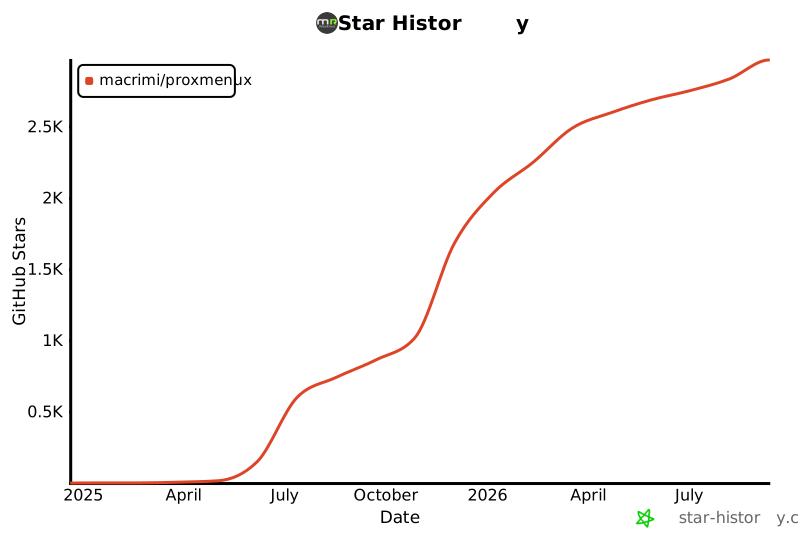](https://www.star-history.com/#MacRimi/ProxMenux&Date)
Support the project on Ko-fi!
## Contributors
 [contrib.rocks](https://contrib.rocks).